
meta-sonata



English | 简体中文
Automatically fetch and fill missing music metadata, cover art, and synced lyrics for your music folders. Preview the changes, then apply them with one command.
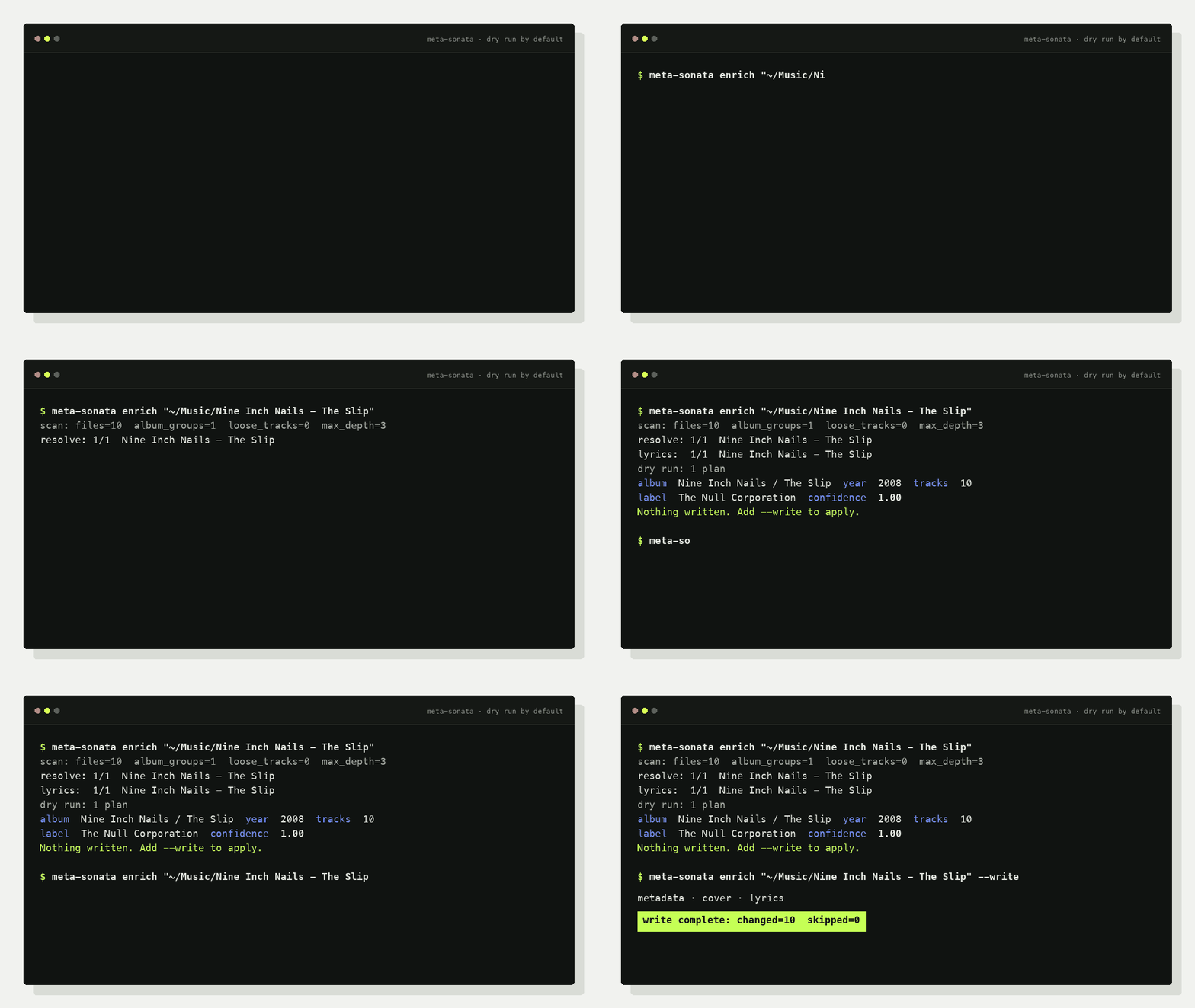
Two Commands
Query and preview the metadata meta-sonata finds. Nothing is written:
meta-sonata enrich "/music/album"
Fetch and write metadata, cover art, and lyrics in one step:
meta-sonata enrich "/music/album" --write
Both commands accept an album folder or a larger music directory. Existing tags, filenames, and folder structure are trusted first; online sources fill the gaps.
Why meta-sonata?
- Local first: existing tags, folder names, and track structure anchor the match.
- Conservative: track count, duration, live/studio, and ambiguity checks prevent risky writes.
- Complete: metadata, cover art, and synced lyrics in one command.
- Automation-ready: dry runs, external incremental state, recursive discovery, and JSON audit plans.
Quick Start
pipx install meta-sonata
Or install it with uv:
uv tool install meta-sonata
macOS App
The macOS app has two modes. Single Track accepts a dropped audio file, completes its metadata, and lets you drag the output copy into Finder. Library opens a local folder in the app's read-only metadata browser. Its helper service binds only to a random local port, with no separate web installation required. The original files are never modified.
The app follows the macOS language by default and can be changed from its language menu. It supports English, Simplified Chinese, Traditional Chinese, Japanese, Korean, French, German, Spanish, and Brazilian Portuguese.
Build the Apple silicon .app and .dmg locally with:
./scripts/build_macos_release.sh
The default build is ad-hoc signed for local validation. Set
MACOS_SIGN_IDENTITY to a Developer ID identity and notarize it before public
distribution.
Typical output:
scan: root=/music/album files=12 album_groups=1 loose_tracks=0 max_depth=3
resolve: 1/1 /music/album
lyrics: 1/1 /music/album
dry run: 1 plan(s)
- album: Artist / Album: artist=Artist  album=Album  year=2006  tracks=12  confidence=0.96  lyrics=11/12
nothing written; pass --write to apply
enrich enables metadata lookup, cover lookup, and lyrics by default. It scans
up to three directory levels; use --max-depth N or --recursive when needed.
What It Can Fill
| Area | Fields |
|---|---|
| Identity | title, artist, album artist, album, track/disc number |
| Release | date, label, catalog number, barcode, release type |
| Sources | MusicBrainz release/track IDs and provenance tags |
| Media | embedded cover art, synced LRC, plain lyrics |
Album metadata sources: MusicBrainz, iTunes, and NetEase.
Lyric sources: QQ Music, NetEase, KuGou, KuWo, and Migu.
meta-sonata sources
Put It in a Pipeline
Run it after download/extraction/CUE splitting and before the final library sync:
meta-sonata enrich "/staging/new-music" \
  --changed-only \
  --state-dir "/var/lib/meta-sonata" \
  --write
Incremental state stays outside music folders. No marker files are added to albums.
Optional Metadata Browser
meta-sonata web "/music" --host 127.0.0.1 --port 8765
Open http://127.0.0.1:8765/ to browse audio files, core tags, source IDs,
technical details, covers, and embedded lyrics. The web UI has no write endpoints.
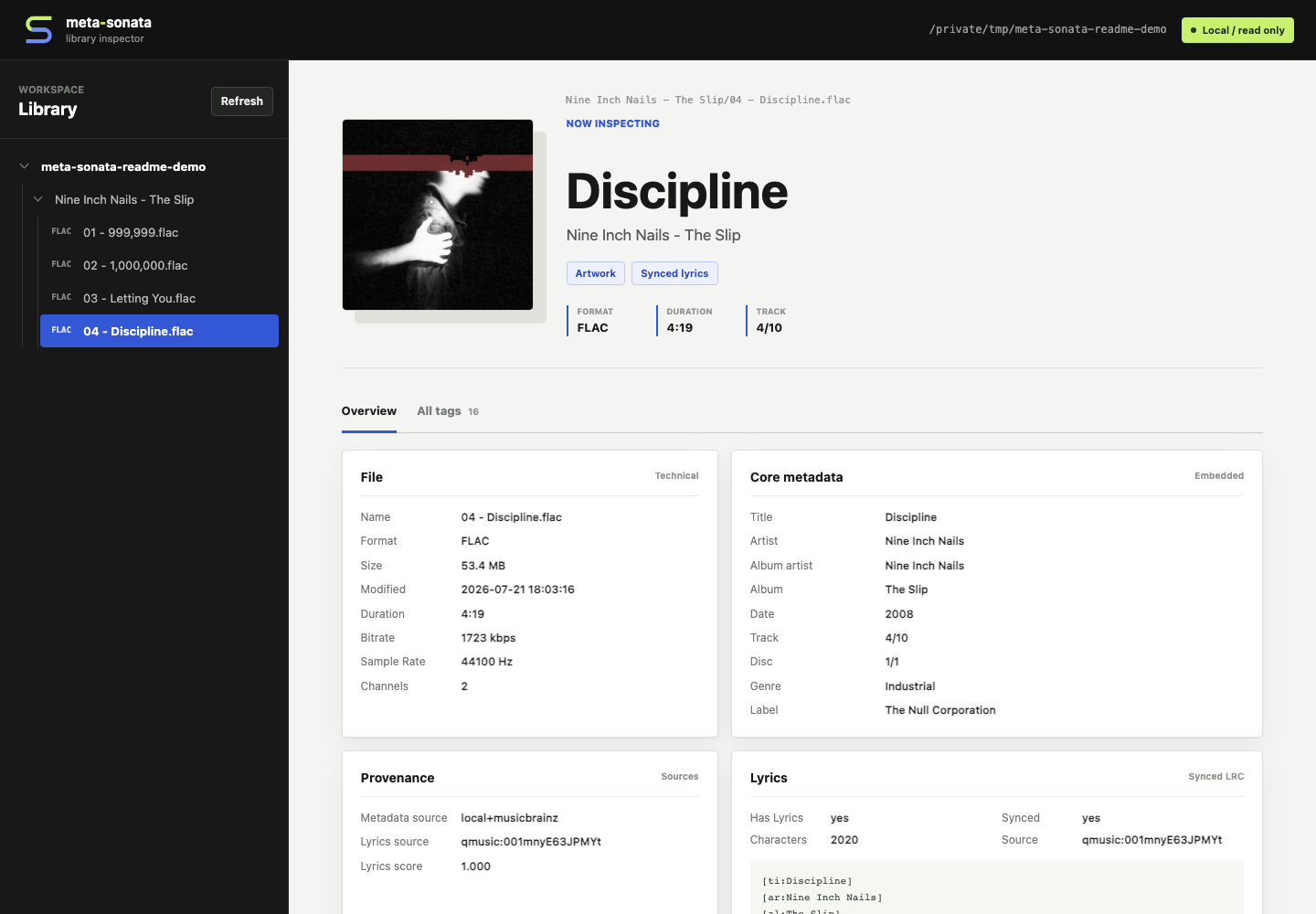
Shown with CC-licensed audio and artwork from Nine Inch Nails' The Slip. See the asset attribution.
Local data storage
Embedded file tags remain the portable source of truth. The macOS app builds a rebuildable local catalog in the background for cross-folder lookup, match history, and future confirmation workflows. Third-party responses live in a separate disposable cache:
- Durable catalog:
~/Library/Application Support/com.sendinge.meta-sonata/catalog.sqlite3 - API cache:
~/Library/Caches/com.sendinge.meta-sonata/provider-cache.sqlite3
Deleting the API cache does not affect music or catalog data. Catalog failures also never block browsing or enrichment. Real MusicBrainz network requests are limited to one per second across CLI, macOS, and test code paths. Every third-party failure degrades to a warning while local processing and other providers continue.
Safety
- Every write command is a dry run unless
--writeis present. - Low-confidence lyrics and ambiguous release identities are skipped.
- Mixed loose tracks are not forced into a fake album.
- Real libraries can be protected with
META_SONATA_PROTECTED_PATHS. - Tests generate silent FLAC files; no copyrighted media is committed.
More
Python 3.9+ is supported. The project is currently an early 0.2.x release;
unofficial provider endpoints may change or be rate-limited.
1 maintainer

Metadata
1 maintainer
Release files for meta-sonata 0.2.0
For a detailed explanation of source distributions (sdists) and built distributions (wheels), please see the package formats documentation.
Source distribution (sdist)
| File | Size | Uploaded | |
|---|---|---|---|
| meta_sonata-0.2.0.tar.gz | 101.1 kB | Details |
Built distribution (wheel)
| File | Interpreter | ABI | Platform | Reset |
|---|---|---|---|---|
| meta_sonata-0.2.0-py3-none-any.whl | Python 3 | none | any | Details |
Total release size: 195.6 kB
Release files / meta_sonata-0.2.0.tar.gz
| Download URL | meta_sonata-0.2.0.tar.gz |
|---|---|
| Size | 101.1 kB |
| Tags | Source |
|
SHA-256 checksum How to use checksums |
0fcc3b833a0c85e99215f294f516bc4b350ab9911acada062eec47676b10c4a5
|
|
BLAKE2b-256 checksum How to use checksums |
37ade9aa03656d2661ccb7deeca1c9b27d36bd122f6d2ef087f9548f44620356
|
| Upload date | |
|
Uploaded using Trusted Publishing? What is trusted publishing? |
Yes |
| Uploaded via |
twine/7.0.0 CPython/3.13.14
|
Provenance
Provenance describes where a file came from. On PyPI, provenance is shared via attestations, which provide a verifiable record of the build or publishing details. View details, limitations and caveats.


PyPI Publish Attestation
PyPI verified that this artifact, at this checksum, originated from the publisher listed below.
Signed by GitHub Actions, verified by PyPI on Aug 5, 2026.
Transparency logRelease files / meta_sonata-0.2.0-py3-none-any.whl
| Download URL | meta_sonata-0.2.0-py3-none-any.whl |
|---|---|
| Size | 94.5 kB |
| Tags | Python 3 |
|
SHA-256 checksum How to use checksums |
14f38f4e6833cf6fe86711df8c88a4c90c941280a58b7663f4e9fc03894599eb
|
|
BLAKE2b-256 checksum How to use checksums |
fc3b530e664cf206c5782da4ad6bef26c1abee5699e832861e61a66e5e7e17bc
|
| Upload date | |
|
Uploaded using Trusted Publishing? What is trusted publishing? |
Yes |
| Uploaded via |
twine/7.0.0 CPython/3.13.14
|
Provenance
Provenance describes where a file came from. On PyPI, provenance is shared via attestations, which provide a verifiable record of the build or publishing details. View details, limitations and caveats.
PyPI Publish Attestation
PyPI verified that this artifact, at this checksum, originated from the publisher listed below.
Signed by GitHub Actions, verified by PyPI on Aug 5, 2026.
Transparency log













