
meta-sonata




English | 简体中文
Meta Sonata turns incomplete music files into a clean, consistent library. Use the standalone macOS app for everyday organizing, or the CLI for batch work and automation.
macOS App
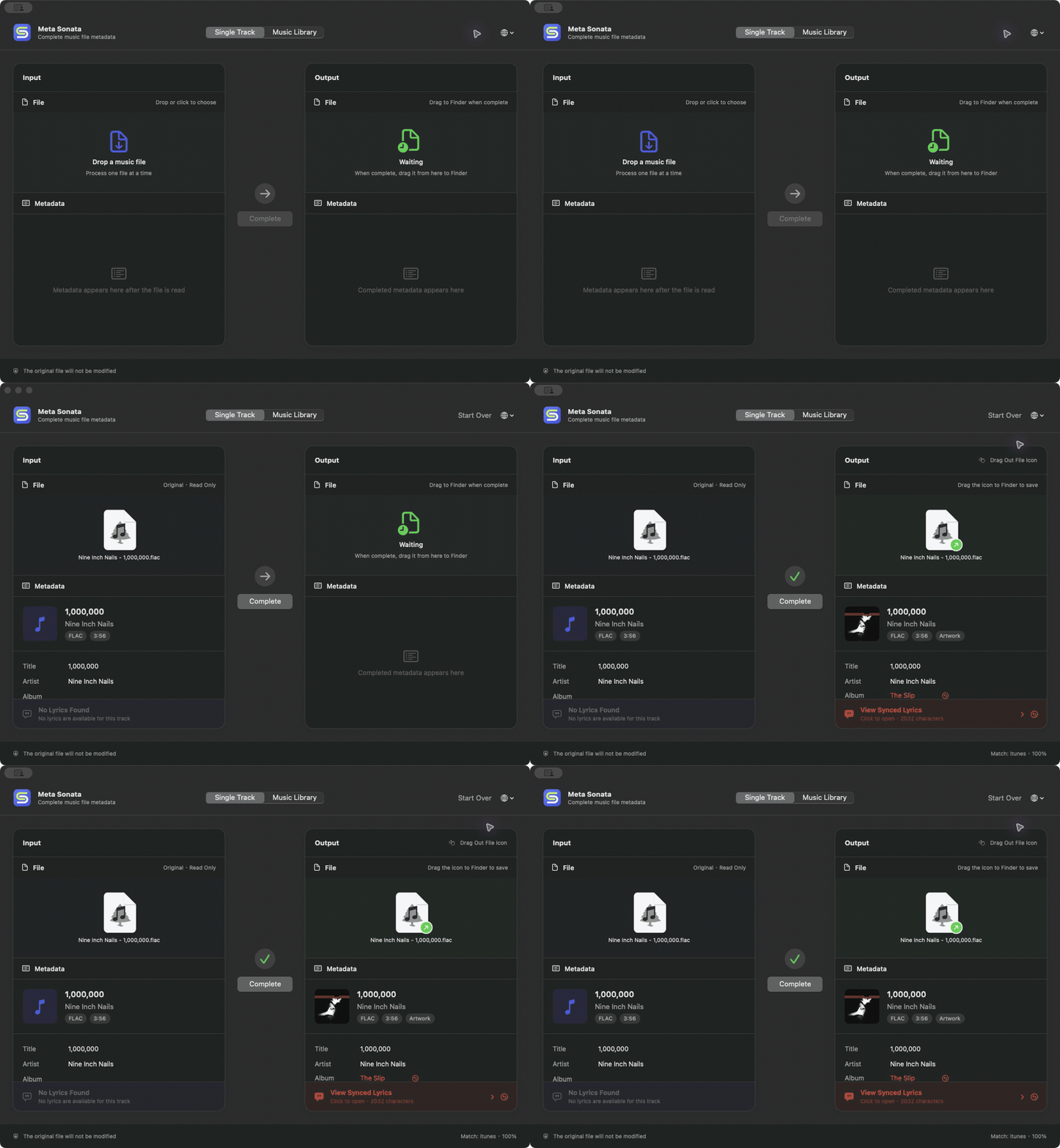
Drop in a track, review what Meta Sonata found, then drag the completed copy back to Finder. No Python, terminal, or separate service is required.
Download the latest Apple-silicon DMG.
What You Get
- Complete music files: fill missing album details, dates, artwork, and synced lyrics in one pass.
- A consistent library: Meta Sonata recognizes the same song across singles, albums, and compilations while preserving each release's own details.
- A safe original: the app creates a new completed copy and never changes the source file.
- One place to browse: open a music folder to view its tags, artwork, audio details, and lyrics.
- Work that keeps moving: if one online source is unavailable, Meta Sonata continues with the information and sources it can use.
The app supports English, Simplified Chinese, Traditional Chinese, Japanese, Korean, French, German, Spanish, and Brazilian Portuguese.
The macOS download is signed with Developer ID and notarized by Apple.
CLI Quick Start
pipx install meta-sonata
Or install it with uv:
uv tool install meta-sonata
Preview the metadata Meta Sonata finds. Nothing is written:
meta-sonata enrich "/music/album"
Fetch and write metadata, cover art, and lyrics in one step:
meta-sonata enrich "/music/album" --write
Both commands accept an album folder or a larger music directory. Existing tags, filenames, and folder structure are trusted first; online sources fill the gaps.
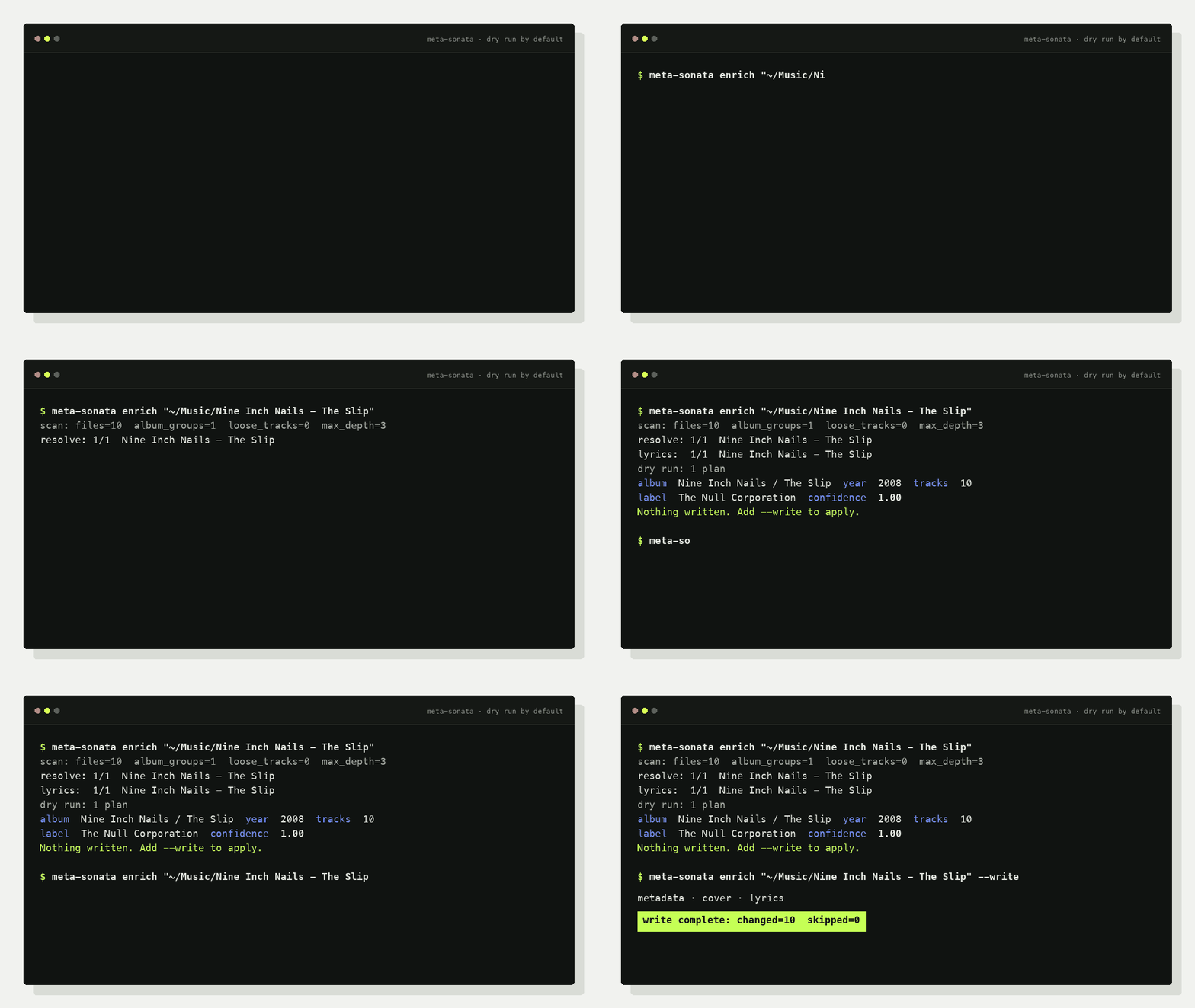
Preview before writing:
scan: root=/music/album files=12 album_groups=1 loose_tracks=0 max_depth=3
resolve: 1/1 /music/album
lyrics: 1/1 /music/album
dry run: 1 plan(s)
- album: Artist / Album: artist=Artist  album=Album  year=2006  tracks=12  confidence=0.96  lyrics=11/12
nothing written; pass --write to apply
enrich enables metadata lookup, cover lookup, and lyrics by default. It scans
up to three directory levels; use --max-depth N or --recursive when needed.
What It Can Fill
| Area | Fields |
|---|---|
| Identity | title, artist, album artist, album, track/disc number |
| Release | date, label, catalog number, barcode, release type |
| Media | embedded cover art, synced LRC, plain lyrics |
Album metadata sources: MusicBrainz, iTunes, and NetEase.
Lyric sources: QQ Music, NetEase, KuGou, KuWo, and Migu.
meta-sonata sources
Put It in a Pipeline
Run it after download/extraction/CUE splitting and before the final library sync:
meta-sonata enrich "/staging/new-music" \
  --changed-only \
  --state-dir "/var/lib/meta-sonata" \
  --write
Incremental state stays outside music folders. No marker files are added to albums.
Optional Metadata Browser
meta-sonata web "/music" --host 127.0.0.1 --port 8765
Open http://127.0.0.1:8765/ to browse audio files, core tags, source IDs,
technical details, covers, and embedded lyrics. The web UI has no write endpoints.
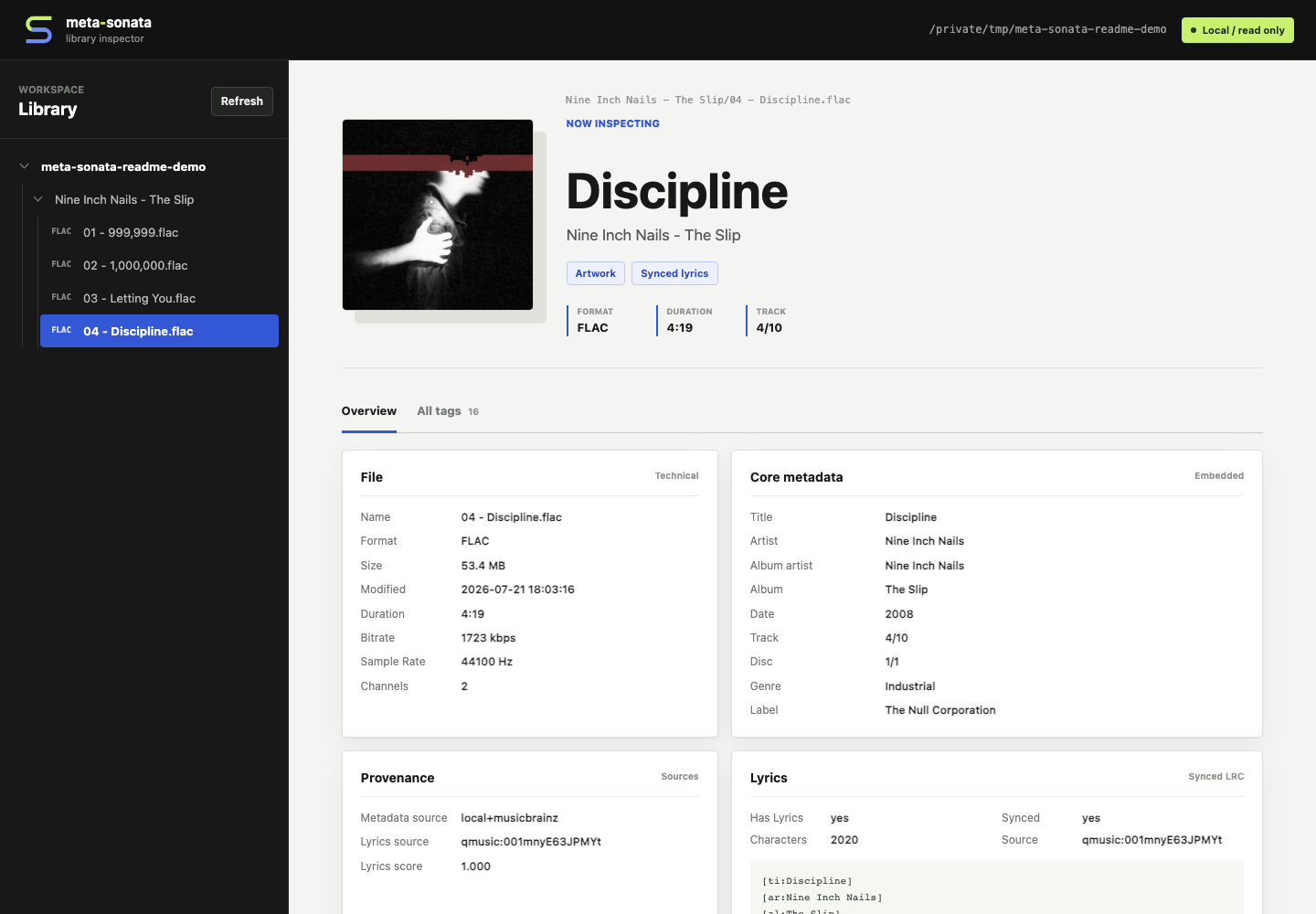
Shown with CC-licensed audio and artwork from Nine Inch Nails' The Slip. See the asset attribution.
Safety
- Every write command is a dry run unless
--writeis present. - Low-confidence lyrics and ambiguous release identities are skipped.
- Mixed loose tracks are not forced into a fake album.
- Real libraries can be protected with
META_SONATA_PROTECTED_PATHS. - Tests generate silent FLAC files; no copyrighted media is committed.
More
Python 3.9+ is supported. The project is currently an early 0.2.x release;
unofficial provider endpoints may change or be rate-limited.
1 maintainer

Metadata
1 maintainer
Release files for meta-sonata 0.2.1
For a detailed explanation of source distributions (sdists) and built distributions (wheels), please see the package formats documentation.
Source distribution (sdist)
| File | Size | Uploaded | |
|---|---|---|---|
| meta_sonata-0.2.1.tar.gz | 100.5 kB | Details |
Built distribution (wheel)
| File | Interpreter | ABI | Platform | Reset |
|---|---|---|---|---|
| meta_sonata-0.2.1-py3-none-any.whl | Python 3 | none | any | Details |
Total release size: 194.6 kB
Release files / meta_sonata-0.2.1.tar.gz
| Download URL | meta_sonata-0.2.1.tar.gz |
|---|---|
| Size | 100.5 kB |
| Tags | Source |
|
SHA-256 checksum How to use checksums |
cc18190d20f9a5d4e9613ee649a625e3eec96d59f6c8a89442de77539b8de980
|
|
BLAKE2b-256 checksum How to use checksums |
09ad414ef237dee83c4445162a66f29c1ef1028d21e8f59b6ffd5827b967858d
|
| Upload date | |
|
Uploaded using Trusted Publishing? What is trusted publishing? |
Yes |
| Uploaded via |
twine/7.0.0 CPython/3.13.14
|
Provenance
Provenance describes where a file came from. On PyPI, provenance is shared via attestations, which provide a verifiable record of the build or publishing details. View details, limitations and caveats.


PyPI Publish Attestation
PyPI verified that this artifact, at this checksum, originated from the publisher listed below.
Signed by GitHub Actions, verified by PyPI on Aug 11, 2026.
Transparency logRelease files / meta_sonata-0.2.1-py3-none-any.whl
| Download URL | meta_sonata-0.2.1-py3-none-any.whl |
|---|---|
| Size | 94.1 kB |
| Tags | Python 3 |
|
SHA-256 checksum How to use checksums |
5074ddcb118025136f03727bdb1a2c7182b5274467c3f153f6a770d7b8474003
|
|
BLAKE2b-256 checksum How to use checksums |
aadc3a1633cbe547583919beae7cdb8cf9e4c10416e3d8be7fdef2adc0522418
|
| Upload date | |
|
Uploaded using Trusted Publishing? What is trusted publishing? |
Yes |
| Uploaded via |
twine/7.0.0 CPython/3.13.14
|
Provenance
Provenance describes where a file came from. On PyPI, provenance is shared via attestations, which provide a verifiable record of the build or publishing details. View details, limitations and caveats.
PyPI Publish Attestation
PyPI verified that this artifact, at this checksum, originated from the publisher listed below.
Signed by GitHub Actions, verified by PyPI on Aug 11, 2026.
Transparency log













