
Apple Silicon GPU/CPU/Memory monitoring CLI — like gpustat, but for Metal

Project description
metalstat

Apple Silicon GPU/CPU/Memory monitoring CLI — like gpustat, but for Metal.
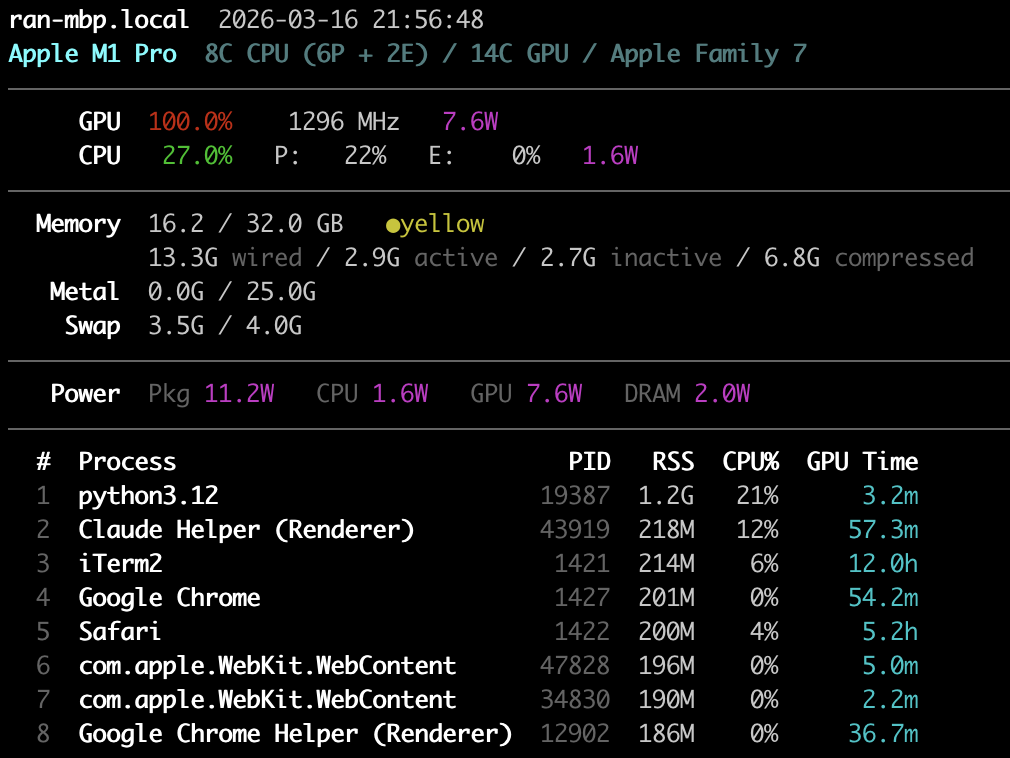
No sudo required. Uses IOReport private API for GPU/power metrics.
Install
pip install metalstat
Or with uv:
uv tool install metalstat
Usage
# One-shot: all metrics + top processes
metalstat -a -p

# Watch mode: refresh every 1s
metalstat -a -i 1

# See all options
metalstat --help
Understanding Apple Silicon memory (vs. CUDA)
Apple Silicon uses Unified Memory Architecture (UMA) — the CPU and GPU share a single pool of RAM. There is no separate VRAM. This is fundamentally different from NVIDIA/CUDA where the GPU has its own dedicated memory (e.g. 24GB VRAM on an RTX 4090) and data must be copied between CPU and GPU over PCIe.
What the memory numbers mean
  Memory  15.6 / 32.0 GB   ●green                    ← system memory (shared by CPU + GPU)
          2.7G wired / 12.9G active / ...             ← breakdown by page state
   Metal  3.4G / 25.0G                                ← GPU memory in use / recommended max
System memory (15.6 / 32.0 GB) is the total unified memory usage — CPU and
GPU workloads combined. The breakdown shows:
- Wired: Locked by the kernel, cannot be paged out or compressed
- Active: Recently used pages
- Inactive: Not recently accessed, still in RAM, reclaimable
- Compressed: macOS compresses inactive pages in-memory before swapping to disk
Metal GPU memory (3.4G / 25.0G) shows how much system memory is
currently in use by GPU resources (textures, buffers, ML model weights) across
all processes vs. the recommended maximum. The in-use value is read
system-wide from the IOAccelerator IORegistry node — MTLDevice's own
currentAllocatedSize is per-process and would only see this tool's own
(empty) device. This is the closest equivalent to "VRAM used / VRAM total" on
NVIDIA, but with important differences:
| NVIDIA (CUDA) | Apple Silicon (Metal) | |
|---|---|---|
| GPU memory pool | Dedicated VRAM (fixed) | Shared with CPU (unified) |
| "Total" | Physical VRAM size | recommendedMaxWorkingSetSize (~75% of RAM) |
| Hard limit? | Yes — allocation fails at VRAM cap | No — soft limit, but going over causes swap thrashing |
| Zero-copy CPU↔GPU? | No, must cudaMemcpy |
Yes, CPU and GPU see the same physical pages |
The recommended max (~75% of RAM) is not a hardware limit — Metal will let you allocate beyond it. But exceeding it forces the OS to compress or swap out other memory, degrading performance. This is why a 192GB Mac can load LLMs that would need multiple 80GB A100s: the GPU directly accesses main memory with no copy overhead, but you're sharing that memory budget with the rest of the system.
Pressure (●green / ●yellow / ●red) shows system-wide memory pressure:
- Green (>50% free): Healthy, plenty of headroom
- Yellow (25-50% free): Moderate pressure, compression active
- Red (<25% free): Heavy pressure, swapping likely
Requirements
- macOS on Apple Silicon (M1/M2/M3/M4)
- Python 3.10+
License
MIT


Download files
Download the file for your platform. If you're not sure which to choose, learn more about installing packages.
Source Distribution
Built Distribution
Filter files by name, interpreter, ABI, and platform.
If you're not sure about the file name format, learn more about wheel file names.
Copy a direct link to the current filters
File details
Details for the file metalstat-0.1.3.tar.gz.
File metadata
- Download URL: metalstat-0.1.3.tar.gz
- Upload date:
- Size: 187.6 kB
- Tags: Source
- Uploaded using Trusted Publishing? No
- Uploaded via: twine/6.2.0 CPython/3.9.12
File hashes
| Algorithm | Hash digest | |
|---|---|---|
| SHA256 |
25b1652bfd460b4e8e45c1aade4c417464f0ebbff48b00e390570ed27cbbf7f2
|
|
| MD5 |
4a3faa6bd315aa4ea7a1faffa21436e1
|
|
| BLAKE2b-256 |
dd0b074983e13bb4e83774ddbaf763ffffd311d03d1df3d4cd985696254bc7b2
|
File details
Details for the file metalstat-0.1.3-py3-none-any.whl.
File metadata
- Download URL: metalstat-0.1.3-py3-none-any.whl
- Upload date:
- Size: 22.4 kB
- Tags: Python 3
- Uploaded using Trusted Publishing? No
- Uploaded via: twine/6.2.0 CPython/3.9.12
File hashes
| Algorithm | Hash digest | |
|---|---|---|
| SHA256 |
f417e788d7e05bdd03d7c41bc96c33716abfab7ff8343a67739a789cbeae7f8f
|
|
| MD5 |
34b5a8722623efb02163ad8fd8814ca5
|
|
| BLAKE2b-256 |
72297fed4e1a47eede56b3eb172d4caf3a1df3e23dbda6dda85b37e3512a60d2
|






