
A tiny autograd engine with a MODIFIED Adam optimizer

Project description
micrograd_hk



A tiny autograd engine built on top of NumPy for fast, matrix-driven backpropagation.
This package implements a minimal Value computation graph (inspired by micrograd), but instead of scalar-by-scalar autograd, everything is vectorized over full NumPy matrices — so training is significantly faster.
It ships with a small MLP / DenseLayer API and a Trainer class supporting several optimizers: SGD, Momentum, RMSProp, Adam, and a custom variant, Adam-M, developed and tuned as part of this project.
✨ Features
- Matrix-first
Valueautograd engine (@,+,-,**,sum,tanh) with full backward-pass support - Simple
DenseLayerandMLPbuilding blocks - Built-in
Trainerwith automatic checkpoint saving/loading - Five optimizers out of the box, including a custom modified Adam
- Optional
tqdmprogress bar during training
📦 Installation
pip install micrograd_hk
To also get the training progress bar:
pip install micrograd_hk[progress]
🚀 Quick Start
from micrograd_hk import Value, DenseLayer, MLP, Trainer

# Build a small MLP: 3 input features -> [8, 8, 1]
m = MLP(shape=[1, 3], nouts=[8, 8, 1])

# Wrap your data and model in a Trainer
loss_evaluator = Trainer(m, xs_matrix, ys_matrix)

# Train using matrix calculations
final_loss, y_pred = loss_evaluator.train(
    lr=0.01,
    iterations=3000,
    optimizer="adam_m",
    iter_stp=None,
    save_checkpoint=True,
)
For lower-level control, MLP and DenseLayer can be used and composed directly.
🧠 Optimizers
Trainer supports the following, selected via the optimizer argument of .train():
| Optimizer | Key |
|---|---|
| SGD | "sgd" |
| Momentum | "momentum" |
| RMSProp | "rmsprop" |
| Adam | "adam" |
| Adam-M | "adam_m" |
Adam (standard)
$$ m_t = \beta_1 m_{t-1} + (1 - \beta_1) g_t \qquad\quad v_t = \beta_2 v_{t-1} + (1 - \beta_2) g_t^2 $$
$$ \hat{m}_t = \frac{m_t}{1 - \beta_1^{t}} \qquad\quad \hat{v}_t = \frac{v_t}{1 - \beta_2^{t}} $$
$$ \theta_t = \theta_{t-1} - \frac{\eta , \hat{m}_t}{\sqrt{\hat{v}_t} + \epsilon} $$
Adam-M (modified — this project)
Adam-M keeps the same moment estimates as Adam, but changes two things: the bias-correction denominators are shifted constants instead of powers of the raw betas, and the step counter t periodically resets every iter_stp steps.
$$ m_t = \beta_1 m_{t-1} + (1 - \beta_1) g_t \qquad\quad v_t = \beta_2 v_{t-1} + (1 - \beta_2) g_t^2 $$
$$ \hat{m}_t = \frac{m_t}{1.5 - \beta_1^{t}} \qquad\quad \hat{v}_t = \frac{v_t}{2.5 - \beta_2^{t}} $$
$$ \theta_t = \theta_{t-1} - \frac{\eta , \hat{m}_t}{\sqrt{\hat{v}_t} + \epsilon} $$
$$ \text{if } iter_stp \text{ is set and } t > iter_stp: \quad t \leftarrow 1 $$
Reference implementation:
def adam_m(self, iter_stp, beta1=0.9, beta2=0.999, eps=1e-8):
    """Adam-M Variant with periodic counter resets."""
    self.t += 1
    if iter_stp is not None and self.t > iter_stp:
        self.t = 1  # Reset counter back to 1

    for p in self.mlp.parameters():
        p.momentum = p.momentum * beta1 + (1.0 - beta1) * p.grad
        p.velocity = (beta2 * p.velocity) + (1.0 - beta2) * (p.grad ** 2)

        momentum_corrected = p.momentum / (1.5 - beta1 ** self.t)
        velocity_corrected = p.velocity / (2.5 - beta2 ** self.t)

        p.data -= (self.lr * momentum_corrected) / (np.sqrt(velocity_corrected) + eps)
The periodic reset keeps the bias-correction terms from decaying all the way to 1 over long training runs, which in testing gave Adam-M steadier convergence on longer runs compared to standard Adam.
📊 Benchmarks
Adam vs. Adam-M, trained on the same model and data (test.py, using matplotlib):
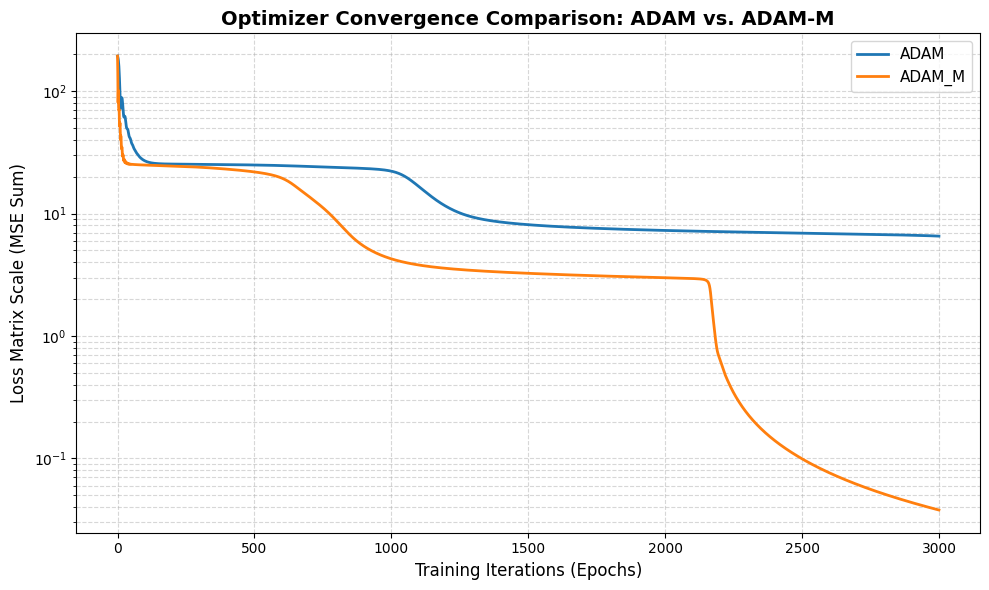
Generated by the optimizer comparison script — both optimizers are trained on identical, deep-copied model initializations so the comparison is apples-to-apples.
🧩 Saving & Loading Models
Training checkpoints are saved automatically when save_checkpoint=True:
final_loss, y_pred = loss_evaluator.train(
    lr=0.01,
    iterations=3000,
    optimizer="adam_m",
    save_checkpoint=True,
    save_filename="trained_mlp.pkl",
)
To reload a trained model into a fresh architecture:
from micrograd_hk import MLP, Trainer

blueprint = MLP(shape=[1, 3], nouts=[8, 8, 1])
model = Trainer.load_model("trained_mlp.pkl", blueprint)
📄 License
MIT © Hariom Lohat
Release history Release notifications | RSS feed

Download files
Download the file for your platform. If you're not sure which to choose, learn more about installing packages.
Source Distribution
Built Distribution
Filter files by name, interpreter, ABI, and platform.
If you're not sure about the file name format, learn more about wheel file names.
Copy a direct link to the current filters
File details
Details for the file micrograd_hk-0.1.1.tar.gz.
File metadata
- Download URL: micrograd_hk-0.1.1.tar.gz
- Upload date:
- Size: 73.2 kB
- Tags: Source
- Uploaded using Trusted Publishing? No
- Uploaded via: twine/6.2.0 CPython/3.13.14
File hashes
| Algorithm | Hash digest | |
|---|---|---|
| SHA256 |
109cc604c10818b77ded45771ae1feef3c1ab2e80c78fd3ee357b1255abf67f4
|
|
| MD5 |
7c40074553a21bd1c918817b2b3cecee
|
|
| BLAKE2b-256 |
09d2e3e715519bca7776516b2f275afa3d32a74b21ccf7e348539c34fbcbff0a
|
File details
Details for the file micrograd_hk-0.1.1-py3-none-any.whl.
File metadata
- Download URL: micrograd_hk-0.1.1-py3-none-any.whl
- Upload date:
- Size: 11.6 kB
- Tags: Python 3
- Uploaded using Trusted Publishing? No
- Uploaded via: twine/6.2.0 CPython/3.13.14
File hashes
| Algorithm | Hash digest | |
|---|---|---|
| SHA256 |
a4a229c57779c18fe6f8dfee41b80582af40f536e0a015af3b846443c1867b8b
|
|
| MD5 |
318e6cf8123ca35e067bae29ff642ed9
|
|
| BLAKE2b-256 |
45c7a320471ed391e29bf0fa0975b2e9f876bcbfa71224c4dc9a5d0a1e4fbaef
|






