
This release is a pre-release and may not be stable for production use.
 MIDI Explorer




Yet another MIDI monitor, analyzer, debugger and manipulation tool.
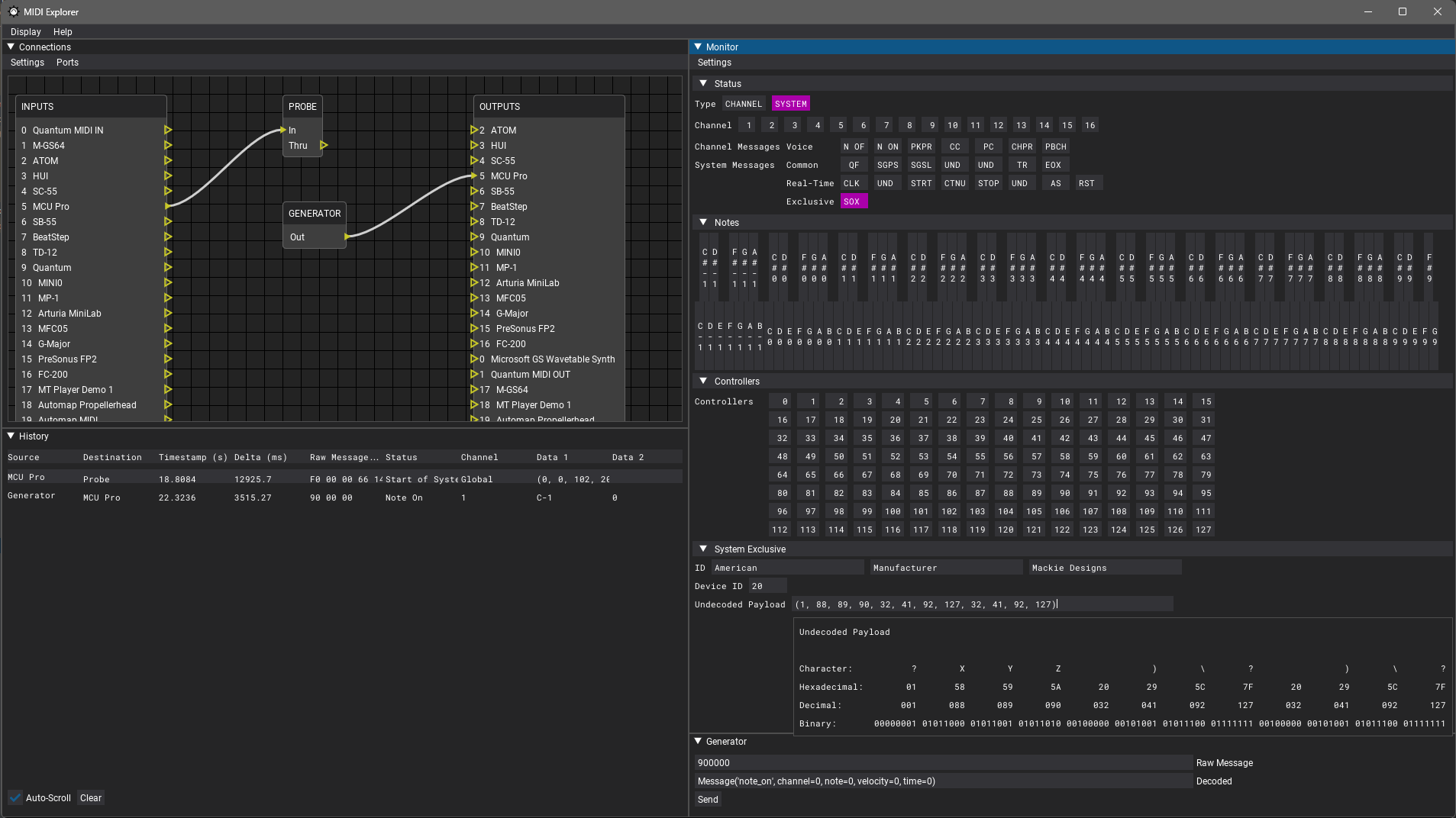
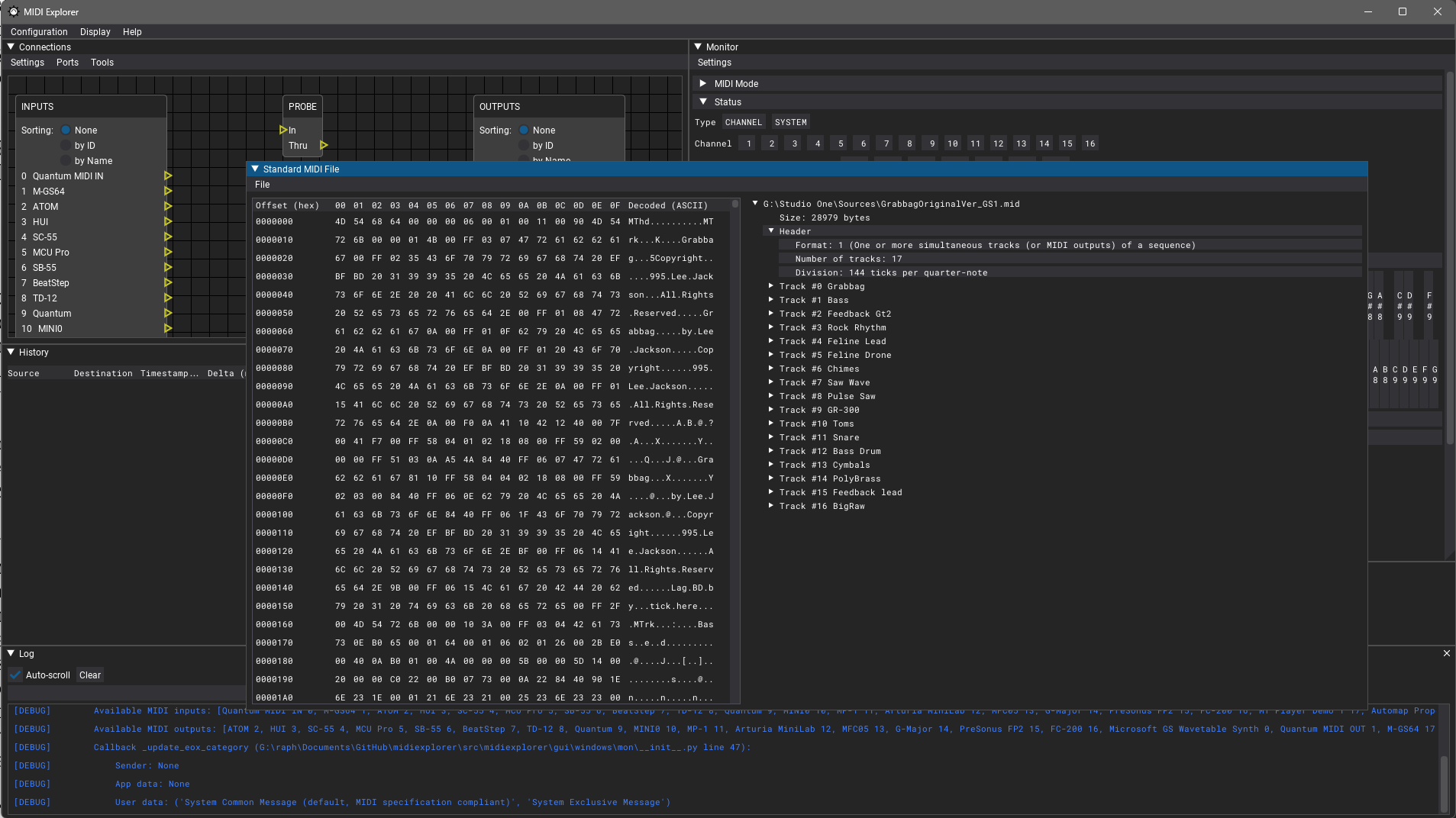
The intent is to be specifications compliant to help debugging, reverse-engineering and developing products based on the MIDI protocol while learning everything there is to know in the process.
The reference specifications used are linked below and comes from the following standards bodies:
- MIDI Association, ex MIDI Manufacturers Association (MMA) USA
- Association of Musical Electronics Industry (AMEI) Japan
- MIDI Standards Committee (MSC) Japan
There is two specification supplement types:
- Recommended Practices (RP) 001-054
- Confirmation of Approval for MIDI Standard (CA) 018-035
A nice history list is provided by the MSC [JP].
I have made a translated and slightly updated
Google Sheet
for easier browsing.
Language is currently Python to help with rapid prototyping and fast iteration. It may change at any time as I see fit.
Table of Contents
Status
Basic features implemented.
First alpha released!
Testers welcome ;)
Installation (Python)
Install Python 3.10
From python.org (recommended) or your favorite package manager.
Install PipX
Follow the instructions for your operating system.
Microsoft Windows
In a terminal
py -m pip install --user pipx
py -m pipx ensurepath
Close and reopen your terminal.
Mac OS X / Linux
python3 -m pip install --user pipx
Install MIDI Explorer
pipx install midiexplorer
Installation (Native)
Nuitka (alpha)
You may also build a compiled, single-file executable from a properly configured venv using:
python -m nuitka --follow-imports --include-package=rtmidi --include-package=mido --include-package=dearpygui --include-package=dearpygui_ext --include-package=midiexplorer --include-package-data=midiexplorer --onefile --disable-console --windows-icon-from-ico=src\midiexplorer\icons\midiexplorer.ico src/midiexplorer
Features & TODO
Documentation
- Developers
- Users
Quality
- Linting
- Code style checks? (PEP8 pycodestyle)
- Docstrings? (darglint)
- Typechecking? (mypy)
- Unit tests? (pytest)
- Coverage
- Packaging
- PyPi
- PyInstaller
- WIP Nuitka
- Microsoft Windows
- Apple Mac OS X
- GNU/Linux
- PyOxidiser?
- Installers
- Continuous Integration? (GitHub Actions workflow)
MIDI protocols
- (WIP) v1.0
includes RP-001/RP-002/RP-003/RP-004/RP-005/RP-006/RP-007/RP-008/RP-009/RP-010/RP-011/RP-012/RP-013/RP-014
(1983 - February 1996)
Using a modified mido - v2.0
(Planned long term: after v1.0 and all its extensions are fully stable)
Platform support
- Microsoft Windows
- WinMM aka Windows Multimedia MME API
via mido's RtMidi backend - WinRt aka UWP Windows Runtime API
RtMidi related issue
- WinMM aka Windows Multimedia MME API
- Apple Mac OS X
- Core MIDI
via mido's RtMidi backend - JACK MIDI
(Should work but untested ATM)
- Core MIDI
- GNU/Linux
- ALSA
- Sequencer API
via mido's RtMidi backend - RawMidi API
- Sequencer API
- JACK MIDI (Should work but untested ATM)
- OSS?
(Legacy API)
- ALSA
Interactive GUI
- Icons
- Fonts
- Custom theme
- About window
- Connections window (Node editor based)
- Inputs
- Outputs
- Modules
- History window (Table)
- Monitor data window (Decoding with live feedback)
- Generator data window
- (WIP) Standard MIDI file window
- Log window
- Insert comment
- Save to file
- Overwrite
- Append
- Actions (Menus and/or keyboard shortcuts)
- Toggle connections (F1)
- Toggle history (F2)
- Toggle monitor (F3)
- Toggle generator (F4)
- Toggle standard MIDI file (F5)
- Toggle full-screen (F11)
- Toggle log (F12)
- Save & restore windows state
(Buggy at the moment)
I/O management
- List MIDI I/O
- USB MIDI 1.0
- OS Level
- Direct Access?
- USB MIDI 2.0
- OS Level?
- Direct Access?
- IEEE-1394
RP-027 (MMA) MIDI Media Adaptation Layer for IEEE-1394 v1.0
RP-027 (AMEI/MSC) MIDI Media Adaptation Layer for IEEE-1394 v1.0- OS Level?
(Probably works but no hardware to test with) - Direct Access?
- OS Level?
- Bluetooth Low Energy (BLE-MIDI)
RP-052 (MMA) Specification for MIDI over Bluetooth Low Energy (BLE-MIDI) v1.0
RP-052 (AMEI/MSC) Specification for MIDI over Bluetooth Low Energy (BLE-MIDI) v1.0- OS Level
Requires WinRt MIDI for Microsoft Windows - Direct Access?
- OS Level
- RTP-MIDI
RTP Payload Format for MIDI (MMA)
IETF RFC 6295 RTP Payload Format for MIDI- (Partial) OS Level
Requires rtpMIDI for Microsoft Windows
(Works with Microsoft Windows. Untested on other OS) - Direct Access?
- (Partial) OS Level
- Virtual
- OS Level
Requires loopMIDI for Microsoft Windows - Native
Provided by RtMidi for Linux & Apple Mac OS X
- OS Level
- Custom Hardware
(Planned in the near future. Prototyping in progress.)- 5-Pin DIN
CA-033 (MMA) MIDI 1.0 Electrical Specification Update [2014]
CA-033 (AMEI/MSC) MIDI 1.0 Electrical Specification Update [2014] - 2.5mm TRS Jack
RP-054 (MMA) Specification for use of TRS Connectors with MIDI Devices
RP-054 (AMEI/MSC) Specification for use of TRS Connectors with MIDI Devices - Mobile Musical Interface
RP-048/amd1 (MMA) Mobile Musical Interface Specification v1.0.6
RP-048/Amd1 (AMEI/MSC) Mobile Musical Instrument Specification v1.1 / Mobile Musical Interface Specification v1.0.6
RP-048 (AMEI/MSC) Mobile Musical Interface Specification v1.0.2
- 5-Pin DIN
- USB MIDI 1.0
-
Select mido backend?
(Only RtMidi suits our needs) - Input reading modes
- Polling
- Callback
-
Sort by ID/Name
(Forced name sorting is enough for now) - Connections
- Port to probe
- Probe to port
- Port to port
- Port to any module
- Any module to port
- Module to module
- Refresh
- Manual
- Auto with reconnect
- Virtual ports
- Add/Remove
- Save/restore connections status
- Timing
- System
(Computed using the highest resolution local clock available) - Hardware
(Retrieved using a modified mido RtMidi backend)
- System
History view (Table decode)
- Input
- Output
- Selection decodes to monitor
- Selection prepares generator
- Color code?
- Per source
- Per channel
- Per message type
Modules
- Plugins based architecture?
- Using pluggy?
- Instances management?
(Add/Remove, multiple instances of a module…) - Virtual Debug Probe
- Read raw input
- Thru support
- Activity monitor
- Settings
- Colors
- Live
- Selected
- Persistence
- Note-On with velocity set to 0 is Note-Off (Per specification)
- Display EOX as either a System Common or a System Exclusive message
- Notation
- English Alphabetical
- Syllabic
- German Alphabetical
- Colors
- Stateless
- Message type
- Channel
- System
- Channel
- Controllers
- Redefinition of CC91 and CC93
RP-023 (MMA) Renaming of CC91 and CC93
RP-023 (AMEI/MSC) Redefinition of CC91 and CC93
- Redefinition of CC91 and CC93
- Message type
- Stateful
- Notes
- Keyboard
- Velocity
- Staff
- Keyboard
- Controllers
- Value
- Data Increment / Decrement
RP-018 (MMA) Response to Data Inc/Dec Controllers
RP-018 (AMEI/MSC) Response to Data Increment/Decrement Controller - Sound Controller Defaults
RP-021 (MMA) Sound Controller Defaults (Revised)
RP-021 (AMEI/MSC) Defaults for Sound Controllers - (Partial decoding) High Resolution Velocity Prefix
CA-031 (MMA) CC #88 High Resolution Velocity Prefix
CA-031 (AMEI/MSC) CC#88 High Resolution Velocity Prefix - Registered Parameter Numbers (RPN)
- (Partial decoding) 00 Pitch Bend Sensitivity
- (Partial decoding) 01 Fine Tuning
- (Partial decoding) 02 Coarse Tuning
- Redefinition of RPN 01/02
RP-022 (MMA) Redefinition of RPN 01/02
RP-022 (AMEI/MSC) Channel Fine/Coarse Tuning
- Redefinition of RPN 01/02
- (Partial decoding) 03 Tuning Program Select
- (Partial decoding) 04 Tuning Bank Select
- (Partial decoding) 05 GM2 Modulation Depth Range
CA-026 (MMA) Modulation Depth Range RPN
CA-026 (AMEI/MSC) Modulation Depth Range RPN - 06 MIDI Polyphonic Expression v1.1 (MPE)
RP-053/CA-034/M1-100-UM MIDI Polyphonic Expression v1.1
CA-034 (AMEI/MSC) MPE Configuration RPN - …
- 61 (0x3D) Three Dimensional Sound Controller
RP-049 (MMA) Three Dimensional Sound Controllers
RP-049 (AMEI/MSC) Three Dimensional Sound Controllers
- Non Registered Parameter Numbers (NRPN)
- Program Changes, Bank Select & Patches
- General MIDI System (MMA)
(GM)
- Level 1 (GM1/GM-1) (1991)
MMA0007/RP-003 General MIDI System Level 1
RP-015 (AMEI/MSC) Response to Reset All Controllers - Level 2 (GM2/GM-2) (1999)
RP-024/RP-036/RP-037/RP-045 (MMA) General MIDI 2 v1.2a
RP-024 (AMEI/MSC) General MIDI Level 2 Recommended Practice
RP-024 General MIDI 2 (AMEI/MSC) v1.2a
RP-036 (AMEI/MSC) Default Pan Curve
RP-037 (AMEI/MSC) GM2 MIDI Tuning Amendment - Lite (GML) (2001)
RP-033 (MMA) General MIDI Lite v1.0
RP-033 (AMEI/MSC) General MIDI Lite v1.0
- Level 1 (GM1/GM-1) (1991)
- Proprietary
- Roland
- Linear Arithmetic (LA) (MT-32…) (1987)
- General Standard (GS) (Sound Canvas…) (1991)
- Yamaha
- EXtended General MIDI (XG)
- Level 1 (1994)
- Level 2 (1997)
- Level 3 (1998)
- Lite (2002)
- EXtended General MIDI (XG)
- Roland
- General MIDI System (MMA)
(GM)
- System Exclusive (SysEx)
- Basic decoding
- Manufacturer ID
- Device ID
- Raw payload
- (WIP) Universal System Exclusive
(Realtime & Non-Realtime)
- Sub-IDs 1 & 2 type decoding
- Payloads decoding
- MIDI Show Control (MSC)
RP-002/RP-014 (MMA) MIDI Show Control 1.1.1 - MIDI Time Code (MTC)
MMA0001/RP-004/RP-008 (MMA) MIDI Time Code v4.2.1 - Notation information
RP-005/RP-006 - File dump
RP-009 - MIDI tuning
RP-012 - MIDI Machine Control (MMC)
MMA-0016/RP-013 (MMA) MIDI Machine Control 1.0 - File Reference System Exclusive Message
CA-018 (MMA) File Reference System Exclusive Message
CA-018 (AMEI/MSC) File Reference System Exclusive Message - Sample Dump Size, Rate and Name Extensions
CA-019 (MMA) Sample Dump Size, Rate and Name Extensions
CA-019 (AMEI/MSC) Sample Dump Size, Rate and Name Extensions - GM2 Midi Tuning Messages
CA-020/CA-021/RP-020 (MMA) MIDI Tuning Messages
CA-020 (AMEI/MSC) MIDI Tuning Bank and Dump Extensions
CA-021 (AMEI/MSC) Scale/Octave Tuning
CA-021/Amd1 (AMEI/MSC) Amendment to Scale/Octave Tuning
RP-020 (AMEI/MSC) - GM2 Controller Destination Setting
CA-022 (MMA) Controller Destination Setting
CA-022 (AMEI/MSC) Controller Destination Setting - GM2 Key-Based Instrument Controllers
CA-023 (MMA) Key-Based Instrument Controllers
CA-023 (AMEI/MSC) Key-Based Instrument Controllers - GM2 Global Parameter Control
CA-024 (MMA) Global Parameter Control
CA-024 (AMEI/MSC) Global Parameter Control - GM2 Master Fine & Coarse Tuning
CA-025 (MMA) Master Fine/Coarse Tuning
[CA-025 (AMEI/MSC)] https://amei.or.jp/midistandardcommittee/Recommended_Practice/e/ca25.pdf) Master Fine/Coarse Tuning - GM2 System Level 2 Message
CA-027 (AMEI/MSC) General MIDI Level 2 Universal System Exclusive Message - Extension 00-01 to File Reference SysEx Message
CA-028 (AMEI/MSC) Extension 00-01 to File Reference Sysex Message - GM-Lite Scalable Polyphony MIDI Specification (SP-MIDI)
[RP-034/RP-035 (MMA)](ç https://www.midi.org/specifications/file-format-specifications/mobile-midi/scalable-polyphony-midi-sp-midi-2) Scalable Polyphony MIDI Specification and Device Profiles v1.0b
RP-034/RP-035 (AMEI/MSC) Scalable Polyphony MIDI Specification and Device Profiles v1.0a - GM-Lite Maximum Instantaneous Polyphony (MIP)
CA-029 (AMEI/MSC) Maximum Instantaneous Polyphony (MIP) - Mobile Phone Control Message
RP-046 (MMA) Mobile Phone Control Message
CA-030 (MMA) Mobile Phone Control Universal Real Time System Exclusive Message - MIDI Visual Control (MVC)
CA-032/RP-050 (MMA) MIDI Visual Control Specification v1.0
CA-032 (AMEI/MSC) MIDI Visual Control Universal Non Realtime System Exclusive Message
RP-050 (AMEI/MSC) MIDI Visual Control Specification v1.0 - MIDI Capability Inquiry (MIDI-CI)
CA-035 (AMEI/MSC) MIDI Capability Inquiry (MIDI-CI) Specification
CA-035 Spec (AMEI/MSC) MIDI Capability Inquiry (MIDI-CI) v1.0
- MIDI Show Control (MSC)
- Basic decoding
- Notes
- Settings
- Generator
- Decode raw hex string
- Generate raw output
- Buffer/Clipboard any message (raw or decoded) to output
- File formats
- WIP Standard MIDI File (SMF)
RP-001 (MMA) Standard MIDI Files 1.0- WIP Analyzer
- Player
- Recorder
- Extensions
- Lyrics Events Definition
RP-017 (MMA) SMF Lyric Meta Event Definition
RP-017 (AMEI/MSC) SMF Lyric Meta Event Definition
RP-026 (AMEI/MSC) SMF Lyric Meta Event
RP-026 SMF with Lyrics Application Guide (AMEI/MSC)
RP-026 SMF with Lyrics Data Creation Guideline - Device & Program Name
RP-019 (MMA) SMF Device Name and Program Name Meta Events
RP-019 (AMEI/MSC) SMF Device Name and Program Name Meta Event - International Standard MIDI Code (ISMC)
RP-051 (AMEI/MSC) International Standard MIDI Code
- Lyrics Events Definition
- Downloadable Sounds (DLS)
- Level 1 (DLS1/DLS-1)
RP-016/MMA-0017 (MMA) Downloadable Sounds Level 1 v1.1b
RP-016 (AMEI/MSC) Downloadable Sounds Level 1 v1.1a
MMA-0017 (AMEI/MSC)
Downloadable Sounds Level 1 v1.1b - Level 2 (DLS2/DLS-2)
RP-025/Amd2 (MMA) Downloadable Sounds Level 2.2 v1.0
RP-025 (AMEI/MSC) Downloadable Sounds Level 2 v1.0
RP-025/Amd1 (AMEI/MSC) Downloadable Sounds Level 2.1 v1.0
RP-025/Amd2 (AMEI/MSC) Downloadable Sounds Level 2.2 v1.0 - GM-Lite Mobile DLS Specification
RP-041 (MMA) Mobile DLS (Downloadable Sounds Format for Mobile Applications) v1.0a
RP-041 (AMEI/MSC) Password:amei2005Mobile DLS (Downloadable Sounds Format for Mobile Applications) v1.0a
- Level 1 (DLS1/DLS-1)
- RMID
RP-029 (AMEI/MSC) Bundling SMF and DLS data in an "RMID" File - eXtensible Music Format (XMF)
RP-030/RP-031/RP-032/RP-039/RP-040/RP-042/RP-043/RP-045/RP-047 (MMA) XMF Specification Incorporating all Recommended Practices v1.2
RP-030 (AMEI/MSC) Specification for XMF Meta File Format v1.00a
RP-031 (AMEI/MSC) Type 0 and Type 1 XMF Files (SMF + DLS)
RP-032 (AMEI/MSC) SMF Meta Event for XMF Patch Type Prefix
RP-039 (AMEI/MSC) XMF Meta File Format Updates 1.01
RP-040 (AMEI/MSC) XMF Compression Definition for ZLIB
RP-042 (AMEI/MSC) Mobile XMF Content Format Specification
RP-043 (AMEI/MSC) XMF Meta File Format 2.00
RP-045 (AMEI/MSC) Audio Clips for Mobile XMF
RP-047 (AMEI/MSC) ID3 Metadata for XMF Files - Support karaoke formats?
- .KAR Tune 1000 Corp. [CA] MIDI Karaoke file type 1 (Soft Karaoke)
- .MID+.TXK KaraDOS
- .CRT Tune 1000 Corp Soft Concert
- .ST3 Creative Labs [KR] Star 3 / Real Orche
- Support proprietary formats?
- Alesis
- DataDisk (v1.x)
- DataDisk SQ (v2.x)
- Ensoniq
- ASR series
- EPS series
- SQ-80 (.efs)
- TS series
- VFX-SD, SD-1
- Kawai
- Q-80
- Korg
- 01/W series
- T series
- PianoDisc
- PianoDisc Sequence
- Roland
- MC-50, MC-500
- Yamaha
- E-SEQ (Clavinova, Disklavier, DOM-30, DRC-20)
- XF
- Alesis
- Converter
- SMF between types
- From/to other formats?
- WIP Standard MIDI File (SMF)
- Splitter
- Merger
- Translator/Filter
- Protocol analyzers/decoders
- HUI
- LCU
- MCU
- Others?
- Trigger/Response (Protocol emulator)
- HUI
- LCU
- MCU
- Others?
- Performance analyzer
- Round trip latency
- Jitter
- Bandwidth
- Correctness
- Stresser/Fuzzer
- Hardware toolbox
MIDI implementation charts
- reStrucuredText (reST) Templates
- v1.0 (MIDI 1.0)
- v2.0
RP-028 (MMA) MIDI IMPLEMENTATION CHART V2 INSTRUCTIONS
RP-028 (AMEI/MSC) Version 2 MIDI Implementation Chart
RP-028 MIDI IMPLEMENTATION CHART V2 INSTRUCTIONS (AMEI/MSC)
- Generator from logged traffic?
Prior art
- MIDI-OX (Win)
- Snoize MIDI Monitor (Mac)
- Midi View (Win/Mac)
- OBD Software Midi Monitor 2002 (Win)
- Morson PocketMIDI (Win/Mac/iOS)
- Drumstick MIDI Monitor aka KMidiMon (Linux)
Legal notice
License

Author: ©2021-2023 Raphaël Doursenaud.
This software is released under the terms of the GNU General Public License, version 3.0 or later (GPL-3.0-or-later).
See LICENSE.
Logo and icons released under the Creative Commons Attribution-Share Alike 4.0 International.
Dependencies & License Acknowledgment
- Python v3.10
Copyright © 2001-2022 Python Software Foundation.
Used under the terms of the PSF License Agreement. - RtMidi
Copyright (c) 2003-2021 Gary P. Scavone.
Used under the terms of the MIT license. - via python-rtmidi
Copyright (c) 2012 - 2021 Christopher Arndt.
Used under the terms of the MIT license. - via mido
Copyright (c) 2013-infinity Ole Martin Bjørndalen.
Used under the terms of the MIT license. - Dear ImGui
Copyright (c) 2014-2022 Omar Cornut.
Used under the terms of the MIT license. - via Dear PyGui
Copyright (c) 2021 Dear PyGui, LLC.
Used under the terms of the MIT license.
Fonts
- Roboto
Copyright (c) 2015 The Roboto Project Authors.
Used under the terms of the Apache License, Version 2.0. - Roboto Mono
Copyright (c) 2015 The Roboto Mono Project Authors.
Used under the terms of the Apache License, Version 2.0.
Logo and icons
Composite work based upon:
- MIDI connector
Copyright Fred the Oyster
Used under the terms of the Creative Commons Attribution-Share Alike 4.0 International license. - Steering Wheel
Copyright Spider
Used under the terms of the Creative Commons Attribution 4.0 International license.
Trademarks
MIDI is a trademark of the MIDI Manufacturers Association (MMA) in the United States of America.
This is not a registered trademark in the European Union and France where I reside.
Other
Other trademarks are property of their respective owners and used fairly for descriptive and nominative purposes only.
1 maintainer

Metadata
1 maintainer
Release files for midiexplorer 0.0.1a5
For a detailed explanation of source distributions (sdists) and built distributions (wheels), please see the package formats documentation.
Source distribution (sdist)
| File | Size | Uploaded | Provenance | |
|---|---|---|---|---|
| midiexplorer-0.0.1a5.tar.gz | 351.0 kB | Without provenance | Details |
Built distribution (wheel)
| File | Interpreter | ABI | Platform | Reset |
|---|---|---|---|---|
| midiexplorer-0.0.1a5-py3-none-any.whl | Python 3 | none | any | Details |
Total release size: 715.2 kB
Release files / midiexplorer-0.0.1a5.tar.gz
| Download URL | midiexplorer-0.0.1a5.tar.gz |
|---|---|
| Size | 351.0 kB |
| Tags | Source |
|
SHA-256 checksum How to use checksums |
ba8c13b79dcfc7cbae6f57e179ee4a155d94eaa87950cf5041d81cf945cc04c2
|
|
BLAKE2b-256 checksum How to use checksums |
61dfc83b047bc57e143ec3f27a5c97a7e566fe037e4a98a70cc1c0a7ac1c4059
|
| Upload date | |
|
Uploaded using Trusted Publishing? What is trusted publishing? |
No |
| Uploaded via |
python-httpx/0.24.1
|
Release files / midiexplorer-0.0.1a5-py3-none-any.whl
| Download URL | midiexplorer-0.0.1a5-py3-none-any.whl |
|---|---|
| Size | 364.2 kB |
| Tags | Python 3 |
|
SHA-256 checksum How to use checksums |
830ff3f08b32651d29c2aad999ba68b44357eef11c7f909fa211a7134ee52e6a
|
|
BLAKE2b-256 checksum How to use checksums |
761bdb1afb00b84ad37feec926d9050685757818cfce0a244465107678d3bdf6
|
| Upload date | |
|
Uploaded using Trusted Publishing? What is trusted publishing? |
No |
| Uploaded via |
python-httpx/0.24.1
|
Security for midiexplorer 0.0.1a5
Provenance
Provenance describes where a file came from. On PyPI, provenance is shared via attestations, which provide a verifiable record of the build or publishing details. View details, limitations and caveats.
No provenance found
None of the files in this release were uploaded with provenance metadata.
A note on package security
PyPI is a repository for distributing packages, not a service for auditing them. While third-party security researchers and our staff do their best to detect and remove malicious packages, PyPI cannot guarantee the quality, security or suitability of any given package.
















