
A package that uses the DHI MIKE1D .NET libraries to read res1d and xns11 files.

Project description

MIKE IO 1D: Read MIKE 1D in python





Read, manipulate, and analyze res1d, res, resx, out, and xns11 files.
For other MIKE files (Dfs0, Dfs1, Dfs2, Dfsu,...) use the related package MIKE IO
Most users of MIKE IO 1D will also find MIKE+Py of interest.
Requirements
- Windows, Linux (experimental)
- Python x64 3.10 - 3.13
- (Windows) VC++ redistributables (already installed if you have MIKE)
- (Linux) .NET Runtime (not installed by default)
Installation
From PyPI:
pip install mikeio1d
Linux users will need to install .NET runtime. For Ubuntu, you can install .NET runtime as follows:
sudo apt install dotnet-runtime-8.0
Or development version:
pip install https://github.com/DHI/mikeio1d/archive/main.zip
If you're on the development branch, you need .NET SDK. Ubuntu users can install these dependencies as follows:
sudo apt install dotnet-sdk-8.0
Documentation
Check out the official documentation for MIKE IO 1D.
Getting started
Read network results into a DataFrame
>>>  import mikeio1d
>>>  res = mikeio1d.open('my_results.res1d')
>>>  df = res.read()

>>>  df_reach = res.reaches['my_reach'].Discharge.read()
>>>  df_node  = res.nodes['my_node'].WaterLevel.read()
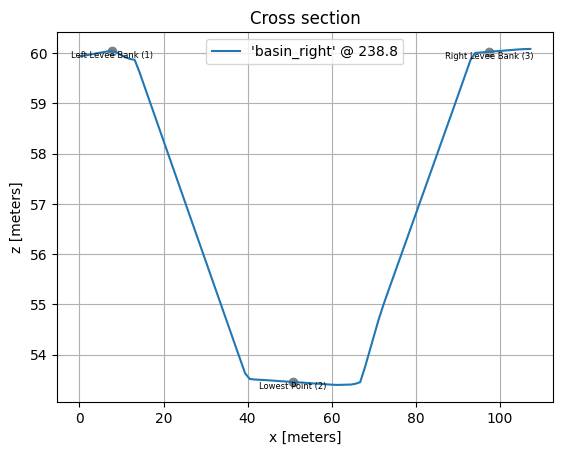
Read Xns11 file and plot a cross section
>>>  import mikeio1d

# Plot section with location id 'basin_right', chainage '238.800', and topo id '1'.
>>>  xns = mikeio1d.open("mikep_cs_demo.xns11")
>>>  xns['basin_right', '238.800', '1'].plot()
Continue learning with additional examples.
Where can I get help?
- Reference - Documentation
- New ideas and feature requests - GitHub Discussions
- Bugs - GitHub Issues
Release history Release notifications | RSS feed


Download files
Download the file for your platform. If you're not sure which to choose, learn more about installing packages.
Source Distributions
Built Distributions
Filter files by name, interpreter, ABI, and platform.
If you're not sure about the file name format, learn more about wheel file names.
Copy a direct link to the current filters
File details
Details for the file mikeio1d-1.2.1a4-py3-none-win_amd64.whl.
File metadata
- Download URL: mikeio1d-1.2.1a4-py3-none-win_amd64.whl
- Upload date:
- Size: 6.4 MB
- Tags: Python 3, Windows x86-64
- Uploaded using Trusted Publishing? No
- Uploaded via: twine/6.2.0 CPython/3.12.13
File hashes
| Algorithm | Hash digest | |
|---|---|---|
| SHA256 |
2431a2a6a77a1152fcd3935e67f93485f1ae6b17ed7098e9ecd602fcc9777e4b
|
|
| MD5 |
ca8ce48a01e3d789128c91ea20edee6b
|
|
| BLAKE2b-256 |
d8e454656d651f1ddd79a94ffe8a05fc526d986e491b2bd671ce3290b10c12f7
|
File details
Details for the file mikeio1d-1.2.1a4-py3-none-manylinux2010_x86_64.whl.
File metadata
- Download URL: mikeio1d-1.2.1a4-py3-none-manylinux2010_x86_64.whl
- Upload date:
- Size: 2.4 MB
- Tags: Python 3, manylinux: glibc 2.12+ x86-64
- Uploaded using Trusted Publishing? No
- Uploaded via: twine/6.2.0 CPython/3.12.13
File hashes
| Algorithm | Hash digest | |
|---|---|---|
| SHA256 |
850c88c3b97a308d22b05ab461bd91c38b38a560e18dd51473756c69ff5d7ff6
|
|
| MD5 |
2e34d2cff7f6c63b1a49306077439f56
|
|
| BLAKE2b-256 |
077e5627b10afd4c519bd6538c2de6db2fcff28138277fab8266a9f65ddf5902
|






