
MindGlide
Brain MRI segmentation for multiple sclerosis — any modality, any quality.
Built with PyTorch + MONAI, trained on >23 000 scans. Nature Communications (2025)






Get started
pip install mindglide
mindglide -i scan.nii.gz -o scan_seg.nii.gz
That's it — no preprocessing needed: no skull-stripping, no bias correction,
no registration, no reorienting. Python ≥ 3.9; runs on GPU (seconds per scan)
or CPU (a few minutes) — picked automatically. The trained model (~123 MB)
downloads and caches on first run. Point -i at a folder to segment every
NIfTI file in it:
mindglide -i scans/ -o segs/ # writes segs/<name>_seg.nii.gz for every scan
Prefer zero installs? Try it in your browser on Colab →
No scan at hand? Use the public MNI152 template:
curl -O https://templateflow.s3.amazonaws.com/tpl-MNI152NLin2009cAsym/tpl-MNI152NLin2009cAsym_res-01_T1w.nii.gz
mindglide -i tpl-MNI152NLin2009cAsym_res-01_T1w.nii.gz -o mni_seg.nii.gz
Use from Python
from mindglide import segment, volumes_dataframe

seg_path = segment("scan.nii.gz")            # writes scan_seg.nii.gz
df = volumes_dataframe(seg_path)             # per-region volumes in mm³
segment("scans_dir/", "segs_dir/")           # whole folder
Same engine as the CLI, byte-identical outputs, clean exceptions
(mindglide.UsageError) instead of exit codes.
From scans to statistics
Segment a cohort, then get one CSV for the whole study:
mindglide -i scans/ -o segs/ --resume        # resumable folder-mode segmentation
mindglide-volumes segs/ --out-csv cohort.csv # one long-format table for all scans
import pandas as pd
df = pd.read_csv("cohort.csv")               # columns: Scan, Label_ID, Region_Name, Volume_mm3
lesions = df[df.Region_Name == "Lesion"]     # e.g. lesion volume per scan
Options
| Option | Meaning |
|---|---|
--device {auto,cpu,cuda,mps} |
Compute device (default: auto — a working GPU if present, else CPU). |
--sw-batch-size N |
Sliding-window batch size (default 4). Lower it if the GPU runs out of memory. |
--model-path FILE |
Use a local .pt checkpoint instead of the automatic download (offline use). |
--resume |
Skip scans whose segmentation already exists at the output location. |
--no-klc |
Keep all connected components (skip largest-component cleanup). |
--no-reorient |
Skip internal RAS re-orientation. Output always matches the input scan's grid. |
--labels |
Print the label code / region name table and exit. |
Output labels
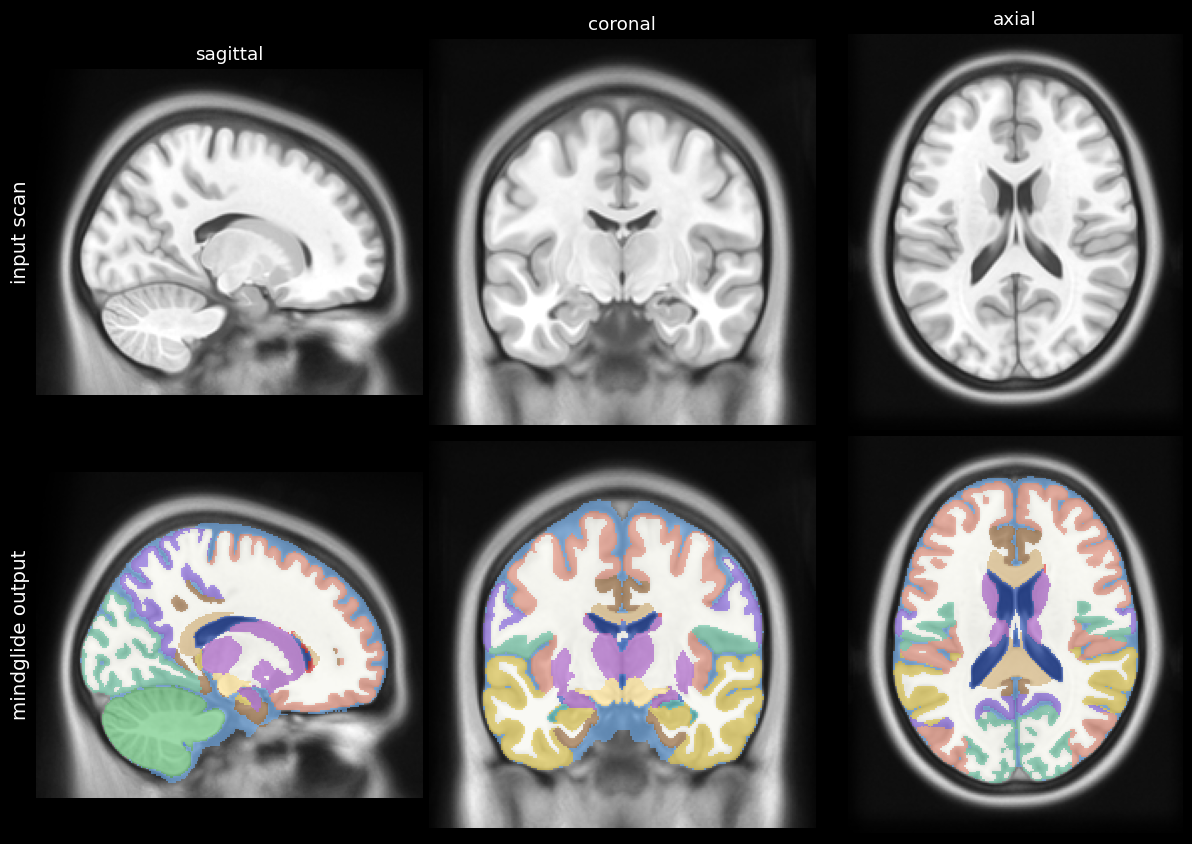
19 regions + background (mindglide --labels prints this table):
| Code | Structure | Code | Structure |
|---|---|---|---|
| 0 | Background | 10 | Optic_chiasm |
| 1 | CSF | 11 | Cerebellar_vermis |
| 2 | Ventricles_3_4_5 | 12 | Corpus_callosum |
| 3 | DGM | 13 | White_matter |
| 4 | Pons | 14 | Frontal_lobe_GM |
| 5 | Brainstem | 15 | Limbic_cortex_GM |
| 6 | Cerebellum | 16 | Parietal_lobe_GM |
| 7 | Temporal_lobe | 17 | Occipital_lobe_GM |
| 8 | Temporal_horn_lateral_ventricle | 18 | Lesion |
| 9 | Lateral_ventricle | 19 | Ventral_diencephalon |
See named, colored regions in your viewer — ready-made colormaps live in
labels/:
fsleyes scan.nii.gz scan_seg.nii.gz -ot label -l labels/mindglide_fsleyes.lut
freeview -v scan.nii.gz scan_seg.nii.gz:colormap=lut:lut=labels/mindglide_freesurfer.txt
# ITK-SNAP: Segmentation > Label Editor > Actions > Import label descriptions
What can I feed it?
- Any single MRI modality — T1, T2, FLAIR, PD, post-contrast; one image per scan (no multi-channel input needed).
- Any quality — designed for real-world clinical archives: 2D thick-slice acquisitions, anisotropic voxels, and older scans, as well as research-grade 3D images. Resampling and reorientation happen internally; the output always lands back on the input scan's grid.
- Validated in the Nature Communications study on tens of thousands of scans from MS clinical archives and trials, where it measured established treatment effects from scans conventional pipelines cannot process.
Intended use: research only. MindGlide is not a medical device and must not be used for clinical decision-making.
Speed (measured): seconds per scan on a modern CUDA GPU (~10 s including model load on a 2016-era Quadro P6000); ~1.5 min for a 2 mm scan and a few minutes for a 1 mm scan on a multi-core CPU.
Troubleshooting & FAQ
Do I need to skull-strip / bias-correct / register first? — No. Feed the raw NIfTI.
"Warning: not using the GPU — … this PyTorch build cannot run on it" —
the default pip PyTorch wheels no longer include kernels for older GPUs
(e.g. Pascal cards: GTX 10xx, Quadro P series). MindGlide falls back to CPU
automatically. To use such a GPU, install a compatible PyTorch first:
pip install "torch==2.6.0+cu118" --index-url https://download.pytorch.org/whl/cu118
pip install mindglide
GPU out of memory — try --sw-batch-size 1, or --device cpu.
Apple Silicon — auto uses MPS when available. If an operation is
unsupported, run with --device cpu or set PYTORCH_ENABLE_MPS_FALLBACK=1.
Offline / air-gapped machines — download
the checkpoint once
and pass --model-path /path/to/model.pt (or set MODEL_PATH).
Model cache location — the auto-downloaded model lives in the Hugging Face
cache (~/.cache/huggingface by default); set HF_HOME to move it.
Can I fine-tune it? — The original container-based training/fine-tuning
pipeline is preserved at the
legacy-container
tag. Open a Discussion
if you're interested.
Docker / Apptainer
Prebuilt images (model weights baked in — works offline; ~8 GB with the CUDA runtime) are published on every release:
docker pull ghcr.io/ms-pinpoint/mindglide:latest

# run on a folder ( --user keeps output files owned by you; drop --gpus all on CPU-only hosts )
docker run --gpus all --ipc=host --user $(id -u):$(id -g) -v /data:/data \
  ghcr.io/ms-pinpoint/mindglide:latest -i /data/scan.nii.gz -o /data/scan_seg.nii.gz
For Apptainer/Singularity on HPC:
apptainer pull mindglide.sif docker://ghcr.io/ms-pinpoint/mindglide:latest
apptainer run --nv -B /data:/data mindglide.sif -i /data/scan.nii.gz -o /data/scan_seg.nii.gz
To build the image yourself instead: git clone this repo and
docker build -t mindglide .
Model weights
The checkpoint (_20240404_conjurer_trained_dice_7733.pt) is downloaded
automatically from
Hugging Face: MS-PINPOINT/mindglide
on first run, pinned to an exact revision for reproducibility. Additional and
legacy checkpoints are archived in the same repository. Models were trained on
the datasets described in the
paper.
From a source checkout you can also fetch the weights as a git submodule (requires Git LFS):
git submodule update --init --recursive
git submodule foreach 'git lfs pull'
Development & tests
git clone https://github.com/MS-PINPOINT/mindGlide.git
cd mindGlide
pip install -e ".[test]"

pytest                          # fast unit tests (seconds, no model download)
MINDGLIDE_RUN_SLOW=1 pytest -v  # + end-to-end on a public MNI scan (CPU, and GPU if present)
See CONTRIBUTING.md. Changes to the numerical path must produce byte-identical segmentations (the e2e tests check real outputs on public data).
Citation
If you use MindGlide, please cite (or use GitHub's Cite this repository button):
Goebl P, Wingrove J, Abdelmannan O, et al. Enabling new insights from old scans by repurposing clinical MRI archives for multiple sclerosis research. Nature Communications. 2025;16(1):3149. doi:10.1038/s41467-025-58274-8
BibTeX
@article{Goebl2025,
    author = {Goebl, Philipp and Wingrove, Jed and Abdelmannan, Omar and {Brito Vega}, Barbara and Stutters, Jonathan and Ramos, {Silvia Da Graca} and Kenway, Owain and Rossor, Thomas and Wassmer, Evangeline and Arnold, Douglas L. and Collins, Louis and Hemingway, Cheryl and Narayanan, Sridar and Chataway, Jeremy and Chard, Declan and Iglesias, {Juan Eugenio} and Barkhof, Frederik and Parker, Geoffrey J. M. and Oxtoby, Neil P. and Hacohen, Yael and Thompson, Alan and Alexander, Daniel C. and Ciccarelli, Olga and Eshaghi, Arman},
    title = {Enabling new insights from old scans by repurposing clinical {MRI} archives for multiple sclerosis research},
    journal = {Nature Communications},
    volume = {16},
    number = {1},
    pages = {3149},
    year = {2025},
    month = apr,
    doi = {10.1038/s41467-025-58274-8},
    pmid = {40195318},
    pmcid = {PMC11976987}
}
Acknowledgements
This study/project is funded by the UK National Institute for Health and Social Care (NIHR) Advanced Fellowship to Arman Eshaghi (Award ID: NIHR302495). The views expressed are those of the author(s) and not necessarily those of the NIHR or the Department of Health and Social Care.

1 maintainer

Metadata
1 maintainer
Release files for mindglide 1.3.0
For a detailed explanation of source distributions (sdists) and built distributions (wheels), please see the package formats documentation.
Source distribution (sdist)
| File | Size | Uploaded | |
|---|---|---|---|
| mindglide-1.3.0.tar.gz | 33.1 kB | Details |
Built distribution (wheel)
| File | Interpreter | ABI | Platform | Reset |
|---|---|---|---|---|
| mindglide-1.3.0-py3-none-any.whl | Python 3 | none | any | Details |
Total release size: 57.0 kB
Release files / mindglide-1.3.0.tar.gz
| Download URL | mindglide-1.3.0.tar.gz |
|---|---|
| Size | 33.1 kB |
| Tags | Source |
|
SHA-256 checksum How to use checksums |
0ea0b9b504d14527ac38960b3966cbdc5be2a27f4690ac7eb77b2d1c485e633d
|
|
BLAKE2b-256 checksum How to use checksums |
6190fd3625c7d168375e6533560dfaf14b6eb280f1cb8e18d6593e406d6e06a9
|
| Upload date | |
|
Uploaded using Trusted Publishing? What is trusted publishing? |
Yes |
| Uploaded via |
twine/7.0.0 CPython/3.13.14
|
Provenance
Provenance describes where a file came from. On PyPI, provenance is shared via attestations, which provide a verifiable record of the build or publishing details. View details, limitations and caveats.


PyPI Publish Attestation
PyPI verified that this artifact, at this checksum, originated from the publisher listed below.
Signed by GitHub Actions, verified by PyPI on Aug 13, 2026.
Transparency logRelease files / mindglide-1.3.0-py3-none-any.whl
| Download URL | mindglide-1.3.0-py3-none-any.whl |
|---|---|
| Size | 23.9 kB |
| Tags | Python 3 |
|
SHA-256 checksum How to use checksums |
6031f365773a37303f2608cb31455bbc9d6f31bfe24ff806dc940891ec397fc5
|
|
BLAKE2b-256 checksum How to use checksums |
814eca4b59be6be5e51c043cf4b0dc031c619ecb5db9fb98e855c50f40d74e3b
|
| Upload date | |
|
Uploaded using Trusted Publishing? What is trusted publishing? |
Yes |
| Uploaded via |
twine/7.0.0 CPython/3.13.14
|
Provenance
Provenance describes where a file came from. On PyPI, provenance is shared via attestations, which provide a verifiable record of the build or publishing details. View details, limitations and caveats.
PyPI Publish Attestation
PyPI verified that this artifact, at this checksum, originated from the publisher listed below.
Signed by GitHub Actions, verified by PyPI on Aug 13, 2026.
Transparency log













