
Tiny macOS dictation tool on your menubar
Verified details
These details have been verified by PyPIProject links
GitHub Statistics
Maintainers

Project description
minidic
A tiny macOS dictation tool for fast voice input from the menu bar or terminal.
Install
minidic is published on PyPI for macOS users.
uv tool install minidic
To upgrade an existing install:
uv tool upgrade minidic
uv tool installs minidic to ~/.local/bin/minidic.
Make sure ~/.local/bin is on your PATH.
Usage
On first use, macOS will prompt for the permissions required by minidic. In general, you need to grant these permissions to the terminal app you use to run minidic:
- Microphone — needed to capture live audio for dictation
- Accessibility — needed to inject transcribed text into the active app and handle global hotkeys in menu bar mode
Environment variables:
GROQ_API_KEY— required when using--asr groqor--polish
Console
Run an interactive dictation session in the terminal. It records from your microphone, transcribes speech, and prints the result.
minidic console
minidic console --asr groq
minidic console --polish
The first time you use the default offline backend, minidic console will download mlx-community/parakeet-tdt-0.6b-v3.
Use the offline backend (Parakeet) for local transcription or Groq for cloud-based transcription. Polish is optional and uses a Groq LLM to improve punctuation and phrasing after transcription. --polish enables the built-in Groq polish backend. You can combine --asr groq with --polish.
Transcribe
Transcribe an existing WAV file from disk instead of recording live microphone input.
minidic transcribe path/to/file.wav
minidic transcribe --asr groq path/to/file.wav
minidic transcribe --polish path/to/file.wav
Menu bar
Run minidic in menu bar mode with a background daemon and a global F5 hotkey to toggle dictation.
minidic menubar
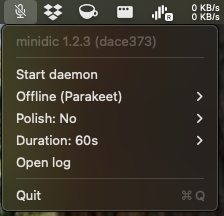
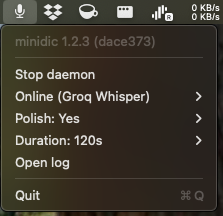
The menubar command itself does not accept ASR or polish selection flags. Use the menu bar UI to change ASR, polish, and duration.
The menu bar UI lets you change settings without restarting the daemon; changes apply on the next transcription:
- Start menu bar mode.
- Optionally choose ASR:
Offline (Parakeet)orOnline (Groq). - Optionally choose Polish:
NoorYes. - Optionally choose a max recording length from Duration.
- Click Start daemon.
- Press
F5to toggle start/stop dictation.
Groq requires GROQ_API_KEY. If the key is missing, minidic raises an error; in daemon mode, the error is logged to daemon.log.
How it works
minidic captures microphone audio, normalizes it to 16 kHz, and runs speech-to-text plus optional cleanup.
Models used
- Offline ASR:
parakeet-mlxon Apple Silicon via MLX - Online ASR: Groq Whisper (
whisper-large-v3-turbo) - Polish model: Groq
llama-3.1-8b-instant
High-level pipeline
- Capture mic audio with
sounddevice - Resample to 16 kHz with
soxrwhen needed - Transcribe with Parakeet or Groq depending on
asr - Apply local regex cleanup by default to remove filler words like
umanduh - Optionally run Groq polish when enabled
- Inject text into the active app on macOS in daemon mode
The daemon mode is hotkey-driven and lazily loads and unloads the ASR model to reduce idle resource usage.
Directory structure
~/.minidic/
├── settings.json          # persisted settings for ASR, polish, and recording duration
└── recordings/            # WAV recordings created during dictation/transcription

~/.local/state/minidic/
├── daemon.error           # last daemon error message (transient)
├── daemon.log             # daemon logs
├── daemon.pid             # daemon process ID
├── daemon.state           # current daemon state: idle, recording, transcribing, error
├── menubar.log            # menu bar mode logs
└── menubar.pid            # menu bar process ID
Configuration
minidic stores persistent configuration in ~/.minidic/settings.json as a flat JSON object with these keys:
asr:"offline"or"groq"polish:trueorfalseduration_seconds
Default settings.json:
{
  "asr": "offline",
  "duration_seconds": 60.0,
  "polish": false
}
Project details
Verified details
These details have been verified by PyPIProject links
GitHub Statistics
Maintainers
Release history Release notifications | RSS feed


Download files
Download the file for your platform. If you're not sure which to choose, learn more about installing packages.
Source Distribution
Built Distribution
Filter files by name, interpreter, ABI, and platform.
If you're not sure about the file name format, learn more about wheel file names.
Copy a direct link to the current filters
File details
Details for the file minidic-1.2.2.tar.gz.
File metadata
- Download URL: minidic-1.2.2.tar.gz
- Upload date:
- Size: 23.2 kB
- Tags: Source
- Uploaded using Trusted Publishing? Yes
- Uploaded via: twine/6.1.0 CPython/3.13.7
File hashes
| Algorithm | Hash digest | |
|---|---|---|
| SHA256 |
138b68ad620053142006c754aabe6d2e36c2a3ac0bcca9a0d842d65b48702827
|
|
| MD5 |
0ab2f11ab6d9468700ccfd28fc90dd0d
|
|
| BLAKE2b-256 |
a1973d7e30ff876e31344a9f74b70047b5101e82259248beca55d07f582ce799
|
Provenance
The following attestation bundles were made for minidic-1.2.2.tar.gz:
Publisher:
publish.yml on goofansu/minidic
-
Statement:
-
Statement type:
https://in-toto.io/Statement/v1 -
Predicate type:
https://docs.pypi.org/attestations/publish/v1 -
Subject name:
minidic-1.2.2.tar.gz -
Subject digest:
138b68ad620053142006c754aabe6d2e36c2a3ac0bcca9a0d842d65b48702827 - Sigstore transparency entry: 1066025633
- Sigstore integration time:
-
Permalink:
goofansu/minidic@44f031c7ffb6737563ea3e13979a59b90453b89b -
Branch / Tag:
refs/tags/v1.2.2 - Owner: https://github.com/goofansu
-
Access:
public
-
Token Issuer:
https://token.actions.githubusercontent.com -
Runner Environment:
github-hosted -
Publication workflow:
publish.yml@44f031c7ffb6737563ea3e13979a59b90453b89b -
Trigger Event:
push
-
Statement type:
File details
Details for the file minidic-1.2.2-py3-none-any.whl.
File metadata
- Download URL: minidic-1.2.2-py3-none-any.whl
- Upload date:
- Size: 29.9 kB
- Tags: Python 3
- Uploaded using Trusted Publishing? Yes
- Uploaded via: twine/6.1.0 CPython/3.13.7
File hashes
| Algorithm | Hash digest | |
|---|---|---|
| SHA256 |
2c2670845671f2931a5eecb81995fd404fbb61fdd0e148f910e44112f3f8f0c3
|
|
| MD5 |
ac470d8f1cbfac8e83491face23323ac
|
|
| BLAKE2b-256 |
6a00506f5fab0c1f11d04ba2673a6c54f1d2a8c4829cb4158de53db9a8ef6e27
|
Provenance
The following attestation bundles were made for minidic-1.2.2-py3-none-any.whl:
Publisher:
publish.yml on goofansu/minidic
-
Statement:
-
Statement type:
https://in-toto.io/Statement/v1 -
Predicate type:
https://docs.pypi.org/attestations/publish/v1 -
Subject name:
minidic-1.2.2-py3-none-any.whl -
Subject digest:
2c2670845671f2931a5eecb81995fd404fbb61fdd0e148f910e44112f3f8f0c3 - Sigstore transparency entry: 1066025650
- Sigstore integration time:
-
Permalink:
goofansu/minidic@44f031c7ffb6737563ea3e13979a59b90453b89b -
Branch / Tag:
refs/tags/v1.2.2 - Owner: https://github.com/goofansu
-
Access:
public
-
Token Issuer:
https://token.actions.githubusercontent.com -
Runner Environment:
github-hosted -
Publication workflow:
publish.yml@44f031c7ffb6737563ea3e13979a59b90453b89b -
Trigger Event:
push
-
Statement type:






