
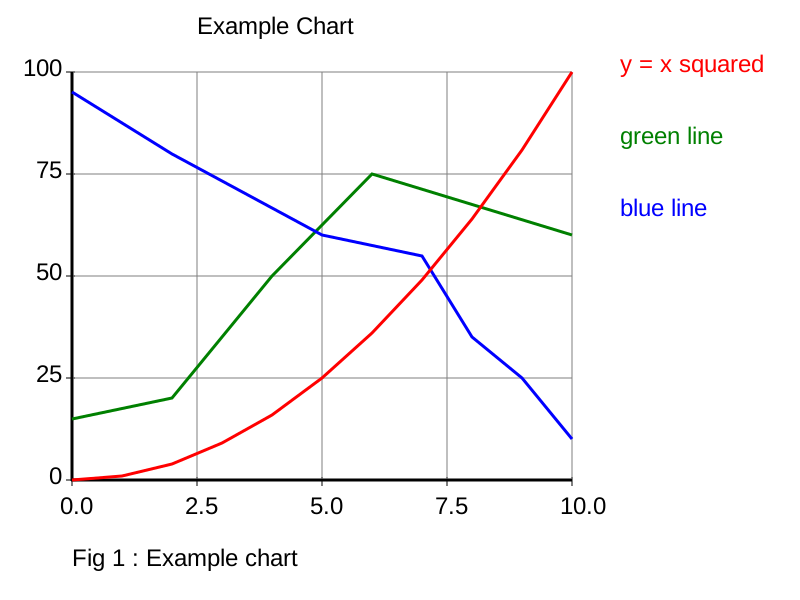
A single Python module, with no dependencies, producing an SVG image of a chart with one or more plotted lines

Project description
minilineplot
minilineplot.py is a single Python module, with no dependencies, producing an SVG image of a chart with one or more plotted lines.
The chart has a left vertical axis and a bottom horizontal axis, grid lines are possible,
Two classes are defined.
Line, containing x,y points which creates a line to be plotted
Axis which creates the axis, and to which Line objects can be added.
The Axis class has methods to create an svg string suitable for embedding in an html document it can also create an svg image, either as a bytes object, or saved to a file.
Line
Arguments
values a list of x,y tuples, x and y being integers or floats.
color an SVG color of the line, such as 'blue'.
stroke line width, 1 for a thin line, default is 3.
label A label string for a key, if not given, the key will not be drawn
x,y values should be values between the min and max Axis attributes
color is an SVG color, using standard strings such as
Color Names: "red", "blue" etc.
Hex Codes: "#FF0000" for red.
RGB/RGBA: "rgb(255,0,0)" or "rgba(255,0,0,0.5)" (with opacity).
HSL/HSLA: "hsl(0,100%,50%)" or "hsla(0,100%,50%,0.5)" (hue, saturation, lightness, alpha)
Axis
Arguments
lines list of Line objects
fontsize default 24
imagewidth default 800
imageheight default 600
xstrings an optional list of strings used as the x axis values, use for text values such as months, etc.,
If xstrings is left empty, the following two arguments will define the x axis text
xformat default string ".1f" Sets how the x axis numbers are formatted.
xintervals default 5, the interval spacing of values along the x axis, 5 would be five intervals and six values.
The above values are ignored if xstrings is populated.
xmin default 0, the minimum x value
xmax default 100, the maximum x value
ystrings an optional list of strings used as the y axis values.
If ystrings is left empty, the following two arguments will define the y axis text
yformat default string ".1f" Sets how the y axis numbers are formatted.
yintervals default 5, the interval spacing of values along the y axis, 5 would be five intervals and six values.
The above values are ignored if ystrings is populated.
ymin default 0, the minimum y value
ymax default 100, the maximum y value
title default "", A string printed at the top of the chart
description default "", A string printed at the bottom of the chart
verticalgrid default 1
0 is no vertical grid lines, 1 is a line for every x axis interval, 2 is a line for every second interval etc.,
horizontalgrid default 1
0 is no horizontal grid lines, 1 is a line for every y axis interval, 2 is a line for every second interval etc.,
The following colors are SVG colors, using standard strings
gridcol default "grey" Color of the chart grid
axiscol default "black" Color of axis, title and description
chartbackcol default "white" the background colour of the chart
backcol default "white" The background colour of the whole image
xformat and yformat are strings describing how numbers are printed, for example the string ".2f" gives a number to two decimal places.
If chart text starts overlapping, either decrease font size, or increase the image size while keeping fontsize the same.
All arguments are also object attributes, and can be changed as required.
Methods
to_string(xml_declaration = False)
Return a string SVG object. If xml_declaration is True, an xml tag will be included in the returned string which is usually required when creating an svg image file but not required if embedding the code directly into an html document,
to_bytes(xml_declaration = True)
Return a bytes SVG object.
to_file(filepath)
Save the plot to an svg image file
To install, either use Pypi, or simply copy minilineplot.py to your own project files, or just cut and paste the contents. The code is public domain.
Note, to keep things simple there is very little data validation, rubbish in = rubbish out.


Download files
Download the file for your platform. If you're not sure which to choose, learn more about installing packages.
Source Distribution
Built Distribution
Filter files by name, interpreter, ABI, and platform.
If you're not sure about the file name format, learn more about wheel file names.
Copy a direct link to the current filters
File details
Details for the file minilineplot-0.0.5.tar.gz.
File metadata
- Download URL: minilineplot-0.0.5.tar.gz
- Upload date:
- Size: 6.7 kB
- Tags: Source
- Uploaded using Trusted Publishing? No
- Uploaded via: python-requests/2.32.5
File hashes
| Algorithm | Hash digest | |
|---|---|---|
| SHA256 |
c832fc3d041facce4459eb756359455ec35f16a4ed981f755047df9f83a15ca6
|
|
| MD5 |
3654c0fde5050475d1832ffff26967bb
|
|
| BLAKE2b-256 |
a74c46bada45c61c0348546fd5de37c868fbd1ac894e7011cd209e33cccfc424
|
File details
Details for the file minilineplot-0.0.5-py3-none-any.whl.
File metadata
- Download URL: minilineplot-0.0.5-py3-none-any.whl
- Upload date:
- Size: 8.0 kB
- Tags: Python 3
- Uploaded using Trusted Publishing? No
- Uploaded via: python-requests/2.32.5
File hashes
| Algorithm | Hash digest | |
|---|---|---|
| SHA256 |
afc5c1d4bb63d060b64bd131df17ed2c28dd9a1a125efb38a7c1f4ecd4dcbcda
|
|
| MD5 |
6629b24214d38f6575344a5f37d5fb74
|
|
| BLAKE2b-256 |
3ee5030c623072524f1269a5e6ef9e161c1e26a8c06e812f568a6c927c2b0867
|






