
This release has been yanked by its maintainers, and will be ignored by installers, except when explicitly specified.
Consider using release 1.1.0 instead.
Reason given by maintainers: This is an incomplete v1.1 that was released by accident



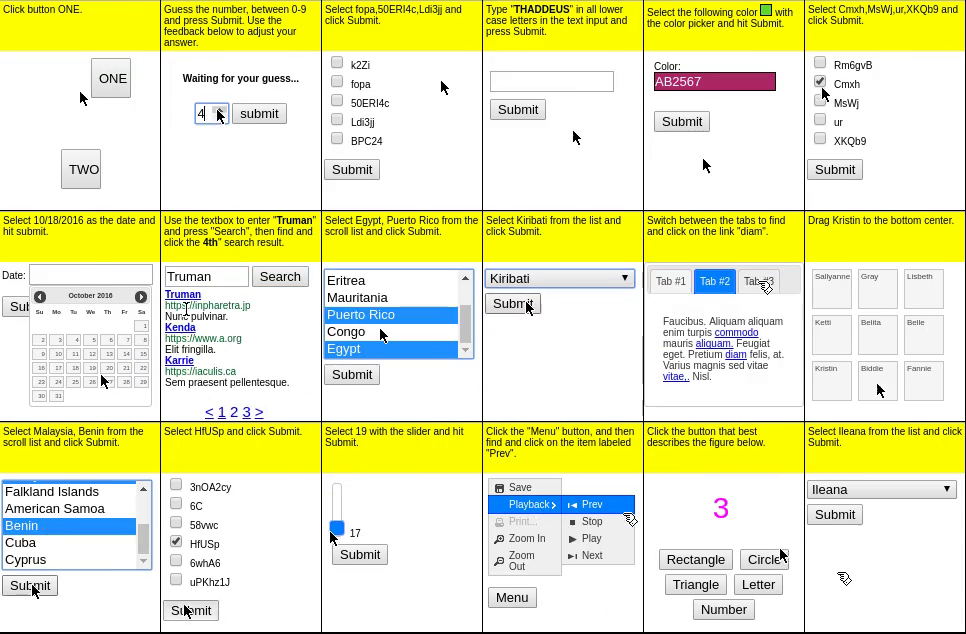
The MiniWoB++ (Mini World of Bits++) library contains a collection of over 100 web interaction environments, along with JavaScript and Python interfaces for programmatically interacting with them. The Python interface follows the Gymnasium API and uses Selenium WebDriver to perform actions on the web browser.
MiniWoB++ is an extension of the OpenAI MiniWoB benchmark, and was introduced in the paper Reinforcement Learning on Web Interfaces using Workflow-Guided Exploration.
The documentation website is at miniwob.farama.org. Development on MiniWoB++ is currently ongoing to bring it up to Farama Standards for mature projects, and will be maintained long term after this point. See the Project Roadmap for more details. If you'd like to help out, you can join our discord server here: https://discord.gg/PfR7a79FpQ.
Installation
MiniWoB++ supports Python 3.10+ on Linux and macOS.
Installing the MiniWoB++ Library
To install the MiniWoB++ library, use pip install miniwob.
Installing Chrome/Chromium and ChromeDriver
We strongly recommend using Chrome or Chromium as the web browser, as other browsers may render the environments differently.
The MiniWoB++ Python interface uses Selenium,
which interacts with the browser via the WebDriver API.
Follow one of the
instruction methods
to install ChromeDriver. The simplest method is to
download ChromeDriver with the matching version,
unzip it, and then add the directory containing the chromedriver executable to the PATH environment variable:
export PATH=$PATH:/path/to/chromedriver
For Chromium, the driver may also be available in a software package; for example, in Debian/Ubuntu:
sudo apt install chromium-driver
Example Usage
The following code performs a deterministic action on the
click-test-2 environment.
import time
import gymnasium
import miniwob
from miniwob.action import ActionTypes

gymnasium.register_envs(miniwob)

env = gymnasium.make('miniwob/click-test-2-v1', render_mode='human')

# Wrap the code in try-finally to ensure proper cleanup.
try:
  # Start a new episode.
  obs, info = env.reset()
  assert obs["utterance"] == "Click button ONE."
  assert obs["fields"] == (("target", "ONE"),)
  time.sleep(2)       # Only here to let you look at the environment.

  # Find the HTML element with text "ONE".
  for element in obs["dom_elements"]:
    if element["text"] == "ONE":
      break

  # Click on the element.
  action = env.unwrapped.create_action(ActionTypes.CLICK_ELEMENT, ref=element["ref"])
  obs, reward, terminated, truncated, info = env.step(action)

  # Check if the action was correct.
  print(reward)      # Should be around 0.8 since 2 seconds has passed.
  assert terminated is True
  time.sleep(2)

finally:
  env.close()
See the documentation for more information.
Environments
The list of the environments that were included in the MiniWoB++ library can be found in the documentation. All environments share the same observation space, while the action space can be configured during environment construction.
Citation
To cite this project please use:
@inproceedings{liu2018reinforcement,
 author = {Evan Zheran Liu and Kelvin Guu and Panupong Pasupat and Tianlin Shi and Percy Liang},
 title = {Reinforcement Learning on Web Interfaces using Workflow-Guided Exploration},
 booktitle = {International Conference on Learning Representations ({ICLR})},
 url = {https://arxiv.org/abs/1802.08802},
 year = {2018},
}


Download files
Download the file for your platform. If you're not sure which to choose, learn more about installing packages.
Source Distribution
Built Distribution
Filter files by name, interpreter, ABI, and platform.
If you're not sure about the file name format, learn more about wheel file names.
Copy a direct link to the current filters
File details
Details for the file miniwob-1.0.1.tar.gz.
File metadata
- Download URL: miniwob-1.0.1.tar.gz
- Upload date:
- Size: 1.6 MB
- Tags: Source
- Uploaded using Trusted Publishing? Yes
- Uploaded via: twine/7.0.0 CPython/3.13.14
File hashes
| Algorithm | Hash digest | |
|---|---|---|
| SHA256 |
a8b2f08f580093702f5522ad60df6147f538f44922e5f459bcff2ab2a4d71ce4
|
|
| MD5 |
692ac645c85f06a03225bf6556de332e
|
|
| BLAKE2b-256 |
4ac0168fad9b15b1049196d7164fa882aaa2da074da6f4579124485d46cbde40
|
Provenance
The following attestation bundles were made for miniwob-1.0.1.tar.gz:
Publisher:
build-publish.yml on Farama-Foundation/MiniWoB-plusplus
-
Statement:
-
Statement type:
https://in-toto.io/Statement/v1 -
Predicate type:
https://docs.pypi.org/attestations/publish/v1 -
Subject name:
miniwob-1.0.1.tar.gz -
Subject digest:
a8b2f08f580093702f5522ad60df6147f538f44922e5f459bcff2ab2a4d71ce4 - Sigstore transparency entry: 2450132818
- Sigstore integration time:
-
Permalink:
Farama-Foundation/MiniWoB-plusplus@eb59fed60fabe8951350275ba8650633b740013b -
Branch / Tag:
refs/tags/v1.1 - Owner: https://github.com/Farama-Foundation
-
Access:
public
-
Token Issuer:
https://token.actions.githubusercontent.com -
Runner Environment:
github-hosted -
Publication workflow:
build-publish.yml@eb59fed60fabe8951350275ba8650633b740013b -
Trigger Event:
release
-
Statement type:
File details
Details for the file miniwob-1.0.1-py3-none-any.whl.
File metadata
- Download URL: miniwob-1.0.1-py3-none-any.whl
- Upload date:
- Size: 1.9 MB
- Tags: Python 3
- Uploaded using Trusted Publishing? Yes
- Uploaded via: twine/7.0.0 CPython/3.13.14
File hashes
| Algorithm | Hash digest | |
|---|---|---|
| SHA256 |
3049438567cabe84287fba491128fbe9a30f7f7c7aae67a12b1a4214807eb737
|
|
| MD5 |
e72d92976aca5dc6f3e9d70056fe6154
|
|
| BLAKE2b-256 |
d5c4b6c166a3856a67da5c2af99ca86ef24c63f8fa3e34c7bbc15ea1ddbad1ce
|
Provenance
The following attestation bundles were made for miniwob-1.0.1-py3-none-any.whl:
Publisher:
build-publish.yml on Farama-Foundation/MiniWoB-plusplus
-
Statement:
-
Statement type:
https://in-toto.io/Statement/v1 -
Predicate type:
https://docs.pypi.org/attestations/publish/v1 -
Subject name:
miniwob-1.0.1-py3-none-any.whl -
Subject digest:
3049438567cabe84287fba491128fbe9a30f7f7c7aae67a12b1a4214807eb737 - Sigstore transparency entry: 2450132841
- Sigstore integration time:
-
Permalink:
Farama-Foundation/MiniWoB-plusplus@eb59fed60fabe8951350275ba8650633b740013b -
Branch / Tag:
refs/tags/v1.1 - Owner: https://github.com/Farama-Foundation
-
Access:
public
-
Token Issuer:
https://token.actions.githubusercontent.com -
Runner Environment:
github-hosted -
Publication workflow:
build-publish.yml@eb59fed60fabe8951350275ba8650633b740013b -
Trigger Event:
release
-
Statement type:







