
This release is a pre-release and may not be stable for production use.













AI agents work in a terminal. Mirage is a virtual terminal that separates the terminal interface, the data storage and the computing machines. Mirage routes each command to the machine that fits it, across heterogeneous machines such as containers, microVMs, cloud sandboxes and SSH hosts. Files, CLIs and machines are added to it separately, which keeps it flexible and its infrastructure cost low, and lets agents work in the most efficient and safest way.
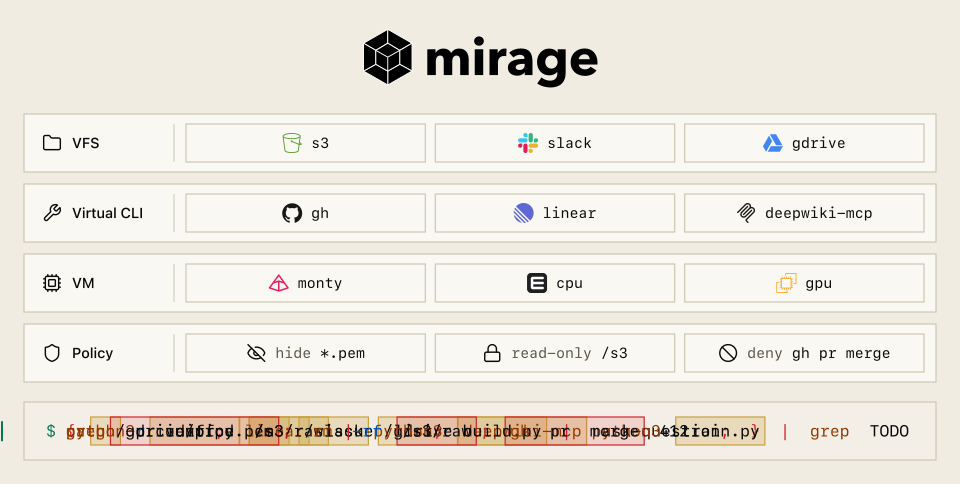
- Controllable. Decide what each agent reaches, which files it sees, which credentials its virtual filesystems and CLIs use without showing them, and which machine runs each of its programs.
- Scriptable. The whole terminal is defined in code or a config file, from its virtual filesystems, CLIs and machines to its rules, such as which commands need approval and how much output an agent gets back.
- Managed. Mirage manages the virtual terminal's infrastructure, composed from the chosen backends. The virtual filesystem sits on S3, Drive, a database or RAM, jobs and history on RAM, Redis or disk, and whole workspaces can be saved as snapshots. Every command an agent runs is recorded and can be sent to an OpenTelemetry backend as a trace.
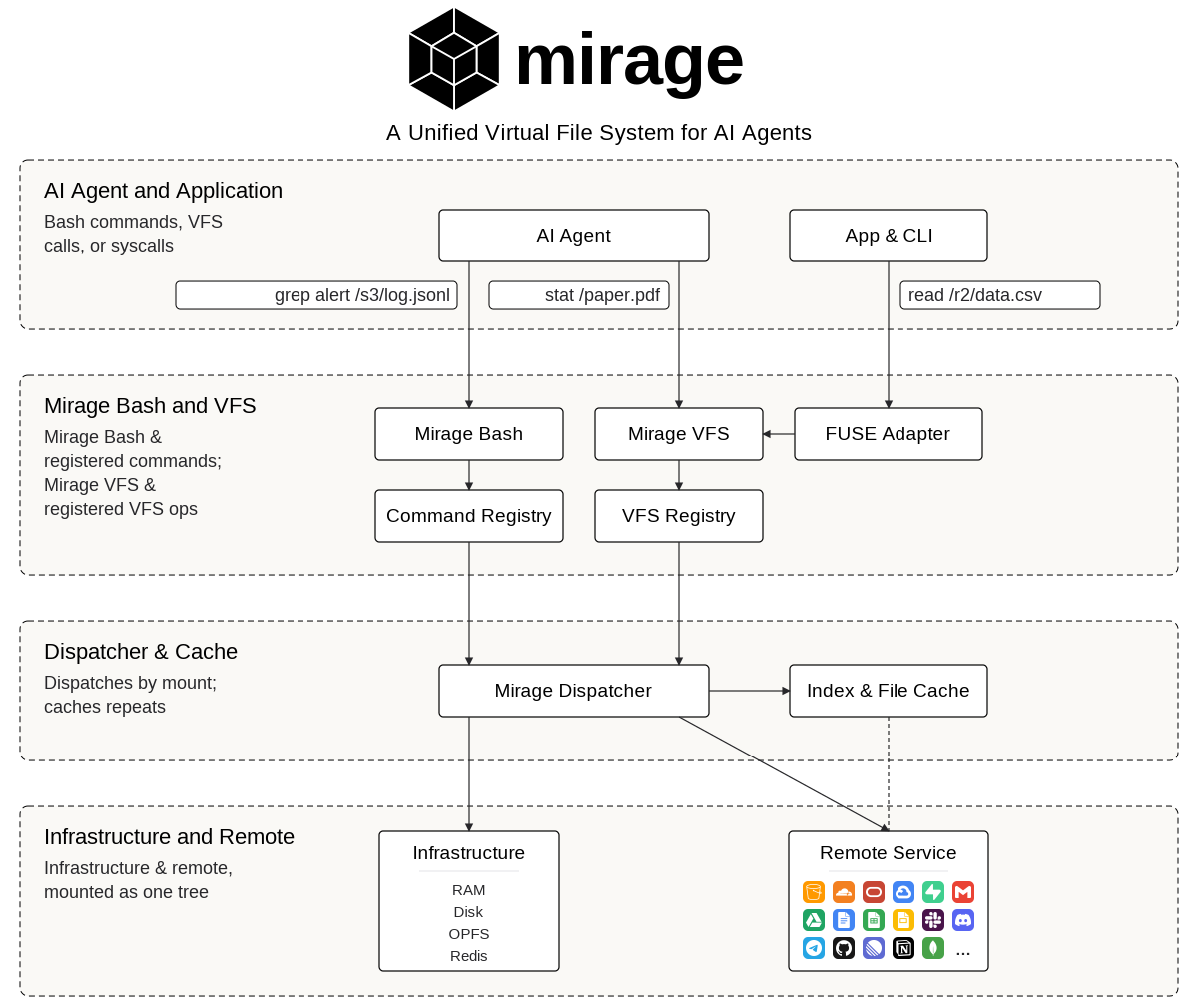
Here is an example of launching Mirage inside an application:
ws = Workspace(
    {
        "/s3":    (S3VFS(S3Config(bucket="my-bucket")), MountMode.WRITE),
        "/slack": (SlackVFS(SlackConfig(token=slack_bot_token)), MountMode.EXEC),
        "/gmail": (GmailVFS(GmailConfig(**google_credentials)), MountMode.READ),
    },
    # Install the Slack CLI, run by name and listed by `man` and `which` like any program
    clis={"slack": (SLACK, {"token": slack_bot_token})},
    # the analyst profile hides /s3/secrets and denies posting to Slack and curl
    profiles={
        "analyst": {
            "paths": {"hide": ["/s3/secrets"]},
            "commands": {"deny": ["slack send-message", "curl"]},
        },
    },
    # python runs in process on monty, or on the e2b sandbox
    machines={
        "py": {"provider": "in_process", "runtime": "monty"},
        "box": {"provider": "e2b", "sandbox_id": sandbox_id, "mount_type": "ssh", "captures": ["python", "python3"]},
    },
    # route the underlying computation: numpy lines run on the machine, the rest on monty
    route_policy=lambda ctx: "box" if "numpy" in ctx.line else None,
)

# Add an agent using the analyst profile
alice = await ws.session("alice", profile="analyst")

# one grep sweeps S3, Slack and Gmail, on each service's own search where it has one
await alice.shell("grep -rlw invoice /s3 /slack /gmail")

# run a script that lives in Slack on monty, file the report into S3
await alice.shell("python3 /slack/channels/general__C0123/2026-10-21/files/report__F0456.py > /s3/report.txt")

# numpy is not in monty, so the route policy sends this line to e2b
await alice.shell("python3 -c 'import numpy; print(numpy.arange(10).sum())'")
And what alice sees in the shell:
$ grep -rlw invoice /s3 /slack /gmail
/s3/billing/2026-10.csv
/gmail/INBOX/2026-10-21/Invoice_1042__18f3a9c2b7d1e0f4.gmail.json
$ ls /s3
billing
report.txt
$ cat /s3/secrets/aws.txt
cat: /s3/secrets/aws.txt: No such file or directory
$ slack send-message --channel general --text "report is up"
slack: Permission denied
About
- Unified virtual terminal interface, not N SDKs and M MCPs. Every backend speaks the same filesystem semantics, so pipelines compose across services.
- A virtual filesystem over every source. S3, Google Drive, Slack, Gmail, Redis and the rest mount side by side under one root, so an agent reaches all of them through a unified interface with the unix tools it already knows, like
ls,grep,findandjq. - Virtual command line tools (CLIs).
git,slackandntnare answered by Mirage itself, so an agent drives the service with nothing installed, across different runtimes and machines, and one tool can be virtualized into two or more, each under its own name with its own credentials. - Routed, dynamic machines. Python, JavaScript and any other command can be sent to a configured machine, in process, sandboxed or remote, which decouples computation from storage and lets either change without touching the other.
- The virtualized Mirage shell. It binds the filesystem, the CLIs and the machines into one command line, so pipes, redirection, variables, jobs and history work across all three.
- Lightweight by design. A workspace, the virtual terminal itself, takes about 100 KB of memory and each new session about 10 KB, so one process serves many agents without a container or VM per agent.
- Profiles designed for agents.
allow,askanddenygovern commands and CLIs, whilehideandshowgovern files and folders, so a hidden path is not merely unreadable but absent from the filesystem the agent sees. - A scriptable policy engine. A policy script can prohibit any dangerous action before it runs, and the same stack gates every VFS op and session write, so neither a file nor an environment variable leaks.
- Notifications wired into the VFS and agents. External changes become an event stream on the mount, so a new Slack reply surfaces as a change to the chat file in the virtual filesystem, and the agent reacts to it instead of rescanning the tree.
Virtual Filesystem
Everything Mirage "mounts" as one unified virtual filesystem for AI agents. Each service sits side-by-side under a single root and answers the same POSIX semantics.
| VFS | |
|---|---|
| Object Storage |                  |
| Files and Documents |           |
| Messaging and Work |          |
| Databases and Data Platforms |            |
| Observability |    |
| Local and Remote |     |
Agents reach it through the Python and TypeScript SDKs, the mirage CLI, or a real
mountpoint over FUSE and FSKit, then work it with the unix tools they already know,
like ls, grep, find and jq.
Virtual Command Line Tool
These command line tools are virtualized: Mirage answers git, slack or ntn
itself, so an agent drives the service without that program being installed on the
machine. Each one mimics the real tool, so an agent that knows the CLI needs nothing
new. Because they are virtual, the same tool can be installed more than once under
different names, each with its own credentials, so every agent gets exactly the
accounts it is given.
| CLIs | |
|---|---|
| Code |  |
| Communication |  |
| Work and Data |     |
Virtual Machine
Machines are virtualized the same way, and not only for coding languages. Any
command on the line can be sent to a configured machine, so Python might run
in-process with Monty while
another command, say kubectl, runs on a remote machine over SSH. Which machine
serves a given line can be decided by a
scripted machine router.
| Machines | |
|---|---|
| Python |      |
| JavaScript |    |
| Machines |         |
Security
A profile decides what a session may run and what it may see. Commands are governed
by customizable allow, ask and deny rules, and paths by hide and show, so a
hidden file is not merely unreadable but absent from the filesystem the agent sees.
For anything those rules cannot express, a profile can name a policy script that runs
at the gate on every command and answers allow, deny or ask itself, though like every
rule it can only restrict and never grant. Separately, a host can register its own
policies on the policy engine, an
ordered stack the workspace consults on every command, VFS op and session write. See
the policy docs.
Service Credentials
Service credentials integrate with the stores secrets already live in, including AWS Secrets Manager, 1Password and dotenv, so an environment variable in Mirage can resolve straight to a credential held in one of them.
| Sources | |
|---|---|
| Built in |   |
| Custom |   |
Installation
- Python ≥ 3.12 for the
mirage-aipackage and themirageCLI - Node.js 22.20+ on Node 22, 24.12+ on Node 24, or 25+ for the TypeScript SDK
Python
uv add mirage-ai              # installs the `mirage` library and the `mirage` CLI binary
uv add 'mirage-ai[openai]'    # OpenAI Agents adapter; each agent framework is an extra
uv add 'mirage-ai[monty]'     # Monty, the in-process Python runtime the examples run on
TypeScript
npm install @struktoai/mirage-node      # Node.js servers and CLIs
npm install @struktoai/mirage-browser   # browser / edge runtimes
Both runtime packages pull in @struktoai/mirage-core automatically.
CLI
npm install -g @struktoai/mirage-cli
# or
uvx --from mirage-ai mirage
# or
npx @struktoai/mirage-cli
To get started, see the quickstarts for Python, TypeScript and the CLI.
Scriptable Policy
A profile can name policy scripts for what its rules cannot express. A script's
pre_command takes the command, can open the files it names, and returns a
deny, an ask or None. This one disables rm, and a Python script whose code
deletes files:
def deletes(path):
    try:
        code = open(path).read()
    except OSError:
        return False
    return any(call in code for call in ("os.remove", "os.unlink", "shutil.rmtree"))


def pre_command(ctx):
    if ctx["command"] == "rm" or (
        ctx["command"].startswith("python") and any(deletes(p) for p in ctx["paths"])
    ):
        return {"kind": "deny", "reason": "deleting files is disabled"}
Register it in a profile, here to run on Monty before every command:
ws = Workspace(
    {"/s3": (S3VFS(S3Config(bucket="my-bucket")), MountMode.WRITE)},
    profiles={
        "analyst": {
            "policy": {
                "pre_command": [{"script": ScriptSource(Path("guard.py").read_text()), "runtime": "monty"}],
            },
        },
    },
    profile="analyst",
)
$ cat /s3/clean.py
import os
os.remove("/s3/report.txt")
$ rm /s3/report.txt
rm: Permission denied
$ python3 /s3/clean.py
python3: Permission denied
See policy scripts for the other stages a script can answer at.
Examples
- In-Process Terminal. A terminal for agents inside your application, even within a FastAPI or Express server, without a fixed machine or sandbox.
- Multi-machine Terminal. A unified virtual terminal across different machines that runs each task on the machine that fits it, so AI agents perform tasks more efficiently and at lower cost.
- Secured Terminal. Decide which files an agent sees, which commands and CLIs it runs and which credentials its tools use, in one workspace config.
- Infra-agnostic Terminal. A virtual terminal not tied to any fixed infrastructure, keeping its files, sessions and command logs on whichever backends are already in place.
Contributors
Thanks to everyone who has contributed to Mirage.

1 maintainer

Metadata
1 maintainer
Release files for mirage-ai 0.1.0a3
For a detailed explanation of source distributions (sdists) and built distributions (wheels), please see the package formats documentation.
Source distribution (sdist)
| File | Size | Uploaded | Provenance | Actions |
|---|---|---|---|---|
| mirage_ai-0.1.0a3.tar.gz | 7.1 MB | Without provenance | Details for mirage_ai-0.1.0a3.tar.gz |
Built distributions (wheels)
Total release size: 184.9 MB
Release files / mirage_ai-0.1.0a3.tar.gz
| Download URL | mirage_ai-0.1.0a3.tar.gz |
|---|---|
| Size | 7.1 MB |
| Tags | Source |
|
SHA-256 checksum How to use checksums |
11cff8a0f95f39c00b461ff8e34ec2ee3ab6671a5608183aa2f19bd4eccbe82d
|
|
BLAKE2b-256 checksum How to use checksums |
1c0186efdeed4f0ad34545f9b744b3ca946320589cf2212729c62b19585a81ee
|
| Upload date | |
|
Uploaded using Trusted Publishing? What is trusted publishing? |
No |
| Uploaded via |
uv/0.11.0 {"installer":{"name":"uv","version":"0.11.0","subcommand":["publish"]},"python":null,"implementation":{"name":null,"version":null},"distro":{"name":"macOS","version":null,"id":null,"libc":null},"system":{"name":null,"release":null},"cpu":null,"openssl_version":null,"setuptools_version":null,"rustc_version":null,"ci":null}
|
Release files / mirage_ai-0.1.0a3-cp312-abi3-win_arm64.whl
| Download URL | mirage_ai-0.1.0a3-cp312-abi3-win_arm64.whl |
|---|---|
| Size | 22.2 MB |
| Tags | CPython 3.12 Windows ARM64 abi3 |
|
SHA-256 checksum How to use checksums |
924997fa5ea7901d5f4eb1857e72faa69cfc809804fc38e8ff7e9e079ca061a4
|
|
BLAKE2b-256 checksum How to use checksums |
6c6c5bc4c7b66b9290be17ce307b96eaea4943f548d274f1639448150c31fce1
|
| Upload date | |
|
Uploaded using Trusted Publishing? What is trusted publishing? |
No |
| Uploaded via |
uv/0.11.0 {"installer":{"name":"uv","version":"0.11.0","subcommand":["publish"]},"python":null,"implementation":{"name":null,"version":null},"distro":{"name":"macOS","version":null,"id":null,"libc":null},"system":{"name":null,"release":null},"cpu":null,"openssl_version":null,"setuptools_version":null,"rustc_version":null,"ci":null}
|
Release files / mirage_ai-0.1.0a3-cp312-abi3-win_amd64.whl
| Download URL | mirage_ai-0.1.0a3-cp312-abi3-win_amd64.whl |
|---|---|
| Size | 23.2 MB |
| Tags | CPython 3.12 Windows x86-64 abi3 |
|
SHA-256 checksum How to use checksums |
2e203055673e6a36930f6378218d37ecc736497d99fec93af95a4e58575e5f49
|
|
BLAKE2b-256 checksum How to use checksums |
0de2d53edf6f672e7ad4503c6e2cafd6a636d891eddcdc8694b3e09fdd8a5da8
|
| Upload date | |
|
Uploaded using Trusted Publishing? What is trusted publishing? |
No |
| Uploaded via |
uv/0.11.0 {"installer":{"name":"uv","version":"0.11.0","subcommand":["publish"]},"python":null,"implementation":{"name":null,"version":null},"distro":{"name":"macOS","version":null,"id":null,"libc":null},"system":{"name":null,"release":null},"cpu":null,"openssl_version":null,"setuptools_version":null,"rustc_version":null,"ci":null}
|
Release files / mirage_ai-0.1.0a3-cp312-abi3-musllinux_1_2_x86_64.whl
| Download URL | mirage_ai-0.1.0a3-cp312-abi3-musllinux_1_2_x86_64.whl |
|---|---|
| Size | 22.8 MB |
| Tags | CPython 3.12 Linux musl 1.2+ x86-64 abi3 |
|
SHA-256 checksum How to use checksums |
0a51299f7a04d05f4b3815e6ed29afa90e71aa0abe248cf68a0c5e427a0639e4
|
|
BLAKE2b-256 checksum How to use checksums |
317bdd171c0b9af83917000411fbfd589e0509fb81f4894a08cb2889a92bcf88
|
| Upload date | |
|
Uploaded using Trusted Publishing? What is trusted publishing? |
No |
| Uploaded via |
uv/0.11.0 {"installer":{"name":"uv","version":"0.11.0","subcommand":["publish"]},"python":null,"implementation":{"name":null,"version":null},"distro":{"name":"macOS","version":null,"id":null,"libc":null},"system":{"name":null,"release":null},"cpu":null,"openssl_version":null,"setuptools_version":null,"rustc_version":null,"ci":null}
|
Release files / mirage_ai-0.1.0a3-cp312-abi3-musllinux_1_2_aarch64.whl
| Download URL | mirage_ai-0.1.0a3-cp312-abi3-musllinux_1_2_aarch64.whl |
|---|---|
| Size | 21.9 MB |
| Tags | CPython 3.12 Linux musl 1.2+ ARM64 abi3 |
|
SHA-256 checksum How to use checksums |
b2720893b621811016a3de80c557e7b538e9e894073c50675e3ce3af2ddb7cee
|
|
BLAKE2b-256 checksum How to use checksums |
a698cd377c220b3d7af623733d18ea5d4d5de215baea0ef11d21e279baceb523
|
| Upload date | |
|
Uploaded using Trusted Publishing? What is trusted publishing? |
No |
| Uploaded via |
uv/0.11.0 {"installer":{"name":"uv","version":"0.11.0","subcommand":["publish"]},"python":null,"implementation":{"name":null,"version":null},"distro":{"name":"macOS","version":null,"id":null,"libc":null},"system":{"name":null,"release":null},"cpu":null,"openssl_version":null,"setuptools_version":null,"rustc_version":null,"ci":null}
|
Release files / mirage_ai-0.1.0a3-cp312-abi3-manylinux2014_x86_64.manylinux_2_17_x86_64.whl
| Download URL | mirage_ai-0.1.0a3-cp312-abi3-manylinux2014_x86_64.manylinux_2_17_x86_64.whl |
|---|---|
| Size | 22.5 MB |
| Tags | CPython 3.12 Linux glibc 2.17+ x86-64 abi3 |
|
SHA-256 checksum How to use checksums |
467f4a57a4750da66c7dfd2331b64eea52e1188c134158300ff453849262b740
|
|
BLAKE2b-256 checksum How to use checksums |
a17a312e78f5c16c5718152b7fa5ac23d76e0b0881a1e9a0b4a0034255a57b77
|
| Upload date | |
|
Uploaded using Trusted Publishing? What is trusted publishing? |
No |
| Uploaded via |
uv/0.11.0 {"installer":{"name":"uv","version":"0.11.0","subcommand":["publish"]},"python":null,"implementation":{"name":null,"version":null},"distro":{"name":"macOS","version":null,"id":null,"libc":null},"system":{"name":null,"release":null},"cpu":null,"openssl_version":null,"setuptools_version":null,"rustc_version":null,"ci":null}
|
Release files / mirage_ai-0.1.0a3-cp312-abi3-manylinux2014_aarch64.manylinux_2_17_aarch64.whl
| Download URL | mirage_ai-0.1.0a3-cp312-abi3-manylinux2014_aarch64.manylinux_2_17_aarch64.whl |
|---|---|
| Size | 21.7 MB |
| Tags | CPython 3.12 Linux glibc 2.17+ ARM64 abi3 |
|
SHA-256 checksum How to use checksums |
0db7cc59c334a262f064692458088df4179aa301f1c81d8180a542f6e2907e48
|
|
BLAKE2b-256 checksum How to use checksums |
320aad3714fe2a793df9029e9190be9b35fe216a1bef4e7adf5dfb2f55d9cab5
|
| Upload date | |
|
Uploaded using Trusted Publishing? What is trusted publishing? |
No |
| Uploaded via |
uv/0.11.0 {"installer":{"name":"uv","version":"0.11.0","subcommand":["publish"]},"python":null,"implementation":{"name":null,"version":null},"distro":{"name":"macOS","version":null,"id":null,"libc":null},"system":{"name":null,"release":null},"cpu":null,"openssl_version":null,"setuptools_version":null,"rustc_version":null,"ci":null}
|
Release files / mirage_ai-0.1.0a3-cp312-abi3-macosx_11_0_arm64.whl
| Download URL | mirage_ai-0.1.0a3-cp312-abi3-macosx_11_0_arm64.whl |
|---|---|
| Size | 21.3 MB |
| Tags | CPython 3.12 abi3 macOS 11.0+ ARM64 |
|
SHA-256 checksum How to use checksums |
d5c92dcdf968f1962c5aec7f5d5d169f0a245348e6d5cc27f31b76caac3a61fc
|
|
BLAKE2b-256 checksum How to use checksums |
454f190307c519fd4c8011224145289df6a2eb7f753d33e40888833ffa8f38ef
|
| Upload date | |
|
Uploaded using Trusted Publishing? What is trusted publishing? |
No |
| Uploaded via |
uv/0.11.0 {"installer":{"name":"uv","version":"0.11.0","subcommand":["publish"]},"python":null,"implementation":{"name":null,"version":null},"distro":{"name":"macOS","version":null,"id":null,"libc":null},"system":{"name":null,"release":null},"cpu":null,"openssl_version":null,"setuptools_version":null,"rustc_version":null,"ci":null}
|
Release files / mirage_ai-0.1.0a3-cp312-abi3-macosx_10_12_x86_64.whl
| Download URL | mirage_ai-0.1.0a3-cp312-abi3-macosx_10_12_x86_64.whl |
|---|---|
| Size | 22.2 MB |
| Tags | CPython 3.12 abi3 macOS 10.12+ x86-64 |
|
SHA-256 checksum How to use checksums |
07595b5f7e9de911079eb721bbd026a81fd3b62c4fe482c53e96028a1421fe68
|
|
BLAKE2b-256 checksum How to use checksums |
c352e8beaa4ee6e590dbcf2d5ac398ef5fdb7872f2bc9f83445e562b1484777a
|
| Upload date | |
|
Uploaded using Trusted Publishing? What is trusted publishing? |
No |
| Uploaded via |
uv/0.11.0 {"installer":{"name":"uv","version":"0.11.0","subcommand":["publish"]},"python":null,"implementation":{"name":null,"version":null},"distro":{"name":"macOS","version":null,"id":null,"libc":null},"system":{"name":null,"release":null},"cpu":null,"openssl_version":null,"setuptools_version":null,"rustc_version":null,"ci":null}
|
Security for mirage-ai 0.1.0a3
Provenance
Provenance describes where a file came from. On PyPI, provenance is shared via attestations, which provide a verifiable record of the build or publishing details. View details, limitations and caveats.
No provenance found
None of the files in this release were uploaded with provenance metadata.
A note on package security
PyPI is a repository for distributing packages, not a service for auditing them. While third-party security researchers and our staff do their best to detect and remove malicious packages, PyPI cannot guarantee the quality, security or suitability of any given package.
To learn more about protecting yourself from malicious actors, visit our package security documentation.














