
mirumoji





An open-source, self-hosted Japanese Immersion Toolkit
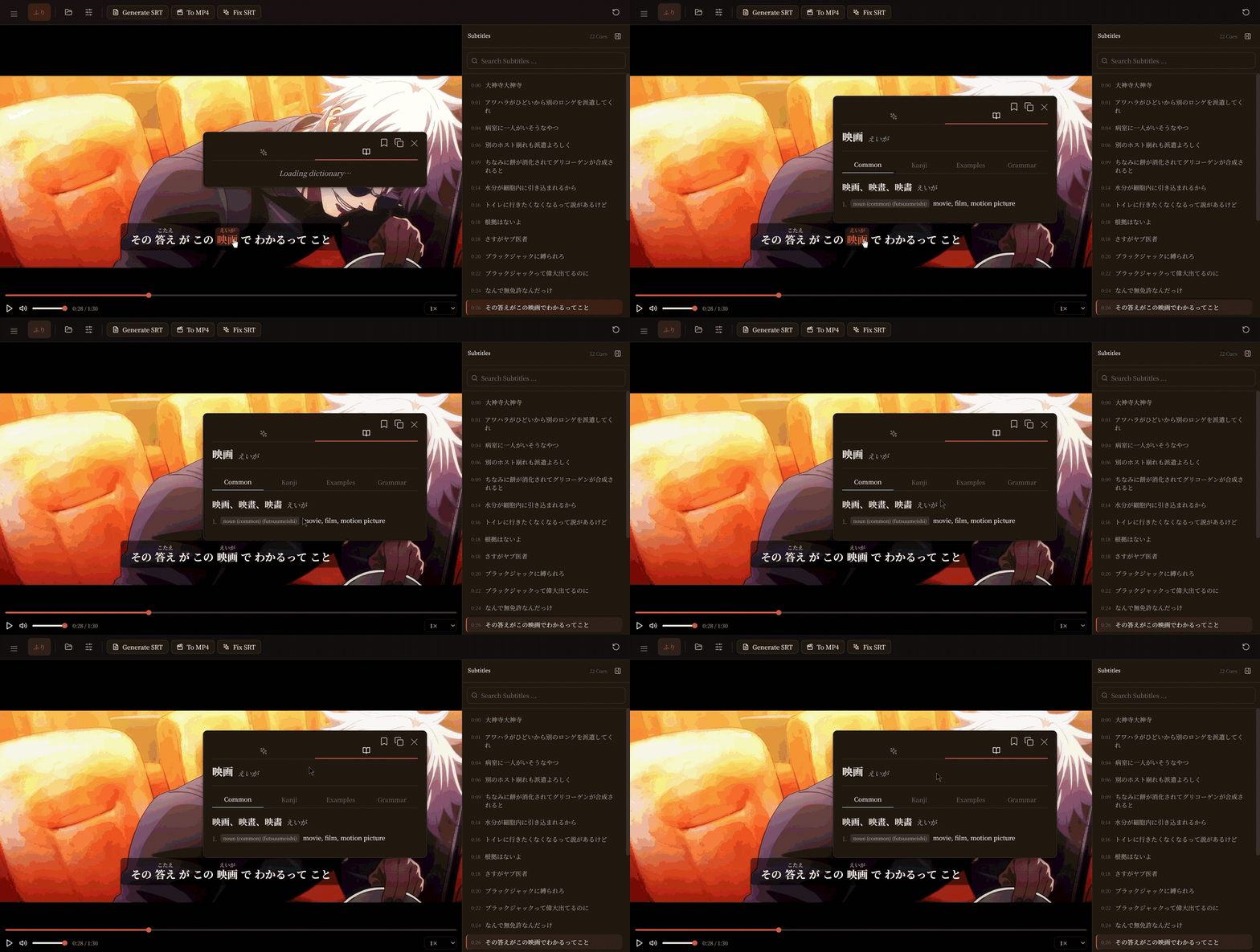
Drop in a video, an anime episode, a drama, or an audio clip and Mirumoji gives you clickable tokenized subtitles with instant dictionary lookups whisper-powered subtitle generation, clip saving, and Anki export. All running locally in Docker, with optional cloud GPU and LLM features
Quickstart
Mirumoji runs as a local Docker Compose Application
The quickest way to start is to download the Desktop Launcher for your platform and follow
the Setup Walkthrough
Alternatives
You can also setup Mirumoji Manually, or through its CLI
Features
| Interactive Player | Load Videos + Subtitles For Clickable, Tokenized Japanese Lines With Dictionary Pop-Ups |
| Transcription | Generate Subtitles + Transcribe Audio with faster-whisper, on a Local / Cloud GPU |
| Dictionary | Wildcard dictionary search (kotobase) + a paste-in text analyzer with furigana |
| LLM | Optionally Use Gemini / Claude / GPT API Keys (Or Your Own Local LLM Server) To Generate Sentence Breakdowns With Fully Customizable Prompts |
| Clips + Anki | Save Video Segments With Their Word Breakdowns And Export Them As An Anki Deck |
| Profiles | Keep Generated Files, Transcripts, Clips, and LLM Templates Organized Per Profile On The Server |
| Launcher | Easily Run The Docker Compose Application Via The CLI Or The Desktop Launcher |
Help
| Documentation | Guides + Full Backend / Frontend API Reference |
| Setup Guide | CLI + GUI + Manual setup |
| Using a GPU | Local GPU x Modal Cloud GPU |
| Changelog | What Changed Between Versions |
| Demo | Test A Limited Preview |
Contributing
-
All contributions are welcome
-
See
CONTRIBUTINGfor more information on how to contribute
1 maintainer

Download files
Download the file for your platform. If you're not sure which to choose, learn more about installing packages.
Source Distribution
Built Distribution
Filter files by name, interpreter, ABI, and platform.
If you're not sure about the file name format, learn more about wheel file names.
Copy a direct link to the current filters
File details
Details for the file mirumoji-3.7.0.tar.gz.
File metadata
- Download URL: mirumoji-3.7.0.tar.gz
- Upload date:
- Size: 218.8 kB
- Tags: Source
- Uploaded using Trusted Publishing? Yes
- Uploaded via: twine/6.1.0 CPython/3.13.14
File hashes
| Algorithm | Hash digest | |
|---|---|---|
| SHA256 |
477a49e80d4fec2c4690519afd3b682e2b91d9874da6cac78e372248e68db3b4
|
|
| MD5 |
58e5854305122fab717c24042b726975
|
|
| BLAKE2b-256 |
473d81900dad8c598595e0e5ca97fc22a43c4b87ebe330b4eb557700f2e9393e
|
Provenance
The following attestation bundles were made for mirumoji-3.7.0.tar.gz:
Publisher:
release.yaml on svdC1/mirumoji
-
Statement:
-
Statement type:
https://in-toto.io/Statement/v1 -
Predicate type:
https://docs.pypi.org/attestations/publish/v1 -
Subject name:
mirumoji-3.7.0.tar.gz -
Subject digest:
477a49e80d4fec2c4690519afd3b682e2b91d9874da6cac78e372248e68db3b4 - Sigstore transparency entry: 2207060720
- Sigstore integration time:
-
Permalink:
svdC1/mirumoji@53ba3cab45b1aa19a3fd187db4a36c7dd0caa0e6 -
Branch / Tag:
refs/tags/v3.7.0 - Owner: https://github.com/svdC1
-
Access:
public
-
Token Issuer:
https://token.actions.githubusercontent.com -
Runner Environment:
github-hosted -
Publication workflow:
release.yaml@53ba3cab45b1aa19a3fd187db4a36c7dd0caa0e6 -
Trigger Event:
push
-
Statement type:
File details
Details for the file mirumoji-3.7.0-py3-none-any.whl.
File metadata
- Download URL: mirumoji-3.7.0-py3-none-any.whl
- Upload date:
- Size: 257.6 kB
- Tags: Python 3
- Uploaded using Trusted Publishing? Yes
- Uploaded via: twine/6.1.0 CPython/3.13.14
File hashes
| Algorithm | Hash digest | |
|---|---|---|
| SHA256 |
3344e056e127b95cf46bebf0ec025b6e3c0b70f6025b18ca8c49e5a578600dbb
|
|
| MD5 |
913e968441bab9fe5c54fe7ab6bfe7f7
|
|
| BLAKE2b-256 |
79a0bcef62a1c73faa061b3a770ac0699e88aaa945dff98d21a53972c4f26bd2
|
Provenance
The following attestation bundles were made for mirumoji-3.7.0-py3-none-any.whl:
Publisher:
release.yaml on svdC1/mirumoji
-
Statement:
-
Statement type:
https://in-toto.io/Statement/v1 -
Predicate type:
https://docs.pypi.org/attestations/publish/v1 -
Subject name:
mirumoji-3.7.0-py3-none-any.whl -
Subject digest:
3344e056e127b95cf46bebf0ec025b6e3c0b70f6025b18ca8c49e5a578600dbb - Sigstore transparency entry: 2207060733
- Sigstore integration time:
-
Permalink:
svdC1/mirumoji@53ba3cab45b1aa19a3fd187db4a36c7dd0caa0e6 -
Branch / Tag:
refs/tags/v3.7.0 - Owner: https://github.com/svdC1
-
Access:
public
-
Token Issuer:
https://token.actions.githubusercontent.com -
Runner Environment:
github-hosted -
Publication workflow:
release.yaml@53ba3cab45b1aa19a3fd187db4a36c7dd0caa0e6 -
Trigger Event:
push
-
Statement type:







