
MkDocs plugin and Markdown extension for rendering ASCII file trees with material icons

Project description
mkdocs-treeview
A Python-Markdown extension and MkDocs plugin that renders ASCII file trees with Material icon theme icons. Works with MkDocs, Material for MkDocs, and Zensical.
Inspired by asciidoctor-treeview.
```treeview
├── src/
│   ├── main.py
│   └── utils.py
├── tests/
│   └── test_main.py
├── Dockerfile
├── tsconfig.json
└── README.md
```
| Light | Dark |
|---|---|
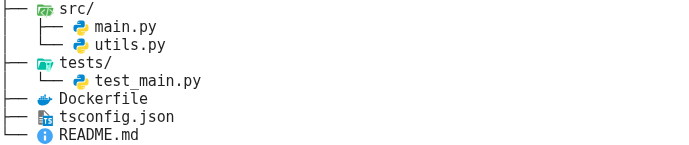 |
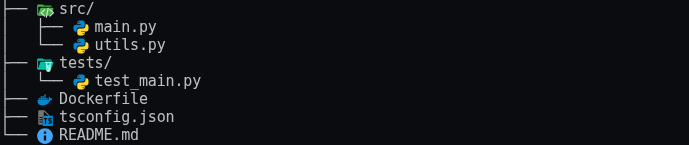 |
Features
- Renders
```treeviewfenced code blocks as styled file trees - Icons automatically chosen by file extension, file name, or folder name
- Supports ASCII-tree format (
treecommand output) and symbol-based (*/#) format - Dynamic CSS — only icons actually used in your site are emitted (~7 KB instead of 1.3 MB)
- Dark/light mode: separate light-variant icons for
[data-md-color-scheme="slate"] - Three asset modes:
files(local SVGs),embedded(base64 in CSS),cdn(jsDelivr)
Installation
pip install mkdocs-treeview
Usage
Write an ASCII tree in a fenced code block tagged treeview:
```treeview
├── src/
│   ├── main.py
│   └── utils.py
├── tests/
│   └── test_main.py
├── Dockerfile
├── tsconfig.json
└── README.md
```
Both formats are accepted:
ASCII-tree (output of the tree command):
├── src/
│   └── main.py
└── README.md
Symbol-based (indent depth = number of markers):
* src/
** main.py
* README.md
Configuration
MkDocs (mkdocs.yml)
plugins:
  - treeview:
      icon_mode: files   # files | embedded | cdn   (default: files)
The plugin registers the Markdown extension automatically and injects
assets/treeview/treeview.css into extra_css. No other configuration needed.
Material for MkDocs (mkdocs.yml)
Identical to the MkDocs configuration — the plugin works with any MkDocs theme:
theme:
  name: material

plugins:
  - treeview:
      icon_mode: embedded
Zensical (zensical.toml)
Add the extension via markdown_extensions and point extra_css at the output file:
[project]
extra_css = ["stylesheets/treeview.css"]

[project.markdown_extensions."mkdocs_treeview.extension"]
css_output_path = "docs/stylesheets/treeview.css"
icon_mode = "embedded"
css_output_path is resolved relative to the directory where zensical build is
run (the project root). The extension writes a lean CSS file there after each page.
Add .cache/ to your .gitignore:
.cache/
The extension writes a manifest file to .cache/treeview.manifest.json to
accumulate icon data across pages. Zensical isolates each page render in its
own Python sub-interpreter, so this file is the mechanism that lets the final
CSS contain icons from all pages rather than just the last one rendered.
The manifest is a build artifact — do not commit it.
Asset modes
| Mode | Behavior | Best for |
|---|---|---|
files |
SVGs copied to assets/treeview/icons/, CSS uses relative URLs |
Production MkDocs sites |
embedded |
SVGs inlined as base64 data URIs — single self-contained CSS file | Zensical, offline output |
cdn |
CSS references jsDelivr URLs — no local files | Quick preview, GitHub rendering |
How it works
The MkDocs plugin hooks into on_config to register the Markdown extension and
inject extra_css. During the build each page's treeview blocks are converted to
HTML with tv-icon tv-icon-<name> CSS classes. After the build, on_post_build
writes a lean CSS file containing only the icons that were actually rendered.
For Zensical, TreeviewCSSPostprocessor writes the CSS file after every page.
Zensical isolates each page render in its own Python sub-interpreter, so the
extension cannot keep an in-memory registry across pages. Instead, the extension
persists the accumulated icon registry to .cache/treeview.manifest.json on
disk. Each page render merges its icons into that file, then regenerates the
full CSS. The final CSS contains every icon used across the entire site.
HTML output
The renderer emits flat <span class="tv-line"> rows with ASCII prefix connectors
(matching the asciidoctor-treeview approach), rather than a nested <ul>/<li> tree:
<div class="treeview">
<span class="tv-line">
<span class="tv-line-prefix">├── </span>
<span class="tv-line-element">
<i class="tv-icon tv-icon-folder-src-open"></i>
<span class="tv-item-name">src/</span>
</span>
</span>
<span class="tv-line">
<span class="tv-line-prefix">│ ├── </span>
<span class="tv-line-element">
<i class="tv-icon tv-icon-python"></i>
<span class="tv-item-name">main.py</span>
</span>
</span>
<span class="tv-line">
<span class="tv-line-prefix">│ └── </span>
<span class="tv-line-element">
<i class="tv-icon tv-icon-python"></i>
<span class="tv-item-name">utils.py</span>
</span>
</span>
<span class="tv-line">
<span class="tv-line-prefix">└── </span>
<span class="tv-line-element">
<i class="tv-icon tv-icon-readme"></i>
<span class="tv-item-name">README.md</span>
</span>
</span>
</div>
Folders with children use the open variant (folder-src-open.svg); leaf folders
use the closed variant. Unknown file types fall back to a generic file icon.
Development
Requirements
- Python >= 3.9
- uv (recommended)
- Node.js / npm (only for
scripts/build_icons.py— regenerating the icon bundle)
Setup
uv sync
Run tests
uv run pytest tests/unit/
uv run pytest tests/integration/
Integration tests build real demo sites into tests/demos/ — inspect them in your
editor after a test run:
tests/demos/
  mkdocs/       MkDocs default theme
  material/     Material for MkDocs
  zensical/     Zensical
Linting and type checking
uv run ruff format mkdocs_treeview/ tests/ scripts/
uv run ruff check mkdocs_treeview/ tests/ scripts/
uv run mypy mkdocs_treeview/
Pre-commit hooks run these automatically before every commit:
uv run pre-commit install # once, after cloning
Update icons
To update to a new version of vscode-material-icon-theme:
uv run python scripts/build_icons.py --version 5.x.y
Requires npm on PATH. Regenerates mkdocs_treeview/icon_map.py and
mkdocs_treeview/icons/. Commit the result.
Publishing
Build
uv build
Produces a wheel and sdist in dist/. Verify contents before publishing:
tar -tzf dist/*.tar.gz | sort
unzip -l dist/*.whl
Bump version
Edit version in pyproject.toml, then tag the release:
git tag v0.2.0
Publish to PyPI
UV_PUBLISH_TOKEN=pypi-... uv publish
Credits and license
SVG icons from vscode-material-icon-theme by Philipp Kief and contributors — MIT license.
Rendering approach inspired by asciidoctor-treeview by lask79 — MIT license.
This package is MIT licensed. See LICENSE.


Download files
Download the file for your platform. If you're not sure which to choose, learn more about installing packages.
Source Distribution
Built Distribution
Filter files by name, interpreter, ABI, and platform.
If you're not sure about the file name format, learn more about wheel file names.
Copy a direct link to the current filters
File details
Details for the file mkdocs_treeview-0.2.2.tar.gz.
File metadata
- Download URL: mkdocs_treeview-0.2.2.tar.gz
- Upload date:
- Size: 370.8 kB
- Tags: Source
- Uploaded using Trusted Publishing? No
- Uploaded via: uv/0.6.3
File hashes
| Algorithm | Hash digest | |
|---|---|---|
| SHA256 |
846d7f5a90743e770ac8eb645f49a482f16905d125b0964f8245c50ef89d0401
|
|
| MD5 |
f8ad391f4e98224bb3ba1b71f3817b9e
|
|
| BLAKE2b-256 |
3eab40f98e55947e78024dd91e20125f3b832a6b7f1ebe4fbf9a81de2e465573
|
File details
Details for the file mkdocs_treeview-0.2.2-py3-none-any.whl.
File metadata
- Download URL: mkdocs_treeview-0.2.2-py3-none-any.whl
- Upload date:
- Size: 837.6 kB
- Tags: Python 3
- Uploaded using Trusted Publishing? No
- Uploaded via: uv/0.6.3
File hashes
| Algorithm | Hash digest | |
|---|---|---|
| SHA256 |
866bc57bccc2289ccc46d03f3150f0a355bb4ad95f5f4224ff83a3fe2ce01a7a
|
|
| MD5 |
e113e4d7d34ac65747e507fe66612d14
|
|
| BLAKE2b-256 |
be27c5d3c9783276007f6a59885d8cabe3e8f598c89d4724f2eaf1c275b7ca31
|






