
ollama-style CLI for MLX models on Apple Silicon

Project description
 MLX Knife
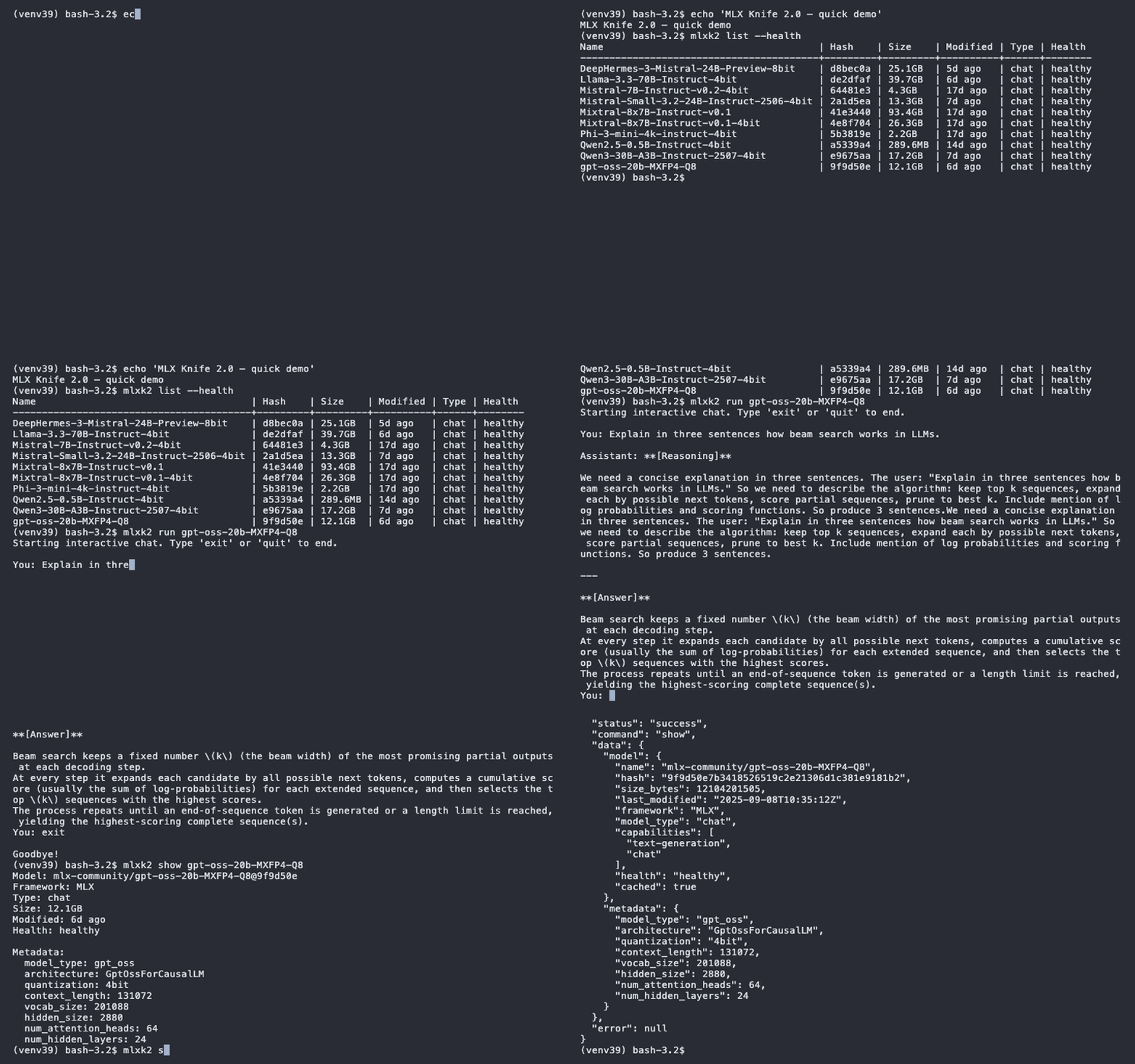
A lightweight, ollama-like CLI for managing and running MLX models on Apple Silicon. CLI-only tool designed for personal, local use - perfect for individual developers and researchers working with MLX models.
Note: MLX Knife is designed as a command-line interface tool only. While some internal functions are accessible via Python imports, only CLI usage is officially supported.
Current Version: 1.1.1 (September 2025) - STABLE RELEASE 🚀
- Features in 1.1.1 — MXFP4 support and GPT-OSS reasoning models:
- Full MXFP4 quantization support (MLX ≥0.29.0, MLX-LM ≥0.27.0),
- GPT-OSS reasoning model formatting with
--hide-reasoningflag, - Enhanced quantization display in
showcommand, - Tested with
gpt-oss-20b-MXFP4-Q8from mlx-community. - Details: see CHANGELOG.md. Install with
pip install mlx-knife.
- Reliable Test System: 166/166 tests passing across Python 3.9–3.13
- Python 3.9-3.13: Full compatibility verified across all Python versions
- Key Issues Resolved: Issues #21, #22, #23 fixed and thoroughly tested





Features
Core Functionality
- List & Manage Models: Browse your HuggingFace cache with MLX-specific filtering
- Model Information: Detailed model metadata including quantization info
- Download Models: Pull models from HuggingFace with progress tracking
- Run Models: Native MLX execution with streaming and chat modes
- Health Checks: Verify model integrity and completeness
- Cache Management: Clean up and organize your model storage
Local Server & Web Interface
- OpenAI-Compatible API: Local REST API with
/v1/chat/completions,/v1/completions,/v1/models - Web Chat Interface: Built-in HTML chat interface with markdown rendering
- Single-User Design: Optimized for personal use, not multi-user production environments
- Conversation Context: Full chat history maintained for follow-up questions
- Streaming Support: Real-time token streaming via Server-Sent Events
- Configurable Limits: Set default max tokens via
--max-tokensparameter - Model Hot-Swapping: Switch between models per conversation
- Tool Integration: Compatible with OpenAI-compatible clients (Cursor IDE, etc.)
Run Experience
- Direct MLX Integration: Models load and run natively without subprocess overhead
- Real-time Streaming: Watch tokens generate with proper spacing and formatting
- Interactive Chat: Full conversational mode with history tracking
- Memory Insights: See GPU memory usage after model loading and generation
- Dynamic Stop Tokens: Automatic detection and filtering of model-specific stop tokens
- Customizable Generation: Control temperature, max_tokens, top_p, and repetition penalty
- Context-Managed Memory: Context manager pattern ensures automatic cleanup and prevents memory leaks
- Exception-Safe: Robust error handling with guaranteed resource cleanup
Installation
Via PyPI (Recommended)
pip install mlx-knife
Requirements
- macOS with Apple Silicon (M1/M2/M3)
- Python 3.9+ (native macOS version or newer)
- 8GB+ RAM recommended + RAM to run LLM
Python Compatibility
MLX Knife has been comprehensively tested and verified on:
✅ Python 3.9.6 (native macOS) - Primary target
✅ Python 3.10-3.13 - Fully compatible
All versions include full MLX model execution testing with real models.
Install from Source
# Clone the repository
git clone https://github.com/mzau/mlx-knife.git
cd mlx-knife

# Install in development mode
pip install -e .

# Or install normally
pip install .

# Install with development tools (ruff, mypy, tests)
pip install -e ".[dev,test]"
Install Dependencies Only
pip install -r requirements.txt
Quick Start
CLI Usage
# List all MLX models in your cache
mlxk list

# Show detailed info about a model
mlxk show Phi-3-mini-4k-instruct-4bit

# Download a new model
mlxk pull mlx-community/Mistral-7B-Instruct-v0.3-4bit

# Run a model with a prompt
mlxk run Phi-3-mini "What is the capital of France?"

# GPT-OSS reasoning model with formatted output
mlxk run gpt-oss-20b-MXFP4-Q8 "Explain quantum computing"

# Hide reasoning steps, show only final answer (GPT-OSS models)
mlxk run gpt-oss-20b-MXFP4-Q8 "What is 2+2?" --hide-reasoning

# Start interactive chat
mlxk run Phi-3-mini

# Check model health
mlxk health
Web Chat Interface
MLX Knife includes a built-in web interface for easy model interaction:
# Start the OpenAI-compatible API server
mlxk server --port 8000 --max-tokens 4000

# Get web chat interface from GitHub
curl -O https://raw.githubusercontent.com/mzau/mlx-knife/main/simple_chat.html

# Open web chat interface in your browser
open simple_chat.html
Features:
- No installation required - Pure HTML/CSS/JS
- Real-time streaming - Watch tokens appear as they're generated
- Model selection - Choose any MLX model from your cache
- Conversation history - Full context for follow-up questions
- Markdown rendering - Proper formatting for code, lists, tables
- Mobile-friendly - Responsive design works on all devices
Local API Server Integration
The MLX Knife server provides OpenAI-compatible endpoints for local development and personal use:
# Start local server (single-user, no authentication)
mlxk server --host 127.0.0.1 --port 8000

# Test with curl
curl -X POST "http://localhost:8000/v1/chat/completions" \
  -H "Content-Type: application/json" \
  -d '{"model": "Phi-3-mini-4k-instruct-4bit", "messages": [{"role": "user", "content": "Hello!"}]}'

# Integration with development tools (community-tested):
# - Cursor IDE: Set API URL to http://localhost:8000/v1
# - LibreChat: Configure as custom OpenAI endpoint
# - Open WebUI: Add as local OpenAI-compatible API
# - SillyTavern: Add as OpenAI API with custom URL
Note: Tool integrations are community-tested. Some tools may require specific configuration or have compatibility limitations. Please report issues via GitHub.
Command Reference
Available Commands
list - Browse Models
mlxk list                    # Show chat-capable MLX models (strict view)
mlxk list --verbose          # Show MLX models with full paths
mlxk list --all              # Show all models with framework and TYPE
mlxk list --all --verbose    # All models with full paths
mlxk list --health           # Include health status
mlxk list Phi-3              # Filter by model name
mlxk list --verbose Phi-3    # Show detailed info (same as show)
show - Model Details
mlxk show <model>            # Display model information
mlxk show <model> --files    # Include file listing
mlxk show <model> --config   # Show config.json content
pull - Download Models
mlxk pull <model>            # Download from HuggingFace
mlxk pull <org>/<model>      # Full model path
run - Execute Models
mlxk run <model> "prompt"              # Single prompt (minimal output)
mlxk run <model> "prompt" --verbose    # Show loading, memory, and stats
mlxk run <model>                       # Interactive chat
mlxk run <model> "prompt" --no-stream  # Batch output
mlxk run <model> --max-tokens 1000     # Custom length
mlxk run <model> --temperature 0.9     # Higher creativity
mlxk run <model> --no-chat-template    # Raw completion mode
mlxk run <model> --hide-reasoning      # Hide reasoning (GPT-OSS models only)
rm - Remove Models
mlxk rm <model>              # Delete model with cache cleanup confirmation
mlxk rm <model>@<hash>       # Delete specific version (removes entire model)
mlxk rm <model> --force      # Skip confirmations, auto-cleanup cache files
Features:
- Removes entire model directory (not just snapshots)
- Cleans up orphaned HuggingFace lock files
- Handles corrupted models gracefully
- Smart prompting (only asks about cache cleanup if needed)
health - Check Integrity
mlxk health                  # Check all models
mlxk health <model>          # Check specific model
server - Start API Server
mlxk server                           # Start on localhost:8000
mlxk server --port 8001               # Custom port
mlxk server --host 0.0.0.0 --port 8000  # Allow external access
mlxk server --max-tokens 4000         # Set default max tokens (default: 2000)
mlxk server --reload                  # Development mode with auto-reload
Command Aliases
After installation, these commands are equivalent:
mlxk(recommended)mlx-knifemlx_knife
Configuration
Cache Location
By default, models are stored in ~/.cache/huggingface/hub. Configure with:
# Set custom cache location
export HF_HOME="/path/to/your/cache"

# Example: External SSD
export HF_HOME="/Volumes/ExternalSSD/models"
Model Name Expansion
Short names are automatically expanded for MLX models:
Phi-3-mini-4k-instruct-4bit→mlx-community/Phi-3-mini-4k-instruct-4bit- Models already containing
/are used as-is
Advanced Usage
Generation Parameters
# Creative writing (high temperature, diverse output)
mlxk run Mistral-7B "Write a story" --temperature 0.9 --top-p 0.95

# Precise tasks (low temperature, focused output)
mlxk run Phi-3-mini "Extract key points" --temperature 0.3 --top-p 0.9

# Long-form generation
mlxk run Mixtral-8x7B "Explain quantum computing" --max-tokens 2000

# Reduce repetition
mlxk run model "prompt" --repetition-penalty 1.2
Working with Specific Commits
# Use specific model version
mlxk show model@commit_hash
mlxk run model@commit_hash "prompt"
Non-MLX Model Handling
The tool automatically detects framework compatibility:
# Attempting to run PyTorch model
mlxk run bert-base-uncased
# Error: Model bert-base-uncased is not MLX-compatible (Framework: PyTorch)!
# Use MLX-Community models: https://huggingface.co/mlx-community
Troubleshooting
Model Not Found
# If model isn't found, try full path
mlxk pull mlx-community/Model-Name-4bit

# List available models
mlxk list --all
Performance Issues
- Ensure sufficient RAM for model size
- Close other applications to free memory
- Use smaller quantized models (4-bit recommended)
Streaming Issues
- Some models may have spacing issues - this is handled automatically
- Use
--no-streamfor batch output if needed
Contributing
Contributions are welcome! Please see CONTRIBUTING.md for development setup and guidelines.
Security
For security concerns, please see SECURITY.md or contact us at broke@gmx.eu.
MLX Knife runs entirely locally - no data is sent to external servers except when downloading models from HuggingFace.
License
MIT License - see LICENSE file for details
Copyright (c) 2025 The BROKE team 🦫
Sponsors

Acknowledgments
- Built for Apple Silicon using the MLX framework
- Models hosted by the MLX Community on HuggingFace
- Inspired by ollama's user experience
Made with ❤️ by The BROKE team
Version 1.1.1 | September 2025
🔮 Next: BROKE Cluster for multi-node deployments

Release history Release notifications | RSS feed


Download files
Download the file for your platform. If you're not sure which to choose, learn more about installing packages.
Source Distribution
Built Distribution
Filter files by name, interpreter, ABI, and platform.
If you're not sure about the file name format, learn more about wheel file names.
Copy a direct link to the current filters
File details
Details for the file mlx_knife-1.1.1.tar.gz.
File metadata
- Download URL: mlx_knife-1.1.1.tar.gz
- Upload date:
- Size: 47.9 kB
- Tags: Source
- Uploaded using Trusted Publishing? No
- Uploaded via: twine/6.1.0 CPython/3.9.6
File hashes
| Algorithm | Hash digest | |
|---|---|---|
| SHA256 |
53bb46b31f3cb8d3d9154cb6cd6850c82f015589388be001460937b9475bba4c
|
|
| MD5 |
34b94154dbf9d5f10824689606994081
|
|
| BLAKE2b-256 |
8da4d644aee5d271f61a76d6ae412641f1715de4283ca3c5620722c23eacec17
|
File details
Details for the file mlx_knife-1.1.1-py3-none-any.whl.
File metadata
- Download URL: mlx_knife-1.1.1-py3-none-any.whl
- Upload date:
- Size: 45.2 kB
- Tags: Python 3
- Uploaded using Trusted Publishing? No
- Uploaded via: twine/6.1.0 CPython/3.9.6
File hashes
| Algorithm | Hash digest | |
|---|---|---|
| SHA256 |
7411f48fdbad316f092844b0e7f13e56371e97c49a03b49839141ccb239ffba0
|
|
| MD5 |
6ce92b311aa53e5e30c72c166e39df62
|
|
| BLAKE2b-256 |
f550959fbffeb2b1dd2d64105634b805d615c60dec346a5250e9f8e96d2dbf49
|






