
HuggingFace model management for MLX on Apple Silicon

Project description
 MLX-Knife 2.0
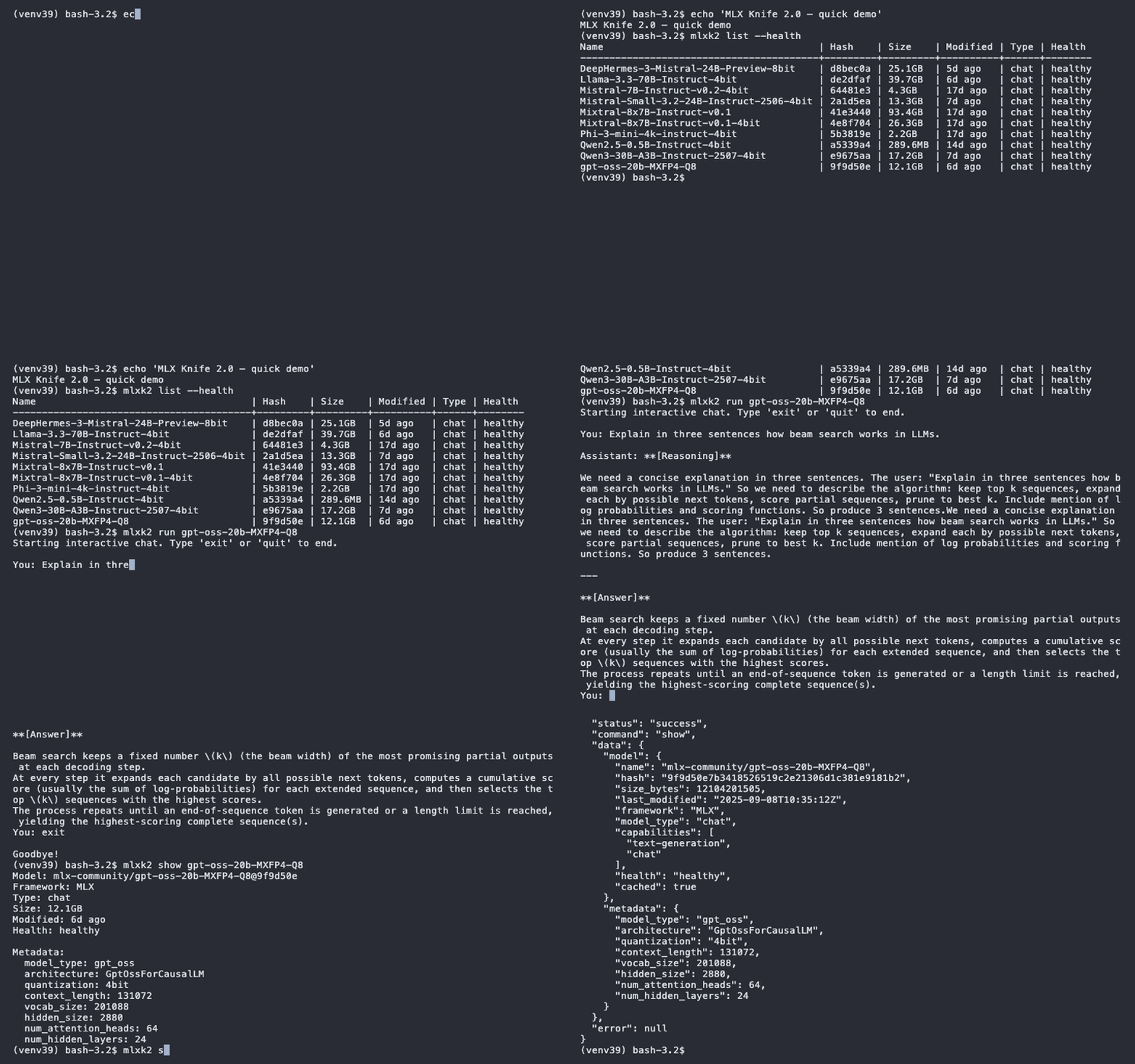
Current Stable Version: 2.0.2




Features
Core Functionality
- List & Manage Models: Browse your HuggingFace cache with MLX-specific filtering
- Model Information: Detailed model metadata including quantization info
- Download Models: Pull models from HuggingFace with progress tracking
- Run Models: Native MLX execution with streaming and chat modes
- Health Checks: Verify model integrity and MLX runtime compatibility
- Cache Management: Clean up and organize your model storage
- Privacy & Network: No background network or telemetry; only explicit Hugging Face interactions when you run pull or the experimental push.
Requirements
- macOS with Apple Silicon
- Python 3.9+ (native macOS version or newer)
- 8GB+ RAM recommended + RAM to run LLM
Python Compatibility
MLX Knife has been comprehensively tested and verified on:
✅ Python 3.9.6 (native macOS) - Primary target ✅ Python 3.10-3.13 - Fully compatible
Installation
Via PyPI (Recommended)
# Install stable release from PyPI
pip install mlx-knife

# Verify installation
mlxk --version  # → mlxk 2.0.2
Development Installation
# Clone and install from source
git clone https://github.com/mzau/mlx-knife.git
cd mlx-knife

# Install with all development dependencies (required for testing and code quality)
pip install -e ".[dev,test]"

# Verify installation
mlxk --version  # → mlxk 2.0.2

# Run tests and quality checks (before committing)
pytest -v
ruff check mlxk2/ --fix
mypy mlxk2/
Note: For minimal user installation without dev tools: pip install -e .
Migrating from 1.x
If you're upgrading from MLX Knife 1.x, see MIGRATION.md for important information about the license change (MIT → Apache 2.0) and behavior changes.
Quick Start
# List models (human-readable)
mlxk list
mlxk list --health
mlxk list --verbose --health

# Check cache health
mlxk health

# Show model details
mlxk show "mlx-community/Phi-3-mini-4k-instruct-4bit"

# Pull a model
mlxk pull "mlx-community/Llama-3.2-3B-Instruct-4bit"

# Run interactive chat
mlxk run "Phi-3-mini" -c

# Start OpenAI-compatible server
mlxk serve --port 8080
Commands
| Command | Description |
|---|---|
server/serve |
OpenAI-compatible API server; SIGINT-robust (Supervisor); SSE streaming |
run |
Interactive and single-shot model execution with streaming/batch modes |
list |
Model discovery with JSON output |
health |
Corruption detection and cache analysis |
show |
Detailed model information with --files, --config |
pull |
HuggingFace model downloads with corruption detection |
rm |
Model deletion with lock cleanup and fuzzy matching |
🔒 push |
Alpha feature - Upload to HuggingFace Hub; requires MLXK2_ENABLE_ALPHA_FEATURES=1 |
🔒 clone |
Alpha feature - Model workspace cloning; requires MLXK2_ENABLE_ALPHA_FEATURES=1 |
JSON API
📋 Complete API Specification: See JSON API Specification for comprehensive schema, error codes, and examples.
All commands support both human-readable and JSON output (--json flag) for automation and scripting, enabling seamless integration with CI/CD pipelines and cluster management systems.
Command Structure
All commands support JSON output via --json flag:
mlxk list --json | jq '.data.models[].name'
mlxk health --json | jq '.data.summary'
mlxk show "Phi-3-mini" --json | jq '.data.model'
Response Format:
{
    "status": "success|error",
    "command": "list|health|show|pull|rm|clone|version|push|run|server",
    "data": { /* command-specific data */ },
    "error": null | { "type": "...", "message": "..." }
}
Examples
List Models
mlxk list --json
# Output:
{
  "status": "success",
  "command": "list",
  "data": {
    "models": [
      {
        "name": "mlx-community/Phi-3-mini-4k-instruct-4bit",
        "hash": "a5339a41b2e3abcdef1234567890ab12345678ef",
        "size_bytes": 4613734656,
        "last_modified": "2024-10-15T08:23:41Z",
        "framework": "MLX",
        "model_type": "chat",
        "capabilities": ["text-generation", "chat"],
        "health": "healthy",
        "runtime_compatible": true,
        "reason": null,
        "cached": true
      }
    ],
    "count": 1
  },
  "error": null
}
Health Check
mlxk health --json
# Output:
{
  "status": "success",
  "command": "health",
  "data": {
    "healthy": [
      {
        "name": "mlx-community/Phi-3-mini-4k-instruct-4bit",
        "status": "healthy",
        "reason": "Model is healthy"
      }
    ],
    "unhealthy": [],
    "summary": { "total": 1, "healthy_count": 1, "unhealthy_count": 0 }
  },
  "error": null
}
Show Model Details
mlxk show "Phi-3-mini" --json --files
# Output (simplified):
{
  "status": "success",
  "command": "show",
  "data": {
    "model": {
      "name": "mlx-community/Phi-3-mini-4k-instruct-4bit",
      "hash": "a5339a41b2e3abcdefgh1234567890ab12345678",
      "size_bytes": 4613734656,
      "framework": "MLX",
      "model_type": "chat",
      "capabilities": ["text-generation", "chat"],
      "last_modified": "2024-10-15T08:23:41Z",
      "health": "healthy",
      "runtime_compatible": true,
      "reason": null,
      "cached": true
    },
    "files": [
      {"name": "config.json", "size": "1.2KB", "type": "config"},
      {"name": "model.safetensors", "size": "2.3GB", "type": "weights"}
    ],
    "metadata": null
  },
  "error": null
}
Hash Syntax Support
All commands support @hash syntax for specific model versions:
mlxk health "Qwen3@e96" --json     # Check specific hash
mlxk show "model@3df9bfd" --json   # Short hash matching
mlxk rm "Phi-3@e967" --json --force  # Delete specific version
Integration Examples
Broke-Cluster Integration
# Get available model names for scheduling
MODELS=$(mlxk list --json | jq -r '.data.models[].name')

# Check cache health before deployment
HEALTH=$(mlxk health --json | jq '.data.summary.healthy_count')
if [ "$HEALTH" -eq 0 ]; then
    echo "No healthy models available"
    exit 1
fi

# Download required models
mlxk pull "mlx-community/Phi-3-mini-4k-instruct-4bit" --json
CI/CD Pipeline Usage
# Verify model integrity in CI
mlxk health --json | jq -e '.data.summary.unhealthy_count == 0'

# Clean up CI artifacts
mlxk rm "test-model-*" --json --force

# Pre-warm cache for deployment
mlxk pull "production-model" --json
Model Management Automation
# Find models by pattern
LARGE_MODELS=$(mlxk list --json | jq -r '.data.models[] | select(.name | contains("30B")) | .name')

# Show detailed info for analysis
for model in $LARGE_MODELS; do
    mlxk show "$model" --json --config | jq '.data.model_config'
done
Human Output
MLX Knife provides rich human-readable output by default (without --json flag).
Basic Usage
mlxk list
mlxk list --health
mlxk health
mlxk show "mlx-community/Phi-3-mini-4k-instruct-4bit"
List Filters
list: Shows MLX chat models only (compact names, safe default)list --verbose: Shows all MLX models (chat + base) with full org/names and Framework columnlist --all: Shows all frameworks (MLX, GGUF, PyTorch)- Flags are combinable:
--all --verbose,--all --health,--verbose --health
Health Status Display (--health flag)
The --health flag adds health status information to the output:
Compact mode (default, --all):
- Shows single "Health" column with values:
healthy- File integrity OK and MLX runtime compatiblehealthy*- File integrity OK but not MLX runtime compatible (use--verbosefor details)unhealthy- File integrity failed or unknown format
Verbose mode (--verbose --health):
- Splits into "Integrity" and "Runtime" columns:
- Integrity:
healthy/unhealthy - Runtime:
yes/no/-(dash = gate blocked by failed integrity) - Reason: Explanation when problems detected (wrapped at 26 chars for readability)
- Integrity:
Examples:
# Compact health view
mlxk list --health
# Output:
# Name                    | Hash    | Size   | Modified | Type | Health
# Llama-3.2-3B-Instruct   | a1b2c3d | 2.1GB  | 2d ago   | chat | healthy
# Qwen2-7B-Instruct       | 1a2b3c4 | 4.8GB  | 3d ago   | chat | healthy*

# Verbose health view with details
mlxk list --verbose --health
# Output:
# Name                    | Hash    | Size   | Modified | Framework | Type | Integrity | Runtime | Reason
# Llama-3.2-3B-Instruct   | a1b2c3d | 2.1GB  | 2d ago   | MLX       | chat | healthy   | yes     | -
# Qwen2-7B-Instruct       | 1a2b3c4 | 4.8GB  | 3d ago   | PyTorch   | chat | healthy   | no      | Incompatible: PyTorch

# All frameworks with health status
mlxk list --all --health
# Output:
# Name                    | Hash    | Size   | Modified | Framework | Type    | Health
# Llama-3.2-3B-Instruct   | a1b2c3d | 2.1GB  | 2d ago   | MLX       | chat    | healthy
# llama-3.2-gguf-q4       | b2c3d4e | 1.8GB  | 3d ago   | GGUF      | unknown | healthy*
# broken-download         | -       | 500MB  | 1h ago   | Unknown   | unknown | unhealthy
Design Philosophy:
unhealthyis a catch-all for anything not understood/supported (broken downloads, unknown formats, creative HuggingFace structures)healthyguarantees the model will work withmlxk2 runhealthy*means files are intact but MLX runtime can't execute them (e.g., GGUF/PyTorch models, incompatible model_type, or mlx-lm version too old)
Note: JSON output is unaffected by these human-only filters and always includes full health/runtime data.
Logging & Debugging
MLX Knife 2.0 provides structured logging with configurable output formats and levels.
Log Levels
Control verbosity with --log-level (server mode):
# Default: Show startup, model loading, and errors
mlxk serve --log-level info

# Quiet: Only warnings and errors
mlxk serve --log-level warning

# Silent: Only errors
mlxk serve --log-level error

# Verbose: All logs including HTTP requests
mlxk serve --log-level debug
Log Level Behavior:
debug: All logs + Uvicorn HTTP access logs (GET /v1/models, etc.)info: Application logs (startup, model switching, errors) + HTTP access logswarning: Only warnings and errors (no startup messages, no HTTP access logs)error: Only error messages
JSON Logs (Machine-Readable)
Enable structured JSON output for log aggregation tools:
# JSON logs (recommended - CLI flag)
mlxk serve --log-json

# JSON logs (alternative - environment variable)
MLXK2_LOG_JSON=1 mlxk serve
Note: --log-json also formats Uvicorn access logs as JSON for consistent output.
JSON Format:
{"ts": 1760830072.96, "level": "INFO", "msg": "MLX Knife Server 2.0 starting up..."}
{"ts": 1760830073.14, "level": "INFO", "msg": "Switching to model: mlx-community/...", "model": "..."}
{"ts": 1760830074.52, "level": "ERROR", "msg": "Model type bert not supported.", "logger": "root"}
Fields:
ts: Unix timestamplevel: Log level (INFO, WARN, ERROR, DEBUG)msg: Log message (HF tokens and user paths automatically redacted)logger: Source logger (mlxk2= application,root= external libraries like mlx-lm)- Additional fields:
model,request_id,detail,duration_ms(context-dependent)
Security: Automatic Redaction
Sensitive data is automatically removed from logs:
- HuggingFace tokens (
hf_...) →[REDACTED_TOKEN] - User home paths (
/Users/john/...) →~/...
Example:
# Original (unsafe):
Using token hf_AbCdEfGhIjKlMnOpQrStUvWxYz123456 from /Users/john/models

# Logged (safe):
Using token [REDACTED_TOKEN] from ~/models
Environment Variables
MLXK2_LOG_JSON=1: Enable JSON log format (alternative to--log-jsonflag)MLXK2_LOG_LEVEL: Override log level (used internally for subprocess mode)
HuggingFace Cache Safety
MLX-Knife 2.0 respects standard HuggingFace cache structure and practices:
Best Practices for Shared Environments
- Read operations (
list,health,show) always safe with concurrent processes - Write operations (
pull,rm) coordinate during maintenance windows - Lock cleanup automatic but avoid during active downloads
- Your responsibility: Coordinate with team, use good timing
Example Safe Workflow
# Check what's in cache (always safe)
mlxk list --json | jq '.data.count'

# Maintenance window - coordinate with team
mlxk rm "corrupted-model" --json --force
mlxk pull "replacement-model" --json

# Back to normal operations
mlxk health --json | jq '.data.summary'
Hidden Alpha Features: clone and push
clone - Model Workspace Creation
mlxk clone is a hidden alpha feature. Enable with MLXK2_ENABLE_ALPHA_FEATURES=1. It creates a local workspace from a cached model for modification and development.
- Creates isolated workspace from cached models
- Supports APFS copy-on-write optimization on same-volume scenarios
- Includes health check integration for workspace validation
- Use case: Fork-modify-push workflows
Example:
# Enable alpha features
export MLXK2_ENABLE_ALPHA_FEATURES=1

# Clone model to workspace
mlxk clone org/model ./workspace
push - Upload to Hub
mlxk push is a hidden alpha feature. Enable with MLXK2_ENABLE_ALPHA_FEATURES=1. It uploads a local folder to a Hugging Face model repository using huggingface_hub/upload_folder.
- Requires
HF_TOKEN(write-enabled). - Default branch:
main(explicitly override with--branch). - Safety:
--privateis required to avoid accidental public uploads. - No validation or manifests. Basic hard excludes are applied by default:
.git/**,.DS_Store,__pycache__/, common virtualenv folders (.venv/,venv/), and*.pyc. .hfignore(gitignore-like) in the workspace is supported and merged with the defaults.- Repo creation: use
--createif the target repo does not exist; harmless on existing repos. Missing branches are created during upload. - JSON output: includes
commit_sha,commit_url,no_changes,uploaded_files_count(when available),local_files_count(approx),change_summaryand a shortmessage. - Quiet JSON by default: with
--json(without--verbose) progress bars/console logs are suppressed; hub logs are still captured indata.hf_logs. - Human output: derived from JSON; add
--verboseto include extras such as the commit URL or a short message variant. JSON schema is unchanged. - Local workspace check: use
--check-onlyto validate a workspace without uploading. Producesworkspace_healthin JSON (no token/network required). - Dry-run planning: use
--dry-runto compute a plan vs remote without uploading. Returnsdry_run: true,dry_run_summary {added, modified:null, deleted}, and sampleadded_files/deleted_files. - Testing: see TESTING.md ("Push Testing (2.0)") for offline tests and opt-in live checks with markers/env.
- Intended for early testers only. Carefully review the result on the Hub after pushing.
- Responsibility: You are responsible for complying with Hugging Face Hub policies and applicable laws (e.g., copyright/licensing) for any uploaded content.
Example:
# Enable alpha features
export MLXK2_ENABLE_ALPHA_FEATURES=1

# Use push command
mlxk push --private ./workspace org/model --create --commit "init"
These features are not final and may change or be removed in future releases.
Testing
The 2.0 test suite runs by default (pytest discovery points to tests_2.0/):
# Run 2.0 tests (default)
pytest -v

# Explicitly run legacy 1.x tests (not maintained on this branch)
pytest tests/ -v

# Test categories (2.0 example):
# - ADR-002 edge cases
# - Integration scenarios
# - Model naming logic
# - Robustness testing

# Current status: all current 2.0 tests pass (some optional schema tests may be skipped without extras)
Test Architecture:
- Isolated Cache System - Zero risk to user data
- Atomic Context Switching - Production/test cache separation
- Mock Models - Realistic test scenarios
- Edge Case Coverage - All documented failure modes tested
Compatibility Notes
- Streaming note: Some UIs buffer SSE; verify real-time with
curl -N. Server sends clear interrupt markers on abort.
Contributing
This branch follows the established MLX-Knife development patterns:
# Run quality checks
python test-multi-python.sh  # Tests across Python 3.9-3.13
./run_linting.sh             # Code quality validation

# Key files:
mlxk2/                       # 2.0.0 implementation
tests_2.0/                   # 2.0 test suite
docs/ADR/                    # Architecture decision records
See CONTRIBUTING.md for detailed guidelines.
Support & Feedback
- Issues: GitHub Issues
- Discussions: GitHub Discussions
- API Specification: JSON API Specification
- Documentation: See
docs/directory for technical details - Security Policy: See SECURITY.md
License
Apache License 2.0 — see LICENSE (root) and mlxk2/NOTICE.
Acknowledgments
- Built for Apple Silicon using the MLX framework
- Models hosted by the MLX Community on HuggingFace
- Inspired by ollama's user experience
Made with ❤️ by The BROKE team
Version 2.0.2 | November 2025
🔮 Next: BROKE Cluster for multi-node deployments

Release history Release notifications | RSS feed


Download files
Download the file for your platform. If you're not sure which to choose, learn more about installing packages.
Source Distribution
Built Distribution
Filter files by name, interpreter, ABI, and platform.
If you're not sure about the file name format, learn more about wheel file names.
Copy a direct link to the current filters
File details
Details for the file mlx_knife-2.0.2.tar.gz.
File metadata
- Download URL: mlx_knife-2.0.2.tar.gz
- Upload date:
- Size: 74.1 kB
- Tags: Source
- Uploaded using Trusted Publishing? No
- Uploaded via: twine/6.1.0 CPython/3.9.6
File hashes
| Algorithm | Hash digest | |
|---|---|---|
| SHA256 |
e2f981994d14d3f32bfa9e0bc349b1b0cca2ffdc92db9ab7ded82e1b8a1361d3
|
|
| MD5 |
9d1824b0477a24096c418393ceaef0c7
|
|
| BLAKE2b-256 |
3f05c16c431adf743786547a0d6b5f84613ab5bba1b79c1a54d37e38cf6394d3
|
File details
Details for the file mlx_knife-2.0.2-py3-none-any.whl.
File metadata
- Download URL: mlx_knife-2.0.2-py3-none-any.whl
- Upload date:
- Size: 85.2 kB
- Tags: Python 3
- Uploaded using Trusted Publishing? No
- Uploaded via: twine/6.1.0 CPython/3.9.6
File hashes
| Algorithm | Hash digest | |
|---|---|---|
| SHA256 |
854fb8647355b14336ac20232b6698f55d7007c6f7ad2d3716d0c331004cf1a0
|
|
| MD5 |
793c53683b1b5ba927515d9f80e85f09
|
|
| BLAKE2b-256 |
2d6e7205cccb3441d081d74890936831d891c4ed6459678aa64e281361957fd7
|






