
mmng-ui
A TUI (text user interface) frontend for multimon-ng.
mmng-ui will listen on a chosen UDP port for raw streams from software like SDR++, use multimon-ng to decode it,
and show you POCSAG/FLEX messages in a wonderful text interface.
You can also use it within a web browser!

Table of contents
Purpose
Why not? I know there are other frontends out there, but I haven't seen any for use in a text console.
I also wanted to learn both Rich and Textual.
See CHANGELOG.md for all the latest updates. The links may not be clickable.
Installation
Normal TUI (text console) mode
The recommended way to install mmng-ui is to use pipx.
After getting pipx installed, simply run:
username@host:~$ pipx install mmng-ui
Please don't use pip system-wide.
You can of course also install it using classic virtualenvs.
Web mode
Thanks to Textual's web serving support, you can also run mmng-ui in a
web browser!
First, install mmng-ui with the web feature/extra:
username@host:~$ pipx install 'mmng-ui[web]'
Then run mmng-ui with the --serve option. Your console will show you the URL to connect to!
By default, it will bind to all interfaces (and both IPv4 and IPv6 if enabled). See the help screen for other choices.
If you supply either --serve-host or --serve-port, there's no need to specify --serve as well -- it is implied.
How to use it
See mmng-ui --help for CLI options.
Run mmng-ui, and you'll be greeted with this screen:

Notice in the status pane, it says "Receiver: idle" -- it is now listening for UDP packets sent to the default port of 8888.
Now go to your favourite SDR application, and send to where mmng-ui is running. If possible, make sure you encode and
send in the right sample rate that multimon-ng likes, 22050 Hz. It probably helps to send mono too.
If you can't send at 22050 Hz, click here to read about using sox mode.
Alpha POCSAG messages will soon display in the top pane. The bottom pane will show the raw output from multimon-ng,
as well as any errors or issues with decoding.
The status panel shows any incoming connections. Receiver will transition between the following states:
| Receiver state | Description |
|---|---|
| idle | No UDP traffic yet seen, or seen in 5 seconds |
| receiving | Actively receiving a decode from multimon-ng |
| waiting | Traffic is coming in, but nothing to be decoded |
Just below the status panel is a sparkline -- this updates on each decode, and reflects character length of said decode.
Underneath the log window in another sparkline, and this shows messages per second, for the last minute.
The footer shows available keyboard choices to quit the app, show a help screen, and clear all logging panes.
The mouse will also work!
JSON detection
mmng-ui will attempt to auto-detect the output format from multimon-ng, and if it looks like JSON, it'll use it.
JSON output was merged into multimon-ng version 1.4.0. Support for older versions will eventually be dropped.
sox conversion mode
With release 1.3.0, you can use the --sox-rate (optionally with --sox-binary) CLI arguments and mmng-ui will put
an instance of sox in the decoding pipeline, before multimon-ng. You can use the same format as sox accepts,
for example, 48k, or 32000.
Multiple ports and tabs
You can listen on multiple UDP ports simultaneously by passing --port (or -p) more than once:
mmng-ui --port 8888 --port 8889 --port 8890
Each port gets its own tab with an independent status pane, sparkline, and message log. At launch you can name a tab
using --port <port>=<name> or --port <port>:<name>:
mmng-ui --port 8888=Primary --port 8889=Secondary
You can also rename the active tab at any time by pressing r.
Capcode database
Pass a JSON or CSV file of known capcodes with --capcodes (or -k):
mmng-ui --capcodes /path/to/capcodes.json
The file format is an array of objects with address, label, and optional icon and colour fields:
[
  { "address": "1234567", "label": "Fire Dept",     "icon": "fire",     "colour": "red" },
  { "address": "7654321", "label": "Ambulance",      "icon": "ambulance" },
  { "address": "1111111", "label": "Local Council" }
]
When a message's capcode matches a known entry, its alias is shown in the configured colour with an optional emoji prefix. Unmatched capcodes display the raw address as before.
CSV format is also supported:
address,label,icon,colour
1234567,Fire Dept,fire,red
7654321,Ambulance,ambulance,
Save tab to file
Press s while the app is running to open the save dialog. You can choose a filename and export format -- CSV,
Markdown, or JSON -- to save all messages from the active tab.
Example screenshot
Here's what a screen full of decodes might look like:

Supported Python versions
mmng-ui supports Python 3.10 and newer.
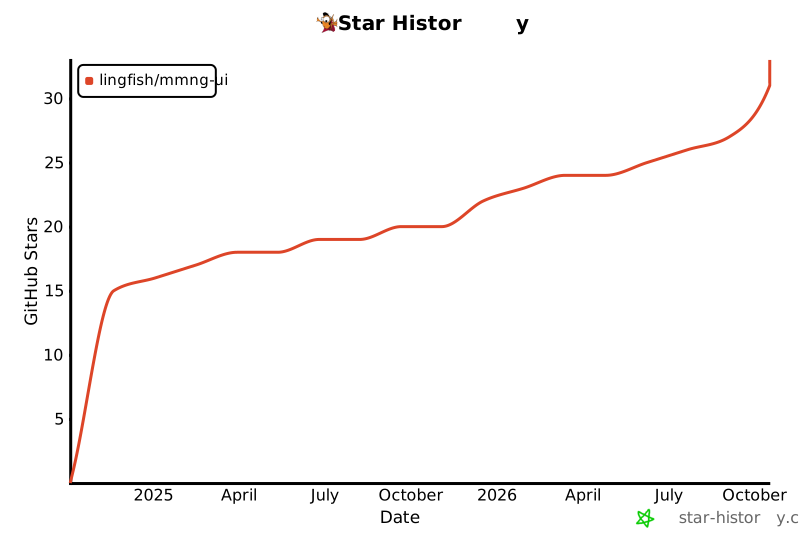
Star history
1 maintainer

Metadata
1 maintainer
Release files for mmng-ui 1.4.1
For a detailed explanation of source distributions (sdists) and built distributions (wheels), please see the package formats documentation.
Source distribution (sdist)
| File | Size | Uploaded | |
|---|---|---|---|
| mmng_ui-1.4.1.tar.gz | 39.8 kB | Details |
Built distribution (wheel)
| File | Interpreter | ABI | Platform | Reset |
|---|---|---|---|---|
| mmng_ui-1.4.1-py3-none-any.whl | Python 3 | none | any | Details |
Total release size: 68.6 kB
Release files / mmng_ui-1.4.1.tar.gz
| Download URL | mmng_ui-1.4.1.tar.gz |
|---|---|
| Size | 39.8 kB |
| Tags | Source |
|
SHA-256 checksum How to use checksums |
ba9aad4ee5cbaf2f7849457641a4fd6d33848371acbb64d41688b0f65fab2cbe
|
|
BLAKE2b-256 checksum How to use checksums |
08e790bff9c0e92adb34560f0c4f97db69427e00259b26270f0f6d589bed670d
|
| Upload date | |
|
Uploaded using Trusted Publishing? What is trusted publishing? |
No |
| Uploaded via |
Hatch/1.18.0 {"ci":true,"cpu":"x86_64","distro":{"id":"trixie","libc":{"lib":"glibc","version":"2.41"},"name":"Debian GNU/Linux","version":"13"},"implementation":{"name":"CPython","version":"3.14.7"},"installer":{"name":"hatch","version":"1.18.0"},"openssl_version":"OpenSSL 3.5.6 7 Apr 2026","python":"3.14.7","system":{"name":"Linux","release":"6.1.0-48-amd64"}} HTTPX2/2.12.0
|
Release files / mmng_ui-1.4.1-py3-none-any.whl
| Download URL | mmng_ui-1.4.1-py3-none-any.whl |
|---|---|
| Size | 28.7 kB |
| Tags | Python 3 |
|
SHA-256 checksum How to use checksums |
52a74c53b7b1ea059a8a4508395f8c7f74cb6a5c325fbe8eda9bd77efd2dce39
|
|
BLAKE2b-256 checksum How to use checksums |
8aa6f352bdcef7aebc182cedb4f5bb3dafb57c1a8c80f8bc64ffd0b8df858e90
|
| Upload date | |
|
Uploaded using Trusted Publishing? What is trusted publishing? |
No |
| Uploaded via |
Hatch/1.18.0 {"ci":true,"cpu":"x86_64","distro":{"id":"trixie","libc":{"lib":"glibc","version":"2.41"},"name":"Debian GNU/Linux","version":"13"},"implementation":{"name":"CPython","version":"3.14.7"},"installer":{"name":"hatch","version":"1.18.0"},"openssl_version":"OpenSSL 3.5.6 7 Apr 2026","python":"3.14.7","system":{"name":"Linux","release":"6.1.0-48-amd64"}} HTTPX2/2.12.0
|














