
A new backend based on pyqtgraph for the 2D-Data-Browser in MNE-Python.

Project description
mne-qt-browser
A new backend based on pyqtgraph for the 2D-Data-Browser in MNE-Python.
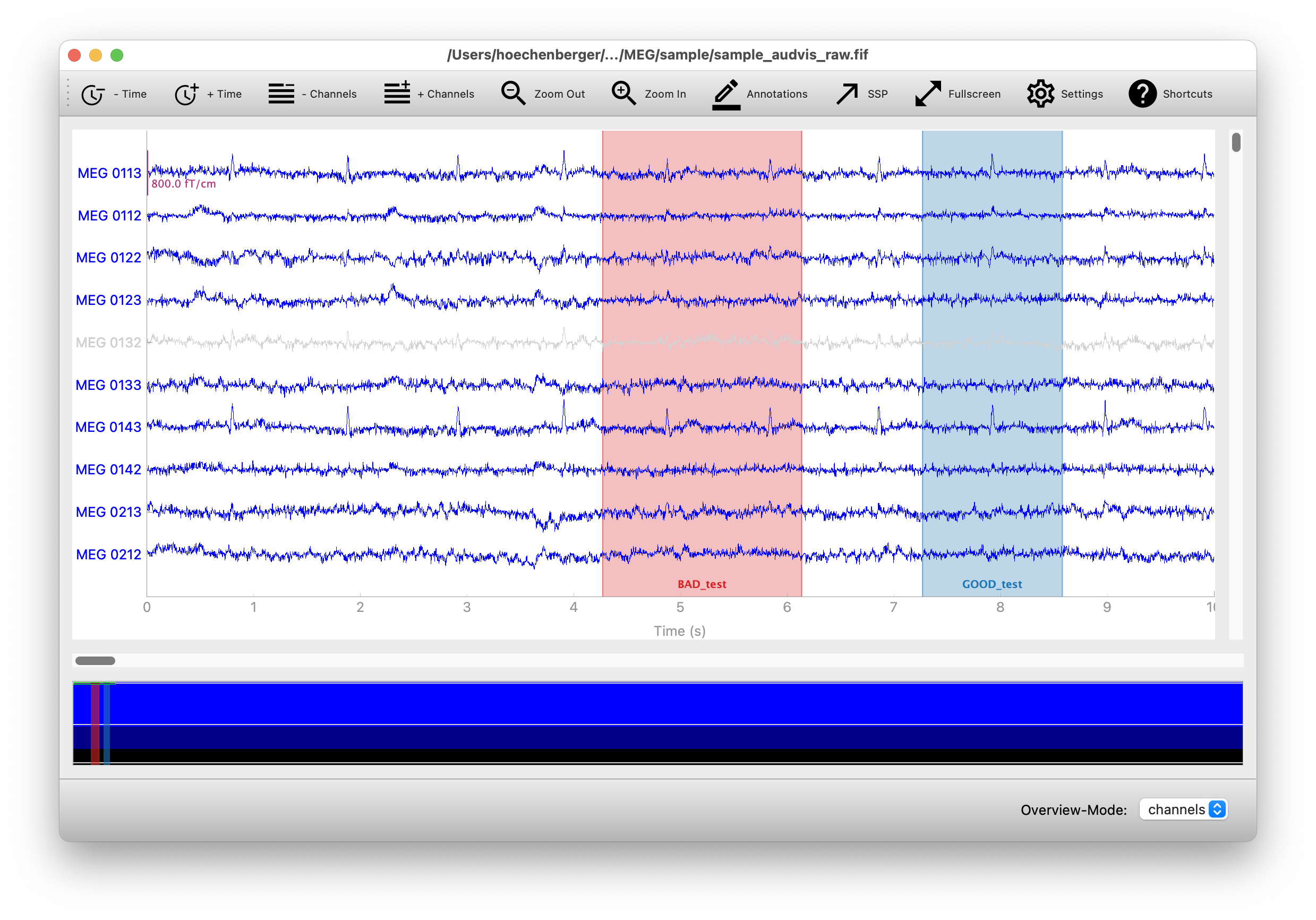
This repository hosts the code for an alternative backend for plotting 2D-Data with MNE-Python.
The backend is based on pyqtgraph which uses Qt's Graphics View Framework for the plotting. Development started as a 2021's Google Summer of Code Project.
Installation
Install full MNE-Python with the instructions provided here or install minimal MNE-Python with
pip
pip install mne matplotlib mne-qt-browser
or
conda
conda install -c conda-forge mne-base matplotlib mne-qt-browser
Usage
The backend supports plotting for the following MNE-Python methods:
mne.io.Raw.plot()mne.Epochs.plot()mne.preprocessing.ICA.plot_sources(raw)mne.preprocessing.ICA.plot_sources(epochs)
In the following example, we'll read M/EEG raw data from the MNE sample dataset
and plot it using the qt-backend.
(For mne-version >= 1.0 the qt-backend will be the default)
from pathlib import Path
import mne

sample_dir = mne.datasets.sample.data_path()
raw_path = Path(sample_dir) / 'MEG' / 'sample' / 'sample_audvis_raw.fif'
raw = mne.io.read_raw(raw_path)

mne.viz.set_browser_backend('qt')  # Enable mne-qt-browser backend if mne < 1.0
raw.plot(block=True)
If the plot is not showing, search for solutions in the troubleshooting section below.
This will use the mne-qt-browser for the current Python session. If you
want to make this change permanent, so you don't have to use the
set_browser_backend() each time after restarting Python, run the following
line to modify your MNE configuration file:
import mne
mne.set_config('MNE_BROWSER_BACKEND', 'qt')
Troubleshooting
Running from a script
If you are running a script containing raw.plot() like
python example_script.py
the plot will not stay open when the script is done.
To solve this either change raw.plot() to raw.plot(block=True) or run the script with the interactive flag
python -i example_script.py
IPython
If the integration of the Qt event loop is not activated for IPython, a plot with raw.plot() will freeze.
Do avoid that either change raw.plot() to raw.plot(block=True) or activate the integration of the event loop with
%gui qt5
Report Bugs & Feature Requests
Please report bugs and feature requests in the issues of this repository.
Development and testing
You can run a benchmark locally with:
pytest -m benchmark mne_qt_browser
To run tests, clone mne-python, and then run the PyQtGraph tests with e.g.:
pytest -m pgtest ../mne-python/mne/viz/tests
If you do not have OpenGL installed, this will currently raise errors, and
you'll need to add this line to mne/conftest.py after the error:: line:
ignore:.*PyOpenGL was not found.*:RuntimeWarning
Project details
Release history Release notifications | RSS feed


Download files
Download the file for your platform. If you're not sure which to choose, learn more about installing packages.
Source Distribution
Built Distribution
Filter files by name, interpreter, ABI, and platform.
If you're not sure about the file name format, learn more about wheel file names.
Copy a direct link to the current filters
File details
Details for the file mne-qt-browser-0.2.2.dev0.tar.gz.
File metadata
- Download URL: mne-qt-browser-0.2.2.dev0.tar.gz
- Upload date:
- Size: 59.6 kB
- Tags: Source
- Uploaded using Trusted Publishing? No
- Uploaded via: twine/3.8.0 pkginfo/1.8.2 readme-renderer/32.0 requests/2.27.1 requests-toolbelt/0.9.1 urllib3/1.26.8 tqdm/4.62.3 importlib-metadata/4.11.1 keyring/23.5.0 rfc3986/2.0.0 colorama/0.4.4 CPython/3.10.2
File hashes
| Algorithm | Hash digest | |
|---|---|---|
| SHA256 |
302028b51e07de37592799c9128b035a627634c11439be3737bb5535833dc6b0
|
|
| MD5 |
fc79b1e2e0875f7b7f294eafaacb49e6
|
|
| BLAKE2b-256 |
128ce108f795684ec38f8568f9dfc13725955e2ee23ed8a386eb0396c5a7ec0a
|
File details
Details for the file mne_qt_browser-0.2.2.dev0-py3-none-any.whl.
File metadata
- Download URL: mne_qt_browser-0.2.2.dev0-py3-none-any.whl
- Upload date:
- Size: 63.5 kB
- Tags: Python 3
- Uploaded using Trusted Publishing? No
- Uploaded via: twine/3.8.0 pkginfo/1.8.2 readme-renderer/32.0 requests/2.27.1 requests-toolbelt/0.9.1 urllib3/1.26.8 tqdm/4.62.3 importlib-metadata/4.11.1 keyring/23.5.0 rfc3986/2.0.0 colorama/0.4.4 CPython/3.10.2
File hashes
| Algorithm | Hash digest | |
|---|---|---|
| SHA256 |
d6aec8173fe80102ed27f9f815d16dc705c85b90be78bde9c29fdfed018250f1
|
|
| MD5 |
81604f6be999a22cb2a7a5a408755288
|
|
| BLAKE2b-256 |
8201c93a0ae0f79a7f525c1efed35ace064b4d9043286a9b319ca18d2b2764ba
|






