
A graphical user interface for MNE
Verified details
These details have been verified by PyPIProject links
GitHub Statistics
Maintainers

Project description





MNELAB

MNELAB is a graphical user interface for MNE-Python (the most popular Python package for EEG/MEG analysis).
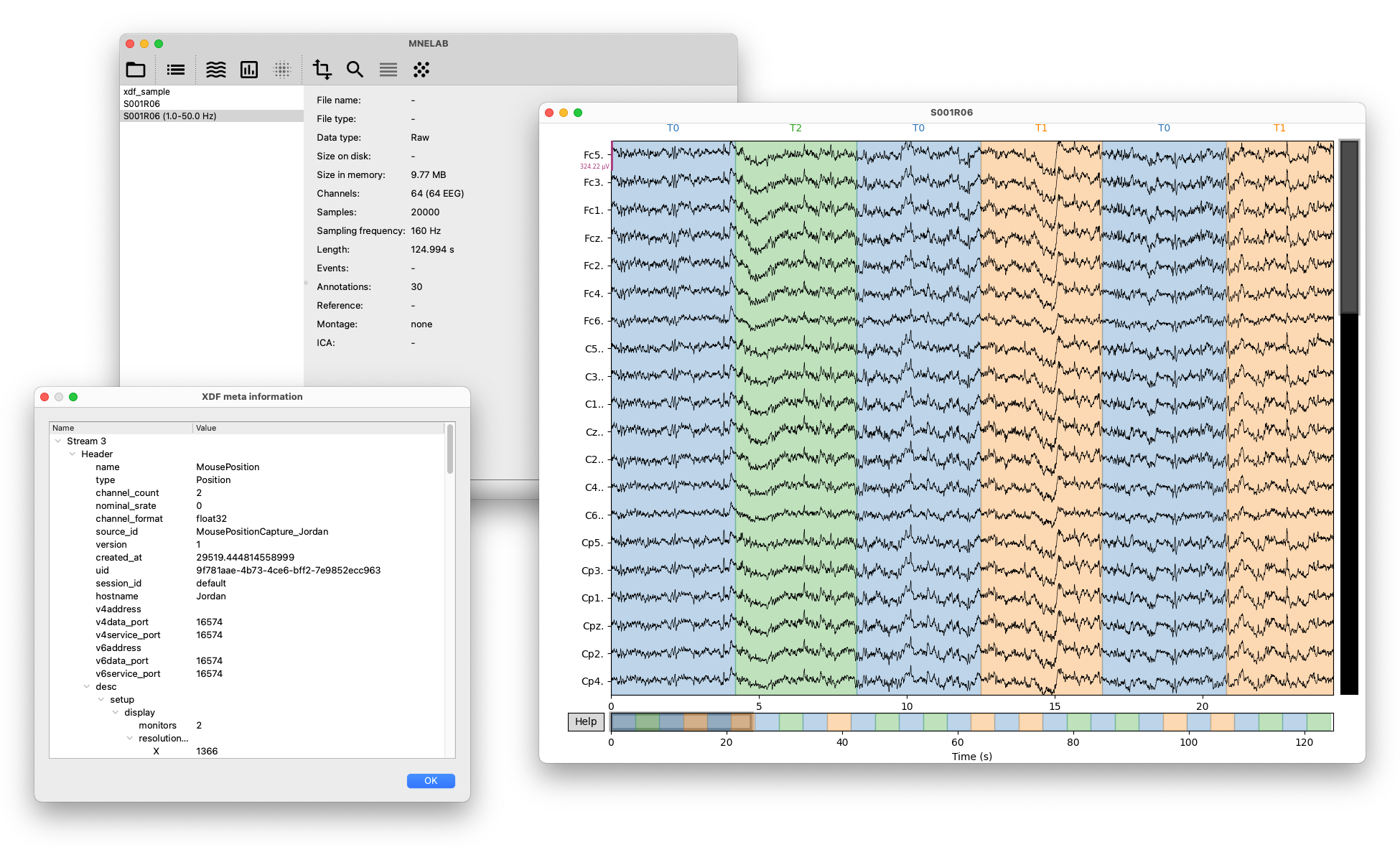
Key features include:
- Cross-platform support (Linux, macOS, Windows).
- A command history that records the underlying MNE-Python commands for each action, allowing users to learn how to use MNE-Python and to reproduce their analyses in code.
- Import data from various formats supported by MNE-Python, and some additional formats like XDF, MATLAB, NumPy, and BVRF.
- Export to EDF, BDF, BrainVision, EEGLAB, and FIFF formats.
- XDF-specific features such as chunk inspection (useful for debugging corrupted XDF files), stream selection, metadata inspection, resampling, gap detection and filling, and more.
- Support for various ICA algorithms, including FastICA, Infomax ICA, and PICARD.
- Automatic classification of independent components using ICLabel.
- Comprehensive tools for managing events and annotations.
- Support for channel locations (montages), re-referencing, cropping, filtering, epoching, and more.
- Plotting functions for raw data, epochs, evoked responses, independent components, ERD/ERS maps, and more.
Documentation
The documentation contains hands-on examples and tutorials for different use cases. Check out the changelog to learn what we added, changed, or fixed.
Quick Start
We recommend using the standalone installers for macOS and Windows:
If you use Arch Linux, you can install MNELAB from the AUR (e.g., yay -S python-mnelab).
Alternatively, you can use uv to run MNELAB directly without installing it (this works on all platforms, but for the best experience we recommend using the standalone installers when available):
uvx mnelab
Advanced Usage
To run the latest development version:
uvx --from https://github.com/cbrnr/mnelab/archive/refs/heads/main.zip mnelab
On Linux, running MNELAB via uvx mnelab uses the Fusion style shipped with PySide6, which may not fit well with the rest of the system. However, if you use KDE, you can set the QT_PLUGIN_PATH environment variable to force the use of the native KDE theme instead, for example:
QT_PLUGIN_PATH=/usr/lib/qt6/plugins uvx mnelab
Contributing
The contributing guide provides detailed instructions for contributing to MNELAB.
Project details
Verified details
These details have been verified by PyPIProject links
GitHub Statistics
Maintainers
Release history Release notifications | RSS feed


Download files
Download the file for your platform. If you're not sure which to choose, learn more about installing packages.
Source Distribution
Built Distribution
Filter files by name, interpreter, ABI, and platform.
If you're not sure about the file name format, learn more about wheel file names.
Copy a direct link to the current filters
File details
Details for the file mnelab-1.5.2.tar.gz.
File metadata
- Download URL: mnelab-1.5.2.tar.gz
- Upload date:
- Size: 11.2 MB
- Tags: Source
- Uploaded using Trusted Publishing? Yes
- Uploaded via: uv/0.11.16 {"installer":{"name":"uv","version":"0.11.16","subcommand":["publish"]},"python":null,"implementation":{"name":null,"version":null},"distro":{"name":"Ubuntu","version":"24.04","id":"noble","libc":null},"system":{"name":null,"release":null},"cpu":null,"openssl_version":null,"setuptools_version":null,"rustc_version":null,"ci":true}
File hashes
| Algorithm | Hash digest | |
|---|---|---|
| SHA256 |
89012355d78567832e965609d7d535aec8e3dea56ff1cb134984073d54957244
|
|
| MD5 |
80378cb0c80da0b642d1c4234eb1ab75
|
|
| BLAKE2b-256 |
f186cfdf3b105f3d209a52bceeb5ae398bef2f59a480ab2181a0de00e493b234
|
File details
Details for the file mnelab-1.5.2-py3-none-any.whl.
File metadata
- Download URL: mnelab-1.5.2-py3-none-any.whl
- Upload date:
- Size: 11.2 MB
- Tags: Python 3
- Uploaded using Trusted Publishing? Yes
- Uploaded via: uv/0.11.16 {"installer":{"name":"uv","version":"0.11.16","subcommand":["publish"]},"python":null,"implementation":{"name":null,"version":null},"distro":{"name":"Ubuntu","version":"24.04","id":"noble","libc":null},"system":{"name":null,"release":null},"cpu":null,"openssl_version":null,"setuptools_version":null,"rustc_version":null,"ci":true}
File hashes
| Algorithm | Hash digest | |
|---|---|---|
| SHA256 |
4102ebcd38aa8492cef1c730c33c4fa223bb59312be629cae3839280e464bcc6
|
|
| MD5 |
b82589ced6bd28bf0ffcaf715cb52fc9
|
|
| BLAKE2b-256 |
b06e5b239be85734fe417cfb6332bfec6b568cac9fc0d90c53c301a344a422f1
|






