

ModelRoom
Does this model have room on your machine?
Built and maintained by VISCONSULT, a consultancy in Germany that
runs AI agents for its own work and for clients under EU data-protection rules. MIT licensed,
Python, on PyPI as modelroom.
ModelRoom (package and command: modelroom) answers two questions for a list of model
families you care about:
- Which local packages exist? It reads the Hugging Face API and the Ollama registry for the base models and packagers you allow, and records every package with its size, format, quantization and the exact revision it was seen at.
- Which of them fit a given machine? It measures a machine itself, cross-checks the reading with llmfit when that is installed, and computes, per package, whether weights plus KV cache plus a configured reserve fit into the memory that machine has.
The result is a JSON snapshot, one hardware profile per machine and a rendered Markdown document with a ranking per configured machine. Nothing in the tool is tied to a specific operator: you bring a configuration file with your families, packagers and machines, run it on the machine you want to size, and keep the files wherever you keep your notes.
Status
Alpha, version 0.2.0 (see CHANGELOG.md). The guided mode and the subcommands work end to end;
the data shapes are versioned contracts (see CONTRACTS.md). Expect changes to the rendered
layout and to the fit rules before a stable release. CHANGELOG.md lists what has landed. The
branch main runs ahead of the release on PyPI: what CHANGELOG.md lists under "Unreleased" is
in this repository and not yet in the package an installer fetches.
Requirements
- Python 3.11 or newer and uv.
llmfit1.1.16 or newer onPATHis optional:hardwaremeasures the machine itself and usesllmfitto cross-check the physical RAM and the graphics memory, and as the fallback where it counts no card of its own -- a card llmfit counts says so with the sourcellmfit. Without it the command still succeeds: the RAM check isabsent, and so is the graphics check, except where no comparison could be made anyway (cards of different sizes, or cards named but none counted:not_comparable,CONTRACTS.md, "Cross-check with llmfit"). The minimum version is set in the configuration ([llmfit] min_version).- The graphics cards are read from each vendor's own source: NVIDIA from
nvidia-smi(one card or several), AMD on Linux from the kernel (sysfs, with the ROCm compute driver), Apple Silicon fromsysctlas one pool of unified memory, and every other unit from the system's list of display adapters (lspcion Linux,Win32_VideoControllerand the registry on Windows).hardwareprints one line per unit: vendor and model, memory, source, and whether it is usable for Ollama and counted. A card that is not counted -- integrated graphics, a card only Vulkan can use, a card whose driver tool is missing -- computes as a machine without a card. - An Ollama daemon on
http://127.0.0.1:11434for the load test only. Without one the guided mode says so in one line and goes on; nothing else in the tool needs it. - Internet access for the search and the fetch.
Tested on
Every machine a version really ran its self-test on (scripts/selftest.py), one line each. The
two-card fixtures were recorded on the Verda and Scaleway instances listed below; the fixtures of three graphics
cards and more, and of cards of mixed sizes, are synthetic (tests/fixtures/README.md). The load
test is the speed the self-test measured for hf.co/unsloth/DeepSeek-R1-0528-Qwen3-8B-GGUF:Q4_K_M
at context 8192, one request. The Class column is what the profile says: server (entered) means
the run supplied the machine class.
| Machine | Class | Graphics cards | Memory | Date | Self-test | Load test |
|---|---|---|---|---|---|---|
| a laptop of the maintainer | laptop (chassis) | 1 x NVIDIA RTX PRO 3000 Blackwell Generation Laptop GPU, 11.94 GiB | 127.46 GiB | 2026-09-27 | SELFTEST: OK |
56.9 tok/s |
| a rented instance at Verda (Helsinki) | server (entered) | 2 x NVIDIA A100-SXM4-80GB, 80.00 GiB each | 235.92 GiB | 2026-09-27 | SELFTEST: OK |
143.5 tok/s |
| a rented instance at Scaleway (Paris) | server (entered) | 2 x NVIDIA L4, 22.49 GiB each | 94.29 GiB | 2026-09-27 | SELFTEST: OK |
48.2 tok/s |
| a rented instance at Seeweb (Frosinone) | server (entered) | 1 x NVIDIA L40S, 44.99 GiB | 31.27 GiB | 2026-10-08 | SELFTEST: OK |
122.8 tok/s |
Installation
As a command-line tool from the Python Package Index, with either installer:
uv tool install modelroom
pipx install modelroom
Then check that the command is there; it prints the version and asks nothing:
modelroom --version
Both need Python 3.11 or newer and the installer itself (uv or
pipx), and both put modelroom into an environment of its own. If the
command is not found afterwards, the installer's folder is not on PATH yet: run
uv tool update-shell or pipx ensurepath once and open a new terminal. The guided mode needs
no configuration file: it writes one into the folder you choose. modelroom.example.toml in this
repository is the starting point for the subcommands further down.
Quick start
Open a terminal in the folder where the results should live and type the command:
modelroom
It opens with what it already knows and then walks five numbered steps. Every step is a block of
its own; a question disappears once it is answered and one line takes its place, with the answer
in the words you gave it, and each step writes its files as it goes. Esc leaves a list, Ctrl-C
leaves at any point. The next run is the same command: it remembers the folder, the machine it
measured and the context you chose.
A guided run, step by step
The pictures come from three runs on a rented server at Seeweb with one NVIDIA L40S graphics card
(44.99 GiB) and 31 GiB of memory, in a folder named /srv/models, chosen for the pictures; any
folder does. (These pictures were taken on Linux; modelroom treats the local computer as having
no vLLM on native Windows and macOS.) Ollama 0.40.1 runs there without a package of the model the run looks for,
and a vLLM server serves Qwen/Qwen3.5-4B at context 4096. The first picture is from the initial
run in a fresh folder, pictures 2 to 8 are from the second run, and the last picture shows a
separate run with an empty search word in the same folder. Your numbers, and so the fit of every
package, will differ.
Start
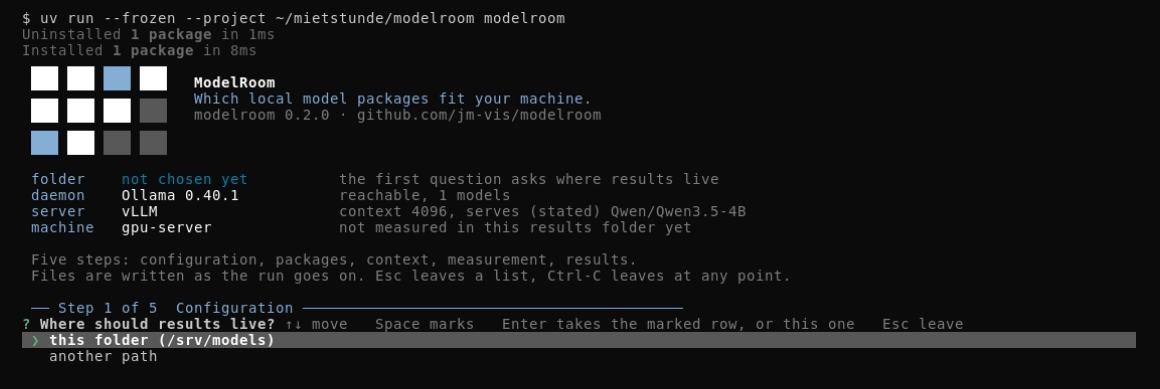
Four facts before the first question: the folder (none chosen yet), the local daemon (Ollama 0.40.1 is reachable, with one model), the vLLM server (context 4096, and the model it states it serves) and this machine (its name, and that no measurement is stored in this folder yet). The first question of step 1 is where the results should live: the folder you are in, or another path. The second run started in the folder the first one chose and was not asked again.
Step 1, Configuration
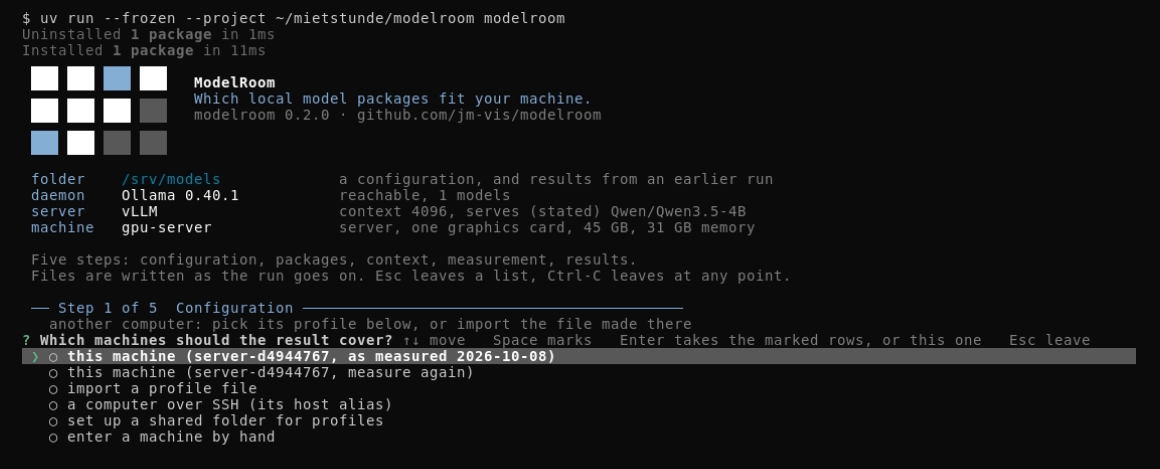
Which machines the result covers. Choosing this machine with measure now or measure again
measures this computer right here, once the question is answered. In the picture the first row
reuses the profile measured in the first run, and the start screen sums it up (server, one graphics card, 45 GB, 31 GB memory). The gray line above the question says where another computer's profile comes in. Measuring asks
what kind of machine this is, laptop, workstation or server, with the class the chassis reports
already marked: keeping it keeps the chassis as its source, another answer is entered. A profile
file measured on another machine can be imported instead, so one folder can rank the same
packages for a laptop and a server. A machine you do not have yet can be entered by hand
from its data sheet: its name, whether it is a laptop, a workstation or a server, its memory, and
whether a graphics card with its own memory, several graphics cards of one size, no graphics card
or unified memory runs the model. It gets a profile and a place in the result of
its own, next to the machines you measured, and says (entered) wherever its name stands --
every number of such a machine is computed, none measured. The measurement is cross-checked with
llmfit when it is installed.
Nothing in the list is marked in advance: the arrow keys move, the space bar marks a row, and Enter
takes what is marked or, with nothing marked, the row under the pointer. Where this machine was
measured in this folder before, its profile is the first row (this machine (server-d4944767, as measured 2026-10-08), the name the result shows for it), so Enter alone keeps it and
measures nothing; measure again is the row under it. The result covers exactly the machines you marked in this run.
Machine names (FR-N). No result file (modelroom.toml, docs/, state/) and no export file
carries a host name; the neutral key of this computer and your SSH aliases are the only values from
~/.modelroom that appear there. Your own state under ~/.modelroom keeps the folders you chose
(results folders and the shared folder), as you typed them, and never leaves your computer. This
computer is computer-<random> in modelroom.toml -- a key made once for your user account and kept
in ~/.modelroom/remote.json -- and laptop-<id> (by its class) in tables and docs/; another
computer is <class>-<id>, or its alias over SSH. A machine entered by hand keeps no name you type
either: it gets a neutral name the same way. A folder of 0.1.0 is renamed once, backups included, by
the first command that writes to it (machine renamed to server-3f9a0c21); a script calling fetch --machine <old name> takes the new key. Only the start screen names this computer's host name, live.
When the current folder is not already configured, step 1 first asks where the results should
live. A folder the last run used is offered
first when you start in another one, with the pointer on it; the start screen already says the folder of the last run, not this one. Started in your home folder or at the top of a drive, the
run asks before it writes anything there -- modelroom.toml, docs and state would land in it --
and offers <home>/modelroom instead.
Another computer
A folder can hold the profiles of several machines -- the laptop you sit at and a server you rent,
say. A machine can be entered by hand (see above), or its profile brought over by hand: on that
computer, with a modelroom.toml of its own, modelroom hardware --config modelroom.toml and
modelroom export-profile --config modelroom.toml --out <name>.json, then import a profile file
here. Beyond that, there are three ways to reach another computer directly:
- Copy the command. At the end of a run, step 5's Which package should go onto another
computer? hands you a line to paste on that machine:
modelroom pull <name> --weights-bytes <n>where modelroom is installed there too, else the plainollama pull <name>. Nothing is sent anywhere on its own; you paste it yourself. - A shared folder, for a computer without SSH. Step 1's machine list always offers
set up a shared folder for profiles(once a folder is set,profiles from the shared folder). Choosing it opens "Shared folder":choose a folderfor a folder on this computer, a network drive such asZ:\profilesor\\nas\profiles, or your cloud sync folder. modelroom checks at once that it can write there, then keeps the folder for your user account in~/.modelroom/remote.json; a later run then showsprofiles from the shared folder, and the same step lets you change it (change the folder) or forget it (none, no shared folder). The folder is only ever shown in that step, never written into a results folder or an export. For a script,MODELROOM_PROFILE_SHAREsets the folder and wins over the kept one; the step then saysset by environment. On the server, with amodelroom.tomlof its own there,modelroom hardware --config modelroom.tomland thenmodelroom export-profile --config modelroom.toml --out <share>/<name>.jsondrop a profile there -- name the file after the export's own neutral name, such asserver-3f9a0c21.json, since that is what other computers pick it up by, never the file name. An answer file for the guided mode is like a script: run only your own, since its answers choose folders and paths. - Over SSH, with modelroom 0.2.0 or newer and Ollama on the server. Step 1's row
a computer over SSH (its host alias)asks for your own SSH host alias for it (~/.ssh/config) -- a neutral name of your own, such asgpu1, not the server's real one: modelroom keeps whatever you type and cannot tell the difference. It reads the server's profile, and lets step 5 check its free disk and pull the package you choose for it -- checked, asked, one Yes -- without you ever running modelroom there by hand. It runs the systemsshstraight to that alias with a fixed, safe set of options: never asks for a password, never accepts a host key it does not already know. Behind a jump host these two hold only for the target itself; the jump host answers with its own connection, under its ownHostblock (below), and needsBatchMode yesandStrictHostKeyChecking yesthere too for the same guarantee. A server is told apart by its machine identity, on Linux the/etc/machine-id; where a server gives none and a saved profile is there to compare with, modelroom cannot tell whether it is still the same machine, says so once, and asks nothing -- unless it had one before.
Setting SSH up, once, on Windows, macOS or Linux:
-
Client. Windows 10 1809 and newer, and Windows Server 2019 and newer, already carry the OpenSSH client; otherwise install it from Settings, Optional features, OpenSSH Client.
-
A key.
ssh-keygen -t ed25519, with a passphrase. -
An agent. Windows: start the OpenSSH Authentication Agent service, then
ssh-add. macOS:ssh-add --apple-use-keychain. Linux:ssh-add. -
The public key on the server.
ssh-copy-id gpu1on macOS or Linux; on Windows, copyid_ed25519.pub's content into the server's own authorized-keys file by hand. A normal account keeps that at%USERPROFILE%\.ssh\authorized_keys(the same file as~/.ssh/authorized_keyselsewhere); an account in the Administrators group keeps it instead atC:\ProgramData\ssh\administrators_authorized_keys, and only once that file's permissions are restricted toSYSTEMandAdministratorsalone -- sshd refuses a looser one. Two commands do that. The first drops every entry set on the file itself; the second drops the inherited ones and grants full access to these two alone. Both name them by their SIDs (S-1-5-32-544forAdministrators,S-1-5-18forSYSTEM) with a leading*, the form Microsoft's OpenSSH-for-Windows documentation gives for a Windows in another display language, where the names differ:icacls.exe "C:\ProgramData\ssh\administrators_authorized_keys" /reset icacls.exe "C:\ProgramData\ssh\administrators_authorized_keys" /inheritance:r /grant:r "*S-1-5-32-544:F" "*S-1-5-18:F"icacls.exe "C:\ProgramData\ssh\administrators_authorized_keys"then lists exactly two entries, both ending in:(F):SYSTEMand the built-inAdministratorsgroup, each under the name the system's display language gives it. -
The host alias, in
~/.ssh/config(Windows:%USERPROFILE%\.ssh\config):Host gpu1 HostName 192.0.2.10 User user IdentityFile ~/.ssh/id_ed25519 # behind a jump host: # ProxyJump jump1 (with its own Host jump1 block, StrictHostKeyChecking yes and BatchMode yes) -
The first connection, by hand.
ssh gpu1once, and check its host key when asked. -
modelroom on the server, on the
PATHof an SSH session:uv tool install modelroomanduv tool update-shell; without that, modelroom falls back to~/.local/bin/modelroomonce.
What is kept. For an SSH computer: the alias, in ~/.modelroom/remote.json and as the
machine's name. For a shared folder: the folder you chose, in ~/.modelroom/remote.json only.
Nothing else about the connection, the files in the shared folder, or the other computer's name.
Machine names throughout the result follow the same rule as this computer's own (see "Machine
names" above).
Every profile the folder already holds stands in step 1 as a row of its own and can be picked;
the result shows only the ones you marked. A folder collects profiles through import, which checks
the file's schema and its name; a file copied by hand into state/hardware/ is taken up by the next
run. The shared folder is read and written like any local one, whatever the operating system mounted
there for you -- a network share or a cloud sync folder included; the only way modelroom opens a
network connection of its own to another computer is the SSH way, through the system's own ssh, to
the alias you named yourself.
Step 2, Packages
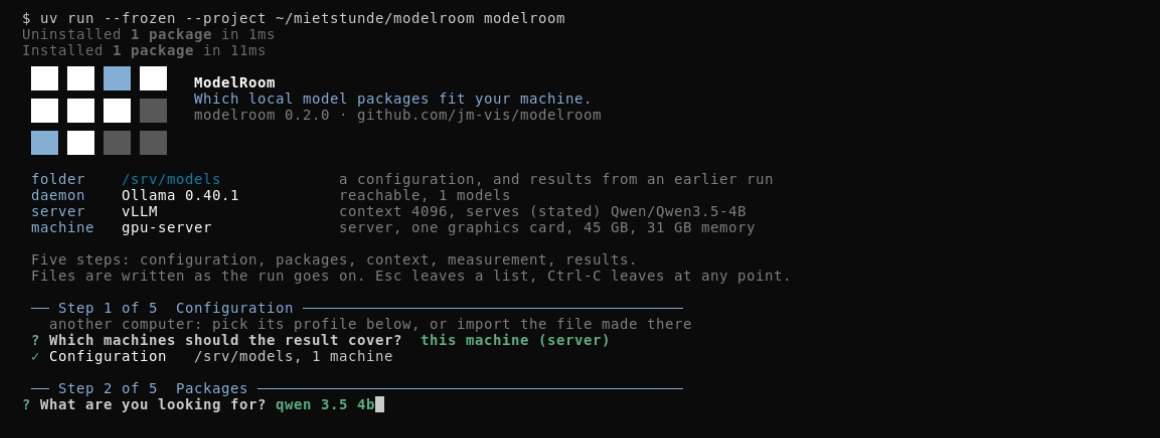
What you are looking for; in the picture qwen 3.5 4b. You can answer in four ways, and none of
them has to be the exact spelling of anything:
| What you type | What happens |
|---|---|
qwen |
the word goes to the Hub, and every account is asked for it |
qwen 3.5 9b |
blanks, hyphens, underscores and colons all separate words; one of them is asked for and the rest narrow the answer, so a missing hyphen, a blank in the wrong place or a gguf you wrote out of habit still find the model. The words themselves have to be right: 9x finds no 9B |
unsloth/Qwen3.5-9B-GGUF |
a repository you already know: one request for exactly that one, and the owner filter never hides it. If it cannot be read or holds no GGUF file, the words of its name are searched instead |
| nothing at all | press Enter and the current models of the shipped catalog are looked up one by one -- the answer to "I have no model in mind, what fits this machine?" (see the last picture) |
A word close to something the catalog knows that finds nothing to pick (qwn) ends in a short
list of what you may have meant; picking one searches again.
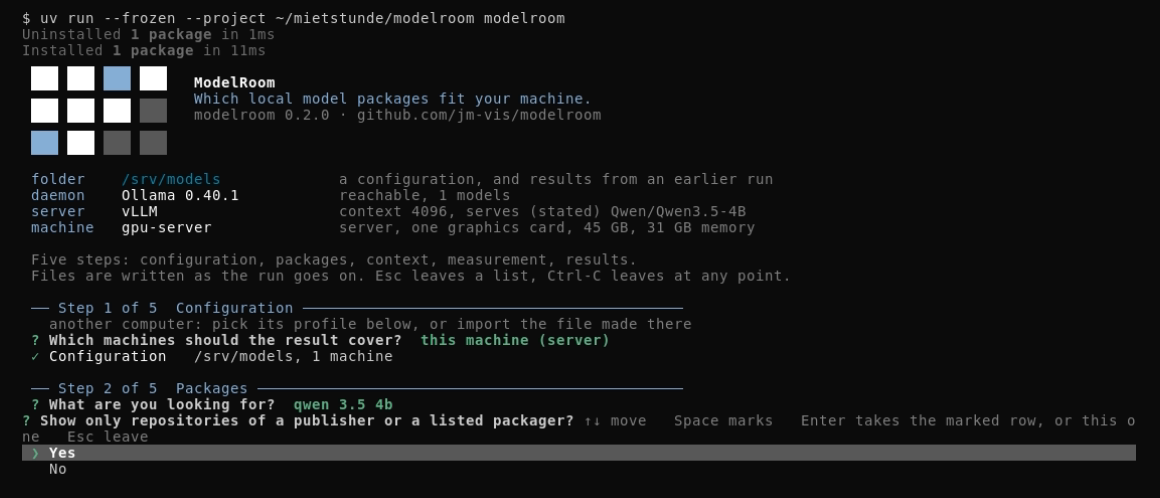
The owner filter. Yes (the default) keeps the list to the publisher of what you searched for
and the packagers configured for the folder, by default these five (unsloth, bartowski,
mradermacher, lmstudio-community, ggml-org), each asked for its newest and its most
downloaded repositories. No adds the twenty
most downloaded and the ten newest repositories for that word, whoever owns them, and lets a model
of a publisher the catalog does not know be picked as well.
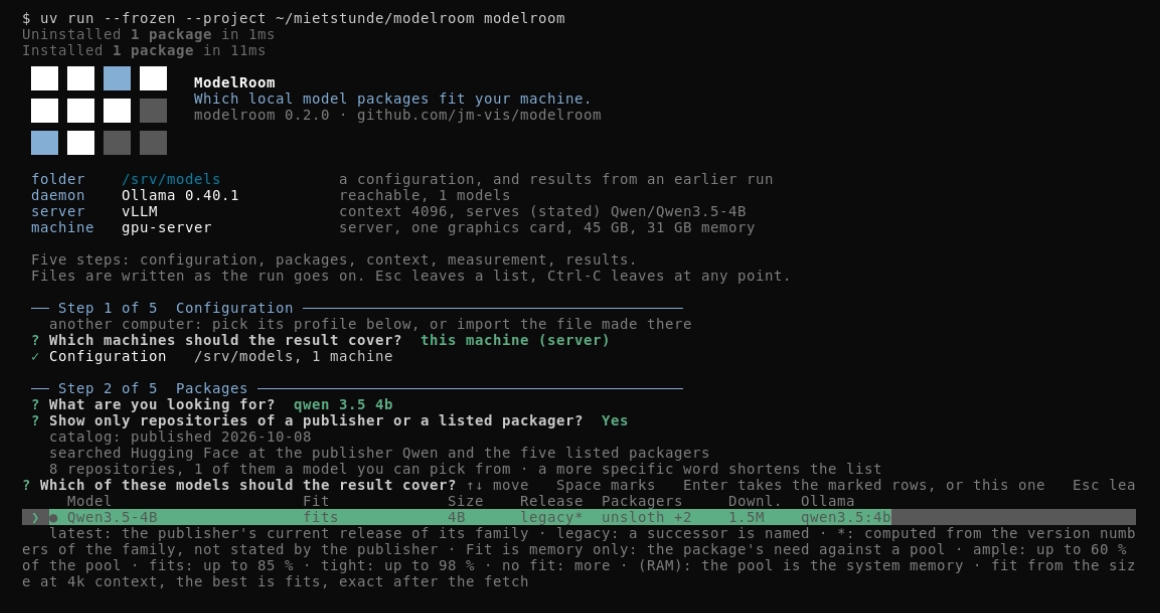
The list of models, one row per model that can really be picked: what fits into the graphics card
first, a model with a named successor (legacy) last, and otherwise the largest model first --
the same rule the result follows. The column head stays above the list while you scroll. The columns:
Fit is what the model's size allows on this machine at the folder's context (32k for a new
folder): fits, tight, no_fit, the share of the memory it needs; fits (RAM) means it needs
system memory rather than the graphics card's. The gray line under the question says what each
word means. After the fetch the fit is computed per package from what the fetch found. Size is the parameter count. Release says latest when the publisher's own page
names this model as the current one of its family, legacy when the publisher named a successor,
and – when nothing decides it. A * behind the word (latest*, legacy*) means the status
is computed from the version numbers of the family, not stated by the publisher: where the catalog
is silent, the highest version of a family and variant is latest* and every lower one legacy*
(state/search.json names the successor). It compares only what the search and the catalog know.
Packagers are the accounts that offer a
GGUF build of it (the first one and how many more, unsloth +3, where they do not all fit),
Downl. the downloads of all of them together, Ollama the name of the same model in the
Ollama registry when the catalog or your configuration knows one; a name longer than its 14
characters is cut, and the install line at the end carries it whole. Space marks a row, Enter takes the
marked rows or, with nothing marked, the row under the pointer. In the picture the search found 8
repositories and one model to pick, Qwen3.5-4B, and it is marked: fits at the folder's 4k,
legacy* because a higher version of the family is known, unsloth +2 and qwen3.5:4b. The
repositories that are no model of the list, and why, are counted in state/search.json rather
than shown as rows nobody can choose. After the choice the run fetches, per model, the packages of
the publisher's own repository and of the first listed packager that has it: their sizes,
formats, quantizations and the exact revision they were seen at.
modelroom looks for packages on Hugging Face, at the model's publisher and at RedHatAI (vLLM
builds) and at the listed GGUF packagers, and in the Ollama library. The start screen shows the runtimes, not
the origins; the origin stands with each row at the package name (<packager> · <quant>).
Step 3, Context
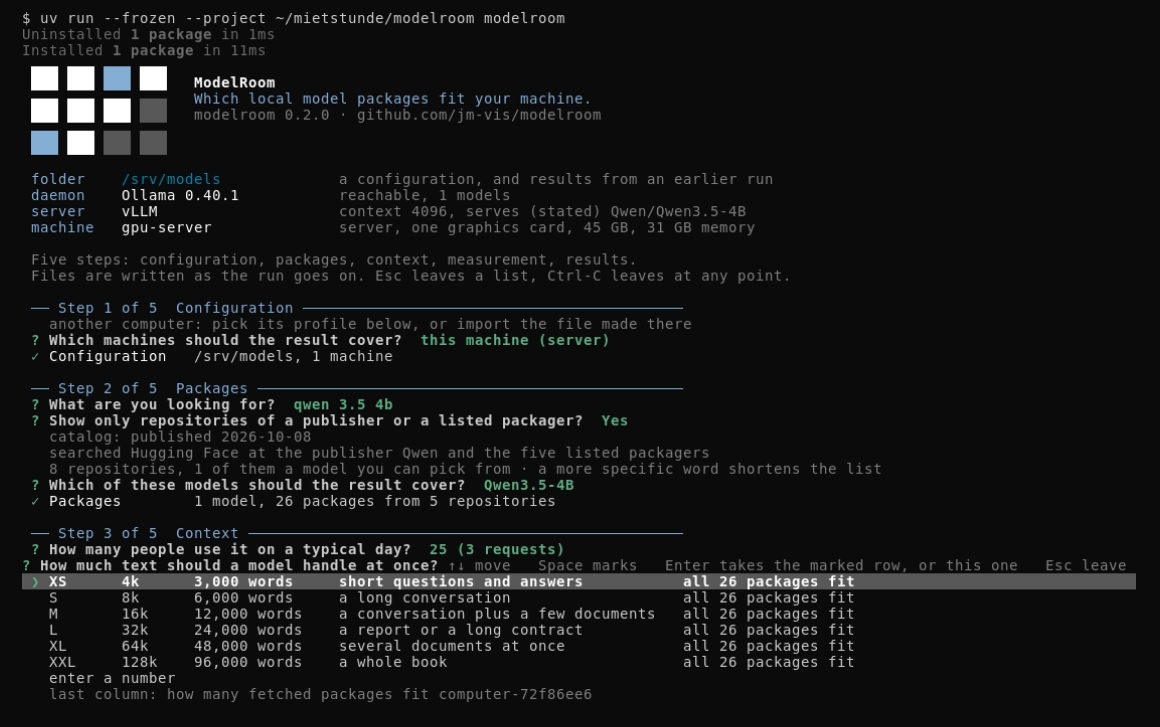
First, how many people use it on a typical day: 1, 5, 10, 25, 100 or a number of your own. The
ranking assumes that 1 in 10 of them send a request at the same moment -- a rule of thumb, not
measured, and the gray line under the list says so -- so 25 people are 3 parallel requests, and
every request holds its own KV cache in memory. Whoever knows the number of parallel requests
types it as 12 requests. A folder keeps the head count it was given and offers it next time.
Then how much text a model should handle at once, as a scale from XS to XXL with the tokens, the words that are and an example. The last column is the point of the question: how many of the packages just fetched still fit this machine at that context and for those requests, because the memory a model needs grows with the text it holds. L (32k, a report or a long contract) is the default for a new folder; a folder keeps the level it chose last time, and a number of tokens can be typed instead. In the picture the folder offers what the first run chose, 25 people (3 requests) and XS (4k, the context the vLLM server runs at); on the L40S all 26 fetched packages fit at every level.
Step 4, Measurement
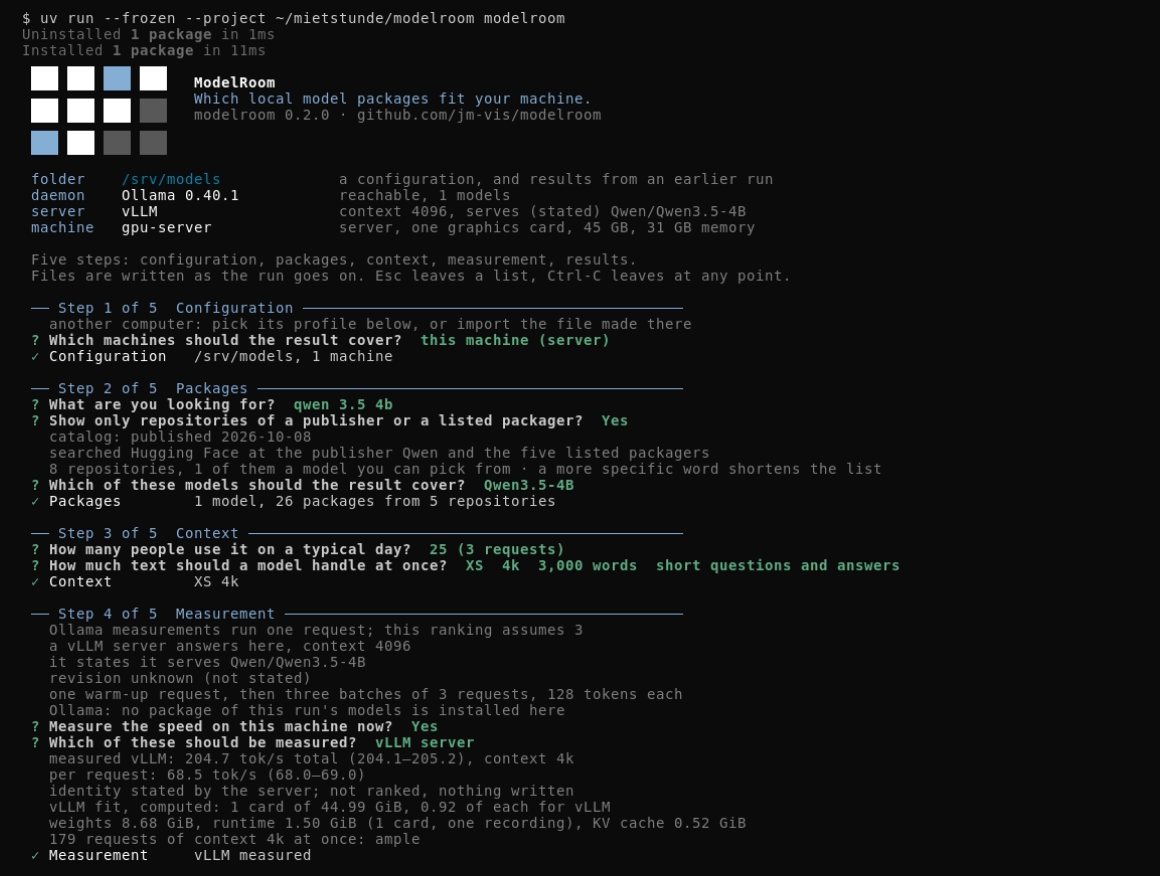
One question for every local server: Measure the speed on this machine now? First each server
says what it has -- the packages of this run's models your Ollama daemon already has, and, where a
vLLM server answers, which model it serves and whether its number will count for this run (it
counts when it serves a model you chose, at the context you chose). Yes shows one list: the
installed packages and the vLLM server, nothing marked, and you pick what to measure. An Ollama
measurement runs a short prompt through the package and records tokens per second; it never
downloads anything. No skips new measurements; a measurement stored earlier for the same package
content at the same context stays in the ranking, and a row without one shows – for speed. An
Ollama measurement always runs one request; when the ranking assumes more, the step says so first, and a
measured row then names why its speed does not count there. The balance says vLLM measured only
where the number counts, else vLLM ran, not counted. A run that ends before the 128 tokens of the
protocol is invalid, and a second line says how far it got (run 1 ended after 2 of 128 tokens) and what
the protocol counts; such a package stays without a speed.
In the picture Ollama has no package of the run's model, so the list holds only the vLLM server.
It states that it serves Qwen/Qwen3.5-4B, but not which revision (revision unknown (not stated)). One warm-up request, then three batches of 3 requests of 128 tokens each give 204.7 tok/s total, 68.5 per request. The lines under it are computed, not measured: one card of 44.99
GiB, of which vLLM takes 0.92, holds the weights (8.68 GiB), its runtime (1.50 GiB) and 179
requests of context 4k at once. In modelroom 0.2.0, vLLM measurements are shown for the current run only; they are not assigned to ranking rows
or saved (identity stated by the server; not ranked, nothing written).
Step 5, Results
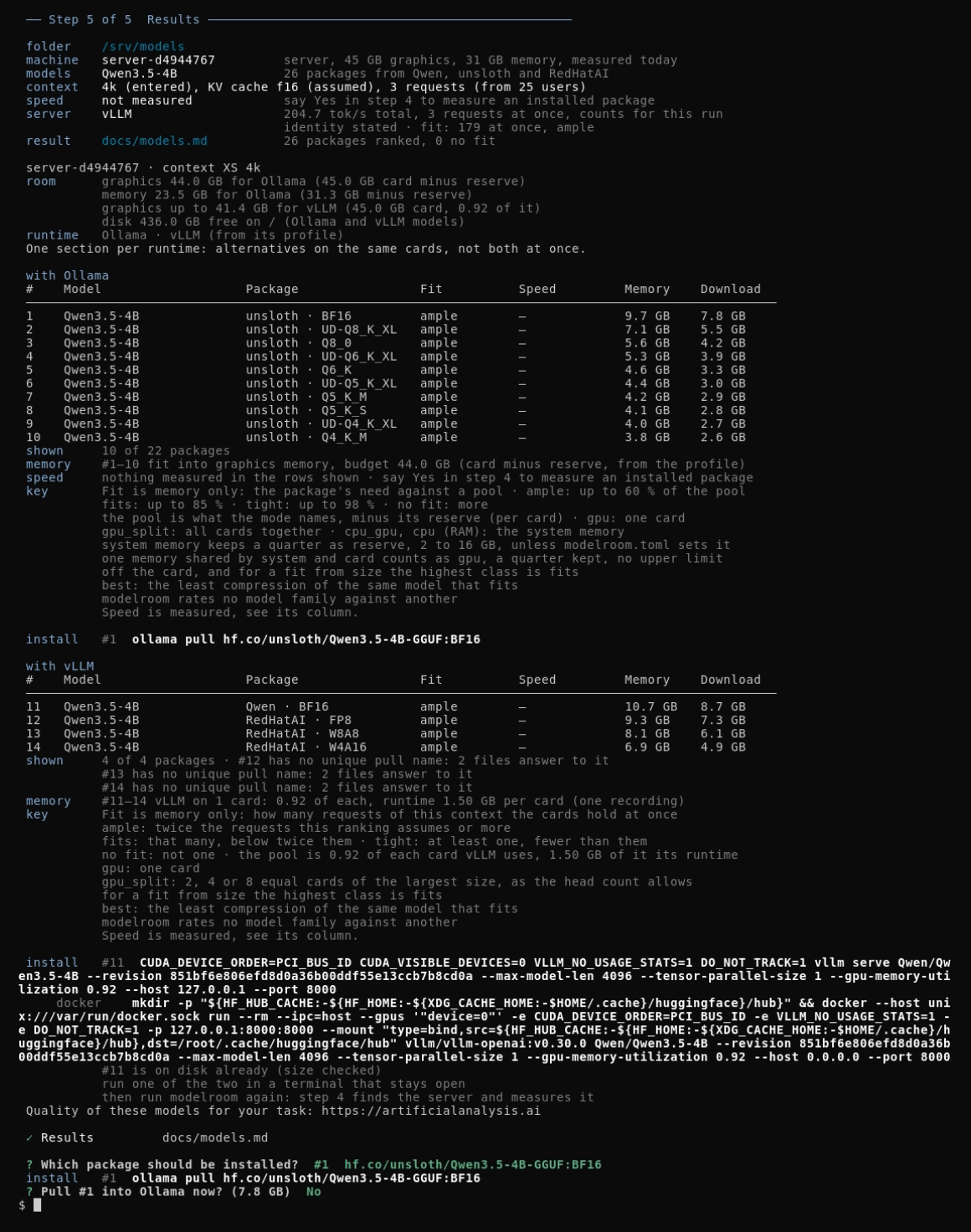
The card of the whole run: folder, machine, models, context, speed, and where the result went.
The context row carries the whole scenario: the context, the KV cache and the requests with where
they came from (3 requests (from 25 users)); beyond eight requests a load row adds that the fit
says nothing about throughput. In the picture the run chose Qwen3.5-4B, 26 packages from Qwen,
unsloth and RedHatAI, all ranked, none without a fit. No Ollama package was measured (speed not measured); the vLLM server's number stands in the server row instead: 204.7 tok/s total, 3 requests at once, counts for this run, and under it the fit computed for it (179 at once, ample). Under the card, the ranking for this machine at the chosen context, one section per
runtime (with Ollama, with vLLM: alternatives on the same card, not both at once): rank,
model, package (packager and quantization), fit, measured speed, memory need. Every speed cell
here reads –. For the Ollama rows nothing was measured. For the vLLM rows, modelroom 0.2.0 does
not assign server measurements to individual packages; the measured total appears only on the run
card. The notes under the
tables say what is shown (10 of 22 for Ollama, 4 of 4 for vLLM), which rows fit into graphics memory and
which need system memory, which rows have their fit computed from the package size as its
basis rather than from the architecture (the line appears only when there are such rows) and
what was measured for speed, and, where that computer's Ollama was asked (this computer, or the
computer over SSH), a local line with the rows it already has; the key says what the fit words mean. The install line is the command for the first row, ready to
paste. Under the head of the table a room line says the budget the fit computes with and how
much disk is free right now where Ollama keeps its models (with its drive; unknown where it cannot
be read), and the Download column is what a pull of that row brings; the memory line names
the budget of each pool. A row whose download, plus 1 GB of room, is more than the free disk
stays where the fit puts it, but lies on red, carries × behind its download (also without color and in
docs/models.md), and a red disk line under memory names those rows; the install line
then takes the best row that also fits the disk, or says in red that no package fits and space
must be freed first. Where the local Ollama daemon answered,
the run lists the rows shown and asks Which package should be pulled into Ollama?, or Which
package should be installed? where the table has vLLM rows, as in the picture -- any row,
not only #1; an Ollama row without an Ollama name is locked, as is any row whose pull name is not
unique or whose download is too large for the free disk; the latter is shown in red with what it
needs.
The command of the choice follows, the disk is checked again, and Pull #1 into Ollama now? with
the size of the package (7.8 GB in the picture): Yes pulls it into the daemon and shows the
progress, No, the answer in the picture, leaves the command for you to run. After the package
has been installed, step 4 of a later run offers to measure it. Too little disk says so and asks nothing.
A row the daemon already has gets a note instead of the question. Rows that look alike name their
repository under the table. A machine that is not this computer -- imported, entered by hand, or
another profile of the folder -- says so on the card and in its table head, and gets its command to
copy there, or, over SSH, the pull there (a row the SSH computer already has ends local already
in the list below). Where that other machine's table has a package of its
own, step 5 also asks Which package should go onto another computer? afterwards -- even for a
run that only ever imported that other machine and never measured or ranked this computer at all --
with the rows of every other chosen machine under its own heading; choosing one hands over
modelroom pull <name> --weights-bytes <n> to paste on that computer, which checks Ollama and the
disk there and asks before it pulls -- so a machine reached only by copy-paste, not by this run's
own daemon, still gets its package. The first row is the largest model
that fits, in the least compression of it that fits -- "best" means the same model, less
compressed; modelroom rates no model family against another. With several models the table shows
one row per model, its best package; a package you measured here that the rule leaves out is added
at the end with its place. The result shows only the machines and models this run chose; a later
modelroom render shows the whole folder again. The ranking, with the totals and what was set aside, is written to
docs/models.md and docs/models.json; what the search asked, page by page, is in
state/search.json next to them.
Nothing in mind
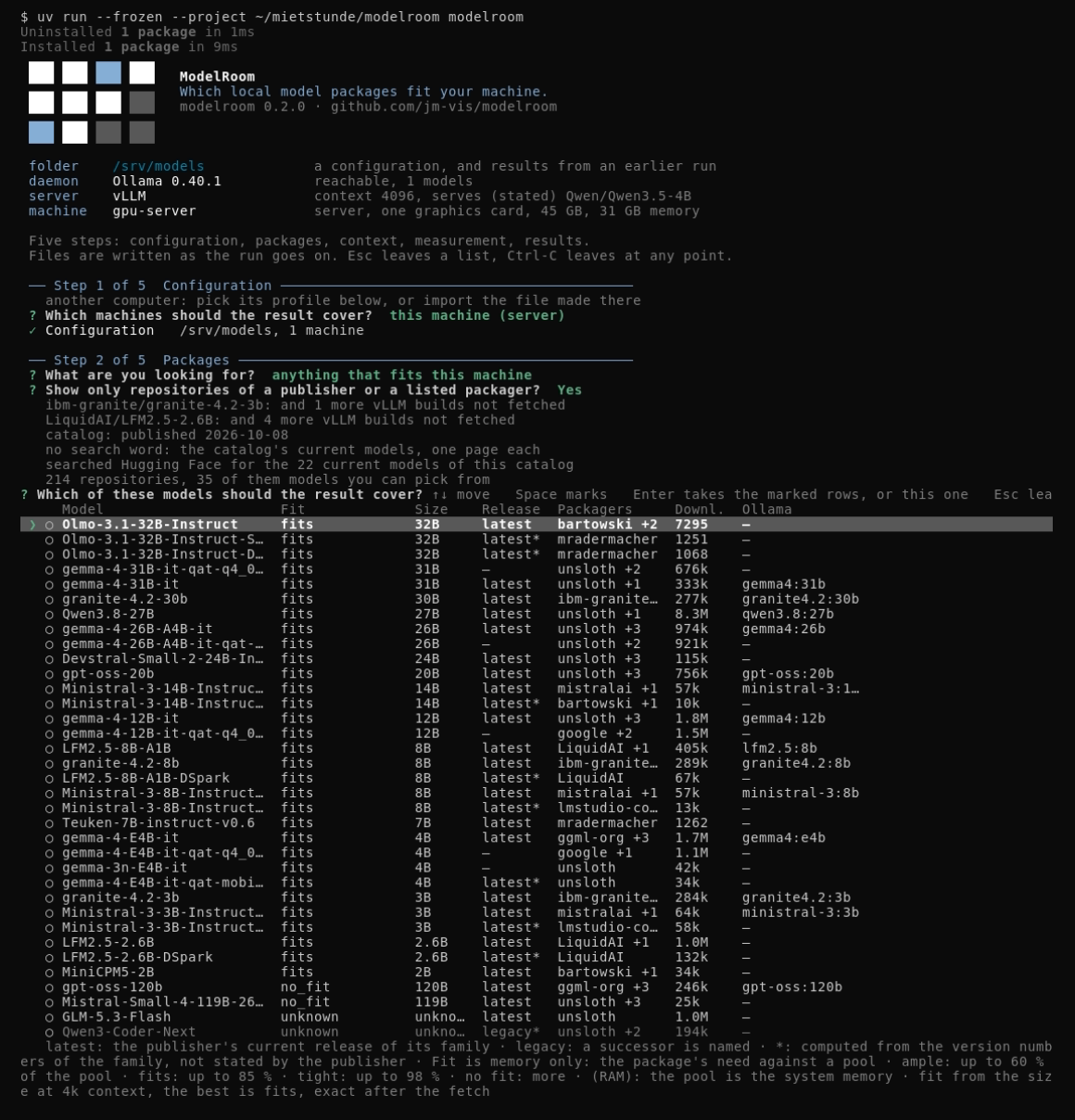
Press Enter on an empty search word and the run looks up the current models of the shipped
catalog, one page each, and lists them by the rule of the result: what fits into the graphics card
first, the largest model that fits and has no named successor at the top, then what needs system
memory. This is the answer to "I have no model in mind, show me what fits this machine". In the
picture the run searched for the 22 current models of the catalog and found 214 repositories, 35
of them models to pick: on the L40S everything from 32B down fits, the two models of about 120B
are no_fit, and two rows whose size the list does not know stay unknown.
Without a terminal
Every choice is a list with the arrow keys, including yes and no; the search word and a path are
typed. Without an interactive terminal the command prints the help and stops; modelroom --answers <file> takes the answers
from a TOML file instead (for a self-test or CI) -- users there is a number of people or
"12 requests", context a level ("L") or a number of tokens; an answer file written for 0.1.0
needs users added (users = 1 sizes for one person, as 0.1.0 did) -- and modelroom --config <file> works on that configuration rather than the
remembered folder. See CONTRACTS.md, "Guided mode", for every question and its key.
The subcommands never ask anything, except modelroom pull, which asks once before it pulls unless
--yes is given; the guided mode is built on the same measurement, fetch and render. From a clone
of this repository, after uv sync --frozen:
cp modelroom.example.toml modelroom.toml
uv run --frozen modelroom hardware --config modelroom.toml
uv run --frozen modelroom fetch --config modelroom.toml --machine workstation
uv run --frozen modelroom render --config modelroom.toml
cat docs/models.md
- The example configuration names three families, the packagers and publishers it allows,
two machines (
workstation, a writer, andinference-server) and two paths. Relative paths resolve against the configuration file's own directory, never the current working directory. Edit the copy for your own models and machines. hardwaremeasures the machine it runs on and writesstate/hardware/<profile_id>.json. Run it once on every machine you want to size; the machine is remembered in a small pointer file in your home folder, so a second run updates the same profile.--machine <name>is optional and adopts that configuration entry's profile;--cpu-onlyjudges the machine as a CPU machine,--new-identitymeasures a clone as a machine of its own, and--same-machinemeasures this machine again under the profile id it is already bound to -- the answer for a results folder whose profile file is gone. The two exclude each other.fetchqueries the registries and writes the snapshotstate/modelroom.json. The named machine has to be markedwriter = true.renderreads the snapshot and every machine's hardware profile and writes two views: the Markdown one topaths.markdown(docs/models.mdin the example) and the JSON one next to it under the same stem. It takes no--machine. A machine is ranked from the profile its[machines.<name>].profilenames -- the guided mode writes that entry after it has measured the machine. It assumes the context the last guided run of that folder chose ([guided].context), so the ranking it writes is the one that run showed; a configuration no guided run has chosen a context in assumes 8192. On success it prints, after a note for every profile file it could not read, one line with a website for model quality; with a failure (no snapshot, a file of a newer version) it prints none, and a script that expected an empty output now meets that one line. The same line ends the result of the guided run; it is not in the Markdown or the JSON file.- Read the table. Only active, complete packages with
from_metadataorapprovedprovenance are shown, and every one of them is ranked per machine: graphics memory before system memory, the largest model first and, within one model, the least compression that fits; a measurement only decides between two builds of the same compression. With several models the table shows one row per model, and a measured package the rule leaves out is added at the end. The rule and the scenario are printed in the header. Packages fit v1 cannot judge stand under "not covered" with the reason, ones that do not fit under "No fit". Every computed number says(computed), the measured speed says(measured).
--config is required by every subcommand that reads a results folder, and there is no default
path; pull and remote read none.
modelroom pull
A seventh subcommand, with no results folder and no configuration at all (AP9-FR A4): the command
a pull_other handover line names, run on the computer that should get the package.
uv run --frozen modelroom pull hf.co/unsloth/Qwen3.5-9B-GGUF:Q4_K_M --weights-bytes 5680522464
It checks the name is safe to pull, that Ollama answers on this computer, notes where it lists the
name already, checks the free disk against --weights-bytes where one was given, then asks Pull
<name> into Ollama now? (default No) before it pulls -- --yes skips the question for a
terminal-less run. See CONTRACTS.md, "modelroom pull", for its exit codes.
vLLM
On a machine that has vLLM, the table lists vLLM rows beside the Ollama rows: safetensors packages
(AWQ, GPTQ, FP8, W4A16, BF16), judged by vLLM's own memory rule, and under the table head a line
runtime Ollama · vLLM serving Qwen3-8B-AWQ (or vLLM installed, not serving, or vLLM (from its profile) for a machine without a connection). A machine without vLLM shows neither the rows nor the
line, and its result is the same as before. modelroom finds vLLM only where it is installed on the
machine (Linux); the docker line is another way to start the same server, not a way to detect it. A
machine whose vLLM exists only as a Docker image counts as a machine without vLLM; native Windows
and macOS count as without vLLM as well.
The fit. vLLM takes 0.92 of each card, loads the weights, keeps 1.50 GiB per card for itself and
gives the rest to the KV cache. The ranking assumes the requests of step 3 and asks how many of them
the cards hold at once. Several cards of the same size (within 1 %) can share a model by tensor
parallel; the other cards of the machine are left out, and the table head says so. The number of
cards t is the smallest of 1, 2, 4, 8 at which the package fits, that is at most the number of
equal cards, divides the model's attention head count and gives the class fits or ample on the
first t cards; where it fits at none, the largest allowed t shows what the cards can do at best,
and with no head count t is 1, with the reason named. A smaller t answers faster and leaves the
other cards free. Computed, never measured; the numbers behind it are in CONTRACTS.md, "Fit for
vLLM".
The install line is a command, not a pull, and modelroom starts nothing. Choosing a vLLM row prints two commands for the same server; run one of the two in a terminal that stays open. vLLM downloads the model at its first start; then run modelroom again, and step 4 finds the server and measures it (10 requests at once, if that is what the ranking assumes; the number is not ranked and nothing is written).
CUDA_DEVICE_ORDER=PCI_BUS_ID CUDA_VISIBLE_DEVICES=0,1,2,3 VLLM_NO_USAGE_STATS=1 DO_NOT_TRACK=1 vllm serve Qwen/Qwen3-8B-AWQ --revision 4da05a8edb55c6046cce958586c33b61da07bb79 --max-model-len 32768 --tensor-parallel-size 4 --gpu-memory-utilization 0.92 --host 127.0.0.1 --port 8000
mkdir -p "${HF_HUB_CACHE:-${HF_HOME:-${XDG_CACHE_HOME:-$HOME/.cache}/huggingface}/hub}" && docker --host unix:///var/run/docker.sock run --rm --ipc=host --gpus '"device=0,1,2,3"' -e CUDA_DEVICE_ORDER=PCI_BUS_ID -e VLLM_NO_USAGE_STATS=1 -e DO_NOT_TRACK=1 -p 127.0.0.1:8000:8000 --mount "type=bind,src=${HF_HUB_CACHE:-${HF_HOME:-${XDG_CACHE_HOME:-$HOME/.cache}/huggingface}/hub},dst=/root/.cache/huggingface/hub" vllm/vllm-openai:v0.30.0 Qwen/Qwen3-8B-AWQ --revision 4da05a8edb55c6046cce958586c33b61da07bb79 --max-model-len 32768 --tensor-parallel-size 4 --gpu-memory-utilization 0.92 --host 0.0.0.0 --port 8000
Every value in them is checked first (no safe command otherwise), and the cards are bound by
number, always, so a mask your shell already holds cannot shrink the line. If the model allows a
larger --tensor-parallel-size than the one named on the machine's equal cards, a line under the commands says larger --tensor-parallel-size spreads the load over more cards, if the server is yours alone. Cards whose
memory nvidia-smi did not read give no line, only computed only.
The docker line. It talks to the local Docker daemon at unix:///var/run/docker.sock and creates
the cache folder first; with rootless Docker, change the part after --host to your socket. Four
limits:
- It mounts the Hugging Face cache of the machine, so the download lands where the free disk was checked. Started with another volume, vLLM has another place, and the disk check does not apply.
- The container writes into the cache as
root. A latervllm serveof the same user reads those files but cannot write there. - If
HF_HUB_CACHE,HF_HOMEorXDG_CACHE_HOME(the one that counts) is a relative path,docker --mountrefuses it; the line is left out and a note saysdocker: left out, the Hugging Face cache is set as a relative path; set it absolute to get this line. Thevllm serveline stays. - modelroom never calls Docker, neither to detect nor to start, and it ignores
DOCKER_HOSTandDOCKER_CONTEXT.
Where the models are, and "on disk already". vLLM keeps them in the Hugging Face cache: HF_HUB_CACHE,
else $HF_HOME/hub, else $XDG_CACHE_HOME/huggingface/hub, else ~/.cache/huggingface/hub. The disk
rule of step 5 reads the free space there for vLLM rows and at Ollama's place for Ollama rows
(disk 41.2 GB free on C: (Ollama and vLLM models) where both are one drive). A package is on disk when
every start file is in the cache with the size the package declares; the check reads sizes, never
content. huggingface_hub 1.x keeps large files in the cache's own blobs/ folder, and modelroom
counts them as there. A part that is missing counts only its missing bytes.
A server over SSH. With a computer reached over SSH (see "Another computer"), the other end reads
and measures vLLM at the server against its own 127.0.0.1:8000, with no forwarded port. The table
shows runtime Ollama · vLLM serving Qwen3-8B-AWQ · on gpu1, step 4 offers vLLM server on gpu1
beside the Ollama candidates, and step 5 prints both commands with on gpu1 in the label (nothing is
started over SSH) and is on disk already (size checked) where the server has the files. Neither
the model's own name or path as the server states it, nor an address, nor a path of the server
reaches this computer: the server answers with the number of the package of the run, or "another
model". Current behavior: the SSH way needs an answering Ollama at the server; Ollama does not answer on gpu1 ends the run even when only vLLM runs there.
What is assumed and what is checked. The numbers rest on eight assumptions, named in CONTRACTS.md.
Confirmed at a rented server (hand probes of 2026-10-02 and 2026-10-03): vLLM is found at
127.0.0.1:8000 also when it runs from the docker line; the measurement with 10 requests at once
runs; the cache place follows the four rules above; and huggingface_hub 1.x keeps large files in
<cache>/blobs/, which the check now counts. Still open: A1 (1.50 GiB per card also under tensor
parallel), A2 (a model with fewer KV heads than cards, and a hybrid model), A3 (vLLM found over a
non-interactive SSH command in PATH or ~/.local/bin), A5 (vLLM fetches exactly the start files),
A6 and A7 (the card numbers of CUDA_VISIBLE_DEVICES and of Docker's --gpus device= are the
index values of nvidia-smi), A8 (the fixed image tag starts and writes into the mounted cache).
A4 concerns LM Studio, which is not part of this release.
Files
Under paths.state:
| File | Written by | Kind |
|---|---|---|
modelroom.json |
fetch |
snapshot, versioned contract |
hardware/<profile_id>.json |
hardware, on that machine |
hardware profile, versioned contract |
hardware/<profile_id>.json |
the guided mode, for a machine entered by hand | hardware profile, versioned contract |
measurements/<profile_id>/<id>.json |
the load test | speed measurement, versioned contract |
modelroom.lock |
fetch, render |
runtime only, not a contract |
run-status.json |
fetch |
runtime only, not a contract |
The snapshot and the hardware profiles carry a schema_version and can be kept under version
control. The lock file and run-status.json are operating data of one deployment. The lock
file is never deleted: the lock is a kernel lock on it, which the operating system releases
when its holder exits, and a second fetch or render against the same state directory
stops at it instead of waiting.
In your user account, outside every results folder, ~/.modelroom/guided.json remembers the last
folder and which profile is this computer in each, and ~/.modelroom/remote.json holds this
computer's neutral key, your SSH aliases and the shared folder you set up (if any). Neither is
exported or copied into a results folder.
Publishers the search resolves
The shipped catalog modelroom/catalog.toml names the publisher accounts whose models a search
resolves: with the owner filter on, a hit is selectable when the Hugging Face account of its base
model is one of them, whoever packaged the GGUF build, or when you typed that repository yourself. Those accounts are mistralai, utter-project, openGPT-X,
Qwen, deepseek-ai, meta-llama, google, microsoft, openai, zai-org, moonshotai,
ibm-granite, nvidia, allenai, tiiuae, CohereLabs, LiquidAI, HuggingFaceTB, openbmb,
tencent, baidu and MiniMaxAI. Every row of the catalog carries the page it was read from, and
a model is called latest only with the publisher page or collection that says so and the date it
was checked; without one the age stays unknown.
The list is a preference, not a gate (since 2026-09-25). With the owner filter on -- the default
-- a hit whose base model belongs to an account that is not in that list is no row of the list of
models; it is counted in state/search.json among the owners the catalog does not list. Say no to the
filter and it can be picked like any
other, with its age left at unknown for want of evidence and its owner shown as other; and a
repository you name yourself (unsloth/Qwen3.5-9B-GGUF) is never filtered out at all, whatever the
catalog says about it. If a publisher you use is missing, open an issue in
this repository naming the account and one of its models; the catalog is data in this repository
and takes a new family with its evidence.
The guided mode reads the current catalog from the public dataset jm-vis/modelroom-catalog on
Hugging Face and keeps a copy in ~/.modelroom/catalog/: at most one attempt every 24 hours, usually
no request or one, three at most, each answer capped and every redirect kept on huggingface.co.
Whatever goes wrong -- no network, a missing dataset, a file that does not validate -- the run goes on
with the newer of the copy and the catalog shipped in the package, and step 2 says which one applied.
MODELROOM_CATALOG=shipped skips the request and uses the shipped catalog only. If the cache folder cannot be
written, every run makes its one attempt (three requests at most, counted against the shared budget) and the
choice stays the same.
Maintenance: a daily background run proposes changes from the Hub (scripts/catalog_scan.py), the maintainer
approves them by number in conversation, and scripts/catalog_publish.py commits and uploads exactly the bytes of
that commit. Nothing is published without the maintainer's word, and the published file is compared with the
repository every day.
What the fit class means
For a judged fit, the cell reads <class> (<mode>, need <n> / pool <n> GiB). The class is
computed from a memory formula: weights plus 10 %, plus a 16-bit KV cache for the context of the
run (the level the guided mode chose for the folder; 8192 for a configuration no guided run has
chosen one in), plus 0.5 GiB. The result is compared with the VRAM of one graphics card minus
its reserve -- the largest card, the way Ollama loads a model -- then, on a machine with several
cards, with all of them together, each minus its own reserve (gpu_split), and with the RAM minus
its reserve when it fits no graphics memory. ample needs at most 60 % of that pool, fits
85 %, tight 98 %; anything above is no_fit. Off the GPU the class is capped at fits. Each
word says only what was computed, and a table carries a line under it that says so. The full rule is in CONTRACTS.md,
"Fit contract v1".
The reserve of the system memory follows the machine's size: a quarter of its memory, at least
2 and at most 16 GB (on unified memory a quarter with no upper bound, plus the card reserve). To
set it yourself, write a number into the machine's table of modelroom.toml -- reserve_ram_gib = 12.0 under [machines.<name>] -- and that number always wins; 0.0 gives the whole memory. A
folder written by 0.1.0 carries 8.0 there and keeps it; the table of such a machine says what the
computed reserve would be. A folder written by this version carries no number where none was set;
the released 0.1.0 refuses it with exit 3 (ADR 0012).
Under each table's head the line room names what the fit computes with -- the budget, not the
memory free at this moment: graphics 11.0 GB for models (12.0 GB card minus reserve) · memory 111.7 GB for models (127.7 GB minus reserve) · disk 41.2 GB free on C: (Ollama models). What Ollama holds
right now stands on a line loaded under it, only while it holds a model.
What it does not say: the class is arithmetic, not a measurement. It makes no statement about tokens per second, output quality or whether a runtime actually loads the package. It is labeled "fit (computed, v1)" in the output for that reason.
Limits of fit v1
- Only a dense transformer architecture is judged from its own layers and heads. A hybrid or
mixture-of-experts architecture is judged from the size of the package instead: the same
formula with the KV cache taken from a constant, shown as
fits (from size)and never asample. The KV cache in that formula is one fixed assumption, not a bound: a mixture architecture usually needs less, a dense model with many layers more, so afits (from size)is coarser than afitswith the architecture behind it (CONTRACTS.md, "Fit from size"). - The Ollama fit rule covers complete GGUF packages. vLLM safetensors packages use the separate
fit rule described under "vLLM"; other formats remain
unknown. - A machine without a hardware profile shows
no profile(orno recommendation: no profile). - Unified memory is computed as one pool -- the memory minus both reserves, since the system and
the model share it. Apple Silicon is read as such a pool (its memory from
sysctl hw.memsize); macOS keeps part of that memory for the system, which the reserves are there for. An Intel Mac computes as a machine without a card (CONTRACTS.md, "Hardware profile").
Exit codes
| Code | Meaning |
|---|---|
0 |
success: every fetch area complete; hardware measured and wrote the profile (also when llmfit was not there to cross-check it); render wrote the document (also when its rating source failed) |
1 |
at least one fetch area incomplete (complete areas are still written); or another process holds the lock; or this fetch is not newer than the stored snapshot; or render has no snapshot; or the existing document was rendered from a newer snapshot; or hardware wrote the profile but could not record the binding in the pointer file. Every case but the first and the last leaves the snapshot, hardware profiles, run-status.json and the rendered document unchanged; the lock file may be created or updated |
2 |
the configuration is missing or invalid; the machine is not a writer (fetch) or not configured (hardware); hardware's bound profile is missing or belongs to another machine (run it with --same-machine or --new-identity, never both); or a tool a command requires is missing, older than the minimum, fails, or returns invalid output |
3 |
an unsupported schema_version in the configuration, the snapshot, a hardware profile, the answer file or the pointer file; or one of them is not valid JSON or does not match its model |
130 |
the guided mode was stopped with Ctrl-C; nothing is left half written |
The guided mode ends with 1 when it wrote its document but a step did not finish -- a
measurement that failed, a fetch that did not complete, an import that did not go through, a
pull that did not finish.
Those lines are printed as they happen; the run goes on with the machines that are there.
Source: CONTRACTS.md, "Exit codes", and AGENTS.md.
modelroom pull (AP9-FR A4) has no results folder and no configuration, so its exit codes are its
own: see CONTRACTS.md, "modelroom pull".
Network access
Registry requests use HTTPS to huggingface.co, ollama.com and registry.ollama.ai; local
runtime requests use HTTP to Ollama at 127.0.0.1:11434 and vLLM at 127.0.0.1:8000. Registry
redirects and pagination links are checked against the same registry allowlist before they are
followed. HTTP_PROXY, HTTPS_PROXY and
NO_PROXY from the environment are honored for the registries, but a proxy only changes how an
allowed request travels, never which targets are allowed; the local daemon is reached directly. Details: CONTRACTS.md, "Transport security and
proxying".
The one exception is a computer you name yourself, by its SSH host alias, in "Another computer"
above: modelroom then runs the system ssh to it, with your own SSH configuration and keys, never
a password for that target itself -- a jump host in between answers under its own configuration
and needs BatchMode yes of its own to hold the same promise (see "Another computer"). It never
connects anywhere else on its own.
The result names a website for model quality; modelroom never opens it.
Language choice
Python, because the catalog logic and Pydantic contracts it integrates with are Python, and the run has to be platform neutral (Windows, Linux, macOS). Everything in this repository, from identifiers to documentation, is English.
Release
For maintainers, from a clean clone at the commit to be released:
uv run --frozen python scripts/release-check.py
uv run --frozen python scripts/release-smoke.py
The first is the release gate (clean tree, version and changelog, public hygiene over the files,
the history and the commit metadata, content of wheel and sdist); with --tag vX.Y.Z it also
checks the release tag. The gate needs MODELROOM_RELEASE_PRIVATE_WORDS: the path of a text file
outside the repository with one word per line -- the maintainer's machine names and the like -- that
must not be in the current state, the built packages or the commit metadata; a finding names the
place and the class private word, never the word, and without the file the gate does not pass.
The second installs the built wheel into a fresh environment and runs
hardware, an offline fetch and render against it. Both must end with exit 0; the full
procedure is in AGENTS.md, "Versioning and releases".
What comes next
In the order we plan to build it, none of it dated:
- Throughput for many people. Step 3 sizes the memory for the parallel requests a head count stands for; how fast those requests are served is measured only for one vLLM server you started (see "vLLM"), and that number is not ranked. Beyond roughly eight at once it is a job for a serving stack such as vLLM; the ranking itself stays a rule of thumb, not measured.
- Unified memory, measured. The rule is in; a measured profile of such a machine is what is missing -- an export from one is welcome.
- The catalog's successors. A model shows
legacyonly when the catalog names its successor with the page that says so; many families still carry no such line, and those rows show–. The catalog is a data file in this repository and takes pull requests.
Contributing and conventions
AGENTS.md is the tool-neutral rule set for anyone (human or agent) working on this
repository. CONTRACTS.md describes the data shapes and their versioning. Issues and pull
requests are welcome.
About
We use ModelRoom to decide which models run on our own laptops and servers, and with clients to size on-premise deployments before anyone buys hardware.
License
MIT, see LICENSE. The machine measurement is cross-checked with llmfit (MIT), which runs as a separate program and is not part of this package.
1 maintainer

Metadata
1 maintainer
Release files for modelroom 0.2.0
For a detailed explanation of source distributions (sdists) and built distributions (wheels), please see the package formats documentation.
Source distribution (sdist)
| File | Size | Uploaded | |
|---|---|---|---|
| modelroom-0.2.0.tar.gz | 2.5 MB | Details |
Built distribution (wheel)
| File | Interpreter | ABI | Platform | Reset |
|---|---|---|---|---|
| modelroom-0.2.0-py3-none-any.whl | Python 3 | none | any | Details |
Total release size: 3.1 MB
Release files / modelroom-0.2.0.tar.gz
| Download URL | modelroom-0.2.0.tar.gz |
|---|---|
| Size | 2.5 MB |
| Tags | Source |
|
SHA-256 checksum How to use checksums |
60b6adf6be7738d9df6a5ff270e4bade05c77130be1145e87fe6bfa1af3e5d12
|
|
BLAKE2b-256 checksum How to use checksums |
44d42270e4163b1b49dc6d905fcfe1678088fa885b39e4c22ea8fa1b3d744ee1
|
| Upload date | |
|
Uploaded using Trusted Publishing? What is trusted publishing? |
No |
| Uploaded via |
uv/0.11.7 {"installer":{"name":"uv","version":"0.11.7","subcommand":["publish"]},"python":null,"implementation":{"name":null,"version":null},"distro":null,"system":{"name":null,"release":null},"cpu":null,"openssl_version":null,"setuptools_version":null,"rustc_version":null,"ci":null}
|
Release files / modelroom-0.2.0-py3-none-any.whl
| Download URL | modelroom-0.2.0-py3-none-any.whl |
|---|---|
| Size | 607.7 kB |
| Tags | Python 3 |
|
SHA-256 checksum How to use checksums |
c36b39a3913f1256f7a48567256972baefbea81e1415bd291fd3391a75f01b79
|
|
BLAKE2b-256 checksum How to use checksums |
3a19bee75353891669b8b09e4653c41334a7fdae7721d5ea2a5bcbcfe7e5ea3c
|
| Upload date | |
|
Uploaded using Trusted Publishing? What is trusted publishing? |
No |
| Uploaded via |
uv/0.11.7 {"installer":{"name":"uv","version":"0.11.7","subcommand":["publish"]},"python":null,"implementation":{"name":null,"version":null},"distro":null,"system":{"name":null,"release":null},"cpu":null,"openssl_version":null,"setuptools_version":null,"rustc_version":null,"ci":null}
|














