

Scale your pandas workflows by changing one line of code





To use Modin, replace the pandas import:
# import pandas as pd
import modin.pandas as pd
Installation
Modin can be installed from PyPI:
pip install modin
If you don't have Ray or Dask installed, you will need to install Modin with one of the targets:
pip install modin[ray] # Install Modin dependencies and Ray to run on Ray
pip install modin[dask] # Install Modin dependencies and Dask to run on Dask
pip install modin[all] # Install all of the above
Modin will automatically detect which engine you have installed and use that for scheduling computation!
Pandas API Coverage
| pandas Object | Modin's Ray Engine Coverage | Modin's Dask Engine Coverage |
|---|---|---|
pd.DataFrame |
 |
|
pd.Series |
 |
|
pd.read_csv |
✅ | ✅ |
pd.read_table |
✅ | ✅ |
pd.read_parquet |
✅ | ✅ |
pd.read_sql |
✅ | ✅ |
pd.read_feather |
✅ | ✅ |
pd.read_excel |
✅ | ✅ |
pd.read_json |
✳️ | ✳️ |
pd.read_<other> |
✴️ | ✴️ |
Choosing a Compute Engine
If you want to choose a specific compute engine to run on, you can set the environment
variable MODIN_ENGINE and Modin will do computation with that engine:
export MODIN_ENGINE=ray  # Modin will use Ray
export MODIN_ENGINE=dask  # Modin will use Dask
This can also be done within a notebook/interpreter before you import Modin:
import os

os.environ["MODIN_ENGINE"] = "ray"  # Modin will use Ray
os.environ["MODIN_ENGINE"] = "dask"  # Modin will use Dask

import modin.pandas as pd
Note: You should not change the engine after you have imported Modin as it will result in undefined behavior
Which engine should I use?
If you are on Windows, you must use Dask. Ray does not support Windows. If you are on Linux or Mac OS, you can install and use either engine. There is no knowledge required to use either of these engines as Modin abstracts away all of the complexity, so feel free to pick either!
Advanced usage
In Modin, you can start a custom environment in Dask or Ray and Modin will connect to that environment automatically. For example, if you'd like to limit the amount of resources that Modin uses, you can start a Dask Client or Initialize Ray and Modin will use those instances. Make sure you've set the correct environment variable so Modin knows which engine to connect to!
For Ray:
import ray
ray.init(plasma_directory="/path/to/custom/dir", object_store_memory=10**10)
# Modin will connect to the existing Ray environment
import modin.pandas as pd
For Dask:
from distributed import Client
client = Client(n_workers=6)
# Modin will connect to the Dask Client
import modin.pandas as pd
This gives you the flexibility to start with custom resource constraints and limit the amount of resources Modin uses.
Full Documentation
Visit the complete documentation on readthedocs: https://modin.readthedocs.io
Scale your pandas workflow by changing a single line of code.
import modin.pandas as pd
import numpy as np

frame_data = np.random.randint(0, 100, size=(2**10, 2**8))
df = pd.DataFrame(frame_data)
In local (without a cluster) modin will create and manage a local (dask or ray) cluster for the execution
To use Modin, you do not need to know how many cores your system has and you do not need to specify how to distribute the data. In fact, you can continue using your previous pandas notebooks while experiencing a considerable speedup from Modin, even on a single machine. Once you've changed your import statement, you're ready to use Modin just like you would pandas.
Faster pandas, even on your laptop
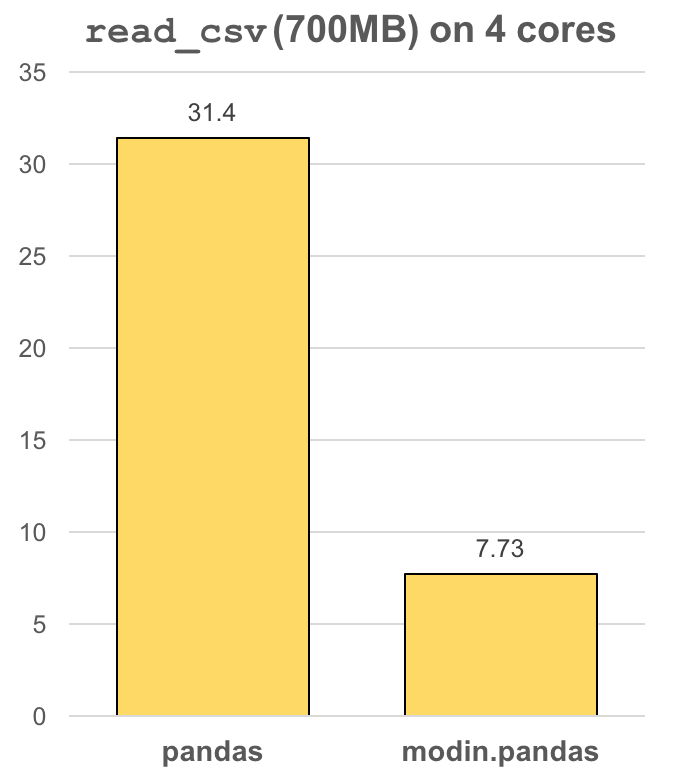
The modin.pandas DataFrame is an extremely light-weight parallel DataFrame. Modin
transparently distributes the data and computation so that all you need to do is
continue using the pandas API as you were before installing Modin. Unlike other parallel
DataFrame systems, Modin is an extremely light-weight, robust DataFrame. Because it is
so light-weight, Modin provides speed-ups of up to 4x on a laptop with 4 physical cores.
In pandas, you are only able to use one core at a time when you are doing computation of
any kind. With Modin, you are able to use all of the CPU cores on your machine. Even in
read_csv, we see large gains by efficiently distributing the work across your entire
machine.
import modin.pandas as pd

df = pd.read_csv("my_dataset.csv")
Modin is a DataFrame designed for datasets from 1MB to 1TB+
We have focused heavily on bridging the solutions between DataFrames for small data (e.g. pandas) and large data. Often data scientists require different tools for doing the same thing on different sizes of data. The DataFrame solutions that exist for 1KB do not scale to 1TB+, and the overheads of the solutions for 1TB+ are too costly for datasets in the 1KB range. With Modin, because of its light-weight, robust, and scalable nature, you get a fast DataFrame at small and large data. With preliminary cluster and out of core support, Modin is a DataFrame library with great single-node performance and high scalability in a cluster.
Modin Architecture
We designed Modin to be modular so we can plug in different components as they develop and improve:

Visit the Documentation for more information, and checkout the difference between Modin and Dask!
modin.pandas is currently under active development. Requests and contributions are welcome!
More information and Getting Involved
- Documentation
- Ask questions or participate in discussions on our Discourse
- Join our mailing list modin-dev@googlegroups.com
- Submit bug reports to our GitHub Issues Page
- Contributions are welcome! Open a pull request
7 maintainers


Metadata
7 maintainers
Release files for modin 0.9.1
For a detailed explanation of source distributions (sdists) and built distributions (wheels), please see the package formats documentation.
Source distribution (sdist)
| File | Size | Uploaded | Provenance | Actions |
|---|---|---|---|---|
| modin-0.9.1.tar.gz | 422.7 kB | Without provenance | Details for modin-0.9.1.tar.gz |
Built distributions (wheels)
| File | Actions Reset | |||
|---|---|---|---|---|
| modin-0.9.1-py3-none-win_amd64.whl | Python 3 | none | Windows x86-64 | Details for modin-0.9.1-py3-none-win_amd64.whl |
| modin-0.9.1-py3-none-win32.whl | Python 3 | none | Windows x86-32 | Details for modin-0.9.1-py3-none-win32.whl |
| modin-0.9.1-py3-none-manylinux1_x86_64.whl | Python 3 | none | Linux glibc 2.5+ x86-64 | Details for modin-0.9.1-py3-none-manylinux1_x86_64.whl |
| modin-0.9.1-py3-none-manylinux1_i686.whl | Python 3 | none | Linux glibc 2.5+ x86-32 | Details for modin-0.9.1-py3-none-manylinux1_i686.whl |
| modin-0.9.1-py3-none-macosx_10_9_x86_64.whl | Python 3 | none | macOS 10.9+ x86-64 | Details for modin-0.9.1-py3-none-macosx_10_9_x86_64.whl |
Total release size: 3.3 MB
Release files / modin-0.9.1.tar.gz
| Download URL | modin-0.9.1.tar.gz |
|---|---|
| Size | 422.7 kB |
| Tags | Source |
|
SHA-256 checksum How to use checksums |
6a31ab403ca47eb1d0d1c42a7a7faa181ee85154afe1d264a07c06da2de633ff
|
|
BLAKE2b-256 checksum How to use checksums |
c4deb6befe4f022553b09be9c92bf88128b2e391c580fe7ca4876acb77aec416
|
| Upload date | |
|
Uploaded using Trusted Publishing? What is trusted publishing? |
No |
| Uploaded via |
twine/3.4.0 importlib_metadata/3.7.3 packaging/20.4 pkginfo/1.6.1 requests/2.24.0 requests-toolbelt/0.9.1 tqdm/4.50.2 CPython/3.8.5
|
Release files / modin-0.9.1-py3-none-win_amd64.whl
| Download URL | modin-0.9.1-py3-none-win_amd64.whl |
|---|---|
| Size | 579.7 kB |
| Tags | Python 3 Windows x86-64 |
|
SHA-256 checksum How to use checksums |
b5d80ab6c12278e5cb0c2cfb85a7df50cfabd181bdc428d0df34197f16f4f5c0
|
|
BLAKE2b-256 checksum How to use checksums |
98250b147c66dc8ce152aef4e9da8d9778a4d4da803dbd7da3d0dd68718923ba
|
| Upload date | |
|
Uploaded using Trusted Publishing? What is trusted publishing? |
No |
| Uploaded via |
twine/3.4.0 importlib_metadata/3.7.3 packaging/20.4 pkginfo/1.6.1 requests/2.24.0 requests-toolbelt/0.9.1 tqdm/4.50.2 CPython/3.8.5
|
Release files / modin-0.9.1-py3-none-win32.whl
| Download URL | modin-0.9.1-py3-none-win32.whl |
|---|---|
| Size | 579.7 kB |
| Tags | Python 3 Windows x86-32 |
|
SHA-256 checksum How to use checksums |
e193ede9609a494269d5b03407efd614d4c16576c5f28bfcdb3ccd50742e2870
|
|
BLAKE2b-256 checksum How to use checksums |
c4fa2669d6e2e074fe96f04c413d6a2f809d3d4540179e06ff6ab9f28b2d8ce4
|
| Upload date | |
|
Uploaded using Trusted Publishing? What is trusted publishing? |
No |
| Uploaded via |
twine/3.4.0 importlib_metadata/3.7.3 packaging/20.4 pkginfo/1.6.1 requests/2.24.0 requests-toolbelt/0.9.1 tqdm/4.50.2 CPython/3.8.5
|
Release files / modin-0.9.1-py3-none-manylinux1_x86_64.whl
| Download URL | modin-0.9.1-py3-none-manylinux1_x86_64.whl |
|---|---|
| Size | 579.7 kB |
| Tags | Linux glibc 2.5+ x86-64 Python 3 |
|
SHA-256 checksum How to use checksums |
89789034975198fe4168287dda767fe365c5b02c2fca4d066bbd108250bccf75
|
|
BLAKE2b-256 checksum How to use checksums |
2087118bc738470e51052162f744f3f7e0d9285f6e73be34b49f62c61ae1893d
|
| Upload date | |
|
Uploaded using Trusted Publishing? What is trusted publishing? |
No |
| Uploaded via |
twine/3.4.0 importlib_metadata/3.7.3 packaging/20.4 pkginfo/1.6.1 requests/2.24.0 requests-toolbelt/0.9.1 tqdm/4.50.2 CPython/3.8.5
|
Release files / modin-0.9.1-py3-none-manylinux1_i686.whl
| Download URL | modin-0.9.1-py3-none-manylinux1_i686.whl |
|---|---|
| Size | 579.7 kB |
| Tags | Linux glibc 2.5+ x86-32 Python 3 |
|
SHA-256 checksum How to use checksums |
ab725c2e7498218f79c8b4a1da67929f303c97098529f38249e8489011087a21
|
|
BLAKE2b-256 checksum How to use checksums |
28afff87edd0e1d74ff50bcfbd4544e9e3057c2a64a7568f9e425f588be69b44
|
| Upload date | |
|
Uploaded using Trusted Publishing? What is trusted publishing? |
No |
| Uploaded via |
twine/3.4.0 importlib_metadata/3.7.3 packaging/20.4 pkginfo/1.6.1 requests/2.24.0 requests-toolbelt/0.9.1 tqdm/4.50.2 CPython/3.8.5
|
Release files / modin-0.9.1-py3-none-macosx_10_9_x86_64.whl
| Download URL | modin-0.9.1-py3-none-macosx_10_9_x86_64.whl |
|---|---|
| Size | 579.7 kB |
| Tags | Python 3 macOS 10.9+ x86-64 |
|
SHA-256 checksum How to use checksums |
7f400859ec52f6bdbbc893ad1e82dfce47cf965a8007008826a1006b34aa3e21
|
|
BLAKE2b-256 checksum How to use checksums |
12230842c64f2a3def8aa777dbaf229f428d56b0e052856a4847494975b52758
|
| Upload date | |
|
Uploaded using Trusted Publishing? What is trusted publishing? |
No |
| Uploaded via |
twine/3.4.0 importlib_metadata/3.7.3 packaging/20.4 pkginfo/1.6.1 requests/2.24.0 requests-toolbelt/0.9.1 tqdm/4.50.2 CPython/3.8.5
|
Security for modin 0.9.1
Provenance
Provenance describes where a file came from. On PyPI, provenance is shared via attestations, which provide a verifiable record of the build or publishing details. View details, limitations and caveats.
No provenance found
None of the files in this release were uploaded with provenance metadata.
A note on package security
PyPI is a repository for distributing packages, not a service for auditing them. While third-party security researchers and our staff do their best to detect and remove malicious packages, PyPI cannot guarantee the quality, security or suitability of any given package.
To learn more about protecting yourself from malicious actors, visit our package security documentation.














