
modist
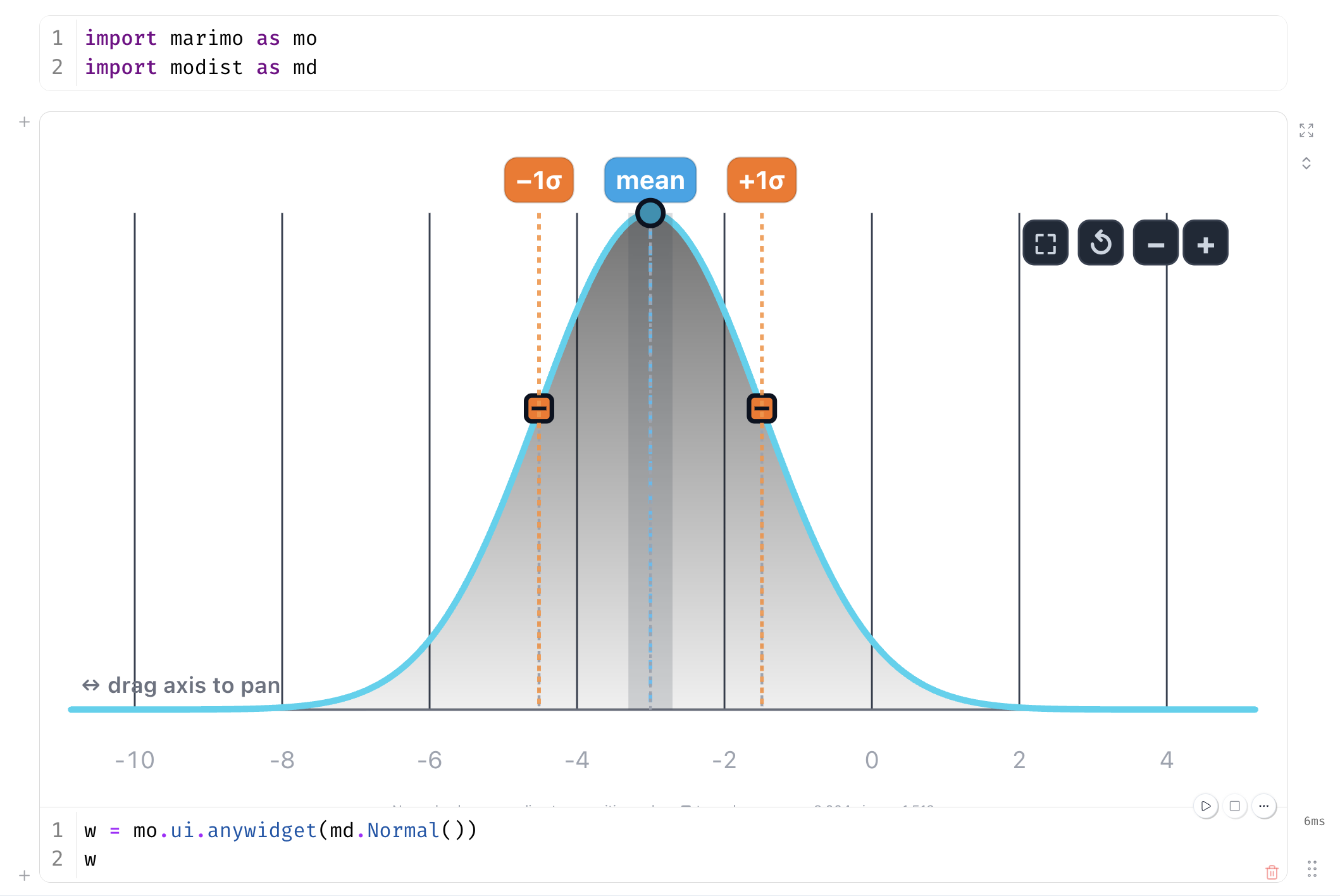
Interactive distribution widgets for marimo, in the style
of koaning/wigglystuff. Drag the
density curve to shape a distribution, then feed the params straight into a
distribution constructor with a single splat.
Install
uv add modist # or: uv pip install modist (pip install modist)
The grouped-priors UI (md.ui) additionally requires marimo:
uv add 'modist[marimo]' (or pip install modist[marimo]). The
priors-from-model helpers (md.pymc) additionally require pymc:
uv add 'modist[marimo,pymc]'.
Quickstart
import marimo as mo
import modist as md

w = mo.ui.anywidget(md.Normal())
w
params = w.value # {'mu': ..., 'sigma': ...}
import pymc as pm
dist = pm.Normal.dist(**params)   # or pm.Beta / pm.Gamma / pm.StudentT
Priors UI
Allocate a whole set of priors at once with a tabbed panel — one draggable distribution per prior:
import modist as md

priors = {"intercept": md.Normal(), "slope": md.Normal(), "sigma": md.Gamma()}
ui = md.ui.create_tabs(priors)
ui
ui.value # {'intercept': {'mu': ..., 'sigma': ...}, 'sigma': {'alpha': ..., 'beta': ...}, ...}
ui.value re-runs live as you drag, and each prior splats straight into its
constructor: pm.Normal.dist(**ui.value["intercept"]). Use
md.ui.create_tabs(priors, orientation="vertical") for a vertical tab bar,
md.ui.create_tabs(priors, height=260) for shorter panels (the widgets size by
aspect ratio, so a smaller height just narrows them), or
md.ui.create_stack(priors) to show every prior at once.
ui.priors maps each name to a pymc_extras.Prior
object (pip install pymc-extras). Your original distribution instances stay
live as you drag, so symbolic flows built off them
(w.create_variable(...), w.params, w.scipy) keep working.
Requires marimo (modist[marimo]). import modist itself stays marimo-free —
md.ui is imported lazily on first access.
Priors from a PyMC model
Requires
modist[marimo,pymc].md.pymcis imported lazily, so plainimport modistdoesn't pull in pymc.
The same idea, lifted from a built model. md.pymc.create_priors(model)
finds the model's root priors — distributions whose parameters don't depend
on other distributions — replaces each with a draggable widget, compiles a
sampler once, and bundles everything into a Priors panel you can drag, draw
from, and hand straight to inference. The whole loop, from model to
pm.sample, is one short session:
import numpy as np, pymc as pm, modist as md
x = np.random.default_rng(0).normal(size=(50, 3))
y = x @ [1.0, -0.5, 2.0] + np.random.default_rng(1).normal(size=50)

with pm.Model(coords={"covariate": ["retention", "content", "price"]}) as model:
    alpha = pm.Normal("alpha", mu=pm.Normal("alpha_mu", sigma=5), sigma=2)
    beta = pm.Normal("beta", dims="covariate")          # one widget per covariate
    sigma = pm.HalfNormal("sigma")                      # auto-mapped to a Gamma widget
    pm.Normal("obs", mu=alpha + x @ beta, sigma=sigma, observed=y)

ui = md.pymc.create_priors(model)   # tabs: alpha_mu, sigma, and a per-covariate beta group
ui                                    # drag the density curves to reshape the priors
Then use for prior predictive, etc:
ui.value                              # live params, ready to splat into pm.*.dist(**p)
ui.draw(1_000)                         # draws of every model RV, driven by the widgets
ui.draw(1_000, beta_price_mu=1.5)       # ... with a named per-parameter override
ui.sample_prior_predictive(1_000)       # -> xr.DataTree: prior / prior_predictive groups
Use the set_distributions method in order to define a new PyMC model.
new_model = ui.set_distributions()    # the widget families replace the priors
idata = pm.sample(model=new_model)    # ordinary pm.sample, ready for arviz
Families
| Widget | Params | Domain | Drag affordances |
|---|---|---|---|
Normal |
mu, sigma |
free | mean line → mu, ±1σ squares → sigma |
Beta |
alpha, beta |
fixed [0, 1] |
mean line → translate, q25/q75 squares → concentrate |
Gamma |
alpha, beta |
edge pinned at 0 | mean line → translate, q25/q75 squares → reshape |
StudentT |
mu, sigma, nu |
free | mean line → mu, q75 square → sigma, tails dial → nu |
StudentT's third parameter is a tails dial: drag it up for fatter tails
(lower nu) or down for thinner tails (higher nu). Because nu has no
natural on-curve landmark, its drag is a separate 1-D slider rather than a
point you move on the density curve.
alpha/beta follow the PyMC / statistics convention
(Gamma's beta is the rate, not scipy's scale). The lazy .scipy and
.pymc adapters map to the right parametrization automatically:
n = md.Normal(mu=2.0, sigma=3.0)
n.scipy   # <scipy.stats.norm> via loc=/scale=
n.pymc    # pm.Normal.dist(mu=2.0, sigma=3.0)

g = md.Gamma(alpha=2.0, beta=3.0)
g.scipy   # scipy.stats.gamma(a=2.0, scale=1/3)  -- rate handled for you
w.value is a plain dict of the synced traits, so pm.X.dist(**w.value) works
with no conversion.
Jupyter
The widgets are anywidget/ipywidgets under the hood, so they run in plain
Jupyter too — no marimo required. Just display() the widget and read its
.params (or .scipy) instead of wrapping it in mo.ui.anywidget(...):
import modist as md
from IPython.display import display

w = md.Normal(mu=0, sigma=1)
display(w)          # drag the curve to reshape it

w.params            # {'mu': ..., 'sigma': ...}
A full walkthrough notebook — all five families, live scipy stats, and a
beta-prior combination example — lives at
demos/jupyter_example.ipynb.
From a checkout:
uv sync --extra dev --extra scipy   # installs jupyter, ipykernel, jupytext
make jupyter                        # opens demos/jupyter_example.ipynb in JupyterLab
make jupyter registers the repo's .venv as a modist kernel, so the
notebook uses exactly the installed packages. Requires a local
JupyterLab (installed alongside jupyter via the
dev extras).
JavaScript, no Python
The widgets aren't tied to a notebook. There's a standalone, single-file ESM
bundle (dist/modist.js) that renders them on any page with an element and a
script tag — the same view used inside marimo/Jupyter. A taste:
<script type="module">
  import { beta } from "https://williambdean.github.io/modist/latest/modist.js";
  const w = beta(document.getElementById("prior"), { alpha: 1, beta: 3 });
  w.onChange((p) => console.log(p));   // fires on every drag
</script>
Each factory takes (element, params?) and returns a handle:
w.params (live snapshot), w.set({...}), w.reset(), w.onChange(fn)
(returns an unsubscribe), and w.destroy(). The four families export as
normal, beta, gamma, studentT; styles are injected once, and the bundle
uses CSS var() fallbacks so it doesn't need your theme.
For anything that ships to others, pin a release tag instead of latest/ —
jsDelivr serves the git tag copy with a year-long immutable cache, while
latest/ re-deploys with each release (the standalone bundle ships in release
tags from v0.6.0; earlier tags only contain the anywidget bundles):
<script type="module">
  import { gamma, studentT }
    from "https://cdn.jsdelivr.net/gh/williambdean/modist@vX.Y.Z/dist/modist.js";
</script>
How it works
Each family is its own anywidget class with a small set of synced parameter
traits (no x_min/x_max/n_points). The view — SVG scaffold, pan/zoom,
draggable hit lines, and per-family math — lives in a self-contained ESM module.
Source JS lives in js/ (js/base.js shared scaffold + one family file,
all importing jStat for
pdf/cdf/quantile math — managed as an npm dependency, kept MIT-only by a
license gate in the publish workflow). Anywidget delivers _esm as a Blob URL,
which cannot resolve relative imports, so esbuild
bundles each family (jStat inlined) into the committed src/modist/static/*.js
files — the same pattern wigglystuff uses for its JS-heavy widgets.
The same esbuild setup also emits dist/modist.js, the standalone bundle
documented above, for JS-only consumers.
Rebuilding the JS
node build.js     # or: `make js` — esbuild js/*.js -> src/modist/static/*.js (and dist/modist.js)
make js-watch     # rebuild on every edit (for anywidget hot-reload dev)
src/modist/static/*.js and dist/modist.js are committed (jsDelivr and
anywidget serve them straight from the repo), so rebuild them whenever js/
changes and include the diff in the commit. site/index.html (the showcase)
embeds the same bundle inline via build.js, so it opens from file:// with no
server — rebuild after touching js/ or site/.
Development
make venv        # creates .venv with dev deps + esbuild
make test        # pytest
npm run test:js  # Playwright JS integration probes (headless Chromium)
Acknowledgements
- jStat — JavaScript statistics library (MIT), bundled for the pdf/cdf/quantile math.
- wigglystuff — the interaction and architecture model (one class per family, prebuilt ESM per class).
1 maintainer

Metadata
1 maintainer
Release files for modist 0.6.0
For a detailed explanation of source distributions (sdists) and built distributions (wheels), please see the package formats documentation.
Source distribution (sdist)
| File | Size | Uploaded | |
|---|---|---|---|
| modist-0.6.0.tar.gz | 165.0 kB | Details |
Built distribution (wheel)
| File | Interpreter | ABI | Platform | Reset |
|---|---|---|---|---|
| modist-0.6.0-py3-none-any.whl | Python 3 | none | any | Details |
Total release size: 334.8 kB
Release files / modist-0.6.0.tar.gz
| Download URL | modist-0.6.0.tar.gz |
|---|---|
| Size | 165.0 kB |
| Tags | Source |
|
SHA-256 checksum How to use checksums |
d53f35d00516c50a3413caa98d1316e07725937d30fcd9dd3db26337dacd8c87
|
|
BLAKE2b-256 checksum How to use checksums |
fd2455240db6f79d364066eb58f44c0e6abc492b6bdea1e9fd3e4f05ed96f48b
|
| Upload date | |
|
Uploaded using Trusted Publishing? What is trusted publishing? |
Yes |
| Uploaded via |
uv/0.12.10 {"installer":{"name":"uv","version":"0.12.10","subcommand":["publish"]},"python":null,"implementation":{"name":null,"version":null},"distro":{"name":"Ubuntu","version":"24.04","id":"noble","libc":null},"system":{"name":null,"release":null},"cpu":null,"openssl_version":null,"setuptools_version":null,"rustc_version":null,"ci":true}
|
Release files / modist-0.6.0-py3-none-any.whl
| Download URL | modist-0.6.0-py3-none-any.whl |
|---|---|
| Size | 169.8 kB |
| Tags | Python 3 |
|
SHA-256 checksum How to use checksums |
03526b6bfb6cbe3c6d41dd662f680d0dd786d00d4cfbbd56e9d02d47693d02f3
|
|
BLAKE2b-256 checksum How to use checksums |
96a754f151bb0e354af266920f4bffff34b10517d4a5521e503edb3c314236a6
|
| Upload date | |
|
Uploaded using Trusted Publishing? What is trusted publishing? |
Yes |
| Uploaded via |
uv/0.12.10 {"installer":{"name":"uv","version":"0.12.10","subcommand":["publish"]},"python":null,"implementation":{"name":null,"version":null},"distro":{"name":"Ubuntu","version":"24.04","id":"noble","libc":null},"system":{"name":null,"release":null},"cpu":null,"openssl_version":null,"setuptools_version":null,"rustc_version":null,"ci":true}
|














