
MoFA_Stage
English | 中文
MoFA_Stage is a web-based development tool for managing and editing Nodes and Dataflows in the MoFA framework.
Features
-
Agent Management
- Browse Agent list
- Create and copy Agents
- Edit Agent files
- Run and stop Agents
- View execution logs
-
Terminal Access
- Web terminal
- SSH connections
- ttyd integration
-
Code Editing
- Text editor
- File browser
- VSCode Server integration (optional)
Technology Stack
Backend
- Python + Flask
- WebSocket support
- SSH terminal integration
- RESTful API
Frontend
- Vue 3 + Element Plus
- Monaco editor
Third-party Services
- ttyd (recommended)
- code-server (optional)
Quick Start
Environment Requirements
System Support
- Linux (supports apt-get and yum package managers)
- macOS
- Windows is not currently supported, WSL (Windows Subsystem for Linux) is recommended
Software Requirements
- Python 3.8 or higher
- Node.js 14 or higher
- MoFA framework installed
Installation and Run Scripts
The project provides two scripts:
-
install: One-click installation of all dependencies
chmod +x install
./install
Automatically installs backend/frontend dependencies with options for Docker or traditional installation. After installation, it will prompt whether to run, selecting yes will execute the run script. For local deployment, choose non-docker deployment.
-
run: One-click service startup
chmod +x run
./run
Supports both Docker and traditional deployment modes. For local deployment, choose non-docker deployment.
Docker Deployment (Recommended)
Using Docker avoids all environment issues for the fastest deployment:
# Simply run the installation script to choose docker deployment
./install
./run

# Or configure separately:

# One-line frontend deployment
docker run -d -p 3000:80 liyao1119/mofa-stage-frontend

# Start backend
cd backend && python app.py
🚀 Quick Start (30-second deployment)
Method 1: Using Official Image (Recommended)
# 1. Pull and start frontend
docker run -d -p 3000:80 --name mofa-frontend \
  --add-host=host.docker.internal:host-gateway \
  liyao1119/mofa-stage-frontend:latest

# 2. Clone repository and start backend
git clone https://github.com/mofa-org/mofa-stage.git
cd mofa-stage/backend
pip install -r requirements.txt
python app.py

# 3. Access system
# Open browser: http://localhost:3000
Method 2: Local Build
# 1. Clone code
git clone https://github.com/mofa-org/mofa-stage.git
cd mofa-stage

# 2. Use installation script (supports Docker mode selection)
./install

# 3. Start services
./run
📋 System Requirements
- Docker Desktop (Download)
- Python 3.8+ (backend only)
- 4GB available memory
Development Mode (Manual Startup)
- Start the backend
cd backend
python app.py
- Start the frontend (development mode)
cd frontend
npm run dev
Access http://localhost:3000.
Production Deployment
- Build the frontend
cd frontend
npm run build  # Generates in the dist directory
- Deployment methods (choose one)
Using Nginx
server {
    listen 80;

    # Static files
    location / {
        root /path/to/mofa_stage/frontend/dist;
        try_files $uri $uri/ /index.html;
    }

    # API forwarding
    location /api {
        proxy_pass http://localhost:5002;
        proxy_set_header Host $host;
        proxy_set_header X-Real-IP $remote_addr;
    }

    # WebSocket
    location /api/webssh {
        proxy_pass http://localhost:5001;
        proxy_http_version 1.1;
        proxy_set_header Upgrade $http_upgrade;
        proxy_set_header Connection "upgrade";
    }
}
Simple Deployment
Using Python's built-in HTTP server:
cd frontend/dist
python -m http.server 3000
Start the backend:
cd backend
python app.py
Common Issues
Port Occupation
If you encounter port occupation issues, you can use this command to release ports:
for port in 3000 5001 5002 7681; do
    pid=$(lsof -t -i:$port)
    if [ -n "$pid" ]; then
        kill -9 $pid
        echo "Released port $port"
    fi
done
Port Description
| Service | Port | Description |
|---|---|---|
| Frontend | 3000 | Web interface |
| Backend API | 5002 | Flask service |
| WebSSH | 5001 | SSH terminal |
| ttyd | 7681 | Web terminal |
| VS Code | 8080 | Code editor |
ttyd Installation Failure
If ttyd automatic installation fails, you can refer to the ttyd GitHub page for manual installation.
Docker-Specific Issues
Q: Port already in use?
# Check process using port 3000
lsof -i :3000
# Or change port mapping
docker run -d -p 8000:80 ...
Q: Container cannot connect to backend? Make sure backend service is running:
cd backend && python app.py
Q: How to update to latest version?
docker pull liyao1119/mofa-stage-frontend:latest
docker stop mofa-frontend
docker rm mofa-frontend
# Re-run docker run command
Q: How to view container logs?
docker logs mofa-frontend
Docker Advanced Configuration
Custom Build
cd frontend
# Build after modifying configuration
docker build -t my-mofa-frontend .
docker run -d -p 3000:80 my-mofa-frontend
Troubleshooting
-
Check if Docker is running properly
docker ps -
Check network connections
curl http://localhost:3000
curl http://localhost:5002/api/settings
-
Restart container
docker restart mofa-frontend
Directory Structure
mofa-stage/
├── backend/
│   ├── app.py              # Main application
│   ├── config.py           # Configuration
│   ├── routes/             # API routes
│   │   ├── agents.py       # Agent management
│   │   ├── terminal.py     # Terminal features
│   │   ├── webssh.py       # SSH connections
│   │   ├── vscode.py       # VSCode integration
│   │   ├── settings.py     # Settings management
│   │   ├── ttyd.py         # ttyd integration
│   │   └── mermaid.py      # Chart rendering
│   ├── utils/              # Utility modules
│   │   ├── mofa_cli.py     # MoFA command wrapper
│   │   ├── file_ops.py     # File operations
│   │   └── ttyd_manager.py # ttyd management
│   └── requirements.txt    # Python dependencies
├── frontend/
│   ├── src/
│   │   ├── views/          # Page components
│   │   ├── components/     # UI components
│   │   ├── api/            # API calls
│   │   ├── store/          # State management
│   │   └── router/         # Routing
│   └── package.json        # Node.js dependencies
├── install.sh              # Installation script
└── run.sh                  # Startup script
User Journey
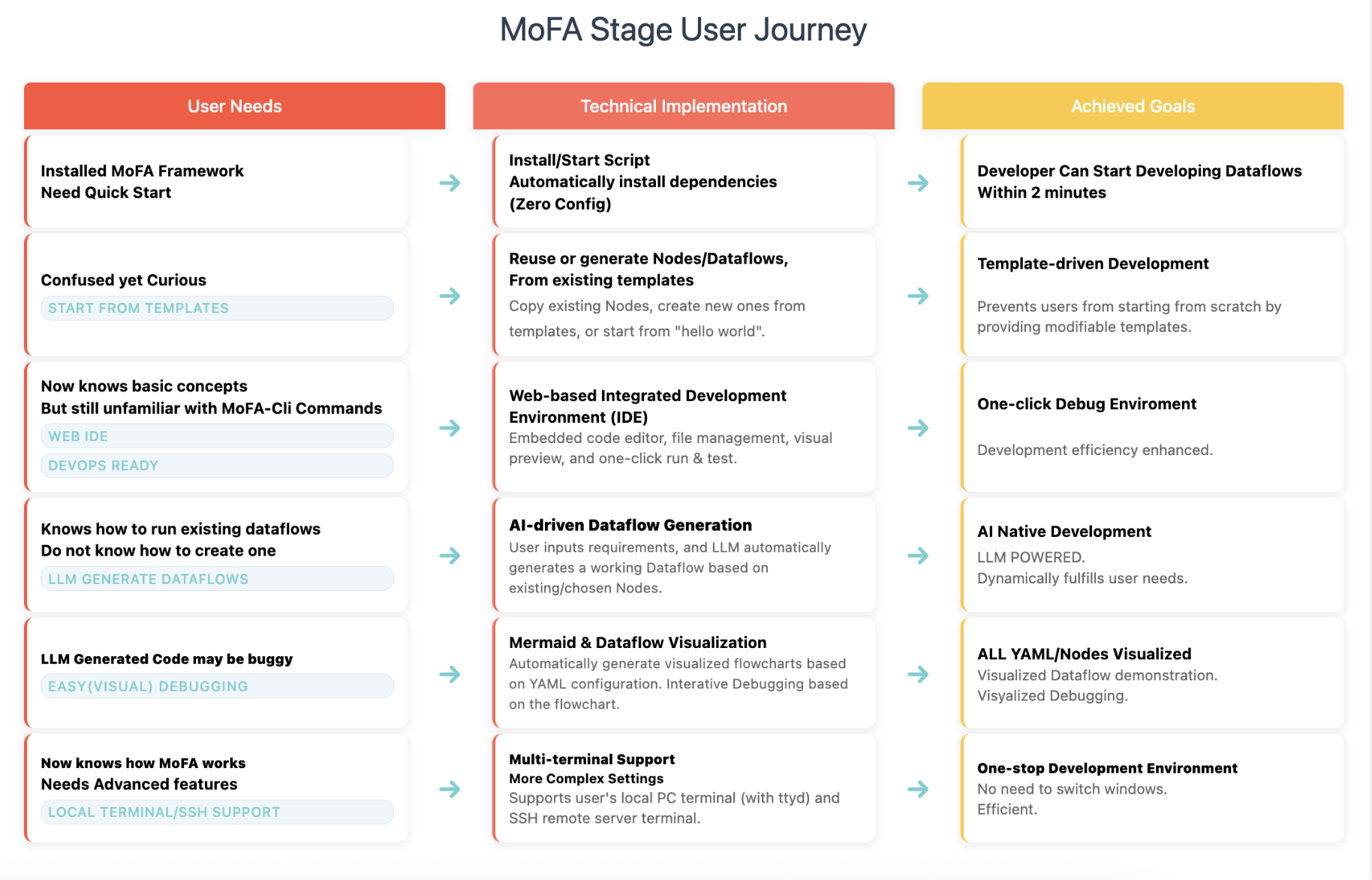
graph TD
    A[🔧 Environment Setup] --> B[⚙️ System Configuration]
    B --> C[🤖 Agent Development]
    C --> D[🔄 Dataflow Orchestration]
    D --> E[🔍 Debugging & Optimization]

    A --> A1[Install MoFA Framework]
    A --> A2[Launch MoFA Stage]
    A --> A3[Access Web Interface]

    B --> B1[Configure MoFA Path]
    B --> B2[Select Terminal Mode]
    B --> B3[Test Connections]

    C --> C1[Browse Agent List]
    C --> C2[Create New Agent]
    C --> C3[Edit Agent Code]
    C --> C4[Test Agent]

    D --> D1[Create Dataflow]
    D --> D2[Connect Agents]
    D --> D3[Set Parameters]
    D --> D4[Run Dataflow]

    E --> E1[View Execution Logs]
    E --> E2[Use Terminal Debugging]
    E --> E3[Performance Monitoring]
    E --> E4[Version Management]
1 maintainer

Metadata
1 maintainer
Release files for mofa-stage 2
For a detailed explanation of source distributions (sdists) and built distributions (wheels), please see the package formats documentation.
Source distribution (sdist)
| File | Size | Uploaded | |
|---|---|---|---|
| mofa_stage-2.tar.gz | 49.8 MB | Details |
Built distribution (wheel)
| File | Interpreter | ABI | Platform | Reset |
|---|---|---|---|---|
| mofa_stage-2-py3-none-any.whl | Python 3 | none | any | Details |
Total release size: 82.0 MB
Release files / mofa_stage-2.tar.gz
| Download URL | mofa_stage-2.tar.gz |
|---|---|
| Size | 49.8 MB |
| Tags | Source |
|
SHA-256 checksum How to use checksums |
8229051ba40b7f0ae6a8995c085920ee985e237e23d0c9f200a2a6993066242a
|
|
BLAKE2b-256 checksum How to use checksums |
6750e9863bf5592e6be2ce452cf0e08ab9ed2c8f74b78d611153b086436f63dd
|
| Upload date | |
|
Uploaded using Trusted Publishing? What is trusted publishing? |
No |
| Uploaded via |
twine/6.1.0 CPython/3.10.18
|
Release files / mofa_stage-2-py3-none-any.whl
| Download URL | mofa_stage-2-py3-none-any.whl |
|---|---|
| Size | 32.1 MB |
| Tags | Python 3 |
|
SHA-256 checksum How to use checksums |
c688835b3e58796c24605cc33451635f9917f0db441579287c9903f0ec7114ab
|
|
BLAKE2b-256 checksum How to use checksums |
99c0022d7d1fd97e5a1ac602f44bdd29153d9a20993db0a5d001af027144cdb9
|
| Upload date | |
|
Uploaded using Trusted Publishing? What is trusted publishing? |
No |
| Uploaded via |
twine/6.1.0 CPython/3.10.18
|














