

Mofresh
Widgets, designed for marimo, that can automatically refresh
Installation
You can install the package using pip:
uv pip install mofresh
Usage
The goal of this project is to offer a few tools that make it easy for you to refresh charts in marimo. This can be useful during a PyTorch training loop where you might want to update a chart on every iteration, but there are many other use-cases for this too.
Widgets
The library provides three widgets:
ImageRefreshWidget- Displays images that can be updated dynamically. Perfect for refreshing matplotlib plots or any image content.HTMLRefreshWidget- Renders HTML content that can be updated on the fly. Great for Altair charts, plotly visualizations, or custom HTML.ProgressBar- A modern progress bar with dark mode support. Ideal for tracking training loops or long-running operations.
How it works
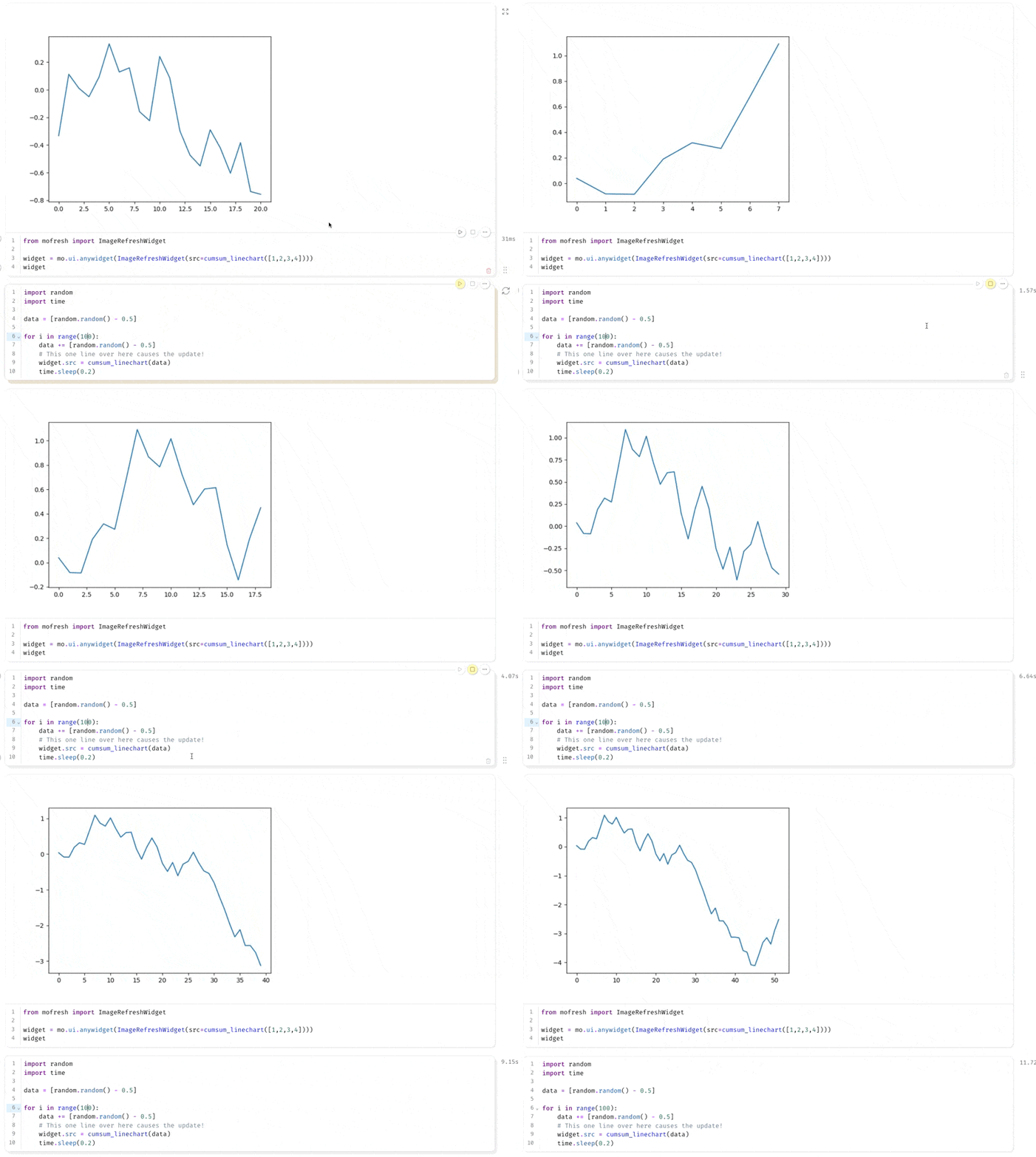
The trick to get updating charts to work is to leverage anywidget. These widgets have a loop that is independant of the marimo cells which means that you can update a chart even if the cell hasn't completed running. The goal of this library is to make it easy to use this pattern by giving you a few utilities.
Effectively that means you can expect to see stuff like this in marimo:
Live demo
If you want to dive deep and experience the API, the best way is to explore the live notebook on Github pages.
1 maintainer

Metadata
1 maintainer
Release files for mofresh 0.2.6
For a detailed explanation of source distributions (sdists) and built distributions (wheels), please see the package formats documentation.
Source distribution (sdist)
| File | Size | Uploaded | |
|---|---|---|---|
| mofresh-0.2.6.tar.gz | 6.5 kB | Details |
Built distribution (wheel)
| File | Interpreter | ABI | Platform | Reset |
|---|---|---|---|---|
| mofresh-0.2.6-py3-none-any.whl | Python 3 | none | any | Details |
Total release size: 12.0 kB
Release files / mofresh-0.2.6.tar.gz
| Download URL | mofresh-0.2.6.tar.gz |
|---|---|
| Size | 6.5 kB |
| Tags | Source |
|
SHA-256 checksum How to use checksums |
6aa73830c3ad0b2d0d8d721b151e64baf804d437e43fa57616c7fdb6de9a983d
|
|
BLAKE2b-256 checksum How to use checksums |
aa16c50c1cfad17c3238d8760da999690aa8d3ccb4f61b6da66f98086c5fcbe2
|
| Upload date | |
|
Uploaded using Trusted Publishing? What is trusted publishing? |
No |
| Uploaded via |
uv/0.7.13
|
Release files / mofresh-0.2.6-py3-none-any.whl
| Download URL | mofresh-0.2.6-py3-none-any.whl |
|---|---|
| Size | 5.6 kB |
| Tags | Python 3 |
|
SHA-256 checksum How to use checksums |
1c32dbc89018464321a5393f1a93a34ac0aee564bfce5a785e73cf49724ce83e
|
|
BLAKE2b-256 checksum How to use checksums |
0efb85c48af08eb9591fc0ffe93d2babc0ddc1372cdfbb23bb61ee2498993332
|
| Upload date | |
|
Uploaded using Trusted Publishing? What is trusted publishing? |
No |
| Uploaded via |
uv/0.7.13
|














