
A Python package for fresh data processing

Project description

Mofresh
Widgets, designed for marimo, that can automatically refresh
Installation
You can install the package using pip:
uv pip install mofresh
Usage
The goal of this project is to offer a few tools that make it easy for you to refresh charts in marimo. This can be useful during a PyTorch training loop where you might want to update a chart on every iteration, but there are many other use-cases for this too.
Widgets
The library provides three widgets:
ImageRefreshWidget- Displays images that can be updated dynamically. Perfect for refreshing matplotlib plots or any image content.HTMLRefreshWidget- Renders HTML content that can be updated on the fly. Great for Altair charts, plotly visualizations, or custom HTML.ProgressBar- A modern progress bar with dark mode support. Ideal for tracking training loops or long-running operations.
How it works
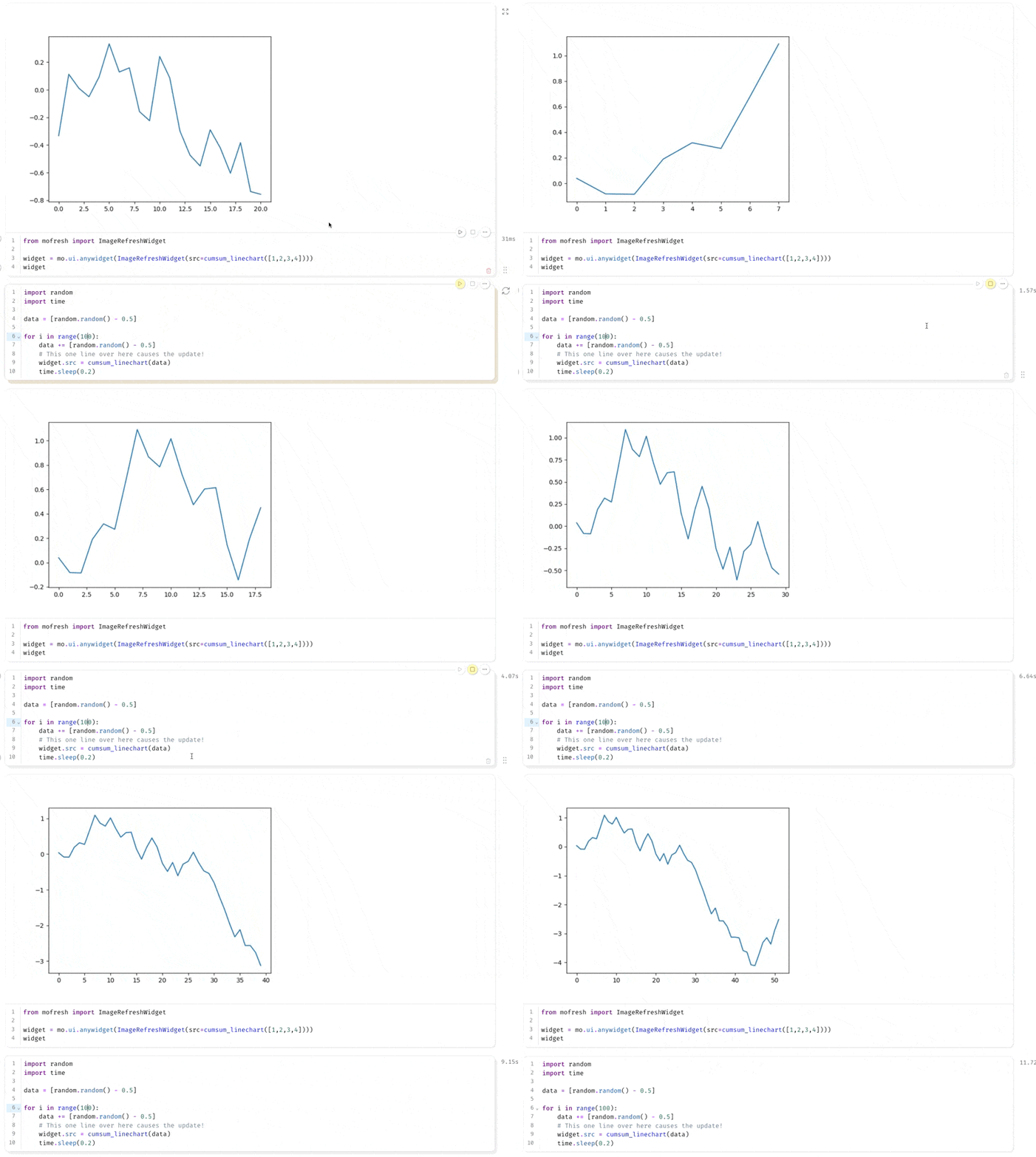
The trick to get updating charts to work is to leverage anywidget. These widgets have a loop that is independant of the marimo cells which means that you can update a chart even if the cell hasn't completed running. The goal of this library is to make it easy to use this pattern by giving you a few utilities.
Effectively that means you can expect to see stuff like this in marimo:
Live demo
If you want to dive deep and experience the API, the best way is to explore the live notebook on Github pages.


Download files
Download the file for your platform. If you're not sure which to choose, learn more about installing packages.
Source Distribution
Built Distribution
Filter files by name, interpreter, ABI, and platform.
If you're not sure about the file name format, learn more about wheel file names.
Copy a direct link to the current filters
File details
Details for the file mofresh-0.2.4.tar.gz.
File metadata
- Download URL: mofresh-0.2.4.tar.gz
- Upload date:
- Size: 6.0 kB
- Tags: Source
- Uploaded using Trusted Publishing? No
- Uploaded via: uv/0.8.13
File hashes
| Algorithm | Hash digest | |
|---|---|---|
| SHA256 |
b80ea97ddade4a09f4373a588ddde521f2b32d97d6fa9ad7bd99ba93a81a0ced
|
|
| MD5 |
66956dc1bb7847f4f01761f63768b52b
|
|
| BLAKE2b-256 |
66f84fcc6e0eb22595ed1be594950e69ee63230a2a4da737ee2c6e9e44d47d9b
|
File details
Details for the file mofresh-0.2.4-py3-none-any.whl.
File metadata
- Download URL: mofresh-0.2.4-py3-none-any.whl
- Upload date:
- Size: 5.1 kB
- Tags: Python 3
- Uploaded using Trusted Publishing? No
- Uploaded via: uv/0.8.13
File hashes
| Algorithm | Hash digest | |
|---|---|---|
| SHA256 |
79d25988a1257361ab27f48c2ab33b3d937f5018254acd403dfcd97be62ec667
|
|
| MD5 |
043bac47f5443cf07ec4ca54b3dc4868
|
|
| BLAKE2b-256 |
73345e392159d727de6e743f5cb51efeb184cdeb4fb80acb58b46a6e55a036cf
|






