
This release is a pre-release and may not be stable for production use.
MONAI Label





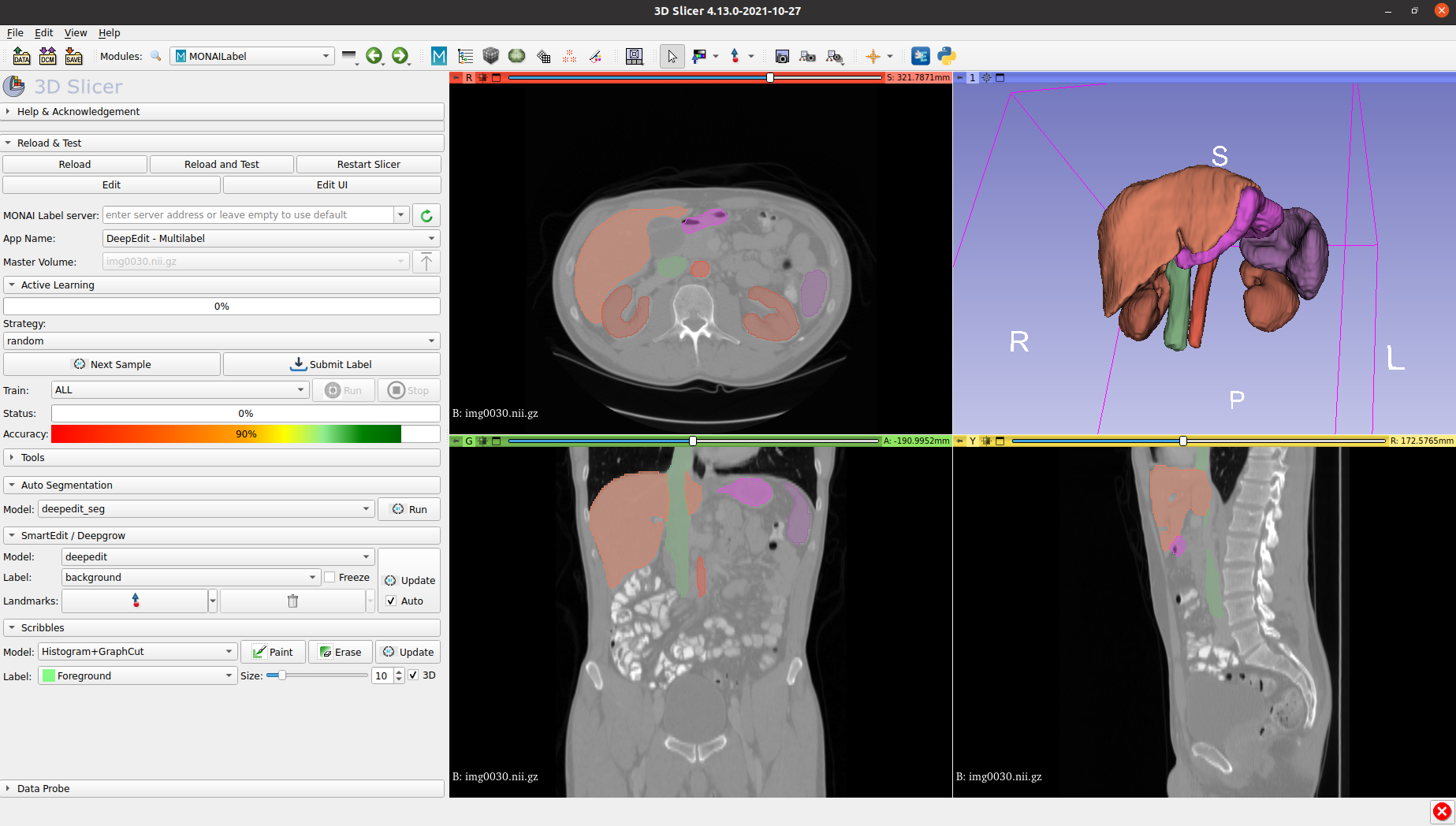
MONAI Label is a server-client system that facilitates interactive medical image annotation by using AI. It is an open-source and easy-to-install ecosystem that can run locally on a machine with one or two GPUs. Both server and client work on the same/different machine. However, initial support for multiple users is restricted. It shares the same principles with MONAI.
Features
The codebase is currently under active development.
- framework for developing and deploying MONAI Label Apps to train and infer AI models
- compositional & portable APIs for ease of integration in existing workflows
- customizable design for varying user expertise
- 3DSlicer support
Installation
MONAI Label supports following OS with GPU/CUDA enabled.
- Ubuntu
- Windows
To install the current release, you can simply run:
  pip install monailabel

  # download sample apps/dataset
  monailabel apps --download --name deepedit_left_atrium --output apps
  monailabel datasets --download --name Task02_Heart --output datasets

  # run server
  monailabel start_server --app apps\deepedit_left_atrium --studies datasets\Task02_Heart\imagesTr
For prerequisites, other installation methods (using the default GitHub branch, using Docker, etc.), please refer to the installation guide.
Once you start the MONAI Label Server, by default it will be up and serving at http://127.0.0.1:8000/. Open the serving URL in browser. It will provide you the list of Rest APIs available.
3D Slicer
Download Preview Release from https://download.slicer.org/ and install MONAI Label plugin from Slicer Extension Manager.
Refer 3D Slicer plugin for other options to install and run MONAI Label plugin in 3D Slicer.
Contributing
For guidance on making a contribution to MONAI Label, see the contributing guidelines.
Community
Join the conversation on Twitter @ProjectMONAI or join our Slack channel.
Ask and answer questions over on MONAI Label's GitHub Discussions tab.
Links
- Website: https://monai.io/
- API documentation: https://docs.monai.io/projects/label
- Code: https://github.com/Project-MONAI/MONAILabel
- Project tracker: https://github.com/Project-MONAI/MONAILabel/projects
- Issue tracker: https://github.com/Project-MONAI/MONAILabel/issues
- Wiki: https://github.com/Project-MONAI/MONAILabel/wiki
- Test status: https://github.com/Project-MONAI/MONAILabel/actions
- PyPI package: https://pypi.org/project/monailabel/
- Weekly previews: https://pypi.org/project/monailabel-weekly/
- Docker Hub: https://hub.docker.com/r/projectmonai/monailabel
2 maintainers


Metadata
2 maintainers
Release files for monailabel-weekly 0.2.dev2129
For a detailed explanation of source distributions (sdists) and built distributions (wheels), please see the package formats documentation.
Source distribution (sdist)
| File | Size | Uploaded | Provenance | |
|---|---|---|---|---|
| monailabel-weekly-0.2.dev2129.tar.gz | 1.2 MB | Without provenance | Details |
Built distribution (wheel)
| File | Interpreter | ABI | Platform | Reset |
|---|---|---|---|---|
| monailabel_weekly-0.2.dev2129-py3-none-any.whl | Python 3 | none | any | Details |
Total release size: 2.5 MB
Release files / monailabel-weekly-0.2.dev2129.tar.gz
| Download URL | monailabel-weekly-0.2.dev2129.tar.gz |
|---|---|
| Size | 1.2 MB |
| Tags | Source |
|
SHA-256 checksum How to use checksums |
15ba2db16bc2cfa41ff11c9ce572c289495f367daadac44400d4593b27835620
|
|
BLAKE2b-256 checksum How to use checksums |
0933b59673ef2c8e42c88fc032071cdf4315becbe8179da8aa91682bae8b63ee
|
| Upload date | |
|
Uploaded using Trusted Publishing? What is trusted publishing? |
No |
| Uploaded via |
twine/3.4.1 importlib_metadata/4.6.1 pkginfo/1.7.1 requests/2.26.0 requests-toolbelt/0.9.1 tqdm/4.61.2 CPython/3.9.6
|
Release files / monailabel_weekly-0.2.dev2129-py3-none-any.whl
| Download URL | monailabel_weekly-0.2.dev2129-py3-none-any.whl |
|---|---|
| Size | 1.3 MB |
| Tags | Python 3 |
|
SHA-256 checksum How to use checksums |
c20cce64f60a49dbabf5fc8b5382d32c9f388b062ae6f006016b61b92b55472c
|
|
BLAKE2b-256 checksum How to use checksums |
677f6af57bad145eedc2e1fe797dbd2c6ece131be45b93b1a46590ce4178b24e
|
| Upload date | |
|
Uploaded using Trusted Publishing? What is trusted publishing? |
No |
| Uploaded via |
twine/3.4.1 importlib_metadata/4.6.1 pkginfo/1.7.1 requests/2.26.0 requests-toolbelt/0.9.1 tqdm/4.61.2 CPython/3.9.6
|
Security for monailabel-weekly 0.2.dev2129
Provenance
Provenance describes where a file came from. On PyPI, provenance is shared via attestations, which provide a verifiable record of the build or publishing details. View details, limitations and caveats.
No provenance found
None of the files in this release were uploaded with provenance metadata.
A note on package security
PyPI is a repository for distributing packages, not a service for auditing them. While third-party security researchers and our staff do their best to detect and remove malicious packages, PyPI cannot guarantee the quality, security or suitability of any given package.














