
This release is a pre-release and may not be stable for production use.
MONAI Label







MONAI Label is a server-client system that facilitates interactive medical image annotation by using AI. It is an open-source and easy-to-install ecosystem that can run locally on a machine with single or multiple GPUs. Both server and client work on the same/different machine. It shares the same principles with MONAI.
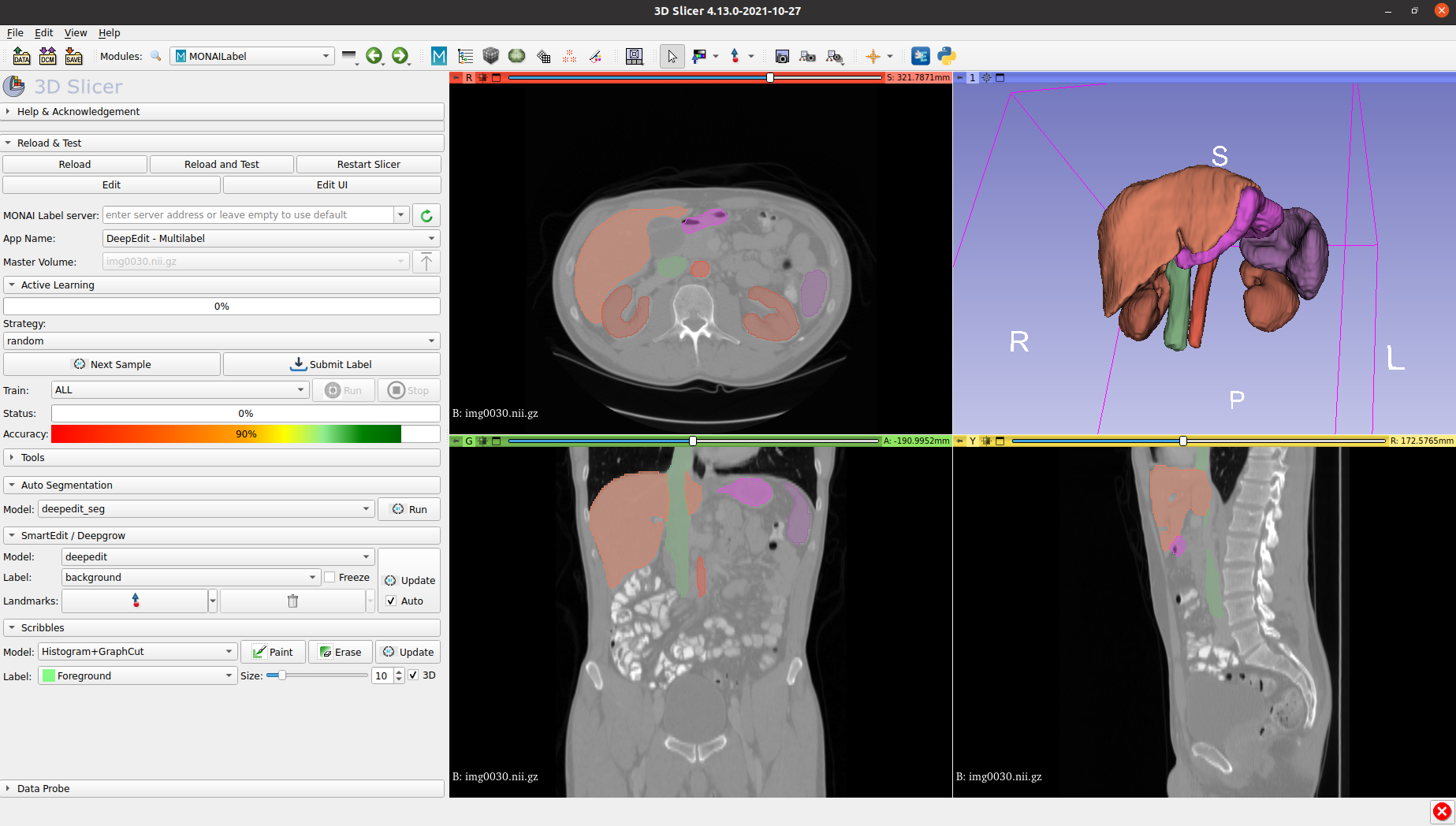
Features
The codebase is currently under active development.
- Framework for developing and deploying MONAI Label Apps to train and infer AI models
- Compositional & portable APIs for ease of integration in existing workflows
- Customizable labelling app design for varying user expertise
- Annotation support via 3DSlicer & OHIF
- PACS connectivity via DICOMWeb
Installation
MONAI Label supports following OS with GPU/CUDA enabled.
- Ubuntu
- Windows
Development Release
To install the latest features using one of the following options:
# option 1: github install (or you can install monailabel-weekly from PyPI)
pip install git+https://github.com/Project-MONAI/MONAILabel#egg=monailabel

# option 2: using docker
docker run --gpus all --rm -ti --ipc=host --net=host projectmonai/monailabel:latest

# option 3: git checkout
git clone https://github.com/Project-MONAI/MONAILabel
pip install -r MONAILabel/requirements.txt
export PATH=$PATH:`pwd`/MONAILabel/monailabel/scripts

# option 4: release candidate (0.4.x)
pip install monailabel>=0.4*


# download radiology app and sample dataset
monailabel apps --download --name radiology --output apps
monailabel datasets --download --name Task09_Spleen --output datasets

# start server using radiology app with deepedit model enabled
monailabel start_server --app apps/radiology --studies datasets/Task09_Spleen/imagesTr --conf models deepedit
You can install latest release candidates
Current Release (0.3.x)
To install the current release, you can simply run:
pip install monailabel

monailabel apps --download --name deepedit --output apps
monailabel datasets --download --name Task09_Spleen --output datasets

monailabel start_server --app apps/deepedit --studies datasets/Task09_Spleen/imagesTr
More details refer docs: https://docs.monai.io/projects/label/en/stable/installation.html
If monailabel install path is not automatically determined, then you can provide explicit install path as:
monailabel apps --prefix ~/.local
For prerequisites, other installation methods (using the default GitHub branch, using Docker, etc.), please refer to the installation guide.
Once you start the MONAI Label Server, by default server will be up and serving at http://127.0.0.1:8000/. Open the serving URL in browser. It will provide you the list of Rest APIs available. For this, please make sure you use the HTTP protocol. You can provide ssl arguments to run server in HTTPS mode but this functionality is not fully verified.
3D Slicer
Download Preview Release from https://download.slicer.org/ and install MONAI Label plugin from Slicer Extension Manager.
Refer 3D Slicer plugin for other options to install and run MONAI Label plugin in 3D Slicer.
To avoid accidentally using an older Slicer version, you may want to uninstall any previously installed 3D Slicer package.
OHIF
MONAI Label comes with pre-built plugin for OHIF Viewer. To use OHIF Viewer, you need to provide DICOMWeb instead of FileSystem as studies when you start the server.
Please install Orthanc before using OHIF Viewer. For Ubuntu 20.x, Orthanc can be installed as
apt-get install orthanc orthanc-dicomweb. However, you have to upgrade to latest version by following steps mentioned hereYou can use PlastiMatch to convert NIFTI to DICOM
  # start server using DICOMWeb
  monailabel start_server --app apps/radiology --studies http://127.0.0.1:8042/dicom-web
OHIF Viewer will be accessible at http://127.0.0.1:8000/ohif/
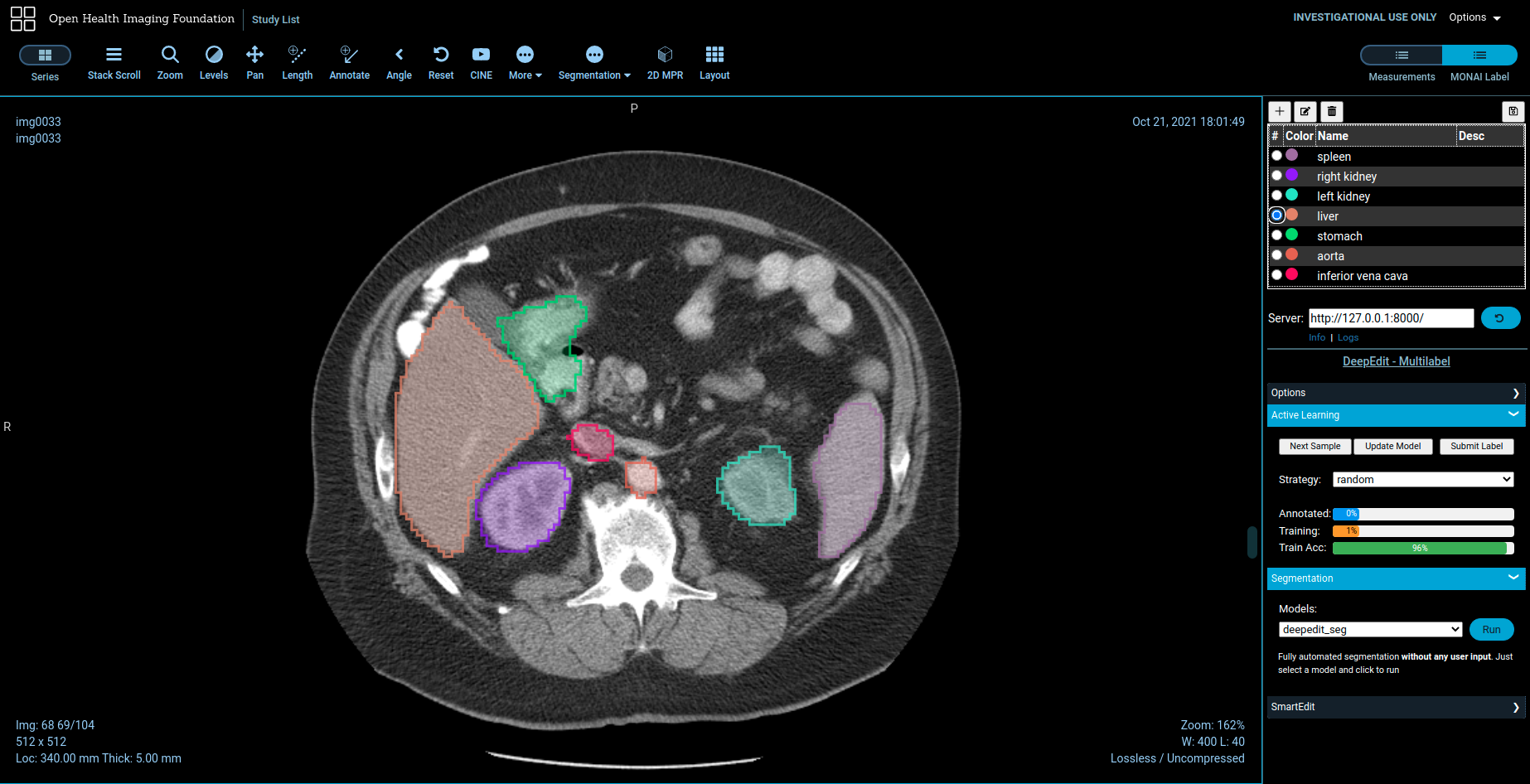
NOTE: OHIF does not yet support Multi-Label interaction for DeepEdit.
Pathology using Digital Slide Archive (DSA)
Refer Pathology for running a sample pathology use-case in MONAILabel.
NOTE: The Pathology App and DSA Plugin are under active development.
Cite
If you are using MONAI Label in your research, please use the following citation:
@article{DiazPinto2022monailabel,
 author = {Diaz-Pinto, Andres and Alle, Sachidanand and Ihsani, Alvin and Asad, Muhammad and
          Nath, Vishwesh and P{\'e}rez-Garc{\'\i}a, Fernando and Mehta, Pritesh and
          Li, Wenqi and Roth, Holger R. and Vercauteren, Tom and Xu, Daguang and
          Dogra, Prerna and Ourselin, Sebastien and Feng, Andrew and Cardoso, M. Jorge},
  title = {{MONAI Label: A framework for AI-assisted Interactive Labeling of 3D Medical Images}},
journal = {arXiv e-prints},
   year = 2022,
   url  = {https://arxiv.org/pdf/2203.12362.pdf}
}
Contributing
For guidance on making a contribution to MONAI Label, see the contributing guidelines.
Community
Join the conversation on Twitter @ProjectMONAI or join our Slack channel.
Ask and answer questions over on MONAI Label's GitHub Discussions tab.
Links
- Website: https://monai.io/
- API documentation: https://docs.monai.io/projects/label
- Code: https://github.com/Project-MONAI/MONAILabel
- Project tracker: https://github.com/Project-MONAI/MONAILabel/projects
- Issue tracker: https://github.com/Project-MONAI/MONAILabel/issues
- Wiki: https://github.com/Project-MONAI/MONAILabel/wiki
- Test status: https://github.com/Project-MONAI/MONAILabel/actions
- PyPI package: https://pypi.org/project/monailabel/
- Weekly previews: https://pypi.org/project/monailabel-weekly/
- Docker Hub: https://hub.docker.com/r/projectmonai/monailabel
2 maintainers


Metadata
2 maintainers
Release files for monailabel-weekly 0.4.dev2217
For a detailed explanation of source distributions (sdists) and built distributions (wheels), please see the package formats documentation.
Source distribution (sdist)
| File | Size | Uploaded | Provenance | |
|---|---|---|---|---|
| monailabel-weekly-0.4.dev2217.tar.gz | 4.9 MB | Without provenance | Details |
Built distribution (wheel)
| File | Interpreter | ABI | Platform | Reset |
|---|---|---|---|---|
| monailabel_weekly-0.4.dev2217-py3-none-any.whl | Python 3 | none | any | Details |
Total release size: 10.1 MB
Release files / monailabel-weekly-0.4.dev2217.tar.gz
| Download URL | monailabel-weekly-0.4.dev2217.tar.gz |
|---|---|
| Size | 4.9 MB |
| Tags | Source |
|
SHA-256 checksum How to use checksums |
5f07c582ea91a8e9c96cfbca54206840d23a66867eb87ef72e19af803cb8b6e9
|
|
BLAKE2b-256 checksum How to use checksums |
fcd5da1fa6eceec0912c99300aeb08a5120d8854d4b15438a72d2e7af00aa897
|
| Upload date | |
|
Uploaded using Trusted Publishing? What is trusted publishing? |
No |
| Uploaded via |
twine/4.0.0 CPython/3.9.12
|
Release files / monailabel_weekly-0.4.dev2217-py3-none-any.whl
| Download URL | monailabel_weekly-0.4.dev2217-py3-none-any.whl |
|---|---|
| Size | 5.1 MB |
| Tags | Python 3 |
|
SHA-256 checksum How to use checksums |
e4e19056dae2b747c08b86f24623de768e22c4dd03303f64d44a0d67225926cc
|
|
BLAKE2b-256 checksum How to use checksums |
bde420b0e42b191961f8bff1c152102825f70ba5cb7a1d31ef43c69765394746
|
| Upload date | |
|
Uploaded using Trusted Publishing? What is trusted publishing? |
No |
| Uploaded via |
twine/4.0.0 CPython/3.9.12
|
Security for monailabel-weekly 0.4.dev2217
Provenance
Provenance describes where a file came from. On PyPI, provenance is shared via attestations, which provide a verifiable record of the build or publishing details. View details, limitations and caveats.
No provenance found
None of the files in this release were uploaded with provenance metadata.
A note on package security
PyPI is a repository for distributing packages, not a service for auditing them. While third-party security researchers and our staff do their best to detect and remove malicious packages, PyPI cannot guarantee the quality, security or suitability of any given package.














