
Declarative AI agents framework for MongoDB with async enrichment via change streams

Project description

MongoClaw
A Clawbot army for every collection
Declarative AI agents framework for MongoDB
Automatically enrich documents with AI using change streams


What is MongoClaw?
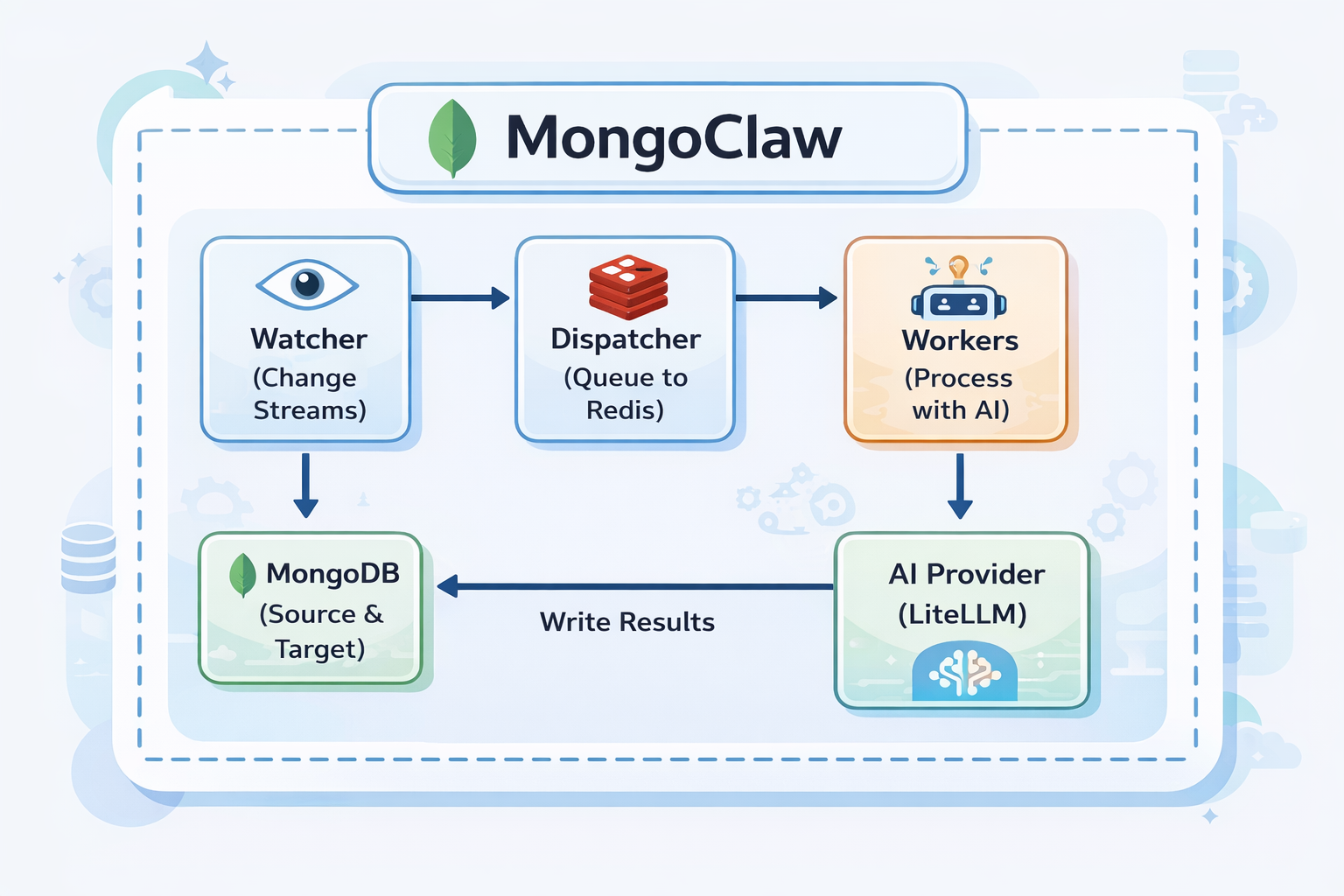
MongoClaw watches your MongoDB collections for changes. When a document is inserted or updated, it automatically sends it to an AI model for processing (classification, summarization, extraction, etc.) and writes the results back to your database.
The workflow is simple:
1. You define an "agent" in YAML (what to watch, what AI prompt to use, where to write results)
2. MongoClaw watches MongoDB using change streams
3. When a matching document arrives, it queues it for processing
4. Workers call the AI model with your prompt + document data
5. AI response is parsed and written back to the document
Example use cases:
- Auto-classify support tickets by category and priority
- Generate summaries for articles and blog posts
- Extract entities from customer feedback
- Analyze sentiment in reviews
- Tag and categorize products
Architecture
Prerequisites
Before using MongoClaw, you need:
| Requirement | Why |
|---|---|
| MongoDB 4.0+ | With replica set enabled (required for change streams) |
| Redis 6.0+ | For job queue and coordination |
| AI Provider API Key | OpenAI, Anthropic, OpenRouter, or any LiteLLM-supported provider |
| Python 3.11+ | Runtime |
Installation
pip install mongoclaw
This installs:
mongoclawCLI command- Python SDK (
from mongoclaw.sdk import MongoClawClient)
Quick Start (5 minutes)
Step 1: Start Infrastructure
Option A: Using Docker Compose (recommended)
git clone https://github.com/supreeth-ravi/mongoclaw.git
cd mongoclaw
docker-compose up -d
Option B: Manual Setup
# Start MongoDB with replica set
docker run -d --name mongo -p 27017:27017 mongo:7 --replSet rs0
docker exec mongo mongosh --eval "rs.initiate()"

# Start Redis
docker run -d --name redis -p 6379:6379 redis:7-alpine
Step 2: Configure Environment
Create a .env file:
# MongoDB (must have replica set for change streams)
MONGOCLAW_MONGODB__URI=mongodb://localhost:27017/mongoclaw?replicaSet=rs0

# Redis
MONGOCLAW_REDIS__URL=redis://localhost:6379/0

# AI Provider (choose one)
OPENAI_API_KEY=sk-...
# or
OPENROUTER_API_KEY=sk-or-...
MONGOCLAW_AI__DEFAULT_MODEL=openrouter/openai/gpt-4o-mini
Step 3: Verify Connections
mongoclaw test connection
Testing MongoDB connection...
  ✓ MongoDB connected
Testing Redis connection...
  ✓ Redis connected
mongoclaw test ai --prompt "Say hello"
  ✓ AI provider connected
  Response: Hello!
Step 4: Create Your First Agent
Create ticket_classifier.yaml:
id: ticket_classifier
name: Ticket Classifier

# What to watch
watch:
  database: support
  collection: tickets
  operations: [insert]
  filter:
    status: open

# AI configuration
ai:
  model: gpt-4o-mini  # or openrouter/openai/gpt-4o-mini
  prompt: |
    Classify this support ticket:

    Title: {{ document.title }}
    Description: {{ document.description }}

    Respond with JSON:
    - category: billing, technical, sales, or general
    - priority: low, medium, high, or urgent
  response_schema:
    type: object
    properties:
      category:
        type: string
        enum: [billing, technical, sales, general]
      priority:
        type: string
        enum: [low, medium, high, urgent]

# Where to write results
write:
  strategy: merge
  target_field: ai_classification

enabled: true
Step 5: Register the Agent
mongoclaw agents create -f ticket_classifier.yaml
✓ Created agent: ticket_classifier
Step 6: Start MongoClaw Server
mongoclaw server start
MongoClaw is now watching for new tickets!
Step 7: Test It
Insert a document into MongoDB:
// Using mongosh or your app
db.tickets.insertOne({
  title: "Can't access my account",
  description: "I've been locked out after too many password attempts",
  status: "open"
})
Within seconds, the document will be enriched:
db.tickets.findOne({ title: "Can't access my account" })
{
  "_id": "...",
  "title": "Can't access my account",
  "description": "I've been locked out after too many password attempts",
  "status": "open",
  "ai_classification": {
    "category": "technical",
    "priority": "high"
  }
}
How to Use MongoClaw
There are 3 ways to interact with MongoClaw:
1. CLI (Command Line)
Best for: Setup, testing, admin tasks
# Manage agents
mongoclaw agents list
mongoclaw agents create -f agent.yaml
mongoclaw agents get <agent_id>
mongoclaw agents enable <agent_id>
mongoclaw agents disable <agent_id>
mongoclaw agents delete <agent_id>

# Test before deploying
mongoclaw test agent <agent_id> -d '{"title": "Test"}'

# Server management
mongoclaw server start
mongoclaw server status

# Health checks
mongoclaw health
mongoclaw test connection
mongoclaw test ai
2. REST API
Best for: Web apps, integrations, programmatic access
Start the server:
mongoclaw server start --api-only
API is available at http://localhost:8000:
| Method | Endpoint | Description |
|---|---|---|
| GET | /health |
Health check |
| GET | /docs |
Swagger UI (interactive docs) |
| GET | /api/v1/agents |
List all agents |
| POST | /api/v1/agents |
Create agent |
| GET | /api/v1/agents/{id} |
Get agent details |
| PUT | /api/v1/agents/{id} |
Update agent |
| DELETE | /api/v1/agents/{id} |
Delete agent |
| POST | /api/v1/agents/{id}/enable |
Enable agent |
| POST | /api/v1/agents/{id}/disable |
Disable agent |
| GET | /api/v1/executions |
List execution history |
| GET | /metrics |
Prometheus metrics |
Example:
# List agents
curl http://localhost:8000/api/v1/agents

# Create agent
curl -X POST http://localhost:8000/api/v1/agents \
  -H "Content-Type: application/json" \
  -d @agent.json
3. Python SDK
Best for: Python applications, scripts, automation
from mongoclaw.sdk import MongoClawClient

# Initialize client
client = MongoClawClient(base_url="http://localhost:8000")

# List agents
agents = client.list_agents()
for agent in agents:
    print(f"{agent.id}: {agent.name}")

# Create agent
client.create_agent({
    "id": "my_agent",
    "name": "My Agent",
    "watch": {"database": "mydb", "collection": "docs"},
    "ai": {"model": "gpt-4o-mini", "prompt": "..."},
    "write": {"strategy": "merge", "target_field": "ai_result"}
})

# Enable/disable
client.enable_agent("my_agent")
client.disable_agent("my_agent")

# Check health
if client.is_healthy():
    print("MongoClaw is running!")
Async version:
from mongoclaw.sdk import AsyncMongoClawClient

async with AsyncMongoClawClient(base_url="http://localhost:8000") as client:
    agents = await client.list_agents()
4. Node.js SDK
Best for: Node.js/TypeScript applications
import { MongoClawClient } from '@mongoclaw/sdk';

const client = new MongoClawClient({ baseUrl: 'http://localhost:8000' });

// List agents
const { agents } = await client.listAgents();

// Create agent
await client.createAgent({
  id: 'my_agent',
  name: 'My Agent',
  watch: { database: 'mydb', collection: 'docs' },
  ai: { model: 'gpt-4o-mini', prompt: '...' },
  write: { strategy: 'merge', target_field: 'ai_result' }
});
Agent Configuration Reference
# Unique identifier
id: my_agent
name: My Agent
description: Optional description

# What MongoDB changes to watch
watch:
  database: mydb              # Database name
  collection: mycollection    # Collection name
  operations: [insert, update] # insert, update, replace, delete
  filter:                     # Optional MongoDB filter
    status: active

# AI configuration
ai:
  provider: openai            # openai, anthropic, openrouter, etc.
  model: gpt-4o-mini          # Model identifier
  prompt: |                   # Jinja2 template
    Process this document:
    {{ document | tojson }}
  system_prompt: |            # Optional system prompt
    You are a helpful assistant.
  temperature: 0.7            # 0.0 - 2.0
  max_tokens: 1000
  response_schema:            # Optional JSON schema for validation
    type: object
    properties:
      result:
        type: string

# How to write results back
write:
  strategy: merge             # merge, replace, or append
  target_field: ai_result     # Where to write (for merge)
  idempotency_key: |          # Prevent duplicate processing
    {{ document._id }}_v1

# Execution settings
execution:
  max_retries: 3
  retry_delay_seconds: 1.0
  timeout_seconds: 60
  rate_limit_requests: 100    # Per minute
  cost_limit_usd: 10.0        # Per hour

# Enable/disable
enabled: true
Deployment
Docker Compose (Development)
docker-compose up -d
Kubernetes
kubectl apply -k deploy/kubernetes/
Helm
helm install mongoclaw deploy/helm/mongoclaw \
  --set secrets.mongodb.uri="mongodb://..." \
  --set secrets.ai.openaiApiKey="sk-..."
Configuration Reference
All settings via environment variables:
# Core
MONGOCLAW_ENVIRONMENT=development|staging|production

# MongoDB
MONGOCLAW_MONGODB__URI=mongodb://localhost:27017/mongoclaw?replicaSet=rs0
MONGOCLAW_MONGODB__DATABASE=mongoclaw

# Redis
MONGOCLAW_REDIS__URL=redis://localhost:6379/0

# AI
MONGOCLAW_AI__DEFAULT_PROVIDER=openai
MONGOCLAW_AI__DEFAULT_MODEL=gpt-4o-mini
OPENAI_API_KEY=sk-...
ANTHROPIC_API_KEY=sk-ant-...
OPENROUTER_API_KEY=sk-or-...

# API Server
MONGOCLAW_API__HOST=0.0.0.0
MONGOCLAW_API__PORT=8000

# Workers
MONGOCLAW_WORKER__CONCURRENCY=10

# Observability
MONGOCLAW_OBSERVABILITY__LOG_LEVEL=INFO
MONGOCLAW_OBSERVABILITY__LOG_FORMAT=json|console
MONGOCLAW_OBSERVABILITY__METRICS_ENABLED=true
Project Structure
mongoclaw/
├── src/mongoclaw/
│   ├── core/           # Config, types, runtime
│   ├── watcher/        # MongoDB change stream handling
│   ├── dispatcher/     # Queue dispatch logic
│   ├── queue/          # Redis Streams implementation
│   ├── worker/         # AI processing workers
│   ├── ai/             # LiteLLM, prompts, response parsing
│   ├── result/         # Idempotent write strategies
│   ├── agents/         # Agent models, storage, validation
│   ├── security/       # Auth, RBAC, PII redaction
│   ├── resilience/     # Circuit breakers, retry logic
│   ├── observability/  # Metrics, tracing, logging
│   ├── api/            # FastAPI REST API
│   ├── cli/            # Click CLI
│   └── sdk/            # Python SDK
├── sdk-nodejs/         # TypeScript SDK
├── configs/agents/     # Example agent configurations
├── deploy/             # Kubernetes & Helm charts
└── tests/
Contributing
Contributions are welcome! Please feel free to submit a Pull Request.
Author
Supreeth Ravi
- Email: supreeth.ravi@phronetic.ai
- GitHub: @supreeth-ravi
- Web: supreethravi.com
License
This project is licensed under the MIT License - see the LICENSE file for details.
Made with ❤️ for the MongoDB + AI community


Download files
Download the file for your platform. If you're not sure which to choose, learn more about installing packages.
Source Distribution
Built Distribution
Filter files by name, interpreter, ABI, and platform.
If you're not sure about the file name format, learn more about wheel file names.
Copy a direct link to the current filters
File details
Details for the file mongoclaw-1.0.1.tar.gz.
File metadata
- Download URL: mongoclaw-1.0.1.tar.gz
- Upload date:
- Size: 2.9 MB
- Tags: Source
- Uploaded using Trusted Publishing? No
- Uploaded via: twine/6.2.0 CPython/3.13.3
File hashes
| Algorithm | Hash digest | |
|---|---|---|
| SHA256 |
87139145ff47f5594756296e6bc5f6924c98915f67264db211a095f95c326e21
|
|
| MD5 |
baeab8d5e2c59667af47674d966e7c2a
|
|
| BLAKE2b-256 |
94dde4d5478b9b027249f8f42ea35519e58682f0cc02c8bedec64541cf73d68d
|
File details
Details for the file mongoclaw-1.0.1-py3-none-any.whl.
File metadata
- Download URL: mongoclaw-1.0.1-py3-none-any.whl
- Upload date:
- Size: 140.6 kB
- Tags: Python 3
- Uploaded using Trusted Publishing? No
- Uploaded via: twine/6.2.0 CPython/3.13.3
File hashes
| Algorithm | Hash digest | |
|---|---|---|
| SHA256 |
61e7bdd7fdebec0b48719a39b0d443505d416e07bd3a0888ddf74f19756173fe
|
|
| MD5 |
7ebee075fc90684f0962887fb715de92
|
|
| BLAKE2b-256 |
e5a20fe1f1e076813dfe99b4f9f31b1fae25d0f1cd2b50068f8dcc47375785cf
|






