
Declarative AI agents framework for MongoDB with async enrichment via change streams

Project description

MongoClaw
A Clawbot army for every collection
Declarative AI Execution Layer for MongoDB
Run controlled, observable AI workflows directly on MongoDB change events


What is MongoClaw?
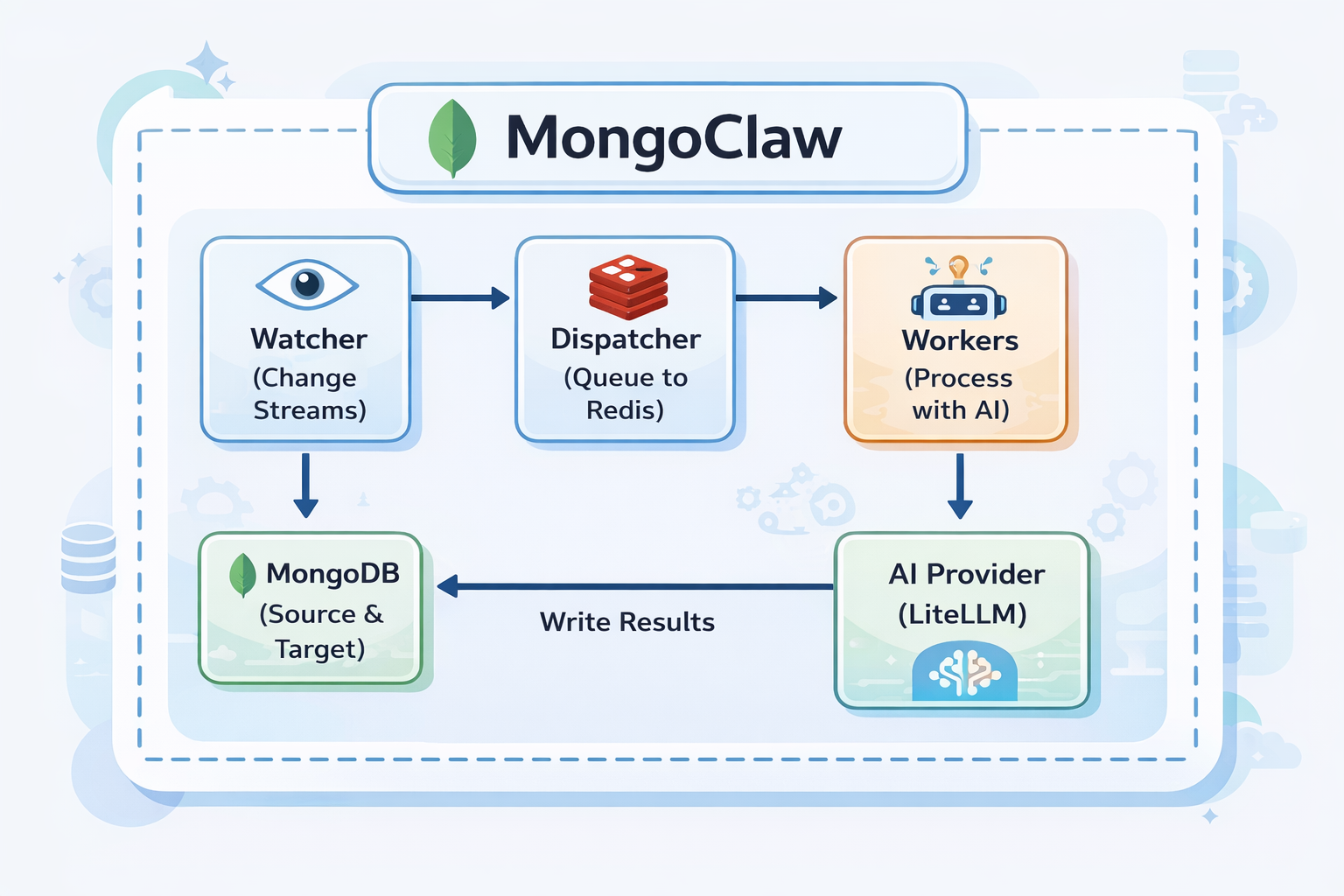
MongoClaw watches your MongoDB collections for changes. When a document is inserted or updated, it automatically sends it to an AI model for processing (classification, summarization, extraction, etc.) and writes the results back to your database.
The workflow is simple:
1. You define your MongoClaw agent, or bring your existing external agent, and configure what collection to watch and where to write results
2. MongoClaw watches MongoDB using change streams
3. When a matching document arrives, it queues it for processing
4. Workers execute enrichment using the configured provider (direct model call or external agent endpoint)
5. Response is parsed and written back to the document
Example use cases:
- Auto-classify support tickets by category and priority
- Generate summaries for articles and blog posts
- Extract entities from customer feedback
- Analyze sentiment in reviews
- Tag and categorize products
Why This Matters (Real Incident Pattern)
In July 2025, public reports described an AI coding assistant incident where production database data was deleted and responses were unreliable during recovery/debug flows.
References:
- https://www.theregister.com/2025/07/21/replit_saastr_vibe_coding_incident/
- https://www.sfgate.com/tech/article/bay-area-tech-product-rogue-ceo-apology-20780833.php
MongoClaw is designed to reduce this class of risk when AI touches live data:
- Separation of concerns: AI agents are declarative and scoped per collection/event, not unrestricted code execution.
- Controlled writeback:
Explicit
writestrategies and target fields avoid arbitrary destructive updates. - Deterministic guards:
strict_post_commit, version checks, and optional hash checks prevent stale/unsafe writes. - Loop and replay safety: Loop-guard metadata, idempotency controls, retries, and DLQ handling.
- Observability first: Execution history + reason codes + metrics for conflicts/timeouts/retries.
- Policy layer:
enrich/block/tagactions with conditions and simulation mode.
This means you still get AI enrichment, but with explicit operational controls expected in production data systems.
60-Second Golden Path
1) Start infra
docker compose up -d
2) Start MongoClaw
MONGOCLAW_MONGODB__URI="mongodb://localhost:27017/mongoclaw?replicaSet=rs0" \
MONGOCLAW_REDIS__URL="redis://localhost:6379/0" \
uv run mongoclaw server start --host 127.0.0.1 --port 8000
3) Create one agent (CLI)
uv run mongoclaw agents create -f configs/agents/ticket_classifier.yaml
4) Insert one document and see writeback
mongosh "mongodb://localhost:27017/support?replicaSet=rs0" --eval '
db.tickets.insertOne({
  title: "Refund not received",
  description: "Paid 3 days ago, no refund yet",
  status: "open"
})'
Then verify:
- Document has AI output field(s)
- Document has
_ai_metadata - Execution appears in
/api/v1/executions
Choosing Consistency Mode
Use this as the default decision guide:
eventual: Best for high-volume enrichment where coverage/throughput matter most.strict_post_commit: Best for correctness-sensitive workflows (financial/compliance) where stale writes must be blocked.shadow: Best for validation and rollout safety; execute AI path but skip writeback.
Practical rule:
- Start new agents in
shadow - Move to
eventualfor scale-centric enrichment - Use
strict_post_commitonly where deterministic safety is required and lower coverage under high churn is acceptable
Architecture
Capabilities
MongoClaw is built to run real AI enrichment workflows on MongoDB collections:
- Declarative agents:
Define agents in YAML/JSON with
watch,ai,write,execution, and optionalpolicyblocks. - Change stream triggers:
React to
insert,update,replace, anddeleteevents with collection-level filters. - Structured AI output: Use response schemas and template-driven prompts for predictable fields.
- Flexible writeback:
merge,replace,append,nested, andtarget_fieldoutput patterns. - Idempotent writes: Optional idempotency keys and metadata tracking for duplicate-event safety.
- Loop protection: Agent-origin metadata avoids same-agent retrigger cascades.
- Consistency controls:
eventual,strict_post_commit, andshadowexecution modes. - Policy-driven actions:
Evaluate conditions and apply
enrich,block, ortagactions with fallback behavior. - Runtime isolation: Per-agent concurrency caps to reduce noisy-neighbor impact.
- Observability:
/metricsendpoint with execution, queue, loop guard, shadow mode, policy, and API metrics. - Interfaces: CLI, REST API, Python SDK, and Node SDK support for the same agent model.

What’s New (Latest Runtime Features)
Recent updates added production-focused execution controls:
- Deterministic strict mode:
strict_post_commitnow enforces optimistic version checks and increments_mongoclaw_versionatomically. - Optional source hash guard:
execution.require_document_hash_matchcan block stale writes when document content changed. - Execution lifecycle persistence:
Execution records now persist
status,lifecycle_state,reason, andwrittenfor auditability. - Fair scheduling and stream isolation: Rotating stream order, per-stream dequeue caps, and optional in-flight cap per agent stream.
- Dispatch backpressure admission:
Queue-pressure aware dispatch with priority bypass and overflow policy (
drop,defer,dlq). - Horizontal-scale routing controls:
Env-driven routing strategy (
by_agent,by_collection,single,partitioned,by_priority) and partition count. - Failure isolation and SLO metrics: Per-agent failure budgets with temporary quarantine and latency SLO violation counters.
Operations UI (Live Dashboard)
MongoClaw now includes a lightweight operations console at /ui in this repo for real-time visibility.
It provides:
- Health status from
/healthand/health/detailed - Agent inventory and controls (enable/disable/validate)
- Live execution feed from
/api/v1/executions - 24h status distribution from
/api/v1/executions/stats - Resilience metrics from
/metrics(DLQ, retries, loop guard, quarantine, circuit breakers)
Run it locally:
cd ui
python3 -m http.server 4173
Then open http://127.0.0.1:4173, set API URL (for example http://127.0.0.1:8000) and your X-API-Key.
Tested Scenarios (Production-Like)
The platform has been exercised with production-like scenarios across:
- CLI, Python SDK, and Node SDK agent lifecycle and enrichment flows
- Loop-guard behavior and replay-safety controls
- Stream fairness under concurrent traffic
- Shadow mode write-skip validation
- Metrics and observability endpoint checks
- Policy actions (
enrich,block,tag) and rule evaluation - Isolation controls and agent-level concurrency limits
- Strict post-commit consistency and determinism safeguards
- High-scale and burst workloads with retries/timeouts and DLQ thresholds
Prerequisites
Before using MongoClaw, you need:
| Requirement | Why |
|---|---|
| MongoDB 4.0+ | With replica set enabled (required for change streams) |
| Redis 6.0+ | For job queue and coordination |
| AI Provider API Key | OpenAI, Anthropic, OpenRouter, or any LiteLLM-supported provider |
| Python 3.11+ | Runtime |
Installation
pip install mongoclaw
This installs:
mongoclawCLI command- Python SDK (
from mongoclaw.sdk import MongoClawClient)
Quick Start (5 minutes)
Step 1: Start Infrastructure
Option A: Using Docker Compose (recommended)
git clone https://github.com/supreeth-ravi/mongoclaw.git
cd mongoclaw
docker-compose up -d
Option B: Manual Setup
# Start MongoDB with replica set
docker run -d --name mongo -p 27017:27017 mongo:7 --replSet rs0
docker exec mongo mongosh --eval "rs.initiate()"

# Start Redis
docker run -d --name redis -p 6379:6379 redis:7-alpine
Option C: Use Your Existing MongoDB + Redis
If you already run MongoDB/Redis, you can skip Docker infra and point MongoClaw to your existing services.
Requirements for existing MongoDB:
- Replica set enabled (required for change streams)
- MongoDB user with read/write permissions on:
- watched databases/collections
- MongoClaw metadata collections (
agents,executions,resume_tokens, etc.)
Set environment variables:
# Existing MongoDB (must include replicaSet)
MONGOCLAW_MONGODB__URI=mongodb://<user>:<pass>@<mongo-host>:27017/mongoclaw?replicaSet=<rs-name>

# Existing Redis
MONGOCLAW_REDIS__URL=redis://<redis-host>:6379/0

# API auth keys (comma-separated allowed)
MONGOCLAW_SECURITY__API_KEYS=test-key

# AI defaults (if using direct LLM providers)
MONGOCLAW_AI__DEFAULT_MODEL=openrouter/openai/gpt-4o-mini
OPENROUTER_API_KEY=sk-or-...
Then run only MongoClaw:
mongoclaw test connection
mongoclaw server start
Step 2: Configure Environment
Create a .env file:
# MongoDB (must have replica set for change streams)
MONGOCLAW_MONGODB__URI=mongodb://localhost:27017/mongoclaw?replicaSet=rs0

# Redis
MONGOCLAW_REDIS__URL=redis://localhost:6379/0

# AI Provider (choose one)
OPENAI_API_KEY=sk-...
# or
OPENROUTER_API_KEY=sk-or-...
MONGOCLAW_AI__DEFAULT_MODEL=openrouter/openai/gpt-4o-mini
Step 3: Verify Connections
mongoclaw test connection
Testing MongoDB connection...
  ✓ MongoDB connected
Testing Redis connection...
  ✓ Redis connected
mongoclaw test ai --prompt "Say hello"
  ✓ AI provider connected
  Response: Hello!
Step 4: Create Your First Agent
Create ticket_classifier.yaml:
id: ticket_classifier
name: Ticket Classifier

# What to watch
watch:
  database: support
  collection: tickets
  operations: [insert]
  filter:
    status: open

# AI configuration
ai:
  model: gpt-4o-mini  # or openrouter/openai/gpt-4o-mini
  prompt: |
    Classify this support ticket:

    Title: {{ document.title }}
    Description: {{ document.description }}

    Respond with JSON:
    - category: billing, technical, sales, or general
    - priority: low, medium, high, or urgent
  response_schema:
    type: object
    properties:
      category:
        type: string
        enum: [billing, technical, sales, general]
      priority:
        type: string
        enum: [low, medium, high, urgent]

# Where to write results
write:
  strategy: merge
  target_field: ai_classification

enabled: true
If you already have an external agent service, create an external-agent config instead:
id: ticket_classifier_external
name: Ticket Classifier (External Agent)

watch:
  database: support
  collection: tickets
  operations: [insert]
  filter:
    status: open

ai:
  provider: external
  model: customer_enrichment_agent
  prompt: |
    Enrich this support ticket:
    {{ document | tojson }}
  response_schema:
    type: object
    properties:
      category: { type: string }
      priority: { type: string }
      summary: { type: string }
  extra_params:
    external_url: https://agents.example.com/run
    external_auth_token: YOUR_TOKEN
    external_auth_header: Authorization
    external_agent_id: customer_enrichment_agent
    external_timeout_seconds: 60

write:
  strategy: merge
  target_field: ai_classification

enabled: true
Step 5: Register the Agent
mongoclaw agents create -f ticket_classifier.yaml
✓ Created agent: ticket_classifier
Step 6: Start MongoClaw Server
mongoclaw server start
MongoClaw is now watching for new tickets!
Step 7: Test It
Insert a document into MongoDB:
// Using mongosh or your app
db.tickets.insertOne({
  title: "Can't access my account",
  description: "I've been locked out after too many password attempts",
  status: "open"
})
Within seconds, the document will be enriched:
db.tickets.findOne({ title: "Can't access my account" })
{
  "_id": "...",
  "title": "Can't access my account",
  "description": "I've been locked out after too many password attempts",
  "status": "open",
  "ai_classification": {
    "category": "technical",
    "priority": "high"
  }
}

How to Use MongoClaw
There are 4 ways to interact with MongoClaw:
Important Runtime Model
Process:
- Start infra (MongoDB + Redis)
- Start MongoClaw server (
mongoclaw server start) - Run client code (CLI, Python SDK, or Node SDK) with:
base_url-> where server is runningapi_key-> your configured API key
Example local values:
base_url:http://127.0.0.1:8000api_key: any key configured viaMONGOCLAW_SECURITY__API_KEYS(example:test-key)
1. CLI (Command Line)
Best for: Setup, testing, admin tasks
# Manage agents
mongoclaw agents list
mongoclaw agents create -f agent.yaml
mongoclaw agents get <agent_id>
mongoclaw agents enable <agent_id>
mongoclaw agents disable <agent_id>
mongoclaw agents delete <agent_id>

# Test before deploying
mongoclaw test agent <agent_id> -d '{"title": "Test"}'

# Server management
mongoclaw server start
mongoclaw server status

# Health checks
mongoclaw health
mongoclaw test connection
mongoclaw test ai
2. REST API
Best for: Web apps, integrations, programmatic access
Start the server:
mongoclaw server start --api-only
API is available at http://localhost:8000:
| Method | Endpoint | Description |
|---|---|---|
| GET | /health |
Health check |
| GET | /docs |
Swagger UI (interactive docs) |
| GET | /api/v1/agents |
List all agents |
| POST | /api/v1/agents |
Create agent |
| GET | /api/v1/agents/{id} |
Get agent details |
| PUT | /api/v1/agents/{id} |
Update agent |
| DELETE | /api/v1/agents/{id} |
Delete agent |
| POST | /api/v1/agents/{id}/enable |
Enable agent |
| POST | /api/v1/agents/{id}/disable |
Disable agent |
| GET | /api/v1/executions |
List execution history |
| GET | /metrics |
Prometheus metrics |
Execution records include status, lifecycle_state, reason, and written so you can distinguish successful writes vs deterministic skips/conflicts.
Example:
# List agents
curl http://localhost:8000/api/v1/agents

# Create agent
curl -X POST http://localhost:8000/api/v1/agents \
  -H "Content-Type: application/json" \
  -d @agent.json
3. Python SDK
Best for: Python applications, scripts, automation
from mongoclaw.sdk import MongoClawClient

# Initialize client
client = MongoClawClient(
    base_url="http://localhost:8000",
    api_key="test-key",  # required when API keys are enabled
)

# List agents
agents = client.list_agents()
for agent in agents:
    print(f"{agent.id}: {agent.name}")

# Create agent
client.create_agent({
    "id": "my_agent",
    "name": "My Agent",
    "watch": {"database": "mydb", "collection": "docs"},
    "ai": {"model": "gpt-4o-mini", "prompt": "..."},
    "write": {"strategy": "merge", "target_field": "ai_result"}
})

# Enable/disable
client.enable_agent("my_agent")
client.disable_agent("my_agent")

# Check health
if client.is_healthy():
    print("MongoClaw is running!")
The script above calls an already-running MongoClaw server.
It does not start MongoClaw server by itself.
Async version:
from mongoclaw.sdk import AsyncMongoClawClient

async with AsyncMongoClawClient(base_url="http://localhost:8000") as client:
    agents = await client.list_agents()
Python SDK capability map:
- Health:
health,health_detailed,is_healthy - Agent lifecycle:
list_agents,get_agent,create_agent,update_agent,enable_agent,disable_agent,delete_agent,validate_agent - Execution visibility:
list_executions,get_execution,wait_for_execution - Metrics access:
get_metrics - Optional/route-dependent methods:
retry_execution,trigger_agent,get_agent_stats(available only if corresponding API routes are enabled in your server build)
4. Node.js SDK
Best for: Node.js/TypeScript applications
import { MongoClawClient } from 'mongoclaw';

const client = new MongoClawClient({ baseUrl: 'http://localhost:8000' });

// List agents
const { agents } = await client.listAgents();

// Create agent
await client.createAgent({
  id: 'my_agent',
  name: 'My Agent',
  watch: { database: 'mydb', collection: 'docs' },
  ai: { model: 'gpt-4o-mini', prompt: '...' },
  write: { strategy: 'merge', target_field: 'ai_result' }
});
Like Python SDK, Node SDK is an HTTP client and does not start server/runtime.
SDK Testing Playbook (Developer)
This section is the recommended way to showcase and validate MongoClaw SDK behavior before release.
1. Test environment requirements
- MongoDB with replica set enabled
- Redis reachable from runtime
- MongoClaw runtime running (
mongoclaw server start) - API reachable (
/health,/health/detailed) - API key configured if auth is enabled (
X-API-Key) - AI provider key configured and tested (
mongoclaw test ai)
2. Minimum release gate (must pass)
- SDK health checks and auth flow
- Agent CRUD lifecycle (create/list/get/update/enable/disable/delete)
- End-to-end enrichment from MongoDB insert -> AI -> MongoDB writeback
- Execution audit visibility from SDK (
list_executions) - Retry behavior on transient failures
- Throughput baseline with fixed prompt/model profile
3. Advanced scenario matrix (recommended)
| Scenario | Why it matters | Expected result |
|---|---|---|
| Insert + rapid updates on same doc before enrichment | Detect stale writeback risk | In eventual, stale output may appear |
deduplicate=true vs false under rapid updates |
Validate idempotency window behavior | Fewer duplicate effective writes when enabled |
strict_post_commit on same race workload |
Prevent stale final writes | Stale writes suppressed (strict_version_conflict / hash_conflict) |
Same-doc stress with max_concurrency=1 vs higher |
Understand ordering/concurrency effects | Compare stale rate + execution volume |
| Idempotency replay (duplicate payload/event) | Validate duplicate protection | Duplicate execution should be skipped from writeback |
| Failure + retry + recovery | Validate resilience | Initial failures, then successful completion after fix |
DLQ path (max_retries=0 or repeated failures) |
Validate dead-letter safety net | Failed item reaches DLQ and can be retried manually |
Policy: block, tag, simulation_mode |
Validate guardrail behavior | Write blocked/tagged/simulated per policy |
| Burst load + backpressure metrics | Validate admission control observability | Dispatch/admission metrics reflect pressure decisions |
| Mixed-priority load | Validate priority bypass behavior | High-priority items admitted first when pressure is active |
| Multi-agent same collection, different target fields | Validate composition | Both fields enriched without overwrite |
| Multi-agent same target field | Validate conflict semantics | Last-writer-wins unless field partitioning is used |
| Agent disable/enable during traffic | Validate operational controls | Disabled: no writes; Enabled: writes resume |
| Webhook-triggered vs change-stream-triggered execution | Validate trigger parity | Same output schema + lifecycle expectations |
| Benchmarks at 100/500/1000 docs | Capacity planning | Track completion ratio and docs/sec at fixed window |
4. Baseline SDK e2e script pattern
For every scenario script, capture these fields in output:
scenario,run_id,agent_idinserted,enriched,failed,skippedexecution_count,status_counts,reason_countselapsed_s,throughput_docs_per_s- For race tests:
final_seq,ai_seen_seq,stale_final_ai - For DLQ tests:
dlq_before,dlq_after,dlq_delta,recovery_result
5. Reporting format (recommended for PRs/releases)
- Summary table: pass/fail/skip by scenario
- Raw metrics snapshot: throughput, completion ratio, error reasons
- Notes on unsupported routes in the active deployment profile
- Config used for run: model, prompt size, worker pool size, retry settings
Agent Configuration Reference
# Unique identifier
id: my_agent
name: My Agent
description: Optional description

# What MongoDB changes to watch
watch:
  database: mydb              # Database name
  collection: mycollection    # Collection name
  operations: [insert, update] # insert, update, replace, delete
  filter:                     # Optional MongoDB filter
    status: active

# AI configuration
ai:
  provider: openai            # openai, anthropic, openrouter, external, etc.
  model: gpt-4o-mini          # Model identifier
  prompt: |                   # Jinja2 template
    Process this document:
    {{ document | tojson }}
  system_prompt: |            # Optional system prompt
    You are a helpful assistant.
  temperature: 0.7            # 0.0 - 2.0
  max_tokens: 1000
  response_schema:            # Optional JSON schema for validation
    type: object
    properties:
      result:
        type: string
  extra_params:               # Optional provider-specific params
    # For provider=external:
    # external_url: https://agents.example.com/run
    # external_auth_token: YOUR_TOKEN
    # external_auth_header: Authorization
    # external_agent_id: customer_enrichment_agent
    # external_timeout_seconds: 60

# How to write results back
write:
  strategy: merge             # merge, replace, or append
  target_field: ai_result     # Where to write (for merge)
  idempotency_key: |          # Prevent duplicate processing
    {{ document._id }}_v1

# Execution settings
execution:
  priority: 5
  max_retries: 3
  retry_delay_seconds: 1.0
  retry_max_delay_seconds: 60
  timeout_seconds: 60
  consistency_mode: eventual # eventual, strict_post_commit, shadow
  require_document_hash_match: false
  max_concurrency: 1         # Optional per-agent in-process concurrency cap
  rate_limit_requests: 100    # Per minute
  cost_limit_usd: 10.0        # Planned per-agent limit (field exists; runtime enforcement not enabled yet)

# Optional declarative policy guardrail
policy:
  condition: result.risk_score > 0.8
  action: block               # enrich, block, tag
  fallback_action: enrich     # skip, enrich
  simulation_mode: false
  tag_field: policy_tag       # used when action=tag
  tag_value: matched

# Enable/disable
enabled: true
External Agent Provider (No Direct LLM Call)
If you already have an external agent service for enrichment, use:
ai:
  provider: external
  model: customer_enrichment_agent
  prompt: |
    Enrich this document:
    {{ document | tojson }}
  extra_params:
    external_url: https://agents.example.com/run
    external_auth_token: YOUR_TOKEN
    external_auth_header: Authorization
    external_agent_id: customer_enrichment_agent
    external_timeout_seconds: 60
The external endpoint should return one of:
content(string), oroutput(string), or- OpenAI-style
choices[0].message.content
Deployment
Docker Compose (Development)
docker-compose up -d
Kubernetes
kubectl apply -k deploy/kubernetes/
Helm
helm install mongoclaw deploy/helm/mongoclaw \
  --set secrets.mongodb.uri="mongodb://..." \
  --set secrets.ai.openaiApiKey="sk-..."
Configuration Reference
All settings via environment variables:
# Core
MONGOCLAW_ENVIRONMENT=development|staging|production

# MongoDB
MONGOCLAW_MONGODB__URI=mongodb://localhost:27017/mongoclaw?replicaSet=rs0
MONGOCLAW_MONGODB__DATABASE=mongoclaw

# Redis
MONGOCLAW_REDIS__URL=redis://localhost:6379/0

# AI
MONGOCLAW_AI__DEFAULT_PROVIDER=openai
MONGOCLAW_AI__DEFAULT_MODEL=gpt-4o-mini
OPENAI_API_KEY=sk-...
ANTHROPIC_API_KEY=sk-ant-...
OPENROUTER_API_KEY=sk-or-...

# API Server
MONGOCLAW_API__HOST=0.0.0.0
MONGOCLAW_API__PORT=8000

# Workers
MONGOCLAW_WORKER__POOL_SIZE=10
MONGOCLAW_WORKER__ROUTING_STRATEGY=by_agent
MONGOCLAW_WORKER__ROUTING_PARTITION_COUNT=8
MONGOCLAW_WORKER__FAIR_SCHEDULING_ENABLED=true
MONGOCLAW_WORKER__FAIR_STREAM_BATCH_SIZE=1
MONGOCLAW_WORKER__FAIR_STREAMS_PER_CYCLE=10
MONGOCLAW_WORKER__MAX_IN_FLIGHT_PER_AGENT_STREAM=50
MONGOCLAW_WORKER__PENDING_METRICS_INTERVAL_SECONDS=10
MONGOCLAW_WORKER__STARVATION_CYCLE_THRESHOLD=20
MONGOCLAW_WORKER__DISPATCH_BACKPRESSURE_ENABLED=true
MONGOCLAW_WORKER__DISPATCH_BACKPRESSURE_THRESHOLD=0.8
MONGOCLAW_WORKER__DISPATCH_OVERFLOW_POLICY=defer # drop|defer|dlq
MONGOCLAW_WORKER__DISPATCH_MIN_PRIORITY_WHEN_BACKPRESSURED=5
MONGOCLAW_WORKER__DISPATCH_DEFER_SECONDS=0.25
MONGOCLAW_WORKER__DISPATCH_DEFER_MAX_ATTEMPTS=3
MONGOCLAW_WORKER__DISPATCH_PRESSURE_CACHE_TTL_SECONDS=1
MONGOCLAW_WORKER__AGENT_ERROR_BUDGET_WINDOW_SECONDS=60
MONGOCLAW_WORKER__AGENT_ERROR_BUDGET_MAX_FAILURES=20
MONGOCLAW_WORKER__AGENT_QUARANTINE_SECONDS=30
MONGOCLAW_WORKER__LATENCY_SLO_MS=3000

# Observability
MONGOCLAW_OBSERVABILITY__LOG_LEVEL=INFO
MONGOCLAW_OBSERVABILITY__LOG_FORMAT=json|console
MONGOCLAW_OBSERVABILITY__METRICS_ENABLED=true
Production Presets
Use these as starting profiles, then tune with your own latency/cost/error SLOs.
Preset A: High Throughput Enrichment (Recommended Default)
Best for: support tickets, catalog tagging, content enrichment where maximum coverage matters more than strict write ordering.
Agent execution:
execution:
  consistency_mode: eventual
  timeout_seconds: 12
  max_retries: 2
  retry_delay_seconds: 1
  retry_max_delay_seconds: 8
  max_concurrency: 8
  require_document_hash_match: false
Worker/runtime:
MONGOCLAW_WORKER__POOL_SIZE=16
MONGOCLAW_WORKER__FAIR_SCHEDULING_ENABLED=true
MONGOCLAW_WORKER__MAX_IN_FLIGHT_PER_AGENT_STREAM=100
MONGOCLAW_WORKER__DISPATCH_BACKPRESSURE_ENABLED=true
MONGOCLAW_WORKER__DISPATCH_OVERFLOW_POLICY=defer
MONGOCLAW_WORKER__LATENCY_SLO_MS=3000
Preset B: Strict Correctness / Compliance
Best for: financial/compliance-adjacent flows where stale writes must be blocked.
Agent execution:
execution:
  consistency_mode: strict_post_commit
  require_document_hash_match: true
  timeout_seconds: 20
  max_retries: 1
  retry_delay_seconds: 2
  retry_max_delay_seconds: 8
  max_concurrency: 2
Worker/runtime:
MONGOCLAW_WORKER__POOL_SIZE=8
MONGOCLAW_WORKER__DISPATCH_BACKPRESSURE_ENABLED=true
MONGOCLAW_WORKER__DISPATCH_MIN_PRIORITY_WHEN_BACKPRESSURED=7
MONGOCLAW_WORKER__DISPATCH_OVERFLOW_POLICY=defer
MONGOCLAW_WORKER__AGENT_ERROR_BUDGET_MAX_FAILURES=10
MONGOCLAW_WORKER__AGENT_QUARANTINE_SECONDS=60
MONGOCLAW_WORKER__LATENCY_SLO_MS=4000
Preset C: Shadow Rollout / Safe Introduction
Best for: validating new prompts/models before enabling writeback.
Agent execution:
execution:
  consistency_mode: shadow
  timeout_seconds: 10
  max_retries: 1
Recommended process:
- Run in
shadowand inspectexecutions(status,lifecycle_state,reason). - Fix prompt/schema issues and reduce
pipeline_errorrate. - Promote to
eventualorstrict_post_commitbased on business correctness requirements.
Testing
Unit + Integration Tests
Install dev dependencies (includes pytest):
uv sync --extra dev
Run test suite:
uv run pytest -q
Project Structure
mongoclaw/
├── src/mongoclaw/
│   ├── core/           # Config, types, runtime
│   ├── watcher/        # MongoDB change stream handling
│   ├── dispatcher/     # Queue dispatch logic
│   ├── queue/          # Redis Streams implementation
│   ├── worker/         # AI processing workers
│   ├── ai/             # LiteLLM, prompts, response parsing
│   ├── result/         # Idempotent write strategies
│   ├── agents/         # Agent models, storage, validation
│   ├── security/       # Auth, RBAC, PII redaction
│   ├── resilience/     # Circuit breakers, retry logic
│   ├── observability/  # Metrics, tracing, logging
│   ├── api/            # FastAPI REST API
│   ├── cli/            # Click CLI
│   └── sdk/            # Python SDK
├── sdk-nodejs/         # TypeScript SDK
├── configs/agents/     # Example agent configurations
├── deploy/             # Kubernetes & Helm charts
└── tests/
Contributing
Contributions are welcome! Please feel free to submit a Pull Request.
Planned
- Per-agent runtime budget enforcement for
execution.cost_limit_usdand token limits - Per-collection budget caps for shared workloads
- Structured policy DSL (
policy.when) with field/operator/value rules - Richer spend rollups in API (agent, collection, and time-window views)
Author
Supreeth Ravi
- Email: supreeth.ravi@phronetic.ai
- GitHub: @supreeth-ravi
- Web: supreethravi.com
License
This project is licensed under the MIT License - see the LICENSE file for details.
Made with ❤️ for the MongoDB + AI community


Download files
Download the file for your platform. If you're not sure which to choose, learn more about installing packages.
Source Distribution
Built Distribution
Filter files by name, interpreter, ABI, and platform.
If you're not sure about the file name format, learn more about wheel file names.
Copy a direct link to the current filters
File details
Details for the file mongoclaw-1.0.4.tar.gz.
File metadata
- Download URL: mongoclaw-1.0.4.tar.gz
- Upload date:
- Size: 3.3 MB
- Tags: Source
- Uploaded using Trusted Publishing? No
- Uploaded via: twine/6.2.0 CPython/3.11.12
File hashes
| Algorithm | Hash digest | |
|---|---|---|
| SHA256 |
20b69e5fd4a44bf1fa8590daa8f25ac18f7f1c2849287412354030130f597cbe
|
|
| MD5 |
461f37a21cfbd5440f33d438c154b4a0
|
|
| BLAKE2b-256 |
7aa79285fec2ba01571508e97b38c91c7cf109b297df8839538f9cbe8ff33602
|
File details
Details for the file mongoclaw-1.0.4-py3-none-any.whl.
File metadata
- Download URL: mongoclaw-1.0.4-py3-none-any.whl
- Upload date:
- Size: 162.1 kB
- Tags: Python 3
- Uploaded using Trusted Publishing? No
- Uploaded via: twine/6.2.0 CPython/3.11.12
File hashes
| Algorithm | Hash digest | |
|---|---|---|
| SHA256 |
cb183ee9bf45516b891414e9a37eca97b8aea6f4d1ffe5ee3ace0e5329004b23
|
|
| MD5 |
bae9af0c42fda1a7e3c56631d0747951
|
|
| BLAKE2b-256 |
a2fe00654c6f0e67a1909227361209bca846bee223f349655e068609b66712a4
|






