

Monique
MONitor Integrated QUick Editor
Graphical monitor configurator for Hyprland, Sway and Niri









Screenshots
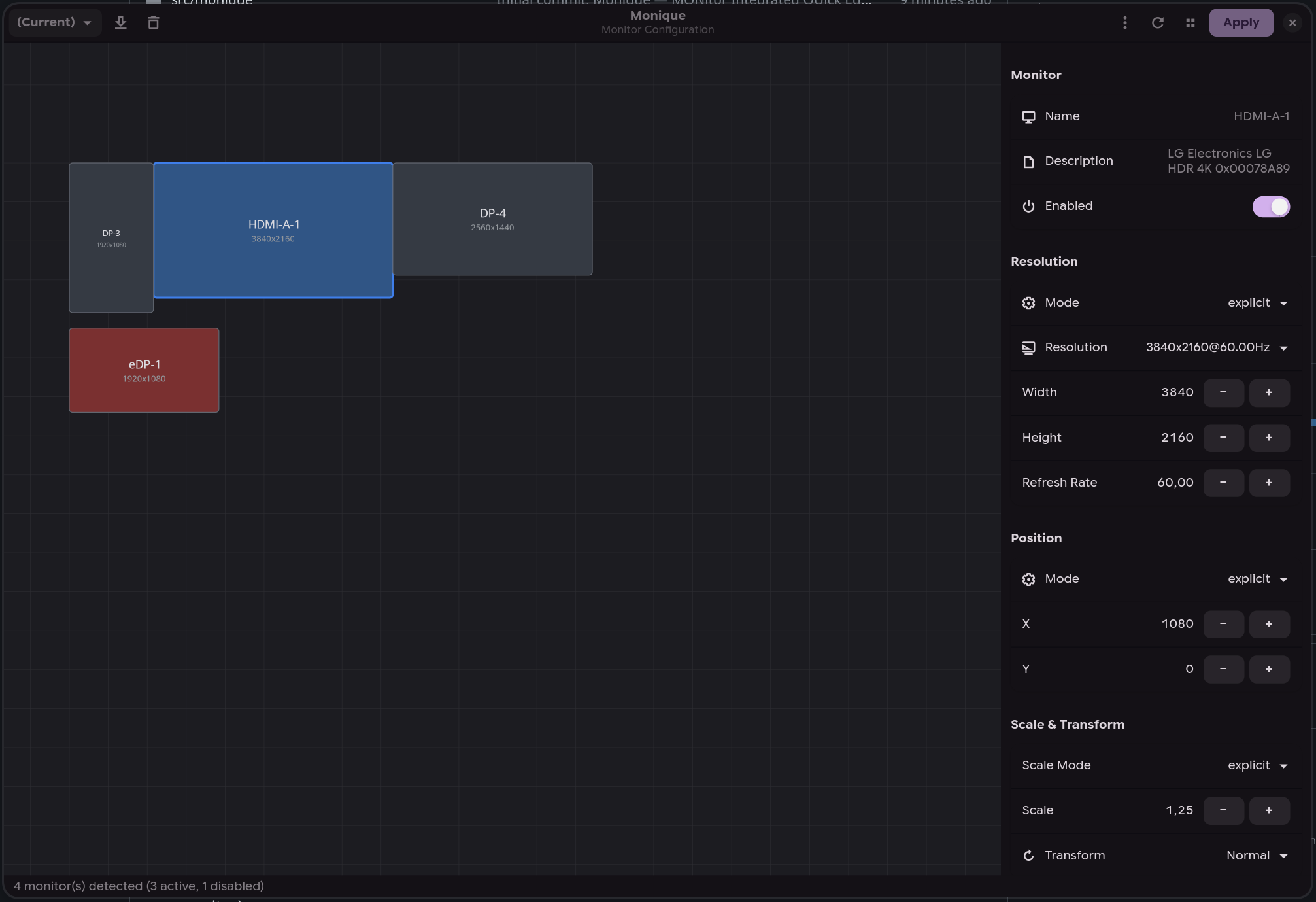
Layout editor |
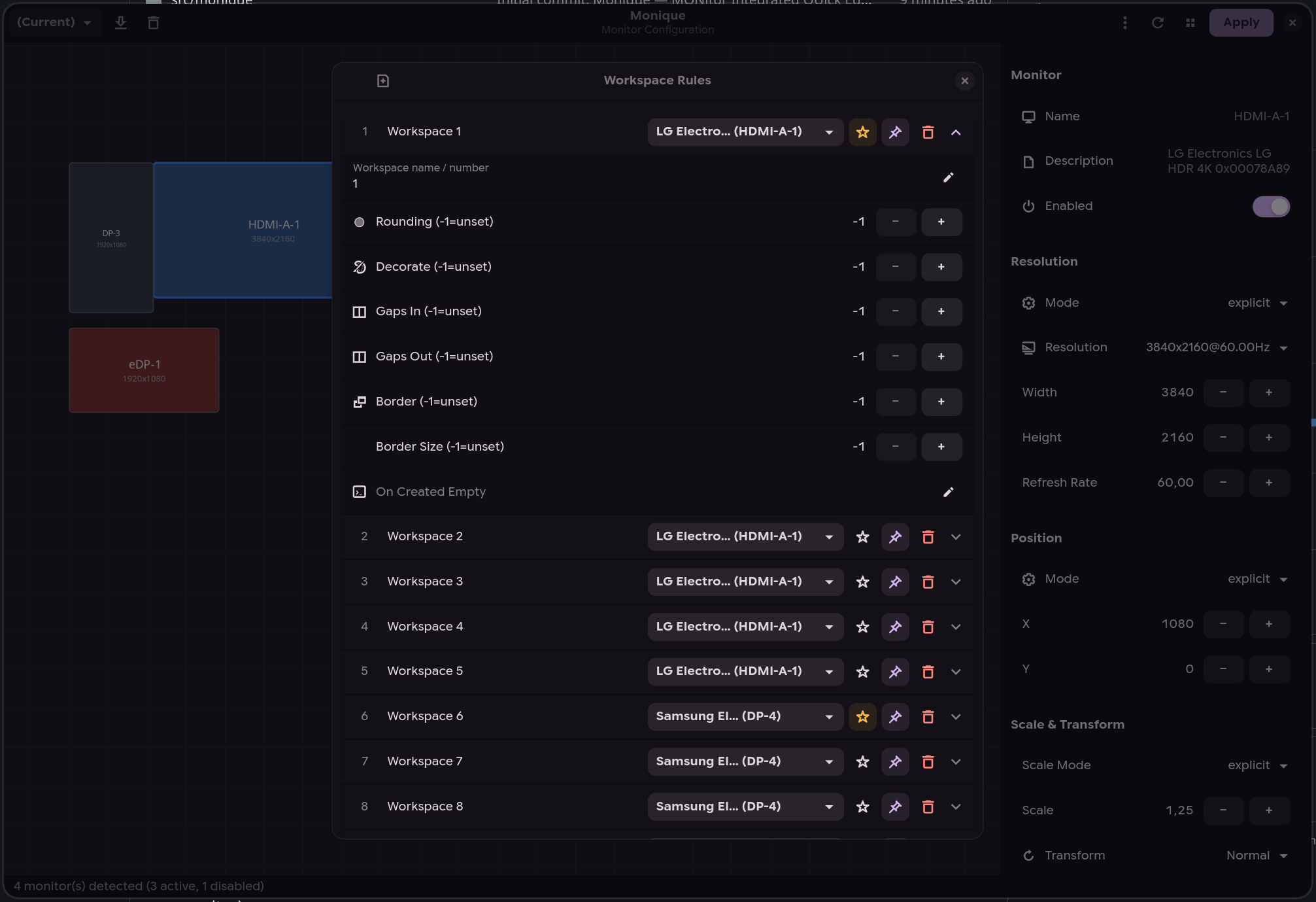
Workspace rules |
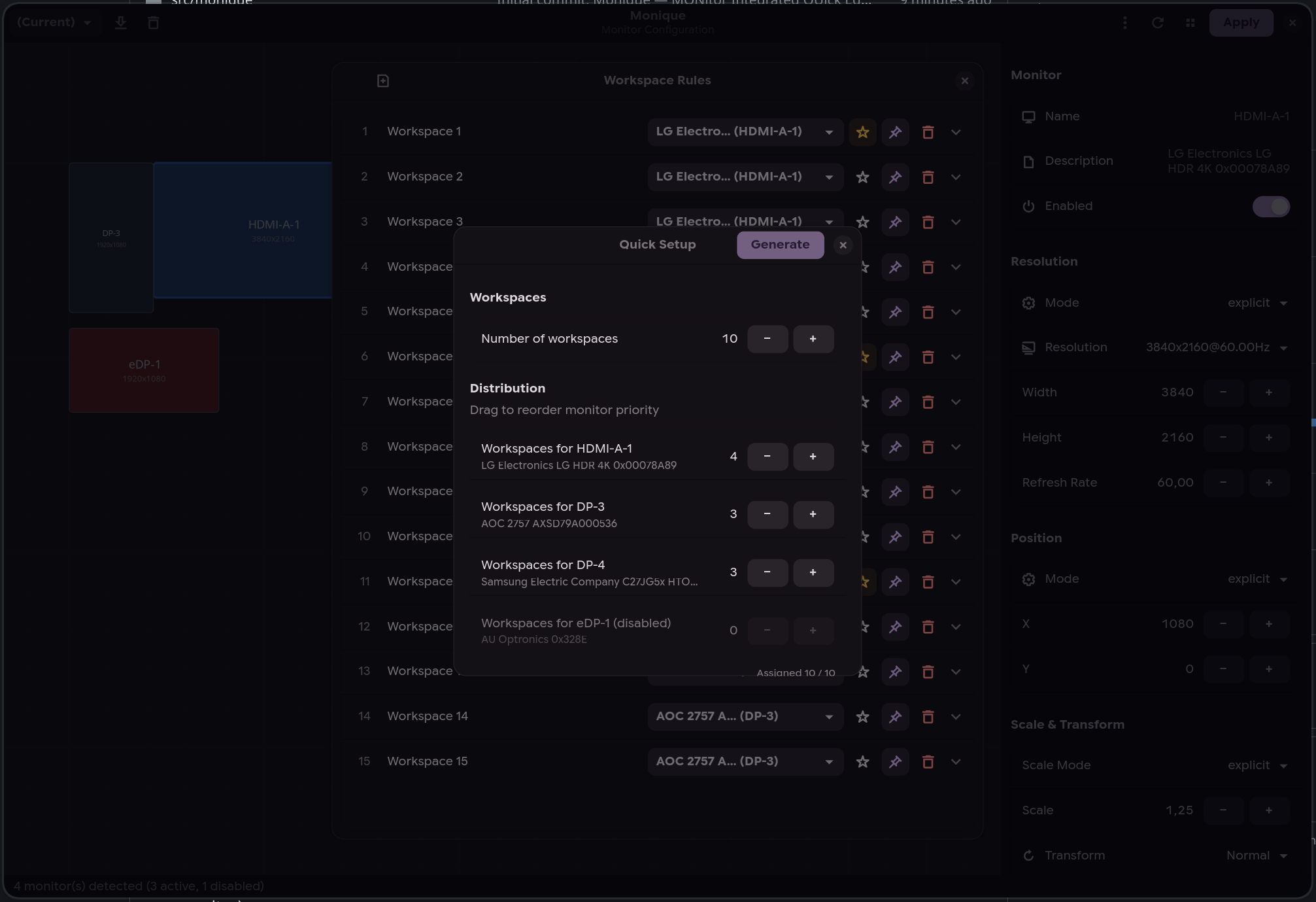
Quick setup |
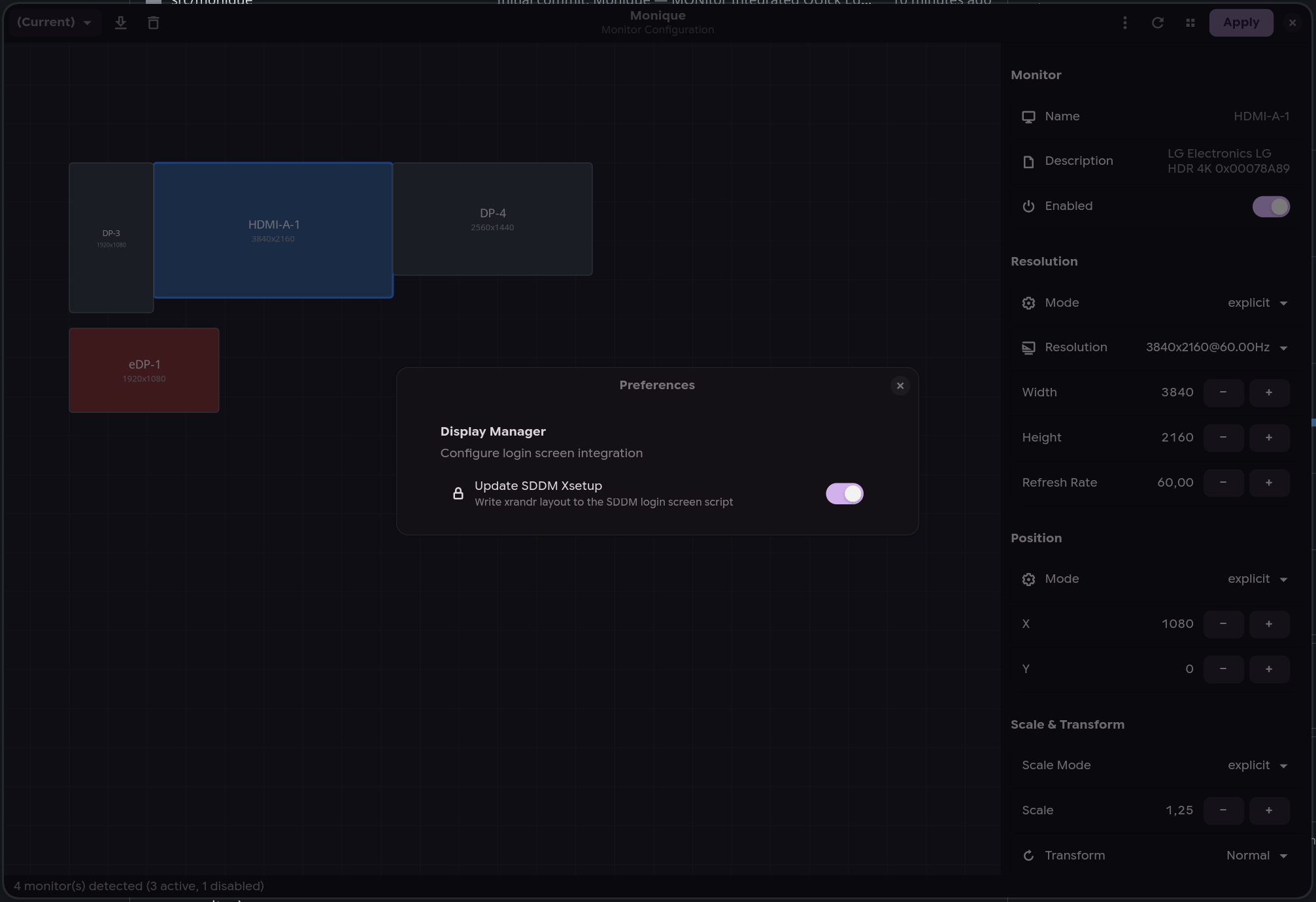
SDDM integration |
Features
- Drag-and-drop layout — arrange monitors visually on an interactive canvas
- Multi-backend — auto-detects Hyprland, Sway, or Niri from the environment
- Cross-write — save a profile in any compositor and automatically generate config files for the others (e.g. configure in Hyprland → get Sway and Niri configs for free)
- Profile system — save, load, and switch between monitor configurations
- Hotplug daemon (
moniqued) — automatically applies the best matching profile when monitors are connected or disconnected - Display manager integration — syncs your layout to the login screen for SDDM (xrandr) and greetd (sway), with polkit rule for passwordless writes
- Workspace rules — configure workspace-to-monitor assignments (Hyprland/Sway)
- HDR & color management — color management presets, 10-bit output, ICC profiles, SDR brightness/saturation and per-monitor EDID luminance overrides (Hyprland
monitorv2) - Live preview — OSD overlay to identify monitors (double-click)
- Workspace migration — automatically moves workspaces to the primary monitor when their monitor is disabled or unplugged (reverted if you click "Revert")
- Clamshell mode — disable the internal laptop display when external monitors are connected (manual toggle in the toolbar or automatic via daemon preferences); the daemon also monitors the lid state via UPower D-Bus
- Confirm-or-revert — 10-second countdown after applying, auto-reverts if display is unusable
- CLI interface — list, query, switch, and auto-detect profiles from the terminal (
--list-profiles,--current-profile,--switch-profile,--detect-profile), perfect for hotkey bindings - Custom config directory — write generated monitor config files to a custom path instead of the compositor default (via Preferences or
--config-dir) - Custom config filename — change the generated file's base name (default
monitors) from Preferences → Config Output; the right extension is added per compositor (.kdl/.conf/.lua) and subdirectories are supported (e.g.cfg/display) - Active profile tracking —
--current-profilereports the profile matching the live monitor layout, falling back to the last applied one when no profile describes it
Installation
AUR (Arch Linux / CachyOS)
yay -S monique
Or manually:
git clone https://aur.archlinux.org/monique.git
cd monique
makepkg -si
NixOS / Nix
With flake (recommended) -- add it as an input and use the NixOS module:
# flake.nix
inputs.monique.url = "github:ToRvaLDz/monique";

# configuration.nix (via module)
{ inputs, ... }: {
  imports = [ inputs.monique.nixosModules.default ];
  programs.monique.enable = true;
}
Run without installing:
nix run github:ToRvaLDz/monique
Install to user profile:
nix profile install github:ToRvaLDz/monique
With overlay:
nixpkgs.overlays = [ inputs.monique.overlays.default ];
environment.systemPackages = [ pkgs.monique ];
Polkit note: the NixOS module automatically installs the polkit rule for passwordless SDDM/greetd writes. Disable with
programs.monique.enablePolkit = false.
PyPI
pip install monique
From source
git clone https://github.com/ToRvaLDz/monique.git
cd monique
pip install .
Runtime dependencies:
| Distro | Packages |
|---|---|
| Arch / CachyOS | python python-gobject gtk4 libadwaita |
| Fedora | python3 python3-gobject gtk4 libadwaita |
| openSUSE | python3 python3-gobject gtk4 libadwaita typelib-1_0-Adw-1 typelib-1_0-Gtk-4_0 |
| Ubuntu / Debian | python3 python3-gi gir1.2-gtk-4.0 gir1.2-adw-1 libadwaita-1-0 |
| NixOS | gestito automaticamente dal flake |
Optional: python-pyudev (hardware hotplug detection for Niri)
Usage
GUI
monique
Open the graphical editor to arrange monitors, set resolutions, scale, rotation, and manage profiles.
CLI
# List all saved profiles (JSON array)
monique --list-profiles

# Get the currently active profile
monique --current-profile

# Switch to a profile
monique --switch-profile "Office"

# Apply the profile matching the connected monitors
monique --detect-profile

# Print that profile without applying it
monique --detect-profile --dry-run

# Switch with a custom config output directory
monique --config-dir ~/my-hypr-config --switch-profile "Office"
Bind monique --switch-profile <name> to any compositor hotkey for quick profile switching.
--detect-profile re-runs the same matching the daemon performs on hotplug, useful when
monitors changed while the machine was off or asleep and no hotplug event was seen.
Daemon
moniqued
Or enable the systemd user service:
systemctl --user enable --now moniqued
The daemon auto-detects the active compositor and listens for monitor hotplug events. When a monitor is connected or disconnected, it waits 500ms (debounce) then applies the best matching profile. On Niri, the daemon uses udev DRM events (via pyudev) for reliable hardware hotplug detection. Orphaned workspaces are automatically migrated to the primary monitor on Hyprland/Sway (configurable via Preferences > Migrate workspaces).
A profile you apply explicitly (from the GUI or with --switch-profile) is remembered for the set of monitors connected at that moment: whenever exactly those monitors are connected, the daemon re-applies your choice instead of picking the best match on its own. This keeps a monitor you disabled switched off even when it drops into standby and comes back as connected. Connecting a different set of monitors falls back to best-match; applying an unsaved layout or running --detect-profile clears the remembered choice.
Clamshell mode
On laptops, the daemon can automatically disable the internal display when external monitors are connected. Enable it from the GUI: Menu > Preferences > Clamshell Mode.
The daemon also monitors the laptop lid state via UPower D-Bus: closing the lid disables the internal display, opening it re-enables it. On desktop PCs (no lid detected), clamshell mode simply disables any internal-type output (eDP, LVDS) whenever external monitors are present.
Note: if your system suspends on lid close, set
HandleLidSwitch=ignorein/etc/systemd/logind.confso the daemon can handle it instead.
Behavior per environment
| Environment | Detection | Events |
|---|---|---|
| Hyprland | $HYPRLAND_INSTANCE_SIGNATURE |
monitoradded / monitorremoved via socket2 |
| Sway | $SWAYSOCK |
output events via i3-ipc subscribe |
| Niri | $NIRI_SOCKET |
udev DRM subsystem (with pyudev), IPC fallback |
| Neither | Warning, retry every 5s | — |
Display manager integration
Monique can sync your monitor layout to the login screen for supported display managers.
| Display Manager | Method | Config path |
|---|---|---|
| SDDM | xrandr via Xsetup script |
/usr/share/sddm/scripts/Xsetup |
| greetd (sway) | sway output commands |
/etc/greetd/monique-monitors.conf |
A polkit rule is included to allow passwordless writes:
# Installed automatically by the PKGBUILD to:
# /usr/share/polkit-1/rules.d/60-com.github.monique.rules
Toggle from the GUI: Menu > Preferences > Update SDDM Xsetup or Update greetd config.
HDR and color management
Available on Hyprland 0.50+, where Monique writes the monitorv2 { … } block syntax
(auto-detected from the running compositor). Sway and Niri expose no equivalent options,
so these controls stay disabled there.
Select a monitor and scroll the properties sidebar. Advanced group:
| Control | Hyprland key | Values |
|---|---|---|
| Color Management | cm |
auto, srgb, dcip3, dp3, adobe, wide, edid, hdr, hdredid |
| Bit Depth | bitdepth |
8 or 10 (10 recommended for HDR) |
| ICC Profile | icc |
absolute path, Hyprland 0.55+ (takes precedence over cm) |
| SDR Brightness | sdrbrightness |
0.0 to 5.0, default 1.0 |
| SDR Saturation | sdrsaturation |
0.0 to 5.0, default 1.0 |
HDR / EDID Override group, for panels whose EDID reports wrong or missing capabilities:
| Control | Hyprland key | Values |
|---|---|---|
| SDR EOTF | sdr_eotf |
Global / sRGB / Gamma 2.2 |
| Supports HDR | supports_hdr |
Auto / Force |
| Supports Wide Color | supports_wide_color |
Auto / Force |
| SDR Min Luminance | sdr_min_luminance |
0.0 to 10.0 |
| SDR Max Luminance | sdr_max_luminance |
0.0 to 2000.0 |
| Min Luminance | min_luminance |
0.0 to 2000.0 |
| Max Luminance | max_luminance |
0.0 to 10000.0 |
| Max Avg Luminance | max_avg_luminance |
0.0 to 10000.0 |
Rows marked inactive only take effect when Color Management is set to hdr or hdredid,
or when Hyprland's auto HDR settings drive them. Values left at their default are omitted
from the generated config, so Hyprland keeps its own defaults.
Washed-out SDR content on an HDR display is the usual first problem: raise SDR Brightness above
1.0and adjust SDR Saturation, and try SDR EOTF → Gamma 2.2.hdrediduses the luminance data from your display's EDID, which helps when that data is accurate and hurts when it is not, which is what the manual luminance overrides are for.
Note: Monique only writes the compositor-side configuration. Whether a given application or game actually outputs HDR depends on it, and on Proton/gamescope, not on the monitor configurator.
Configuration
All configuration is stored in ~/.config/monique/:
~/.config/monique/
├── profiles/
│   ├── Home.json
│   └── Office.json
└── settings.json
Monitor config files are written to the compositor's config directory:
- Hyprland:
~/.config/hypr/monitors.confand/or~/.config/hypr/monitors.lua - Sway:
~/.config/sway/monitors.conf - Niri:
~/.config/niri/monitors.kdl
For Hyprland's legacy hyprlang config, add source = ~/.config/hypr/monitors.conf to hyprland.conf.
For Hyprland 0.55+ Lua config, add require("monitors") to hyprland.lua.
By default Monique writes both Hyprland formats so either config style keeps working.
If you only use one, pick it in Preferences → Hyprland Config Format (legacy, lua,
or both, stored as hypr_config_format in settings.json). Switching away from a format
leaves the previously generated file on disk: delete it, or drop its source/require
line from your Hyprland config, otherwise Hyprland keeps applying the stale layout.
To use a custom output directory, set it in Preferences → Config Output or pass --config-dir on the command line.
To change the generated file's base name (default monitors), set Monitor config filename in
Preferences → Config Output (stored as monitor_config_name in settings.json). The value is a
base name without extension, relative to the compositor's config directory, and may include
subdirectories (e.g. cfg/display → cfg/display.kdl for Niri, cfg/display.conf for Sway, and
cfg/display.conf/cfg/display.lua for Hyprland). Absolute paths and .. segments are rejected.
For Niri, the include line in config.kdl is kept in sync with the configured name; if you change
the name later, update your Hyprland source/require lines to match.
Project structure
src/monique/
├── app.py               # Application entry point
├── window.py            # Main GTK4/Adwaita window
├── canvas.py            # Monitor layout canvas
├── properties_panel.py  # Monitor properties sidebar
├── workspace_panel.py   # Workspace rules dialog
├── models.py            # MonitorConfig, Profile, WorkspaceRule
├── hyprland.py          # Hyprland IPC client
├── sway.py              # Sway IPC client (binary i3-ipc)
├── niri.py              # Niri IPC client (JSON socket)
├── daemon.py            # Hotplug daemon (moniqued)
├── profile_manager.py   # Profile save/load/match
└── utils.py             # Paths, file I/O, helpers
Contributors
Thanks to everyone who has contributed to Monique!

License
1 maintainer

Release files for monique 0.8.2
For a detailed explanation of source distributions (sdists) and built distributions (wheels), please see the package formats documentation.
Source distribution (sdist)
| File | Size | Uploaded | |
|---|---|---|---|
| monique-0.8.2.tar.gz | 107.8 kB | Details |
Built distribution (wheel)
| File | Interpreter | ABI | Platform | Reset |
|---|---|---|---|---|
| monique-0.8.2-py3-none-any.whl | Python 3 | none | any | Details |
Total release size: 203.5 kB
Release files / monique-0.8.2.tar.gz
| Download URL | monique-0.8.2.tar.gz |
|---|---|
| Size | 107.8 kB |
| Tags | Source |
|
SHA-256 checksum How to use checksums |
427c1e9450734830c7d82c61b6f6023f7f6d1cfc67a034d021923d550e327f6a
|
|
BLAKE2b-256 checksum How to use checksums |
e51e570191630faaa2c22986e9ea4a8d18ea309d1ae4b10ecc496ec4a4be042a
|
| Upload date | |
|
Uploaded using Trusted Publishing? What is trusted publishing? |
Yes |
| Uploaded via |
twine/7.0.0 CPython/3.13.14
|
Provenance
Provenance describes where a file came from. On PyPI, provenance is shared via attestations, which provide a verifiable record of the build or publishing details. View details, limitations and caveats.


PyPI Publish Attestation
PyPI verified that this artifact, at this checksum, originated from the publisher listed below.
Signed by GitHub Actions, verified by PyPI on Sep 25, 2026.
Transparency logRelease files / monique-0.8.2-py3-none-any.whl
| Download URL | monique-0.8.2-py3-none-any.whl |
|---|---|
| Size | 95.7 kB |
| Tags | Python 3 |
|
SHA-256 checksum How to use checksums |
42d35d18802954518d0440461e282b8515cbf7a2e2ceec320fd791b8f8194038
|
|
BLAKE2b-256 checksum How to use checksums |
f51cd7b9bdf416542f05f7f55a7c35e1e719237c0ea466e52a803d07eff6b3a3
|
| Upload date | |
|
Uploaded using Trusted Publishing? What is trusted publishing? |
Yes |
| Uploaded via |
twine/7.0.0 CPython/3.13.14
|
Provenance
Provenance describes where a file came from. On PyPI, provenance is shared via attestations, which provide a verifiable record of the build or publishing details. View details, limitations and caveats.
PyPI Publish Attestation
PyPI verified that this artifact, at this checksum, originated from the publisher listed below.
Signed by GitHub Actions, verified by PyPI on Sep 25, 2026.
Transparency log













