
Monotonic Dense Layer
⚠️ Deprecation Notice ⚠️
This package is no longer maintained and has been replaced by
monotonic-nn (PyPi |
GitHub |
Docs)
Please update your dependencies accordingly.
This Python library implements Monotonic Dense Layer as described in Davor Runje, Sharath M. Shankaranarayana, “Constrained Monotonic Neural Networks” [PDF].
If you use this library, please cite:
@inproceedings{runje2023,
  title={Constrained Monotonic Neural Networks},
  author={Davor Runje and Sharath M. Shankaranarayana},
  booktitle={Proceedings of the 40th {International Conference on Machine Learning}},
  year={2023}
}
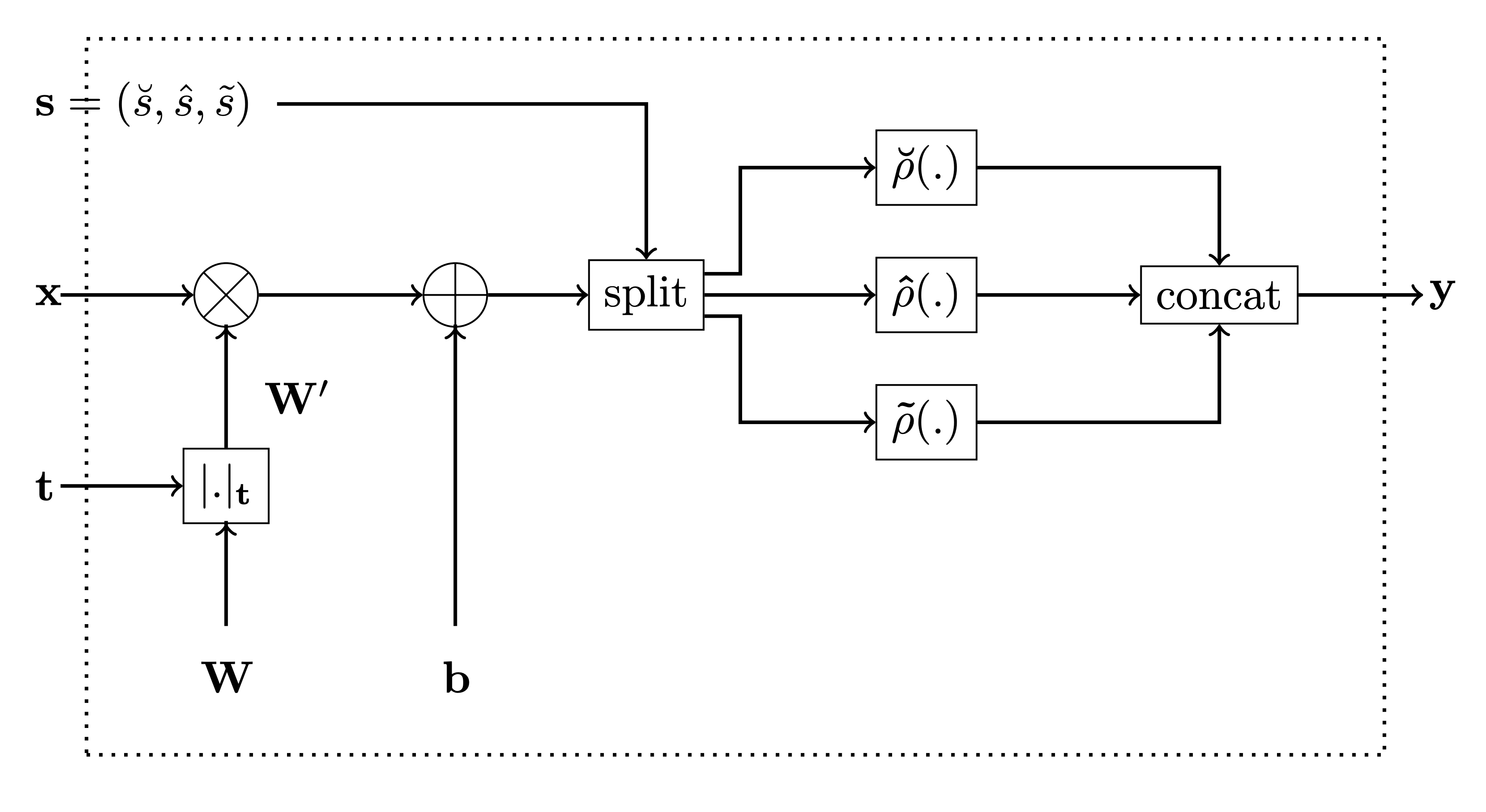
This package contains an implementation of our Monotonic Dense Layer
MonoDense
(Constrained Monotonic Fully Connected Layer). Below is the figure from
the paper for reference.
In the code, the variable monotonicity_indicator corresponds to t
in the figure and parameters is_convex, is_concave and
activation_weights are used to calculate the activation selector s
as follows:
-
if
is_convexoris_concaveis True, then the activation selector s will be (units, 0, 0) and (0,units, 0), respecively. -
if both
is_convexoris_concaveis False, then theactivation_weightsrepresent ratios between $\breve{s}$, $\hat{s}$ and $\tilde{s}$, respecively. E.g. ifactivation_weights = (2, 2, 1)andunits = 10, then
$$ (\breve{s}, \hat{s}, \tilde{s}) = (4, 4, 2) $$
Install
pip install mono-dense-keras
How to use
In this example, we’ll assume we have a simple dataset with three inputs values $x_1$, $x_2$ and $x_3$ sampled from the normal distribution, while the output value $y$ is calculated according to the following formula before adding Gaussian noise to it:
$y = x_1^3 + \sin\left(\frac{x_2}{2 \pi}\right) + e^{-x_3}$
<style type="text/css"> </style>| x0 | x1 | x2 | y |
|---|---|---|---|
| 0.304717 | -1.039984 | 0.750451 | 0.234541 |
| 0.940565 | -1.951035 | -1.302180 | 4.199094 |
| 0.127840 | -0.316243 | -0.016801 | 0.834086 |
| -0.853044 | 0.879398 | 0.777792 | -0.093359 |
| 0.066031 | 1.127241 | 0.467509 | 0.780875 |
Now, we’ll use the
MonoDense
layer instead of Dense layer to build a simple monotonic network. By
default, the
MonoDense
layer assumes the output of the layer is monotonically increasing with
all inputs. This assumtion is always true for all layers except possibly
the first one. For the first layer, we use monotonicity_indicator to
specify which input parameters are monotonic and to specify are they
increasingly or decreasingly monotonic:
-
set 1 for increasingly monotonic parameter,
-
set -1 for decreasingly monotonic parameter, and
-
set 0 otherwise.
In our case, the monotonicity_indicator is [1, 0, -1] because $y$
is: - monotonically increasing w.r.t. $x_1$
$\left(\frac{\partial y}{x_1} = 3 {x_1}^2 \geq 0\right)$, and
- monotonically decreasing w.r.t. $x_3$ $\left(\frac{\partial y}{x_3} = - e^{-x_2} \leq 0\right)$.
from tensorflow.keras import Sequential
from tensorflow.keras.layers import Dense, Input

from mono_dense_keras import MonoDense

model = Sequential()

model.add(Input(shape=(3,)))
monotonicity_indicator = [1, 0, -1]
model.add(
    MonoDense(128, activation="elu", monotonicity_indicator=monotonicity_indicator)
)
model.add(MonoDense(128, activation="elu"))
model.add(MonoDense(1))

model.summary()
Model: "sequential_7"
_________________________________________________________________
 Layer (type)                Output Shape              Param #
=================================================================
 mono_dense_21 (MonoDense)   (None, 128)               512

 mono_dense_22 (MonoDense)   (None, 128)               16512

 mono_dense_23 (MonoDense)   (None, 1)                 129

=================================================================
Total params: 17,153
Trainable params: 17,153
Non-trainable params: 0
_________________________________________________________________
Now we can train the model as usual using Model.fit:
from tensorflow.keras.optimizers import Adam
from tensorflow.keras.optimizers.schedules import ExponentialDecay

lr_schedule = ExponentialDecay(
    initial_learning_rate=0.01,
    decay_steps=10_000 // 32,
    decay_rate=0.9,
)
optimizer = Adam(learning_rate=lr_schedule)
model.compile(optimizer=optimizer, loss="mse")

model.fit(
    x=x_train, y=y_train, batch_size=32, validation_data=(x_val, y_val), epochs=10
)
Epoch 1/10
313/313 [==============================] - 2s 5ms/step - loss: 9.6909 - val_loss: 6.3050
Epoch 2/10
313/313 [==============================] - 1s 4ms/step - loss: 4.1970 - val_loss: 2.0028
Epoch 3/10
313/313 [==============================] - 1s 4ms/step - loss: 1.7086 - val_loss: 1.0551
Epoch 4/10
313/313 [==============================] - 1s 4ms/step - loss: 0.9906 - val_loss: 0.5927
Epoch 5/10
313/313 [==============================] - 1s 4ms/step - loss: 0.6411 - val_loss: 0.1694
Epoch 6/10
313/313 [==============================] - 1s 4ms/step - loss: 0.6686 - val_loss: 1.7604
Epoch 7/10
313/313 [==============================] - 1s 4ms/step - loss: 0.6464 - val_loss: 0.1079
Epoch 8/10
313/313 [==============================] - 1s 4ms/step - loss: 0.4570 - val_loss: 0.1365
Epoch 9/10
313/313 [==============================] - 1s 4ms/step - loss: 0.2945 - val_loss: 0.0664
Epoch 10/10
313/313 [==============================] - 1s 4ms/step - loss: 0.2095 - val_loss: 0.0849

<keras.callbacks.History>
License
This
work is licensed under a
Creative
Commons Attribution-NonCommercial-ShareAlike 4.0 International
License.

You are free to: - Share — copy and redistribute the material in any medium or format
- Adapt — remix, transform, and build upon the material
The licensor cannot revoke these freedoms as long as you follow the license terms.
Under the following terms: - Attribution — You must give appropriate credit, provide a link to the license, and indicate if changes were made. You may do so in any reasonable manner, but not in any way that suggests the licensor endorses you or your use.
-
NonCommercial — You may not use the material for commercial purposes.
-
ShareAlike — If you remix, transform, or build upon the material, you must distribute your contributions under the same license as the original.
-
No additional restrictions — You may not apply legal terms or technological measures that legally restrict others from doing anything the license permits.


Release files for mono-dense-keras 0.1.1
For a detailed explanation of source distributions (sdists) and built distributions (wheels), please see the package formats documentation.
Source distribution (sdist)
| File | Size | Uploaded | |
|---|---|---|---|
| mono_dense_keras-0.1.1.tar.gz | 26.3 kB | Details |
Built distribution (wheel)
| File | Interpreter | ABI | Platform | Reset |
|---|---|---|---|---|
| mono_dense_keras-0.1.1-py3-none-any.whl | Python 3 | none | any | Details |
Total release size: 50.0 kB
Release files / mono_dense_keras-0.1.1.tar.gz
| Download URL | mono_dense_keras-0.1.1.tar.gz |
|---|---|
| Size | 26.3 kB |
| Tags | Source |
|
SHA-256 checksum How to use checksums |
a930312d6f47936a08ca9460a4acb2dbfb8496cdc106f53c70d8631d7c673bd9
|
|
BLAKE2b-256 checksum How to use checksums |
1d7d71f23b162e3faeca832476c89a644fa1df7dc15ac407e1dcf32f316da869
|
| Upload date | |
|
Uploaded using Trusted Publishing? What is trusted publishing? |
No |
| Uploaded via |
twine/6.1.0 CPython/3.9.22
|
Release files / mono_dense_keras-0.1.1-py3-none-any.whl
| Download URL | mono_dense_keras-0.1.1-py3-none-any.whl |
|---|---|
| Size | 23.7 kB |
| Tags | Python 3 |
|
SHA-256 checksum How to use checksums |
9126a468677357a5f07649504e150c1da2713d8a7d17d5e53ed082ca59e948ed
|
|
BLAKE2b-256 checksum How to use checksums |
c673d2dd29ece1a2617ba0cf43a7e370cbc4abb929f7777b2fb0ab357a099d72
|
| Upload date | |
|
Uploaded using Trusted Publishing? What is trusted publishing? |
No |
| Uploaded via |
twine/6.1.0 CPython/3.9.22
|














