





Monopoly is a Python library & CLI that converts bank statement PDFs to CSV.
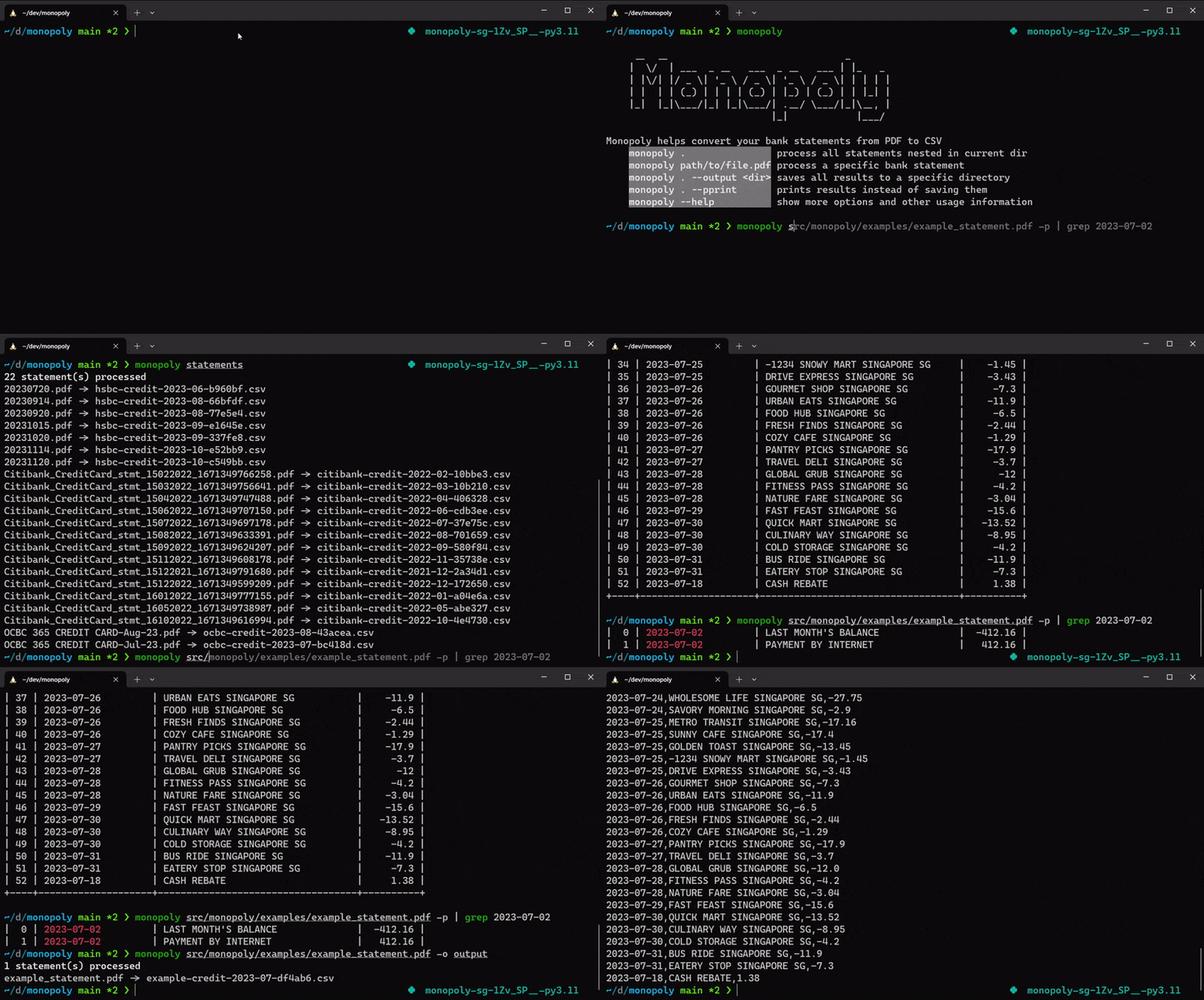
Supported banks:
| Bank | Credit Statement | Debit Statement |
|---|---|---|
| American Express (Singapore Platinum, US) | ✅ | ❌ |
| Bank of America | ✅ | ✅ |
| Bank of Montreal (BMO) | ✅ | ✅ |
| Canadian Imperial Bank of Commerce (CIBC) | ✅ | ✅ |
| Canadian Tire Bank | ✅ | ❌ |
| Capital One Canada | ✅ | ❌ |
| Capital One 360 (US) | ❌ | ✅ |
| Chase | ✅ | ❌ |
| Citibank | ✅ | ❌ |
| DBS/POSB | ✅ | ✅ |
| HSBC | ✅ | ❌ |
| Maybank | ✅ | ✅ |
| OCBC | ✅ | ✅ |
| Royal Bank of Canada (RBC) | ✅ | ✅ |
| Schwab Bank | N/A | ✅ |
| Scotiabank | ✅ | ✅ |
| Standard Chartered | ✅ | ❌ |
| TD Canada Trust | ✅ | ✅ |
| Trust | ✅ | ❌ |
| UOB | ✅ | ✅ |
| US Bank | ✅ | ❌ |
| Zürcher Kantonalbank | ❌ | ✅ |
Install
Monopoly is a pip-installable Python package on PyPI under the name monopoly-core.
Since Monopoly uses pdftotext, you'll need to install additional dependencies:
apt-get install build-essential libpoppler-cpp-dev ocrmypdf
or
brew install gcc@11 poppler ocrmypdf
Then install with pipx:
pipx install monopoly-core
For additional OCR support:
pipx install 'monopoly-core[ocr]'
Usage
Monopoly runs in your terminal, allowing you to extract, transform and write bank statements to a CSV file.
To list commands and options:
monopoly --help
You can run it on a single statement
monopoly src/monopoly/examples/example_statement.pdf
or multiple statements
monopoly ./statements
To keep the output filename the same as the input (with a .csv extension), pass:
monopoly path/to/file.pdf --output ./out --preserve-filename
By default Monopoly writes a 4-column CSV. Pass --format json for a richer,
versioned schema (schema_version, statement metadata, payment summary, and a
stable per-transaction id):
monopoly path/to/file.pdf --output ./out --format json
Each transaction also carries currency (the statement's settlement currency),
posting_date, a normalized direction ("credit"/"debit"), and a nullable
account slot. Per-transaction FX/original-currency and account last-4 extraction
are a planned follow-up (currently null).
If you need to run monopoly on a password protected file, ensure that passwords are set in the .env file:
cp .env.template .env
PDF_PASSWORDS=["password1","password2"]
Monopoly can also be run as a Python library:
python3 src/monopoly/examples/single_statement.py
Features
- Parses PDFs using predefined configuration classes per bank.
- Handles locked PDFs with credentials passed via environment variables.
- Supports adding OCR for image-based bank statements.
- Provides a generic parser that can be used without any predefined configuration (caveat emptor).
- Includes a safety check (enabled by default) that validates totals for debit or credit statements.
Development
Want to add a bank but can't share a real statement? See
CONTRIBUTING.md for the redacted text-fixture path
(monopoly-fixture dump / build).
Clone the repo
git clone https://github.com/benjamin-awd/monopoly.git
Install system dependencies and the Python environment
make setup
On Linux this uses apt (build-essential, libpoppler-cpp-dev); elsewhere it uses Homebrew (brew bundle). Python itself is provisioned by uv (pinned in .python-version), not Homebrew.
1 maintainer

Metadata
1 maintainer
Release files for monopoly-core 0.23.6
For a detailed explanation of source distributions (sdists) and built distributions (wheels), please see the package formats documentation.
Source distribution (sdist)
| File | Size | Uploaded | Provenance | Actions |
|---|---|---|---|---|
| monopoly_core-0.23.6.tar.gz | 361.7 kB | Without provenance | Details for monopoly_core-0.23.6.tar.gz |
Built distribution (wheel)
| File | Interpreter | ABI | Platform | Actions Reset |
|---|---|---|---|---|
| monopoly_core-0.23.6-py3-none-any.whl | Python 3 | none | any | Details for monopoly_core-0.23.6-py3-none-any.whl |
Total release size: 664.5 kB
Release files / monopoly_core-0.23.6.tar.gz
| Download URL | monopoly_core-0.23.6.tar.gz |
|---|---|
| Size | 361.7 kB |
| Tags | Source |
|
SHA-256 checksum How to use checksums |
ccb5dc043e9fa42c674f3ce65e5cb6d4eac7eec819991435b7386a95545499da
|
|
BLAKE2b-256 checksum How to use checksums |
e0e9c8ff63d6bf9df00d3bf864ec6b7c4d79767e6a5aca785680846349967cfa
|
| Upload date | |
|
Uploaded using Trusted Publishing? What is trusted publishing? |
Yes |
| Uploaded via |
uv/0.13.6 {"installer":{"name":"uv","version":"0.13.6","subcommand":["publish"]},"python":null,"implementation":{"name":null,"version":null},"distro":{"name":"Ubuntu","version":"24.04","id":"noble","libc":null},"system":{"name":null,"release":null},"cpu":null,"openssl_version":null,"setuptools_version":null,"rustc_version":null,"ci":true}
|
Release files / monopoly_core-0.23.6-py3-none-any.whl
| Download URL | monopoly_core-0.23.6-py3-none-any.whl |
|---|---|
| Size | 302.8 kB |
| Tags | Python 3 |
|
SHA-256 checksum How to use checksums |
a72e1dfb5257e6e11318dfd8b67d446a076829081f994c659a941532b606d8ba
|
|
BLAKE2b-256 checksum How to use checksums |
fa8a487bd8028381df52fc198660f44b3907cd57c62b7df5b37aca4f84fe5482
|
| Upload date | |
|
Uploaded using Trusted Publishing? What is trusted publishing? |
Yes |
| Uploaded via |
uv/0.13.6 {"installer":{"name":"uv","version":"0.13.6","subcommand":["publish"]},"python":null,"implementation":{"name":null,"version":null},"distro":{"name":"Ubuntu","version":"24.04","id":"noble","libc":null},"system":{"name":null,"release":null},"cpu":null,"openssl_version":null,"setuptools_version":null,"rustc_version":null,"ci":true}
|
Security for monopoly-core 0.23.6
Provenance
Provenance describes where a file came from. On PyPI, provenance is shared via attestations, which provide a verifiable record of the build or publishing details. View details, limitations and caveats.
No provenance found
None of the files in this release were uploaded with provenance metadata.
A note on package security
PyPI is a repository for distributing packages, not a service for auditing them. While third-party security researchers and our staff do their best to detect and remove malicious packages, PyPI cannot guarantee the quality, security or suitability of any given package.
To learn more about protecting yourself from malicious actors, visit our package security documentation.














