
Moog Sub37 MCP
A Model Context Protocol (MCP) server that allows Claude and other MCP-compatible LLMs to interact with and control the Moog Sub37/Subsequent37 analog synthesizer via MIDI. This integration enables AI-assisted sound design and parameter control of this legendary Moog synthesizer.
About the Moog Sub37/Subsequent37
The Moog Sub37/Subsequent37 is a powerful analog synthesizer featuring:
- 2 oscillators with sub oscillators
- Classic Moog ladder filter
- Dual LFOs
- Extensive modulation options
- 256 preset memory
- 37-key keyboard with velocity and aftertouch
- Mono and Duo (paraphonic) modes
- Built-in arpeggiator and step sequencer
Prompt Examples
"Design a deep, resonant bass patch using the Moog filter's self-oscillation"
"Create an evolving pad sound using both oscillators in Duo mode"
"Program a sequence that showcases the Sub37's classic Moog lead sound"
"Design a dark atmospheric sound using the Sub37's modulation capabilities"
"Create a punchy bass sound perfect for techno using the multidrive circuit"
Features
- Complete MIDI control interface for all Sub37/Subsequent37 parameters
- Support for both Sub37 and Subsequent37 models
- Access to all synthesis parameters:
- Oscillator controls (waveform, pitch, sync)
- Filter controls (cutoff, resonance, envelope amount)
- Envelope generators
- LFO settings
- Modulation routing
- Arpeggiator/Sequencer parameters
- Preset management
- Real-time parameter automation
Demo
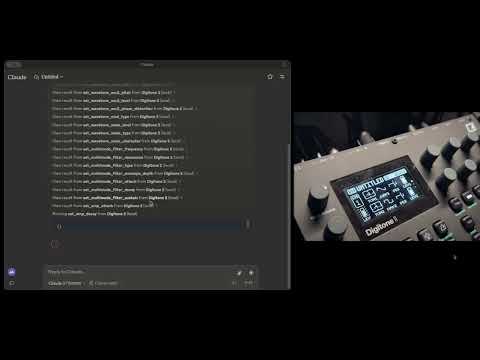
Watch Claude control the Moog Sub37/Subsequent37 in real-time:
Installation and Usage
Prerequisites
- Python 3.12+
- uv for package management
- A Moog Sub37 or Subsequent37 synthesizer connected via USB
- Claude Desktop app (for full integration)
Installing Dependencies
uv is mandatory for this project. Start by installing it:
For macOS:
brew install uv
For Windows:
Follow the instructions here
Installing with Claude Desktop
To use with Claude AI, add the MCP server configuration in Claude Desktop:
⚠️ Important: You don't need to clone the repository or install the packages manually. The MCP server is published on PyPI and can be installed automatically.
Go to Claude > Settings > Developer > Edit Config > claude_desktop_config.json to include the following:
{
  "mcpServers": {
    "Sub37": {
      "command": "uvx",
      "args": ["moog-sub37-mcp"]
    }
  }
}
Architecture
The MCP server is designed to provide comprehensive control over the Sub37/Subsequent37:
- Parameter Control: Direct access to all synthesizer parameters via MIDI CC messages
- Preset Management: Load, save, and modify presets
- Real-time Control: Immediate response to parameter changes
- MIDI Implementation: Complete MIDI specification support
- Error Handling: Robust error handling for MIDI communication
Implementation Details
This library leverages:
- FastMCP: For exposing synth controls to LLMs
- Pydantic Models: For parameter validation and type safety
- mido: For reliable MIDI communication with the synthesizer
- Dynamic Versioning: Automatic version management for releases
Use Cases
- AI-Assisted Sound Design: Let Claude help you create new sounds and explore the synth's capabilities
- Automated Parameter Control: Program complex parameter changes for evolving sounds
- Preset Management: Organize and modify your preset library
- Live Performance: Control the synth in real-time with AI assistance
- Educational Tool: Learn about synthesis through interactive AI guidance
Community and Support
- Join our Discord community for help and discussion
- Visit synthgenie.com for the web-based version (API key available for free on Discord)
- Report issues and contribute on GitHub
License
MIT License - See LICENSE file for details
1 maintainer

Metadata
1 maintainer
Release files for moog-sub37-mcp 0.0.5
For a detailed explanation of source distributions (sdists) and built distributions (wheels), please see the package formats documentation.
Source distribution (sdist)
| File | Size | Uploaded | |
|---|---|---|---|
| moog_sub37_mcp-0.0.5.tar.gz | 29.7 kB | Details |
Built distribution (wheel)
| File | Interpreter | ABI | Platform | Reset |
|---|---|---|---|---|
| moog_sub37_mcp-0.0.5-py3-none-any.whl | Python 3 | none | any | Details |
Total release size: 48.5 kB
Release files / moog_sub37_mcp-0.0.5.tar.gz
| Download URL | moog_sub37_mcp-0.0.5.tar.gz |
|---|---|
| Size | 29.7 kB |
| Tags | Source |
|
SHA-256 checksum How to use checksums |
46851b1962ddfef29292f66211253738d6863f0890026cf67fe51a1b0e296222
|
|
BLAKE2b-256 checksum How to use checksums |
c16e2f8b86de51a7c5046724916e25b90c0fd11288c6afd5f4bc5e0e9de2ddfe
|
| Upload date | |
|
Uploaded using Trusted Publishing? What is trusted publishing? |
No |
| Uploaded via |
uv/0.6.8
|
Release files / moog_sub37_mcp-0.0.5-py3-none-any.whl
| Download URL | moog_sub37_mcp-0.0.5-py3-none-any.whl |
|---|---|
| Size | 18.8 kB |
| Tags | Python 3 |
|
SHA-256 checksum How to use checksums |
f5363b17394d72f032f4448f2e02bef6d8cc4dcecb32d732f6fbd85ec8cc70d1
|
|
BLAKE2b-256 checksum How to use checksums |
6ba1bb39e0e00fb08fb4c09d2e126c876af8596347d97ce69f20b387e0357a0a
|
| Upload date | |
|
Uploaded using Trusted Publishing? What is trusted publishing? |
No |
| Uploaded via |
uv/0.6.8
|














