
MPC to control Moog Sub37 Monophonic Synthesizer

Project description
Moog Sub37 MCP
A Model Context Protocol (MCP) server that allows Claude and other MCP-compatible LLMs to interact with and control the Moog Sub37/Subsequent37 analog synthesizer via MIDI. This integration enables AI-assisted sound design and parameter control of this legendary Moog synthesizer.
About the Moog Sub37/Subsequent37
The Moog Sub37/Subsequent37 is a powerful analog synthesizer featuring:
- 2 oscillators with sub oscillators
- Classic Moog ladder filter
- Dual LFOs
- Extensive modulation options
- 256 preset memory
- 37-key keyboard with velocity and aftertouch
- Mono and Duo (paraphonic) modes
- Built-in arpeggiator and step sequencer
Prompt Examples
"Design a deep, resonant bass patch using the Moog filter's self-oscillation"
"Create an evolving pad sound using both oscillators in Duo mode"
"Program a sequence that showcases the Sub37's classic Moog lead sound"
"Design a dark atmospheric sound using the Sub37's modulation capabilities"
"Create a punchy bass sound perfect for techno using the multidrive circuit"
Features
- Complete MIDI control interface for all Sub37/Subsequent37 parameters
- Support for both Sub37 and Subsequent37 models
- Access to all synthesis parameters:
- Oscillator controls (waveform, pitch, sync)
- Filter controls (cutoff, resonance, envelope amount)
- Envelope generators
- LFO settings
- Modulation routing
- Arpeggiator/Sequencer parameters
- Preset management
- Real-time parameter automation
Demo
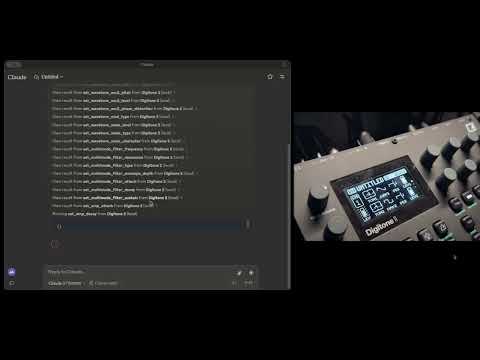
Watch Claude control the Moog Sub37/Subsequent37 in real-time:
Installation and Usage
Prerequisites
- Python 3.12+
- uv for package management
- A Moog Sub37 or Subsequent37 synthesizer connected via USB
- Claude Desktop app (for full integration)
Installing Dependencies
uv is mandatory for this project. Start by installing it:
For macOS:
brew install uv
For Windows:
Follow the instructions here
Installing with Claude Desktop
To use with Claude AI, add the MCP server configuration in Claude Desktop:
⚠️ Important: You don't need to clone the repository or install the packages manually. The MCP server is published on PyPI and can be installed automatically.
Go to Claude > Settings > Developer > Edit Config > claude_desktop_config.json to include the following:
{
  "mcpServers": {
    "Sub37": {
      "command": "uvx",
      "args": ["moog-sub37-mcp"]
    }
  }
}
Architecture
The MCP server is designed to provide comprehensive control over the Sub37/Subsequent37:
- Parameter Control: Direct access to all synthesizer parameters via MIDI CC messages
- Preset Management: Load, save, and modify presets
- Real-time Control: Immediate response to parameter changes
- MIDI Implementation: Complete MIDI specification support
- Error Handling: Robust error handling for MIDI communication
Implementation Details
This library leverages:
- FastMCP: For exposing synth controls to LLMs
- Pydantic Models: For parameter validation and type safety
- mido: For reliable MIDI communication with the synthesizer
- Dynamic Versioning: Automatic version management for releases
Use Cases
- AI-Assisted Sound Design: Let Claude help you create new sounds and explore the synth's capabilities
- Automated Parameter Control: Program complex parameter changes for evolving sounds
- Preset Management: Organize and modify your preset library
- Live Performance: Control the synth in real-time with AI assistance
- Educational Tool: Learn about synthesis through interactive AI guidance
Community and Support
- Join our Discord community for help and discussion
- Visit synthgenie.com for the web-based version (API key available for free on Discord)
- Report issues and contribute on GitHub
License
MIT License - See LICENSE file for details


Download files
Download the file for your platform. If you're not sure which to choose, learn more about installing packages.
Source Distribution
Built Distribution
Filter files by name, interpreter, ABI, and platform.
If you're not sure about the file name format, learn more about wheel file names.
Copy a direct link to the current filters
File details
Details for the file moog_sub37_mcp-0.0.4.tar.gz.
File metadata
- Download URL: moog_sub37_mcp-0.0.4.tar.gz
- Upload date:
- Size: 29.6 kB
- Tags: Source
- Uploaded using Trusted Publishing? No
- Uploaded via: uv/0.6.8
File hashes
| Algorithm | Hash digest | |
|---|---|---|
| SHA256 |
b6328d1834e0281295b9cf49a9220587a112ba63c90c7050f1c461730c694e5c
|
|
| MD5 |
909f724b32eaa55e67ea0e093c1a5f7d
|
|
| BLAKE2b-256 |
ecd285d28aa240c0ca82614a23805c4a779ccc6c2ef06c7e6b7b7e8c543149c2
|
File details
Details for the file moog_sub37_mcp-0.0.4-py3-none-any.whl.
File metadata
- Download URL: moog_sub37_mcp-0.0.4-py3-none-any.whl
- Upload date:
- Size: 18.6 kB
- Tags: Python 3
- Uploaded using Trusted Publishing? No
- Uploaded via: uv/0.6.8
File hashes
| Algorithm | Hash digest | |
|---|---|---|
| SHA256 |
1bd0f64ae72d0208833e80244da737daab558223bf5ad491d839dfc9be4d5fde
|
|
| MD5 |
f3af34dafb9d2925e9bca5edd55fa26d
|
|
| BLAKE2b-256 |
2e8332d22da1508eece0bc8d66d3d4d3d063ff887474fdfba777a14baeb1cbeb
|






