

Moondream Station: Local Visual Reasoning




|
|
How It Works🚀 Launches Local Server 🔧 Control via CLI 🌐 Access via HTTP |
Installation
Install from PyPI:
$ pip install moondream-station
Install from source:
$ git clone https://github.com/m87-labs/moondream-station.git
$ cd moondream-station
$ pip install -e .
That's it! Moondream Station will automatically set itself up.
Usage
Launch Moondream Station
To fire up Moondream Station, execute this command in your terminal:
$ moondream-station
Model Management
By default, Moondream Station uses the latest model your machine supports. If you want to view or activate other Moondream models, use the following commands:
models- List available modelsmodels switch <model>- Switch to a model
Service Control
We like to think Moondream has 20/20 vision; that’s why, by default, we launch Moondream Station on port 2020. If that port is taken, Moondream Station will try a nearby free port. Additionally, you can control the port and status of the inference service with the following commands:
start [port]- Start REST server (default: port 2020)stop- Stop serverrestart- Restart server
Inference
Access via HTTP: Point any of our inference clients at your Moondream Station; for example, with our python client you can do:
import moondream as md
from PIL import Image

# connect to Moondream Station
model = md.vl(endpoint="http://localhost:2020/v1")

# Load an image
image = Image.open("path/to/image.jpg")

# Ask a question
answer = model.query(image, "What's in this image?")["answer"]
print("Answer:", answer)
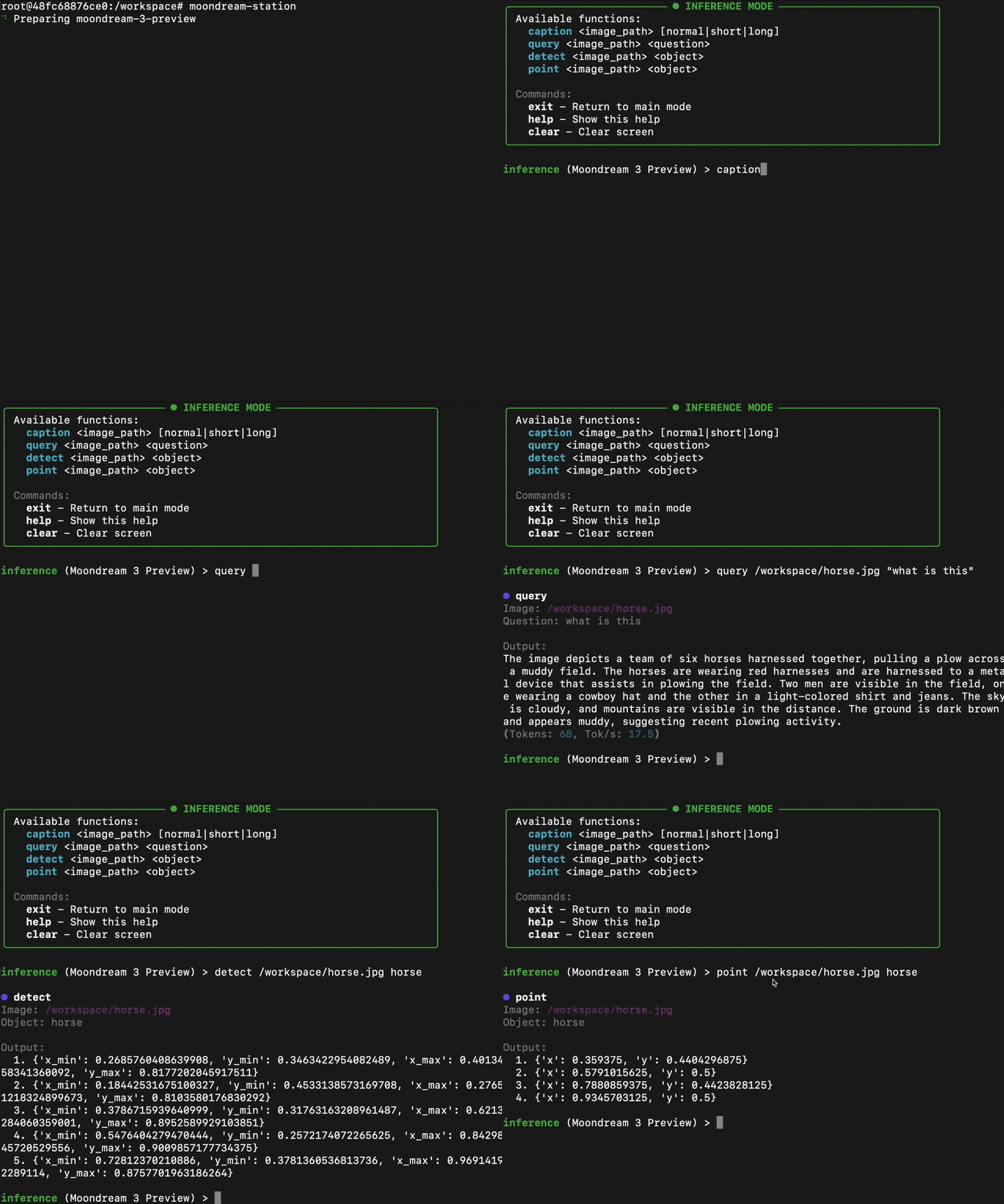
For more information on our clients visit: Python, Node, Quick Start caption /Users/zekieldee/Desktop/code/moondream-station/chat.png Connect via CLI: Use all the capabilities of Moondream directly through your terminal. No need to touch any code!
infer <function> [args]- Run single inferenceinference- Enter interactive inference mode
Settings
Control the number of workers, queue size, privacy settings, and more through Settings:
settings- Show configurationsettings set <key> <value>- Set setting value
Moondream Station collects anonymous usage metrics to help us improve the app. The following data is collected:
- Event data: when you use features like caption, query, detect, or point.
- Version information: active bootstrap, hypervisor, inference client, and model version.
- System information: OS version, IP address, and Python version/runtime.
No personal information, images, or prompts/responses are ever collected. To opt out of logging, run: settings set logging false.
Utility
The utility functions provide insight into what Moondream Station is currently doing. To view statistics for your current session, use the session mode. To view a log of requests processed by Moondream Station, use the history command.
session- Show session statshelp- Show available commandshistory- Show command historyreset- Reset app data & settingsclear- Clear screenexit- Quit application
1 maintainer

Metadata
1 maintainer
Release files for moondream-station-nell-02 0.1.10
For a detailed explanation of source distributions (sdists) and built distributions (wheels), please see the package formats documentation.
Source distribution (sdist)
| File | Size | Uploaded | |
|---|---|---|---|
| moondream_station_nell_02-0.1.10.tar.gz | 41.9 kB | Details |
Built distribution (wheel)
| File | Interpreter | ABI | Platform | Reset |
|---|---|---|---|---|
| moondream_station_nell_02-0.1.10-py3-none-any.whl | Python 3 | none | any | Details |
Total release size: 90.4 kB
Release files / moondream_station_nell_02-0.1.10.tar.gz
| Download URL | moondream_station_nell_02-0.1.10.tar.gz |
|---|---|
| Size | 41.9 kB |
| Tags | Source |
|
SHA-256 checksum How to use checksums |
f24cdbcca1582f063192a1a67a4e5a34ca1b0cb45cec1afdb6a5b16102c0b7ca
|
|
BLAKE2b-256 checksum How to use checksums |
206ca297d3f5a4d4284cf3e2dc0824b504c46a51e68d9ac36bf869d207c48bd9
|
| Upload date | |
|
Uploaded using Trusted Publishing? What is trusted publishing? |
No |
| Uploaded via |
twine/6.2.0 CPython/3.11.8
|
Release files / moondream_station_nell_02-0.1.10-py3-none-any.whl
| Download URL | moondream_station_nell_02-0.1.10-py3-none-any.whl |
|---|---|
| Size | 48.5 kB |
| Tags | Python 3 |
|
SHA-256 checksum How to use checksums |
f8702fbb87e43fc2b6aa77f3aad43c105de7fabc30844596dbbbeed8e85738c2
|
|
BLAKE2b-256 checksum How to use checksums |
060924596a5b7594a1a3273ea17eda25f157a9b264a6b790194acc93bf371483
|
| Upload date | |
|
Uploaded using Trusted Publishing? What is trusted publishing? |
No |
| Uploaded via |
twine/6.2.0 CPython/3.11.8
|














