
Local inference and model management.

Project description

Moondream Station: Local Visual Reasoning




|
|
How It Works🚀 Launches Local Server 🔧 Control via CLI 🌐 Access via HTTP |
Installation
Install from PyPI:
$ pip install moondream-station
Install from source:
$ git clone https://github.com/m87-labs/moondream-station.git
$ cd moondream-station
$ pip install -e .
That's it! Moondream Station will automatically set itself up.
Usage
Launch Moondream Station
To fire up Moondream Station, execute this command in your terminal:
$ moondream-station
Model Management
By default, Moondream Station uses the latest model your machine supports. If you want to view or activate other Moondream models, use the following commands:
models- List available modelsmodels switch <model>- Switch to a model
Service Control
We like to think Moondream has 20/20 vision; that’s why, by default, we launch Moondream Station on port 2020. If that port is taken, Moondream Station will try a nearby free port. Additionally, you can control the port and status of the inference service with the following commands:
start [port]- Start REST server (default: port 2020)stop- Stop serverrestart- Restart server
Inference
Access via HTTP: Point any of our inference clients at your Moondream Station; for example, with our python client you can do:
import moondream as md
from PIL import Image

# connect to Moondream Station
model = md.vl(endpoint="http://localhost:2020/v1")

# Load an image
image = Image.open("path/to/image.jpg")

# Ask a question
answer = model.query(image, "What's in this image?")["answer"]
print("Answer:", answer)
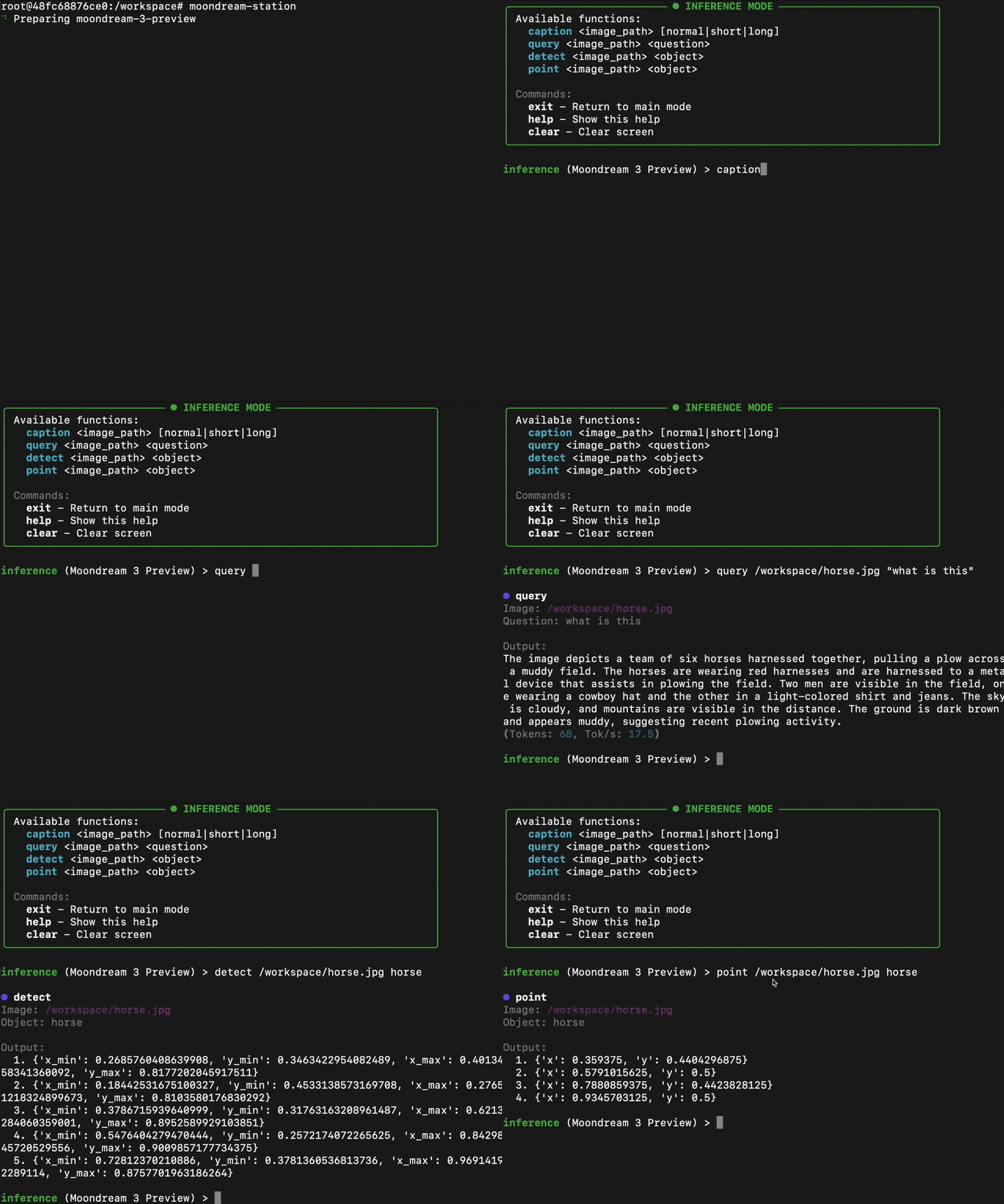
For more information on our clients visit: Python, Node, Quick Start caption /Users/zekieldee/Desktop/code/moondream-station/chat.png Connect via CLI: Use all the capabilities of Moondream directly through your terminal. No need to touch any code!
infer <function> [args]- Run single inferenceinference- Enter interactive inference mode
Settings
Control the number of workers, queue size, privacy settings, and more through Settings:
settings- Show configurationsettings set <key> <value>- Set setting value
Moondream Station collects anonymous usage metrics to help us improve the app. The following data is collected:
- Event data: when you use features like caption, query, detect, or point.
- Version information: active bootstrap, hypervisor, inference client, and model version.
- System information: OS version, IP address, and Python version/runtime.
No personal information, images, or prompts/responses are ever collected. To opt out of logging, run: settings set logging false.
Utility
The utility functions provide insight into what Moondream Station is currently doing. To view statistics for your current session, use the session mode. To view a log of requests processed by Moondream Station, use the history command.
session- Show session statshelp- Show available commandshistory- Show command historyreset- Reset app data & settingsclear- Clear screenexit- Quit application


Download files
Download the file for your platform. If you're not sure which to choose, learn more about installing packages.
Source Distribution
Built Distribution
Filter files by name, interpreter, ABI, and platform.
If you're not sure about the file name format, learn more about wheel file names.
Copy a direct link to the current filters
File details
Details for the file moondream_station_nell_02-0.1.8.tar.gz.
File metadata
- Download URL: moondream_station_nell_02-0.1.8.tar.gz
- Upload date:
- Size: 42.3 kB
- Tags: Source
- Uploaded using Trusted Publishing? No
- Uploaded via: twine/6.2.0 CPython/3.11.8
File hashes
| Algorithm | Hash digest | |
|---|---|---|
| SHA256 |
234793635de0358912c361d6d215f29fc4b0b68d833d5f17233fa5a39fbd986e
|
|
| MD5 |
730d065ab47ac4bd49c7b431662290dc
|
|
| BLAKE2b-256 |
5d7af1e77fb9eaf97765d4567ded8a33254e79a1e6025ad34165ecece11ef261
|
File details
Details for the file moondream_station_nell_02-0.1.8-py3-none-any.whl.
File metadata
- Download URL: moondream_station_nell_02-0.1.8-py3-none-any.whl
- Upload date:
- Size: 49.1 kB
- Tags: Python 3
- Uploaded using Trusted Publishing? No
- Uploaded via: twine/6.2.0 CPython/3.11.8
File hashes
| Algorithm | Hash digest | |
|---|---|---|
| SHA256 |
2e2886e18639ee27b918940afa0429bd4ced26351d814d5c8f313d92937a8410
|
|
| MD5 |
c719b7391ec8a25a2888f21104368c7c
|
|
| BLAKE2b-256 |
5e25efb7286d774c4fffd2ecde6da1526c34c88bd51a6b672a7316ebba5f1930
|






