






Model Serving made Efficient in the Cloud.
Introduction
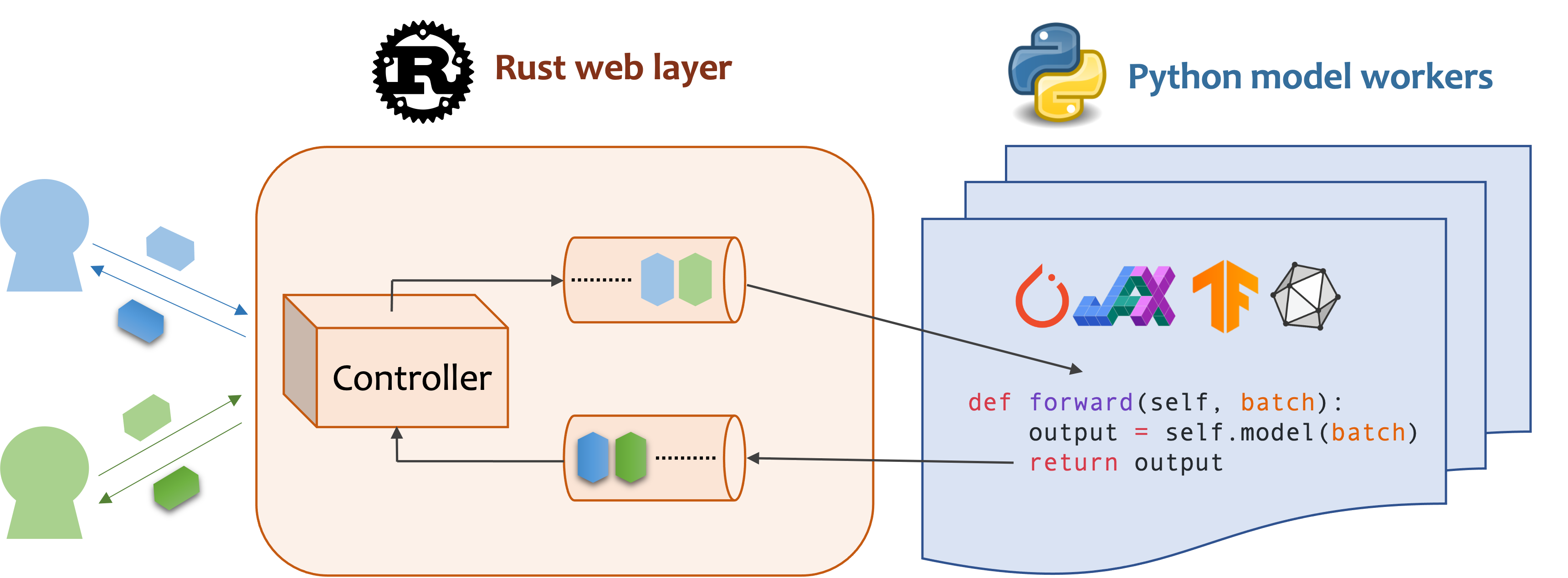
Mosec is a high-performance and flexible model serving framework for building ML model-enabled backend and microservices. It bridges the gap between any machine learning models you just trained and the efficient online service API.
- Highly performant: web layer and task coordination built with Rust 🦀, which offers blazing speed in addition to efficient CPU utilization powered by async I/O
- Ease of use: user interface purely in Python 🐍, by which users can serve their models in an ML framework-agnostic manner using the same code as they do for offline testing
- Dynamic batching: aggregate requests from different users for batched inference and distribute results back
- Pipelined stages: spawn multiple processes for pipelined stages to handle CPU/GPU/IO mixed workloads
- Cloud friendly: designed to run in the cloud, with the model warmup, graceful shutdown, and Prometheus monitoring metrics, easily managed by Kubernetes or any container orchestration systems
- Do one thing well: focus on the online serving part, users can pay attention to the model optimization and business logic
Installation
Mosec requires Python 3.7 or above. Install the latest PyPI package for Linux or macOS with:
pip install -U mosec
# or install with conda
conda install conda-forge::mosec
# or install with pixi
pixi add mosec
To build from the source code, install Rust and run the following command:
make package
You will get a mosec wheel file in the dist folder.
Usage
We demonstrate how Mosec can help you easily host a pre-trained stable diffusion model as a service. You need to install diffusers and transformers as prerequisites:
pip install --upgrade diffusers[torch] transformers
Write the server
Click me for server codes with explanations.
Firstly, we import the libraries and set up a basic logger to better observe what happens.
from io import BytesIO

import torch  # type: ignore
from diffusers import StableDiffusionPipeline  # type: ignore

from mosec import Server, Worker, get_logger
from mosec.mixin import MsgpackMixin

logger = get_logger()
Then, we build an API for clients to query a text prompt and obtain an image based on the stable-diffusion-v1-5 model in just 3 steps.
-
Define your service as a class which inherits
mosec.Worker. Here we also inheritMsgpackMixinto employ the msgpack serialization format(a). -
Inside the
__init__method, initialize your model and put it onto the corresponding device. Optionally you can assignself.examplewith some data to warm up(b) the model. Note that the data should be compatible with your handler's input format, which we detail next. -
Override the
forwardmethod to write your service handler(c), with the signatureforward(self, data: Any | list[Any]) -> Any | list[Any]. Receiving/returning a single item or a tuple depends on whether dynamic batching(d) is configured.
class StableDiffusion(MsgpackMixin, Worker):
    def __init__(self):
        self.pipe = StableDiffusionPipeline.from_pretrained(
            "sd-legacy/stable-diffusion-v1-5", torch_dtype=torch.float16
        )
        self.pipe.enable_model_cpu_offload()
        self.example = ["useless example prompt"] * 4  # warmup (batch_size=4)

    def forward(self, data: list[str]) -> list[memoryview]:
        logger.debug("generate images for %s", data)
        res = self.pipe(data)
        logger.debug("NSFW: %s", res[1])
        images = []
        for img in res[0]:
            dummy_file = BytesIO()
            img.save(dummy_file, format="JPEG")
            images.append(dummy_file.getbuffer())
        return images
Finally, we append the worker to the server to construct a single-stage workflow (multiple stages can be pipelined to further boost the throughput, see this example), and specify the number of processes we want it to run in parallel (num=1), and the maximum batch size (max_batch_size=4, the maximum number of requests dynamic batching will accumulate before timeout; timeout is defined with the max_wait_time=10 in milliseconds, meaning the longest time Mosec waits until sending the batch to the Worker).
if __name__ == "__main__":
    server = Server()
    # 1) `num` specifies the number of processes that will be spawned to run in parallel.
    # 2) By configuring the `max_batch_size` with the value > 1, the input data in your
    # `forward` function will be a list (batch); otherwise, it's a single item.
    server.append_worker(StableDiffusion, num=1, max_batch_size=4, max_wait_time=10)
    server.run()
Run the server
Click me to see how to run and query the server.
The above snippets are merged in our example file. You may directly run at the project root level. We first have a look at the command line arguments (explanations here):
python examples/stable_diffusion/server.py --help
Then let's start the server with debug logs:
python examples/stable_diffusion/server.py --log-level debug --timeout 30000
Open http://127.0.0.1:8000/openapi/swagger/ in your browser to get the OpenAPI doc.
Starting in v0.9.8, OpenAPI generation works for all Worker implementations and
does not require TypedMsgPackMixin. See the OpenAPI reference
for schema generation details.
And in another terminal, test it:
python examples/stable_diffusion/client.py --prompt "a cute cat playing with a red ball" --output cat.jpg --port 8000
You will get an image named "cat.jpg" in the current directory.
You can check the metrics:
curl http://127.0.0.1:8000/metrics
That's it! You have just hosted your stable-diffusion model as a service! 😉
Examples
More ready-to-use examples can be found in the Example section. It includes:
- Pipeline: a simple echo demo even without any ML model.
- Request validation: validate the request with type annotation and generate OpenAPI documentation.
- Multiple route: serve multiple models in one service
- Embedding service: OpenAI compatible embedding service
- Reranking service: rerank a list of passages based on a query
- Shared memory IPC: inter-process communication with shared memory.
- Customized GPU allocation: deploy multiple replicas, each using different GPUs.
- Customized metrics: record your own metrics for monitoring.
- Jax jitted inference: just-in-time compilation speeds up the inference.
- Compression: enable request/response compression.
- PyTorch deep learning models:
- sentiment analysis: infer the sentiment of a sentence.
- image recognition: categorize a given image.
- stable diffusion: generate images based on texts, with msgpack serialization.
Configuration
- Dynamic batching
max_batch_sizeandmax_wait_time (millisecond)are configured when you callappend_worker.- Make sure inference with the
max_batch_sizevalue won't cause the out-of-memory in GPU. - Normally,
max_wait_timeshould be less than the batch inference time. - If enabled, it will collect a batch either when the number of accumulated requests reaches
max_batch_sizeor whenmax_wait_timehas elapsed. The service will benefit from this feature when the traffic is high.
- Check the arguments doc for other configurations.
Deployment
- If you're looking for a GPU base image with
mosecinstalled, you can check the official imagemosecorg/mosec. For the complex use case, check out envd. - This service doesn't need Gunicorn or NGINX, but you can certainly use the ingress controller when necessary.
- This service should be the PID 1 process in the container since it controls multiple processes. If you need to run multiple processes in one container, you will need a supervisor. You may choose Supervisor or Horust.
- Remember to collect the metrics.
mosec_service_batch_size_bucketshows the batch size distribution.mosec_service_batch_duration_second_bucketshows the duration of dynamic batching for each connection in each stage (starts from receiving the first task).mosec_service_process_duration_second_bucketshows the duration of processing for each connection in each stage (including the IPC time but excluding themosec_service_batch_duration_second_bucket).mosec_service_remaining_taskshows the number of currently processing tasks.mosec_service_throughputshows the service throughput.
- Stop the service with
SIGINT(CTRL+C) orSIGTERM(kill {PID}) since it has the graceful shutdown logic.
Performance tuning
- Find out the best
max_batch_sizeandmax_wait_timefor your inference service. The metrics will show the histograms of the real batch size and batch duration. Those are the key information to adjust these two parameters. - Try to split the whole inference process into separate CPU and GPU stages (ref DistilBERT). Different stages will be run in a data pipeline, which will keep the GPU busy.
- You can also adjust the number of workers in each stage. For example, if your pipeline consists of a CPU stage for preprocessing and a GPU stage for model inference, increasing the number of CPU-stage workers can help to produce more data to be batched for model inference at the GPU stage; increasing the GPU-stage workers can fully utilize the GPU memory and computation power. Both ways may contribute to higher GPU utilization, which consequently results in higher service throughput.
- For multi-stage services, note that the data passing through different stages will be serialized/deserialized by the
serialize_ipc/deserialize_ipcmethods, so extremely large data might make the whole pipeline slow. The serialized data is passed to the next stage through rust by default, you could enable shared memory to potentially reduce the latency (ref RedisShmIPCMixin). - You should choose appropriate
serialize/deserializemethods, which are used to decode the user request and encode the response. By default, both are using JSON. However, images and embeddings are not well supported by JSON. You can choose msgpack which is faster and binary compatible (ref Stable Diffusion). - Configure the threads for OpenBLAS or MKL. It might not be able to choose the most suitable CPUs used by the current Python process. You can configure it for each worker by using the env (ref custom GPU allocation).
- Enable HTTP/2 from client side.
mosecautomatically adapts to user's protocol (e.g., HTTP/2) since v0.8.8.
Adopters
Here are some of the companies and individual users that are using Mosec:
- Modelz: Serverless platform for ML inference.
- MOSS: An open sourced conversational language model like ChatGPT.
- TencentCloud: Tencent Cloud Machine Learning Platform, using Mosec as the core inference server framework.
- TensorChord: Cloud native AI infrastructure company.
- OAT: Serving reward models for online LLM alignment.
Citation
If you find this software useful for your research, please consider citing
@software{yang2021mosec,
  title = {{MOSEC: Model Serving made Efficient in the Cloud}},
  author = {Yang, Keming and Liu, Zichen and Cheng, Philip},
  howpublished = {https://github.com/mosecorg/mosec},
  year = {2021}
}
Contributing
We welcome any kind of contribution. Please give us feedback by raising issues or discussing on Discord. You could also directly contribute your code and pull request!
To start develop, you can use envd to create an isolated and clean Python & Rust environment. Check the envd-docs or build.envd for more information.


Release files for mosec 0.9.8
For a detailed explanation of source distributions (sdists) and built distributions (wheels), please see the package formats documentation.
Source distribution (sdist)
| File | Size | Uploaded | Provenance | |
|---|---|---|---|---|
| mosec-0.9.8.tar.gz | 178.4 kB | Without provenance | Details |
Built distributions (wheels)
Total release size: 23.6 MB
Release files / mosec-0.9.8.tar.gz
| Download URL | mosec-0.9.8.tar.gz |
|---|---|
| Size | 178.4 kB |
| Tags | Source |
|
SHA-256 checksum How to use checksums |
5dff01127dd89291644abefccaa0d333536810a3332001c93d9576a5ebe96db7
|
|
BLAKE2b-256 checksum How to use checksums |
26418139122887284cbc5f733ed48258a6837c6b707838326a7cd7aa62eaec37
|
| Upload date | |
|
Uploaded using Trusted Publishing? What is trusted publishing? |
Yes |
| Uploaded via |
uv/0.13.0 {"installer":{"name":"uv","version":"0.13.0","subcommand":["publish"]},"python":null,"implementation":{"name":null,"version":null},"distro":{"name":"Ubuntu","version":"24.04","id":"noble","libc":null},"system":{"name":null,"release":null},"cpu":null,"openssl_version":null,"setuptools_version":null,"rustc_version":null,"ci":true}
|
Release files / mosec-0.9.8-py3-none-musllinux_1_2_x86_64.whl
| Download URL | mosec-0.9.8-py3-none-musllinux_1_2_x86_64.whl |
|---|---|
| Size | 2.0 MB |
| Tags | Linux musl 1.2+ x86-64 Python 3 |
|
SHA-256 checksum How to use checksums |
a9dcb88a1b1dc70ed888cdffebf5b64c09b764608dc1f644a0da85111ab60319
|
|
BLAKE2b-256 checksum How to use checksums |
75aefd38eda6d021093bae62e40e90e0fbd904c10c80499dfd02d52fbef87c02
|
| Upload date | |
|
Uploaded using Trusted Publishing? What is trusted publishing? |
Yes |
| Uploaded via |
uv/0.13.0 {"installer":{"name":"uv","version":"0.13.0","subcommand":["publish"]},"python":null,"implementation":{"name":null,"version":null},"distro":{"name":"Ubuntu","version":"24.04","id":"noble","libc":null},"system":{"name":null,"release":null},"cpu":null,"openssl_version":null,"setuptools_version":null,"rustc_version":null,"ci":true}
|
Release files / mosec-0.9.8-py3-none-musllinux_1_2_i686.whl
| Download URL | mosec-0.9.8-py3-none-musllinux_1_2_i686.whl |
|---|---|
| Size | 2.0 MB |
| Tags | Linux musl 1.2+ x86-32 Python 3 |
|
SHA-256 checksum How to use checksums |
4622816579f92545fb2cc96a0f805b98f3b92c980c1130c21a46458658b233dc
|
|
BLAKE2b-256 checksum How to use checksums |
a07287909dc4a9515250e5e97475d41422cce6c3e424e147401f3baee37f4907
|
| Upload date | |
|
Uploaded using Trusted Publishing? What is trusted publishing? |
Yes |
| Uploaded via |
uv/0.13.0 {"installer":{"name":"uv","version":"0.13.0","subcommand":["publish"]},"python":null,"implementation":{"name":null,"version":null},"distro":{"name":"Ubuntu","version":"24.04","id":"noble","libc":null},"system":{"name":null,"release":null},"cpu":null,"openssl_version":null,"setuptools_version":null,"rustc_version":null,"ci":true}
|
Release files / mosec-0.9.8-py3-none-musllinux_1_2_armv7l.whl
| Download URL | mosec-0.9.8-py3-none-musllinux_1_2_armv7l.whl |
|---|---|
| Size | 1.8 MB |
| Tags | Linux musl 1.2+ ARMv7l Python 3 |
|
SHA-256 checksum How to use checksums |
3f0b1ccb808584b0d1230e3065523ab2df847fc9a8c02cac61239e95b1600db3
|
|
BLAKE2b-256 checksum How to use checksums |
9fdfadc87d21434a201215560bd4fc4c71c862d077feed8f3fa8eff770428905
|
| Upload date | |
|
Uploaded using Trusted Publishing? What is trusted publishing? |
Yes |
| Uploaded via |
uv/0.13.0 {"installer":{"name":"uv","version":"0.13.0","subcommand":["publish"]},"python":null,"implementation":{"name":null,"version":null},"distro":{"name":"Ubuntu","version":"24.04","id":"noble","libc":null},"system":{"name":null,"release":null},"cpu":null,"openssl_version":null,"setuptools_version":null,"rustc_version":null,"ci":true}
|
Release files / mosec-0.9.8-py3-none-musllinux_1_2_aarch64.whl
| Download URL | mosec-0.9.8-py3-none-musllinux_1_2_aarch64.whl |
|---|---|
| Size | 1.9 MB |
| Tags | Linux musl 1.2+ ARM64 Python 3 |
|
SHA-256 checksum How to use checksums |
9f69f72755d2249725deea94bc5b9b328775550d7868c3b8c93cc63026eb5d03
|
|
BLAKE2b-256 checksum How to use checksums |
19f6f2527484d7a6d18d943b4473e4fc87318f6debefb43667f8a9414c3462cc
|
| Upload date | |
|
Uploaded using Trusted Publishing? What is trusted publishing? |
Yes |
| Uploaded via |
uv/0.13.0 {"installer":{"name":"uv","version":"0.13.0","subcommand":["publish"]},"python":null,"implementation":{"name":null,"version":null},"distro":{"name":"Ubuntu","version":"24.04","id":"noble","libc":null},"system":{"name":null,"release":null},"cpu":null,"openssl_version":null,"setuptools_version":null,"rustc_version":null,"ci":true}
|
Release files / mosec-0.9.8-py3-none-manylinux_2_17_x86_64.manylinux2014_x86_64.whl
| Download URL | mosec-0.9.8-py3-none-manylinux_2_17_x86_64.manylinux2014_x86_64.whl |
|---|---|
| Size | 2.0 MB |
| Tags | Linux glibc 2.17+ x86-64 Python 3 |
|
SHA-256 checksum How to use checksums |
4b415d7c107aa2be8f8e8c62c87c416245b4a257facf2469da86fbd917677f09
|
|
BLAKE2b-256 checksum How to use checksums |
700780f1679af9a96eac0c9659c2d49091e7b00dcb2c9bec398b5196f2a72e44
|
| Upload date | |
|
Uploaded using Trusted Publishing? What is trusted publishing? |
Yes |
| Uploaded via |
uv/0.13.0 {"installer":{"name":"uv","version":"0.13.0","subcommand":["publish"]},"python":null,"implementation":{"name":null,"version":null},"distro":{"name":"Ubuntu","version":"24.04","id":"noble","libc":null},"system":{"name":null,"release":null},"cpu":null,"openssl_version":null,"setuptools_version":null,"rustc_version":null,"ci":true}
|
Release files / mosec-0.9.8-py3-none-manylinux_2_17_s390x.manylinux2014_s390x.whl
| Download URL | mosec-0.9.8-py3-none-manylinux_2_17_s390x.manylinux2014_s390x.whl |
|---|---|
| Size | 2.0 MB |
| Tags | Linux glibc 2.17+ IBM System/390x Python 3 |
|
SHA-256 checksum How to use checksums |
9120e0c7c57452cbdcbe73cb1cd6f19557e8500511815871dfb819676698d252
|
|
BLAKE2b-256 checksum How to use checksums |
20e5d4c1f8bcd5650fe67dff5e5e1eb5586849267c889ecd35c6df66ee3b4ef3
|
| Upload date | |
|
Uploaded using Trusted Publishing? What is trusted publishing? |
Yes |
| Uploaded via |
uv/0.13.0 {"installer":{"name":"uv","version":"0.13.0","subcommand":["publish"]},"python":null,"implementation":{"name":null,"version":null},"distro":{"name":"Ubuntu","version":"24.04","id":"noble","libc":null},"system":{"name":null,"release":null},"cpu":null,"openssl_version":null,"setuptools_version":null,"rustc_version":null,"ci":true}
|
Release files / mosec-0.9.8-py3-none-manylinux_2_17_ppc64le.manylinux2014_ppc64le.whl
| Download URL | mosec-0.9.8-py3-none-manylinux_2_17_ppc64le.manylinux2014_ppc64le.whl |
|---|---|
| Size | 2.3 MB |
| Tags | Linux glibc 2.17+ PowerPC 64-le Python 3 |
|
SHA-256 checksum How to use checksums |
f2ae1122aeb81d8fbb2c1ab016f7777b8dc111ed34fc678a5b497dc689a630ee
|
|
BLAKE2b-256 checksum How to use checksums |
726953cccddf98127fcb21d89d3a85cbf5283fe553b46713e6411db00b19375a
|
| Upload date | |
|
Uploaded using Trusted Publishing? What is trusted publishing? |
Yes |
| Uploaded via |
uv/0.13.0 {"installer":{"name":"uv","version":"0.13.0","subcommand":["publish"]},"python":null,"implementation":{"name":null,"version":null},"distro":{"name":"Ubuntu","version":"24.04","id":"noble","libc":null},"system":{"name":null,"release":null},"cpu":null,"openssl_version":null,"setuptools_version":null,"rustc_version":null,"ci":true}
|
Release files / mosec-0.9.8-py3-none-manylinux_2_17_i686.manylinux2014_i686.whl
| Download URL | mosec-0.9.8-py3-none-manylinux_2_17_i686.manylinux2014_i686.whl |
|---|---|
| Size | 2.1 MB |
| Tags | Linux glibc 2.17+ x86-32 Python 3 |
|
SHA-256 checksum How to use checksums |
1c67258c13c5090630cc3ea52928dd4727d558fbd5dc47b0b4184b6cdff70bc5
|
|
BLAKE2b-256 checksum How to use checksums |
ad39c34f8cd6b93bb9495233bec957c84c29e375208aa1642d84b7545fdefd9a
|
| Upload date | |
|
Uploaded using Trusted Publishing? What is trusted publishing? |
Yes |
| Uploaded via |
uv/0.13.0 {"installer":{"name":"uv","version":"0.13.0","subcommand":["publish"]},"python":null,"implementation":{"name":null,"version":null},"distro":{"name":"Ubuntu","version":"24.04","id":"noble","libc":null},"system":{"name":null,"release":null},"cpu":null,"openssl_version":null,"setuptools_version":null,"rustc_version":null,"ci":true}
|
Release files / mosec-0.9.8-py3-none-manylinux_2_17_armv7l.manylinux2014_armv7l.whl
| Download URL | mosec-0.9.8-py3-none-manylinux_2_17_armv7l.manylinux2014_armv7l.whl |
|---|---|
| Size | 1.8 MB |
| Tags | Linux glibc 2.17+ ARMv7l Python 3 |
|
SHA-256 checksum How to use checksums |
51c3bd95df99118911c12052ecc0a571352100c7f1515954effa33d6eca68a39
|
|
BLAKE2b-256 checksum How to use checksums |
10c7cbb5b1536e5b1ee9bba9eb85f722db214f3c98b1861746a186da7c6ee745
|
| Upload date | |
|
Uploaded using Trusted Publishing? What is trusted publishing? |
Yes |
| Uploaded via |
uv/0.13.0 {"installer":{"name":"uv","version":"0.13.0","subcommand":["publish"]},"python":null,"implementation":{"name":null,"version":null},"distro":{"name":"Ubuntu","version":"24.04","id":"noble","libc":null},"system":{"name":null,"release":null},"cpu":null,"openssl_version":null,"setuptools_version":null,"rustc_version":null,"ci":true}
|
Release files / mosec-0.9.8-py3-none-manylinux_2_17_aarch64.manylinux2014_aarch64.whl
| Download URL | mosec-0.9.8-py3-none-manylinux_2_17_aarch64.manylinux2014_aarch64.whl |
|---|---|
| Size | 1.9 MB |
| Tags | Linux glibc 2.17+ ARM64 Python 3 |
|
SHA-256 checksum How to use checksums |
c3d71faee339b7db4935a7986b21048c73c0926d269946856c89c219b75b58ab
|
|
BLAKE2b-256 checksum How to use checksums |
0ae5a6ee97ee92b7c0eabb7ae952be9533335354677c9df448bde8701e4e7e59
|
| Upload date | |
|
Uploaded using Trusted Publishing? What is trusted publishing? |
Yes |
| Uploaded via |
uv/0.13.0 {"installer":{"name":"uv","version":"0.13.0","subcommand":["publish"]},"python":null,"implementation":{"name":null,"version":null},"distro":{"name":"Ubuntu","version":"24.04","id":"noble","libc":null},"system":{"name":null,"release":null},"cpu":null,"openssl_version":null,"setuptools_version":null,"rustc_version":null,"ci":true}
|
Release files / mosec-0.9.8-py3-none-macosx_11_0_arm64.whl
| Download URL | mosec-0.9.8-py3-none-macosx_11_0_arm64.whl |
|---|---|
| Size | 1.8 MB |
| Tags | Python 3 macOS 11.0+ ARM64 |
|
SHA-256 checksum How to use checksums |
ca9b0b4e7d997d0cd3cbafedfe496de5ea2b6b9d9c9c45f909549d23a30c9f35
|
|
BLAKE2b-256 checksum How to use checksums |
8aa5e7934bc692de5e104cdd7883f3e2d4b38a5e02f6d7c2c36353cf5c0d184e
|
| Upload date | |
|
Uploaded using Trusted Publishing? What is trusted publishing? |
Yes |
| Uploaded via |
uv/0.13.0 {"installer":{"name":"uv","version":"0.13.0","subcommand":["publish"]},"python":null,"implementation":{"name":null,"version":null},"distro":{"name":"Ubuntu","version":"24.04","id":"noble","libc":null},"system":{"name":null,"release":null},"cpu":null,"openssl_version":null,"setuptools_version":null,"rustc_version":null,"ci":true}
|
Release files / mosec-0.9.8-py3-none-macosx_10_12_x86_64.whl
| Download URL | mosec-0.9.8-py3-none-macosx_10_12_x86_64.whl |
|---|---|
| Size | 1.8 MB |
| Tags | Python 3 macOS 10.12+ x86-64 |
|
SHA-256 checksum How to use checksums |
b0b8b6e0faec0a2973aefcfc70ea792536b88e89294bf0e770cfea1694aeaa2b
|
|
BLAKE2b-256 checksum How to use checksums |
1b358c60db07ae1e503cc584b0a542ce15429ba3c1df87d8e5f94a3f67517765
|
| Upload date | |
|
Uploaded using Trusted Publishing? What is trusted publishing? |
Yes |
| Uploaded via |
uv/0.13.0 {"installer":{"name":"uv","version":"0.13.0","subcommand":["publish"]},"python":null,"implementation":{"name":null,"version":null},"distro":{"name":"Ubuntu","version":"24.04","id":"noble","libc":null},"system":{"name":null,"release":null},"cpu":null,"openssl_version":null,"setuptools_version":null,"rustc_version":null,"ci":true}
|
Security for mosec 0.9.8
Provenance
Provenance describes where a file came from. On PyPI, provenance is shared via attestations, which provide a verifiable record of the build or publishing details. View details, limitations and caveats.
No provenance found
None of the files in this release were uploaded with provenance metadata.
A note on package security
PyPI is a repository for distributing packages, not a service for auditing them. While third-party security researchers and our staff do their best to detect and remove malicious packages, PyPI cannot guarantee the quality, security or suitability of any given package.














