
This release is a pre-release and may not be stable for production use.

What is motionEye?
motionEye is an online interface for the software motion, a video surveillance program with motion detection.
Check out the wiki for more details. Changelog is available on the releases page.
From version 0.43, motionEye is multilingual:
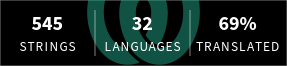 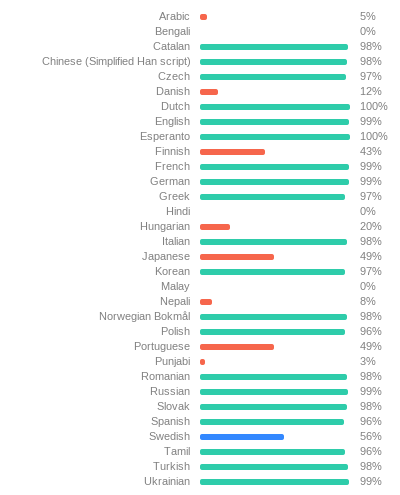 |
|---|
You can contribute to translations on Weblate.
Installation
(Docker images are provided on Docker Hub. See docker/README.md for further details.)
-
Install Python 3.9 or later and build dependencies
Here, the commands for APT-based Linux distributions are given:
sudo apt update
sudo apt --no-install-recommends install ca-certificates curl python3-venv
On ARMv6/ARMv7 (32-bit), RISC-V, and other rare CPU architectures, additional build dependencies may be required to compile the Pillow, PycURL, and CFFI modules:
sudo apt --no-install-recommends install python3-dev gcc libjpeg62-turbo-dev libcurl4-openssl-dev libssl-dev libffi-dev
-
Create a Python virtual environment (
venv) for motionEyesudo python3 -m venv --upgrade-deps /opt/motioneye
-
Install and setup motionEye
sudo /opt/motioneye/bin/pip install motioneye
sudo /opt/motioneye/bin/motioneye_init
motioneye_initsets up a systemd service with its main executablemeyectlfrom thevenvpath, respectively the Python environment the calledmotioneye_initbelongs to. A custommeyectlpath can be given with--meyectl /path/to/meyectl.motioneye_initcurrently assumes either an APT- or RPM-based distribution withsystemdas init system. For a manual setup, config and service files can be found here: https://github.com/motioneye-project/motioneye/tree/dev/motioneye/extra -
Access the web interface
After having successfully followed the installation instructions, the motionEye server should be running on your system and listening on port 8765. Fire up your favorite web browser and visit the following URL (replacing
[your_ip]with... well, your system's IP address):http://[your_ip]:8765/Use the username admin with an empty password when prompted for credentials. Passwords must be set for both the admin and surveillance (view-only) user accounts when saving any configuration changes.
Upgrade
If motionEye was installed with
sudo python3 -m pip install motioneyebefore, outside of avenv, uninstall it withsudo python3 -m pip uninstall motioneye, then follow the installation steps. Your configuration in/etc/motioneyeis kept, andmotioneye_initupdates the systemd service.
When upgrading motionEye, remember to restart the service. To rule out any mix of old in-memory backend code with new frontend assets, it is recommended to stop it prior to the upgrade, and start it back up afterwards:
sudo systemctl stop motioneye
sudo /opt/motioneye/bin/pip install --upgrade motioneye
sudo systemctl start motioneye
Pre-releases
We may push beta versions to PyPI to give upcoming releases some testing period. Those can be installed with pip's --pre flag:
sudo systemctl stop motioneye
sudo /opt/motioneye/bin/pip install --upgrade --pre motioneye
sudo systemctl start motioneye
If you want to test a recent commit on our development branch:
sudo systemctl stop motioneye
sudo /opt/motioneye/bin/pip install --upgrade 'https://github.com/motioneye-project/motioneye/archive/dev.tar.gz'
sudo systemctl start motioneye
1 maintainer

Metadata
1 maintainer
Release files for motioneye 0.45.0b1
For a detailed explanation of source distributions (sdists) and built distributions (wheels), please see the package formats documentation.
Source distribution (sdist)
| File | Size | Uploaded | Provenance | Actions |
|---|---|---|---|---|
| motioneye-0.45.0b1.tar.gz | 1.2 MB | Without provenance | Details for motioneye-0.45.0b1.tar.gz |
Built distribution (wheel)
| File | Interpreter | ABI | Platform | Actions Reset |
|---|---|---|---|---|
| motioneye-0.45.0b1-py3-none-any.whl | Python 3 | none | any | Details for motioneye-0.45.0b1-py3-none-any.whl |
Total release size: 2.4 MB
Release files / motioneye-0.45.0b1.tar.gz
| Download URL | motioneye-0.45.0b1.tar.gz |
|---|---|
| Size | 1.2 MB |
| Tags | Source |
|
SHA-256 checksum How to use checksums |
511643cdf63a5d1fe239fb9b3e176d97c521a32c36bd7264b3918c251195044d
|
|
BLAKE2b-256 checksum How to use checksums |
6504bb62c481286810f00ca70b161544d32b6f6f6806f2460f35bf3c3333c73b
|
| Upload date | |
|
Uploaded using Trusted Publishing? What is trusted publishing? |
No |
| Uploaded via |
twine/7.0.0 CPython/3.15.2
|
Release files / motioneye-0.45.0b1-py3-none-any.whl
| Download URL | motioneye-0.45.0b1-py3-none-any.whl |
|---|---|
| Size | 1.2 MB |
| Tags | Python 3 |
|
SHA-256 checksum How to use checksums |
6ac7d64a92d35a576c8cd2ec49a7cf4895a86118f1e60bf6771b518df7364fbd
|
|
BLAKE2b-256 checksum How to use checksums |
1f77bc0ee9b5c39004f3e71282593d33b9b883871ea6004663a460faa13a4ee3
|
| Upload date | |
|
Uploaded using Trusted Publishing? What is trusted publishing? |
No |
| Uploaded via |
twine/7.0.0 CPython/3.15.2
|
Security for motioneye 0.45.0b1
Provenance
Provenance describes where a file came from. On PyPI, provenance is shared via attestations, which provide a verifiable record of the build or publishing details. View details, limitations and caveats.
No provenance found
None of the files in this release were uploaded with provenance metadata.
A note on package security
PyPI is a repository for distributing packages, not a service for auditing them. While third-party security researchers and our staff do their best to detect and remove malicious packages, PyPI cannot guarantee the quality, security or suitability of any given package.
To learn more about protecting yourself from malicious actors, visit our package security documentation.














