
motulator-export
Export motulator drive systems and grid converter systems to PLECS and Simulink, and simulate them natively in C.
Documentation: https://aalto-electric-drives.github.io/motulator-export/
Build the system in motulator as usual, then:
from motulator_export import native, plecs, simulink

plecs.write_model("drive.plecs", mdl, ctrl, t_stop=1.2)  # PLECS model
simulink.write_model("drive.slx", mdl, ctrl, t_stop=1.2)  # Simulink model
res = native.Simulation(mdl, ctrl).simulate(t_stop=1.2)  # Native simulation
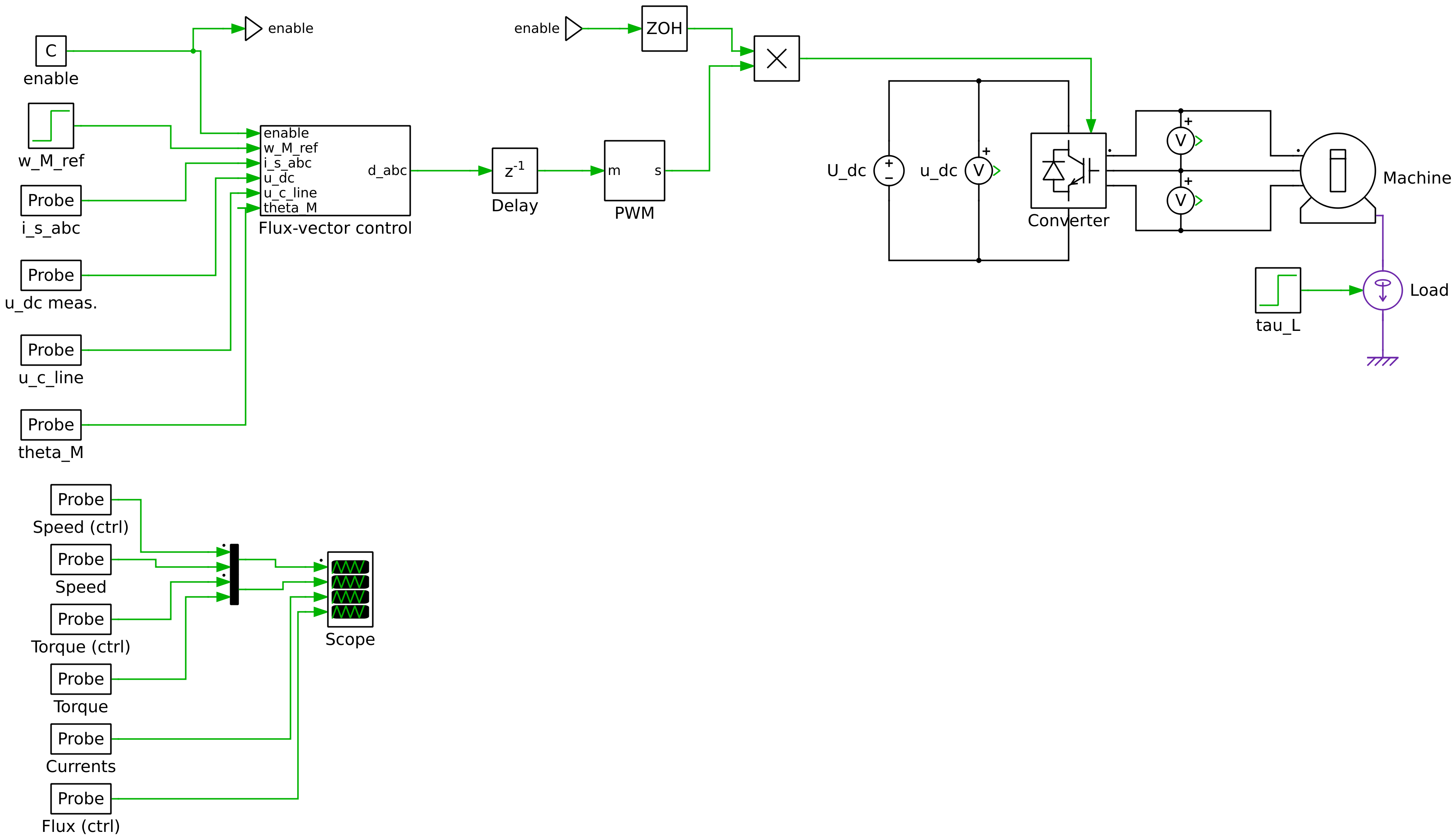
PLECS model of a 2.2-kW IPMSM drive with sensorless flux-vector control, written by examples/ipmsm_2kw_fvc.py.
- One control code everywhere. The control algorithms of motulator are ported to C. The same code runs in PLECS, in Simulink, and in the native simulation.
- The structure of motulator. Each class of the control system is a masked block with the arguments of its class, nested as in motulator. The parameters are set as in a motulator script, and they can be changed without Python.
- Verified. The PLECS and Simulink models agree with motulator to about 1e-6 relative to the signal magnitudes, and the native simulation to the rounding errors.
- Fast. The native simulation is 30 to 40 times faster than motulator, which is useful, e.g., for parameter sweeps.
Installation
Python 3.12 or later. Install the package in a virtual environment, which also installs motulator 0.15.2 or a later 0.15 release:
python -m venv .venv
source .venv/bin/activate  # On Windows: .venv\Scripts\activate
python -m pip install motulator-export
The examples are in the repository. To run them, clone the repository and install the package from it:
git clone https://github.com/Aalto-Electric-Drives/motulator-export
cd motulator-export
python -m pip install -e .
python examples/ipmsm_2kw_fvc.py
Then open the model examples/ipmsm_2kw_fvc.plecs in PLECS. See the documentation for the requirements of PLECS, Simulink, and the native simulation.
Development
Install the package with pip install -e .[dev] and run the tests with pytest (requires gcc). The implementation is described in the developer notes:
- examples/README.md: the structure of the PLECS models and their agreement with motulator
- motulator_export/simulink/README.md: the structure of the Simulink models and their agreement with motulator
- motulator_export/c/README.md: the C port of the control algorithms
- motulator_export/matlab/README.md: the MATLAB port
License
1 maintainer

Metadata
1 maintainer
Release files for motulator-export 0.7.0
For a detailed explanation of source distributions (sdists) and built distributions (wheels), please see the package formats documentation.
Source distribution (sdist)
| File | Size | Uploaded | Provenance | |
|---|---|---|---|---|
| motulator_export-0.7.0.tar.gz | 206.8 kB | Without provenance | Details |
Built distribution (wheel)
| File | Interpreter | ABI | Platform | Reset |
|---|---|---|---|---|
| motulator_export-0.7.0-py3-none-any.whl | Python 3 | none | any | Details |
Total release size: 481.1 kB
Release files / motulator_export-0.7.0.tar.gz
| Download URL | motulator_export-0.7.0.tar.gz |
|---|---|
| Size | 206.8 kB |
| Tags | Source |
|
SHA-256 checksum How to use checksums |
645e111c88d24f493e98bf3f23963291819b64576a19a1443c55611c2ffa3d3f
|
|
BLAKE2b-256 checksum How to use checksums |
51bf7781966f2a1260b34ac511b60737dfcb1e6c6be37c821ed744b55bb398f5
|
| Upload date | |
|
Uploaded using Trusted Publishing? What is trusted publishing? |
No |
| Uploaded via |
twine/7.0.0 CPython/3.12.15
|
Release files / motulator_export-0.7.0-py3-none-any.whl
| Download URL | motulator_export-0.7.0-py3-none-any.whl |
|---|---|
| Size | 274.3 kB |
| Tags | Python 3 |
|
SHA-256 checksum How to use checksums |
7356216dbb5ab7f1a684cdf02d1d01b2a25318ab3b1b076559ff4f6ae7c6f80a
|
|
BLAKE2b-256 checksum How to use checksums |
211b8f99ae67283041ea65d4f2317e8d297860fabc080c24cdb9edab097fe3e2
|
| Upload date | |
|
Uploaded using Trusted Publishing? What is trusted publishing? |
No |
| Uploaded via |
twine/7.0.0 CPython/3.12.15
|
Security for motulator-export 0.7.0
Provenance
Provenance describes where a file came from. On PyPI, provenance is shared via attestations, which provide a verifiable record of the build or publishing details. View details, limitations and caveats.
No provenance found
None of the files in this release were uploaded with provenance metadata.
A note on package security
PyPI is a repository for distributing packages, not a service for auditing them. While third-party security researchers and our staff do their best to detect and remove malicious packages, PyPI cannot guarantee the quality, security or suitability of any given package.














