
MoVer: Motion Verification for Motion Graphics Animations
Jiaju Ma and
Maneesh Agrawala
ACM Transactions on Graphics (SIGGRAPH 2025), 44(4), August 2025.
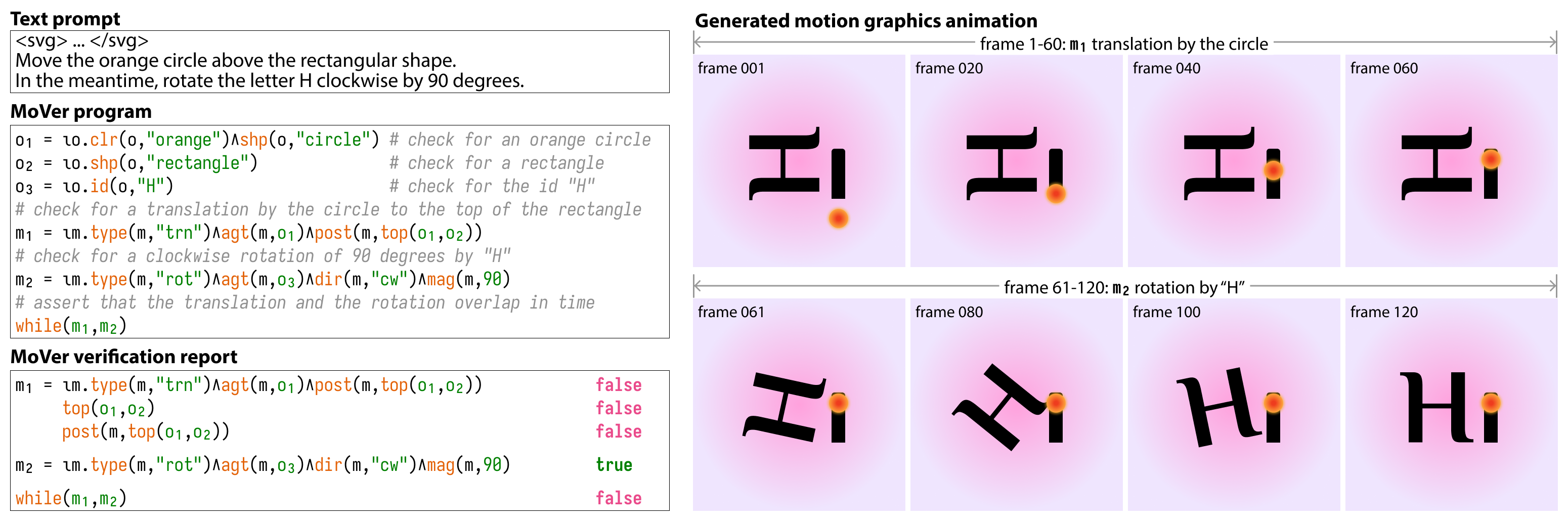



This repository contains the official implementation of MoVer, a domain-specific language based on first-order logic that can verify if various spatio-temporal properties of motion graphics are satisfied by an animation. We provide tools to use MoVer as part of an LLM-based motion graphics animation generation pipeline with verification.
MoVer also includes a converter that extracts animation data as JSON and renders GSAP-based HTML/SVG animations to PNG, SVG, MP4, and GIF.
Check out the project page for animation and benchmark results.
Dataset
The MoVer dataset of 5,600 prompts used in the paper can be found in mover_dataset/. Each prompt contains the ground truth MoVer program and information about the prompt's syntactic construction and whether an LLM is used as part of its generation.
We provide scripts to generate your own dataset of prompts with MoVer. See mover_dataset/create_dataset.py for details.
Installation
Full pipeline installation
Install the complete MoVer animation generation and verification pipeline.
pip install "mover[full]"
python -m playwright install chromium
Or add it to a uv-managed project:
uv add "mover[full]"
uv run playwright install chromium
If you need a platform-specific PyTorch build, install the appropriate build
from pytorch.org before installing
mover[full].
Standard installation
For rendering and LLM access without the DSL, verifier, or Torch:
pip install mover
python -m playwright install chromium
When adding MoVer to a uv-managed project:
uv add mover
uv run playwright install chromium
Both installations support cloud and local LLMs through LiteLLM. Chromium is needed for rendering, and MP4/GIF export requires FFmpeg.
Development installation
git clone https://github.com/jama1017/MoVer.git
cd MoVer

# pip
pip install -e ".[full]"

# or uv (also installs the development dependency group)
uv sync --extra full

python -m playwright install chromium
Full pipeline quick start
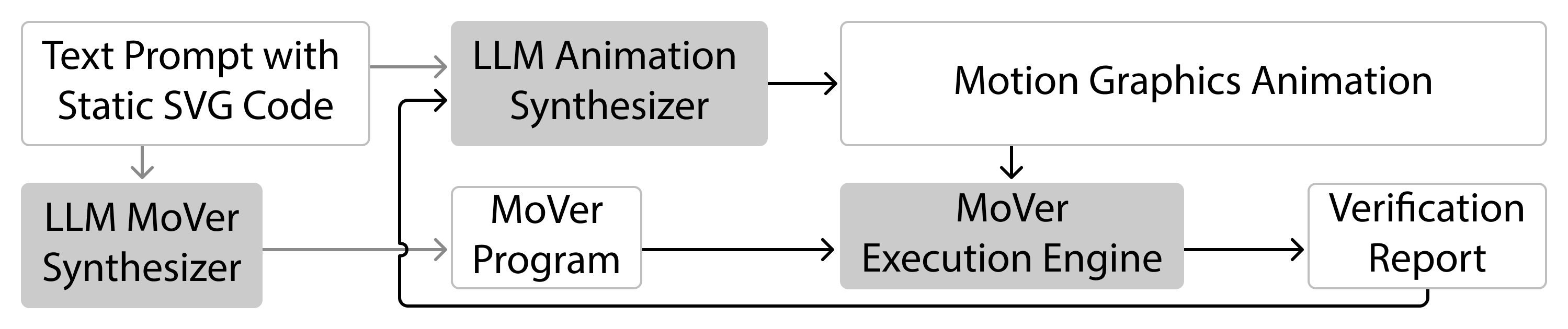
Starter Example
Once you have installed mover[full], clone this repository to get access to the examples/ directory, where we have prepared some examples for you to try out. By default, OpenAI models are used, so make sure you have stored your API key as environment variables (must be named OPENAI_API_KEY). Or you can change the config file to use other models (see examples/configs/ for examples).
First, to get things started, from the root directory of this repository, run the following command to generate some simple animations with the LLM-based MoVer pipeline (using examples/configs/config_starter.yaml):
python -m mover.pipeline examples/configs/config_starter.yaml
The MoVer pipeline takes in a YAML config file as input. Here, the prompts used are stored in examples/prompts/prompts_starter.json.
Each model configuration uses model: openai/gpt-4.1 (or another LiteLLM model
identifier), with request settings in params, instead of separate name and provider fields.
If you look at the JSON file, you can see that, for each prompt, we have populated the ground_truth_program field with the MoVer program for verification.
Running this command should create a directory called example_output/prompts_starter/, where you can find the iterations of generated animations with videos.
Teaser Hi Example

Next, let's recreate the teaser Hi example in the paper by running the following command (pre-generated results are available in examples/).
python -m mover.pipeline examples/configs/config_teaser.yaml
This time, we did not fill in the ground_truth_program field in the prompts, so the pipeline will generate a MoVer program for verification and store it in the example_output/prompts_teaser/ directory as a Python script.
To create your own animations with MoVer, modify the starter config file and write your own prompts in the following format:
[
    {
        "svg_name": "<name of the SVG file (then specify the directory in the config file)>",
        "svg_file_path": "<alternatively, you can specify the exact path to the SVG file>",
        "chat_id_name": "<unique identifier for the prompt>",
        "animation_prompt": "<describe the animation in detail. avoid fuzzy descriptions like 'make the square dance'>",
        "ground_truth_program": "(optional) <ground truth MoVer program>",
        "has_run": false
    }
]
Setting has_run to true will make the pipeline ignore this prompt.
Usage Guide
Tutorial
Check out the tutorial.ipynb for a walkthrough of each part of the MoVer pipeline (animation synthesis, MoVer program synthesis, and MoVer verification).
SVG Animation
To understand how MoVer's LLM-based animation synthesizer generates SVG animations using a simple JavaScript API based on GSAP, check out the synthesizer's system message sys_msg_animation_synthesizer.md and the API itself in api.js.
- To extend the API, make sure to update
api.jsand reflect the changes in the system message. Seetutorial.ipynbfor how to pass in your own system message. - Each SVG animation is saved as an HTML file (see
examples/). To properly render the HTML file, first get all the files insrc/mover/converter/assets/and put them in the same directory as the HTML file. Then open the HTML file in your browser to see the animation in action. - With
--create-video, the converter can render animation outputs with--format mp4,--format gif,--format png, or--format svg. PNG and SVG formats write per-frame files, and--video-fpscontrols both output frame sampling and JSON sampling.
MoVer DSL
The MoVer DSL is designed with predicates corresponding to spatial-temporal concepts that people commonly use in natural language to describe motions. For example, for the following animation prompt:
Translate the black square upwards by 100 px
We can write the corresponding MoVer program as:
o_1 = iota(Object, lambda o: color(o, "black") and shape(o, "square"))
m_1 = iota(Motion, lambda m: type(m, "translate") and direction(m, [0.0, 1.0]) and magnitude(m, 100.0) and agent(m, o_1))
Table 1 in the paper gives an overview of the predicates in the MoVer DSL. For more detailed documentations and examples of how they can be composed into MoVer programs, check out MoVer synthesizer's system message sys_msg_mover_synthesizer.md, figures in the paper, and the results page.
- To extend the DSL, update scripts in
src/mover/dsl/and reflect the changes in the system message.
Resolving references to similar objects and motions
For the animation prompt below, notice that we have two black squares in the scene, as well as two rightward translation motions (see the SVG here and the generated animation here).
"Translate the first black square to the right, then down, and then to the right. Translate the second black square up."
To refer to the second instances of repeated objects and motions, we can use the not predicate to exclude the first instance. This pattern generalizes to more instances of repetitions as well. For example, for the above animation prompt, we can write the corresponding MoVer program as:
o_1 = iota(Object, lambda o: color(o, "black") and shape(o, "square"))
## notice the use of not o_1 to refer to the second black square
o_2 = iota(Object, lambda o: color(o, "black") and shape(o, "square") and not o_1)

m_1 = iota(Motion, lambda m: type(m, "translate") and direction(m, [1.0, 0.0]) and agent(m, o_1))
m_2 = iota(Motion, lambda m: type(m, "translate") and direction(m, [0.0, -1.0]) and agent(m, o_1))
## notice the use of not m_1 to refer to the second rightward translation motion
m_3 = iota(Motion, lambda m: type(m, "translate") and direction(m, [1.0, 0.0]) and agent(m, o_1) and not m_1)
m_4 = iota(Motion, lambda m: type(m, "translate") and direction(m, [0.0, 1.0]) and agent(m, o_2))

t_before(m_1, m_2)
t_after(m_3, m_2)
Converter
Use mover-convert to convert a GSAP animation HTML file into sampled JSON data
and optionally per-frame or video outputs.
mover-convert <input_animation.html> <port number>
<port number>: Use0to automatically select an available local port, or provide a specific port number.--output-dir <directory>: Write generated files to this directory. The default is the directory containing the input HTML file.--create-video: Create an MP4, GIF, PNG sequence, or SVG sequence in addition to JSON data.--format <mp4|gif|png|svg>: Select the animation output format. The default ismp4.--video-fps <fps>: Set the frame rate used for animation and JSON sampling. The default is 60 FPS.--capture-duration <seconds>: Set a finite capture duration. This is required for infinitely repeating animations.--save-keyframes: Write<stem>_data_keyframes.json.--save-for-comparison: Write<stem>_data_rendered.json.--save-animated-properties: Write<stem>_properties.json.--comparison-properties '<json>': Select the spatial, visual, and SVG attributes included in comparison data.--disable-easing: Replace tween easing with linear interpolation.--print-console: Print browser console and network messages.--hide-grid: Hide the default SVG grid during raster capture.--omit-background: Capture a transparent background. Implies--hide-grid. Alpha survives with--format pngonly — the MP4 and GIF encoders flatten it.
The converter always writes <stem>_data.json. GIF output requires a working FFmpeg installation.
License
This project is licensed under the Apache License 2.0 - see the LICENSE file for details.
Contact
Jiaju Ma
@jama1017
majiaju.io
hellojiajuma@gmail.com
Citation
If you find MoVer useful in your project, please cite our paper:
@article{ma2025mover,
    author = {Ma, Jiaju and Agrawala, Maneesh},
    title = {MoVer: Motion Verification for Motion Graphics Animations},
    year = {2025},
    issue_date = {August 2025},
    publisher = {Association for Computing Machinery},
    address = {New York, NY, USA},
    volume = {44},
    number = {4},
    issn = {0730-0301},
    url = {https://doi.org/10.1145/3731209},
    doi = {10.1145/3731209},
    journal = {ACM Trans. Graph.},
    month = jul,
    articleno = {33},
    numpages = {17},
}
Acknowledgments
We thank Yusong Wu for his help on getting this repository ready for release. This project builds on the wonderful foundation of the Concepts framework by Jiayuan Mao. The MoVer DSL parser and executor is based on LEFT by Joy Hsu and Jiayuan Mao. Our SVG animation API uses the one and only GSAP. The MoVer converter uses the ntc js (Name that Color JavaScript) library for converting hex colors to names.
1 maintainer

Metadata
1 maintainer
Release files for mover 0.4.0
For a detailed explanation of source distributions (sdists) and built distributions (wheels), please see the package formats documentation.
Source distribution (sdist)
| File | Size | Uploaded | Provenance | Actions |
|---|---|---|---|---|
| mover-0.4.0.tar.gz | 292.5 kB | With provenance | Details for mover-0.4.0.tar.gz |
Built distribution (wheel)
| File | Interpreter | ABI | Platform | Actions Reset |
|---|---|---|---|---|
| mover-0.4.0-py3-none-any.whl | Python 3 | none | any | Details for mover-0.4.0-py3-none-any.whl |
Total release size: 579.8 kB
Release files / mover-0.4.0.tar.gz
| Download URL | mover-0.4.0.tar.gz |
|---|---|
| Size | 292.5 kB |
| Tags | Source |
|
SHA-256 checksum How to use checksums |
e59f71a147bcf7d9923f32816071f24b1bc7f70159a6c409259db2013929a60a
|
|
BLAKE2b-256 checksum How to use checksums |
68a1676551573d09c31d781f2f392c70645f2dc166d05a257243ce7e5bac54bc
|
| Upload date | |
|
Uploaded using Trusted Publishing? What is trusted publishing? |
Yes |
| Uploaded via |
twine/7.0.0 CPython/3.13.16
|
Provenance
Provenance describes where a file came from. On PyPI, provenance is shared via attestations, which provide a verifiable record of the build or publishing details. View details, limitations and caveats.


PyPI Publish Attestation
PyPI verified that this artifact, at this checksum, originated from the publisher listed below.
Signed by GitHub Actions, verified by PyPI on Oct 23, 2026.
Transparency logRelease files / mover-0.4.0-py3-none-any.whl
| Download URL | mover-0.4.0-py3-none-any.whl |
|---|---|
| Size | 287.3 kB |
| Tags | Python 3 |
|
SHA-256 checksum How to use checksums |
0a52ff9eb637624ee0465411679a55e3624581b02292797c5fd8efa7ab10df6d
|
|
BLAKE2b-256 checksum How to use checksums |
2361c4bb722b6f0788a122cf81d10f3d1d21fd80f29e0895db645ac7f7afeeb8
|
| Upload date | |
|
Uploaded using Trusted Publishing? What is trusted publishing? |
Yes |
| Uploaded via |
twine/7.0.0 CPython/3.13.16
|
Provenance
Provenance describes where a file came from. On PyPI, provenance is shared via attestations, which provide a verifiable record of the build or publishing details. View details, limitations and caveats.
PyPI Publish Attestation
PyPI verified that this artifact, at this checksum, originated from the publisher listed below.
Signed by GitHub Actions, verified by PyPI on Oct 23, 2026.
Transparency logSecurity for mover 0.4.0
Provenance
Provenance describes where a file came from. On PyPI, provenance is shared via attestations, which provide a verifiable record of the build or publishing details. View details, limitations and caveats.
Full provenance
All 2 files in this release have been uploaded with provenance metadata.
Attestation for mover-0.4.0.tar.gz
PyPI Publish Attestation
PyPI verified that this artifact, at this checksum, originated from the publisher listed below.
Signed by GitHub Actions, verified by PyPI on Oct 23, 2026.
Transparency logA note on package security
PyPI is a repository for distributing packages, not a service for auditing them. While third-party security researchers and our staff do their best to detect and remove malicious packages, PyPI cannot guarantee the quality, security or suitability of any given package.
To learn more about protecting yourself from malicious actors, visit our package security documentation.















