
Turn any static matplotlib script into an animated GIF or MP4 by sweeping one or more variables

Project description
mpl-animator
Turn any static matplotlib script into an animated GIF or MP4 by sweeping a variable — no rewriting required.
Install
pip install mpl-animator
Or just drop mpl_animator.py into your project and use it directly.
Usage
# Sweeps f from 3→60, writes wave_static_animated.gif
mpl-animator wave_static.py --var f --range "3,60"

# MP4 instead (requires ffmpeg)
mpl-animator plot.py --var t --range "0,2*pi" --format mp4

# Multiple variables at once
mpl-animator orbit.py --var azim spin elev --range "0,360" "0,6.28" "20,40" --ping-pong

# Discrete values instead of a range
mpl-animator plot.py --var n --values "5,10,50,200,1000"

# Save the generated .py script too (useful for --sequential re-runs)
mpl-animator plot.py --var t --range "0,1" --save-script
The GIF lands in your current directory as <script>_animated.gif. Pass --out for a custom path.
What it does
- Parses your script's AST to find everything that depends on the animated variable
- Splits code into static (runs once) and dynamic (recalculated per frame)
- Renders frames in parallel across all CPU cores, then stitches to GIF or MP4
No annotations. No rewriting. Point and shoot.
Examples
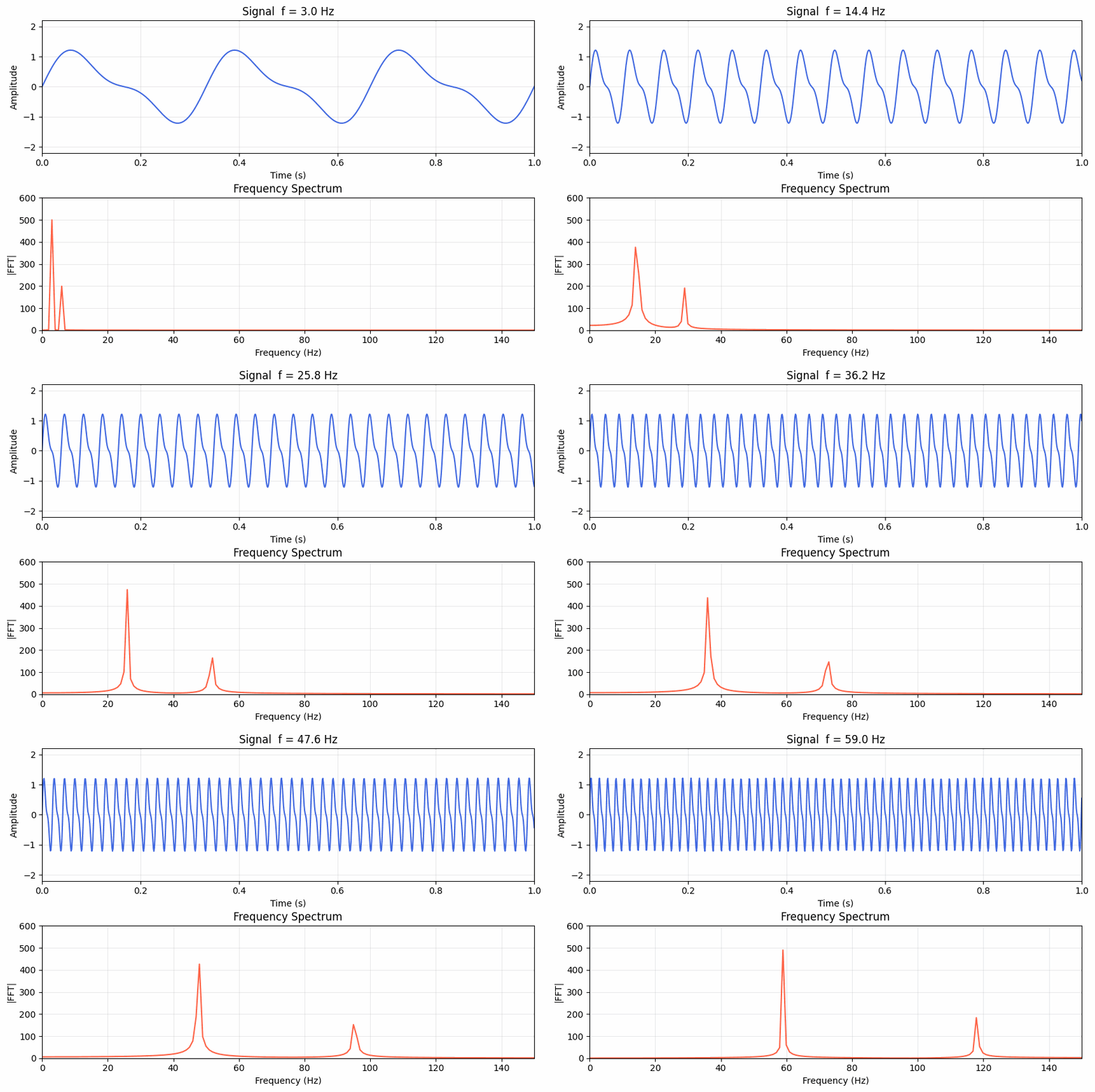
Wave & spectrum
# wave_static.py
import numpy as np
import matplotlib.pyplot as plt

f   = 10.0                          # <- animate this
t   = np.linspace(0, 1, 1000)
y   = np.sin(2*np.pi*f*t) + 0.4*np.sin(2*np.pi*2*f*t)
freqs    = np.fft.rfftfreq(len(t), d=t[1]-t[0])
spectrum = np.abs(np.fft.rfft(y))

fig, (ax1, ax2) = plt.subplots(2, 1, figsize=(9, 6))
ax1.plot(t, y, 'royalblue', lw=1.5);  ax1.set_title(f"Signal  f = {f:.1f} Hz")
ax2.plot(freqs, spectrum, 'tomato', lw=1.5);  ax2.set_title("Frequency Spectrum")
plt.tight_layout(); plt.show()
mpl-animator examples/wave_static.py --var f --range "3,60" --frames 60 --fps 20
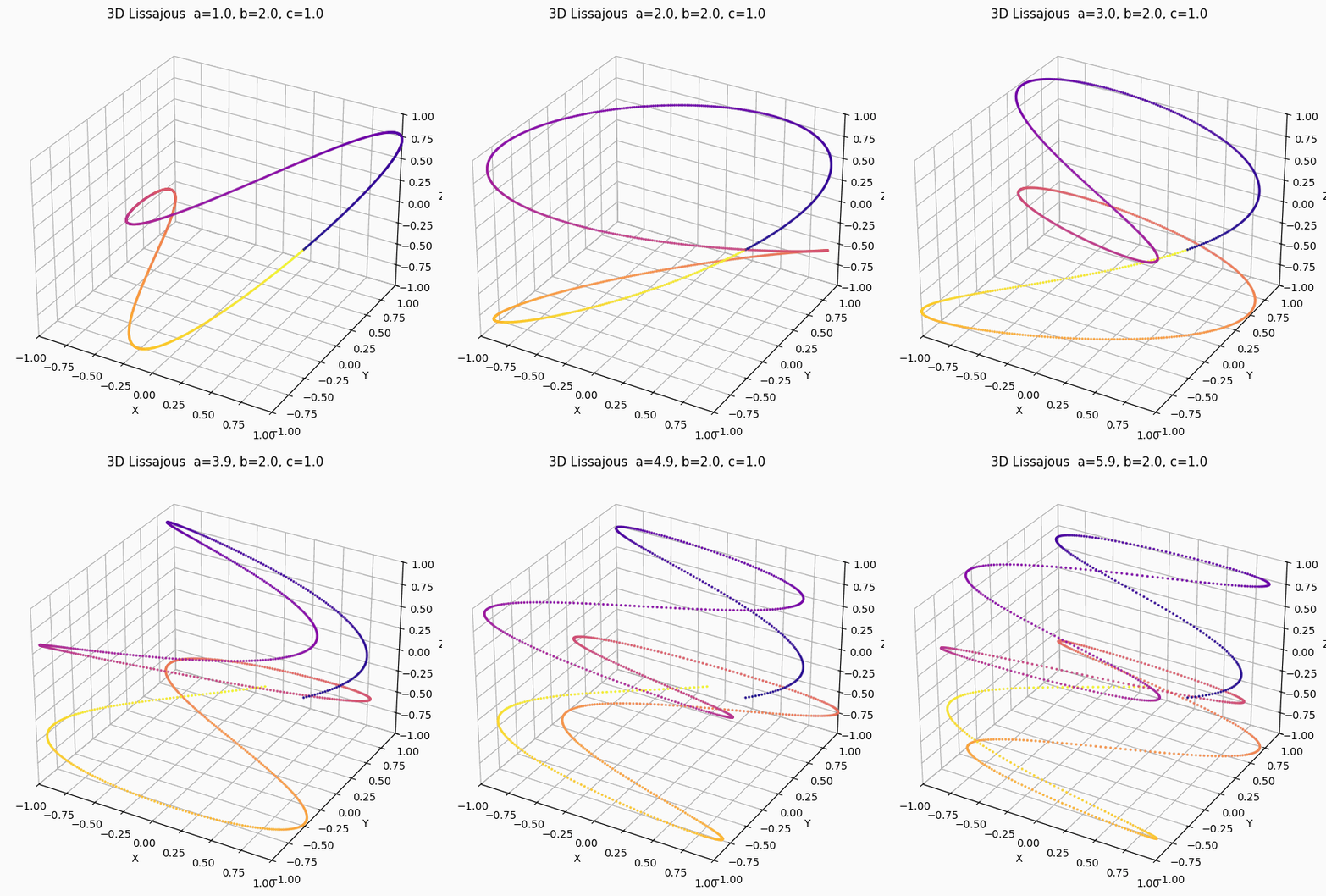
3D Lissajous
examples/lissajous_3d_static.py
mpl-animator examples/lissajous_3d_static.py --var a --range "1,6" --frames 80 --fps 20
Cinematic orbit (3 variables)
examples/orbit_static.py — camera orbits 360°, object spins a full turn, camera cranes up:
mpl-animator examples/orbit_static.py \
    --var azim spin elev \
    --range "0,360" "0,6.28318" "20,40" \
    --frames 90 --fps 25 --dpi 120 --ping-pong
Library API
from mpl_animator import animate

src = open("my_plot.py").read()

# Returns the generated animation script as a string
code = animate(src, var="t", range_str="0,6.28", frames=60, fps=25)

# Multi-variable
code = animate(src, var=["azim", "spin"], range_str=["0,360", "0,6.28"], frames=90, ping_pong=True)

# Explicit values
code = animate(src, var="n", values="5,10,50,200,1000")
Options
| Flag | Default | Description |
|---|---|---|
--var |
t |
Variable(s) to animate |
--range |
0,1 |
start,end per variable (math expressions ok) |
--values |
— | Explicit values instead of a range |
--frames |
120 | Frame count |
--fps |
25 | Frames per second |
--format |
gif |
gif or mp4 |
--out |
auto | Output filename |
--dpi |
100 | Render DPI |
--workers |
auto | Parallel workers (0 = cpu_count) |
--loop |
0 | GIF loops (0 = forever) |
--ping-pong |
off | Play forward then reversed |
--reverse |
off | Sweep end → start |
--save-script |
off | Save the generated .py alongside the GIF |
Tests
pytest tests/test_animator.py   # 208 unit + integration tests
pytest tests/test_gallery.py    # 276 tests across all matplotlib gallery examples
pytest tests/ -m slow           # tests that generate actual GIF/MP4 files
Validated against all 510 official matplotlib gallery examples.
Known limitations
- Accumulating scripts — re-runs from scratch each frame; not suitable for scripts that build state iteratively
__main__guards — variables assigned insideif __name__ == "__main__":may not partition correctly- Variable domain safety — no awareness of valid domains; bad ranges cause per-frame errors (skipped gracefully)
Author: Basem Rajjoub · Built with Claude Code
Release history Release notifications | RSS feed


Download files
Download the file for your platform. If you're not sure which to choose, learn more about installing packages.
Source Distribution
Built Distribution
Filter files by name, interpreter, ABI, and platform.
If you're not sure about the file name format, learn more about wheel file names.
Copy a direct link to the current filters
File details
Details for the file mpl_animator-0.1.12.tar.gz.
File metadata
- Download URL: mpl_animator-0.1.12.tar.gz
- Upload date:
- Size: 29.8 kB
- Tags: Source
- Uploaded using Trusted Publishing? No
- Uploaded via: twine/6.2.0 CPython/3.14.4
File hashes
| Algorithm | Hash digest | |
|---|---|---|
| SHA256 |
23ba61856ff9e60b67cc9d30b86ded49bdcf7df053757de14b8e78e1aa81df2f
|
|
| MD5 |
c35c8c909f791d3e49220d2790dbf275
|
|
| BLAKE2b-256 |
cc8b38b5ed4d79fbd9f0dfd2b61118d3cbbe55d985914231c20ccd57a5137188
|
File details
Details for the file mpl_animator-0.1.12-py3-none-any.whl.
File metadata
- Download URL: mpl_animator-0.1.12-py3-none-any.whl
- Upload date:
- Size: 18.4 kB
- Tags: Python 3
- Uploaded using Trusted Publishing? No
- Uploaded via: twine/6.2.0 CPython/3.14.4
File hashes
| Algorithm | Hash digest | |
|---|---|---|
| SHA256 |
9e28259dc8b35600383673ada6da24b5a509c2d72e4fe28f31ff072d647d976e
|
|
| MD5 |
087f97ecf4bdb7580c596cef1985b713
|
|
| BLAKE2b-256 |
26929bce3b51f7efcfc2c3778b5207ebcc7a20497f86c40669816a495ffdf1fa
|






