
Turn any static matplotlib script into an animated GIF or MP4 by sweeping one or more variables

Project description
mpl-animator
Turn any static matplotlib script into an animated GIF or MP4 by sweeping a variable - no rewriting required.
Features
- Zero boilerplate - point it at an existing script, it figures out the rest
- Multi-variable animation - sweep multiple variables simultaneously with
--var azim spin elev --range "0,360" "0,6.28" "20,40"; all variables share the same frame clock, each advances independently - Explicit value lists - animate over any discrete set of values with
--values "1,5,10,50,100"instead of a linear range; frame count is inferred automatically - AST-based dependency tracking - automatically identifies which variables and calculations need to update each frame, across all animated variables
- Parallel rendering - renders frames across all CPU cores via
multiprocessing, falls back to sequential automatically - GIF and MP4 output - export as animated GIF (Pillow) or MP4 (ffmpeg); just add
--format mp4 - Loop control -
--loop 0(forever, default),--loop 1(play once),--loop N - Ping-pong -
--ping-pongplays forward then reversed for seamless looping GIFs - Reverse -
--reversesweeps each range end → start - Axis rotation - animate
azimwithax.view_initto rotate 3D plots; animateanglewithax.set_theta_offsetto spin polar plots - Math expressions in ranges -
--range "0,2*pi"just works - 2D, 3D, and polar plots - handles
plot_surface,scatter3D, subplots, polar axes, and more - Single-file, standalone -
mpl_animator.pycan be dropped into any project with no install required; only depends onmatplotlib,numpy, andPillow(no exotic dependencies) - Library API - importable as a Python module for use in notebooks or pipelines
- Extensively tested - validated against all 510 official matplotlib gallery examples; 652 automated tests total
Install
pip install mpl-animator
Or just copy the file - no install needed:
# copy mpl_animator.py into your project, then use it directly
python mpl_animator.py my_plot.py --var t --range "0,1"
Usage
If installed via pip, use the mpl-animator command. If using the file directly, replace mpl-animator with python mpl_animator.py - everything else is identical.
# Basic: animate variable `f` from 3 to 60 (outputs GIF by default)
mpl-animator wave_static.py --var f --range "3,60"

# Export as MP4 instead of GIF (requires ffmpeg)
mpl-animator plot.py --var t --range "0,2*pi" --format mp4

# Math expressions in range, custom frame count and FPS
mpl-animator plot.py --var t --range "0,2*pi" --frames 60 --fps 30

# Rotate a 3D plot by animating the camera azimuth
mpl-animator my_3d_plot.py --var azim --range "0,360" --frames 72 --fps 20

# Multi-variable: camera orbits (azim) while the object spins (spin) and camera rises (elev)
mpl-animator orbit_static.py --var azim spin elev --range "0,360" "0,6.28" "20,40" --frames 90 --fps 25 --ping-pong

# Ping-pong loop (plays forward then reversed — great for seamless GIFs)
mpl-animator plot.py --var t --range "0,1" --frames 60 --ping-pong

# Control output quality and parallelism
mpl-animator plot.py --var alpha --range "0,1" --dpi 150 --workers 8

# Custom output filename
mpl-animator plot.py --var t --range "0,1" --out my_animation.gif

# Explicit values: animate over specific discrete values (frame count = len(values))
mpl-animator plot.py --var n --values "5,10,50,200,1000"

# Multi-variable explicit values: one comma-separated list per variable
mpl-animator plot.py --var a b --values "1,2,5,10" "0.1,0.5,1.0,2.0"
This generates a <script>_animated.py file. Run it to produce the output:
python wave_static_animated.py              # parallel (default)
python wave_static_animated.py --sequential # single-threaded fallback
Examples
Example 1 - Wave & spectrum (2D)
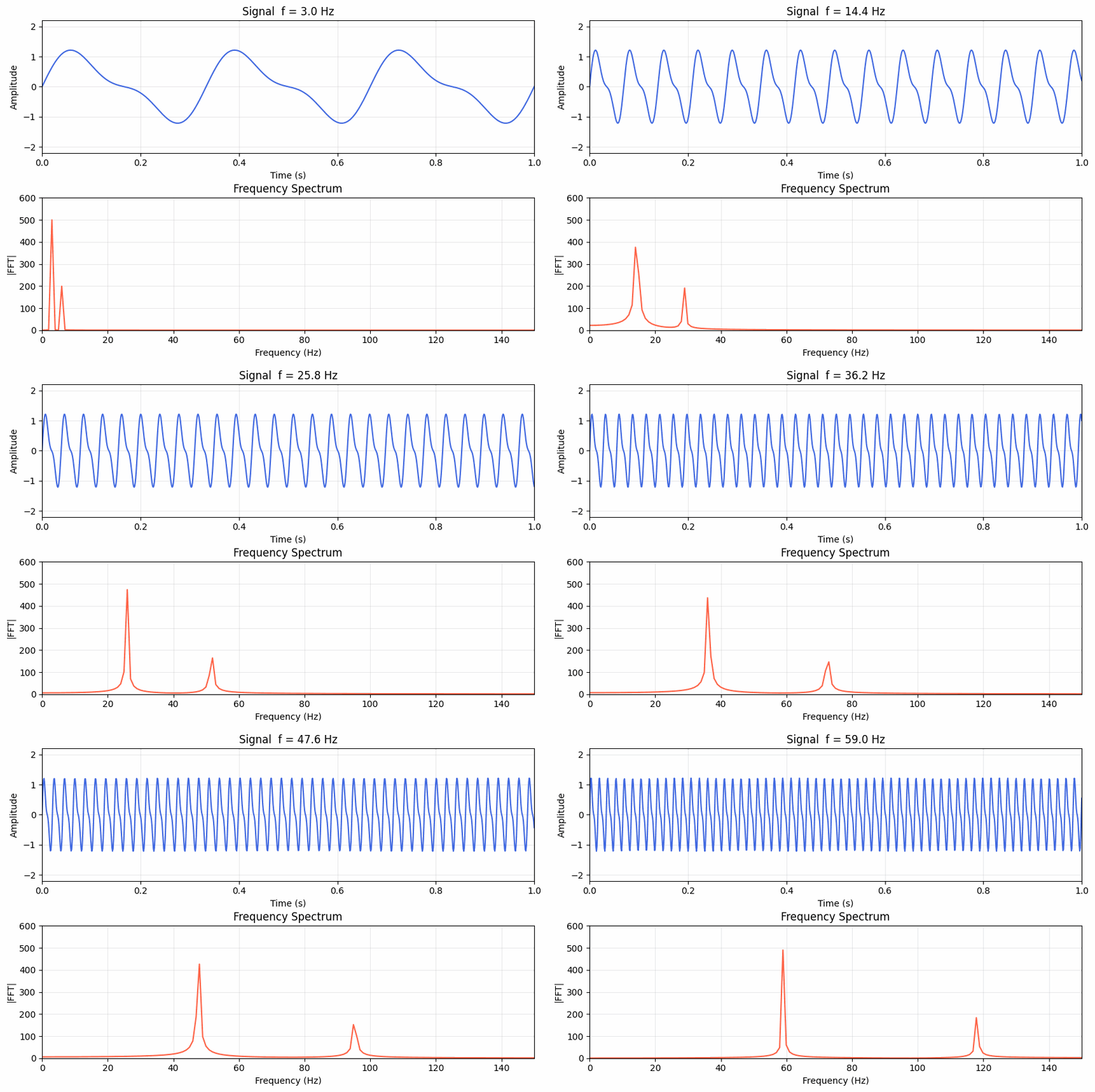
wave_static.py plots a signal and its frequency spectrum for a fixed frequency f:
# wave_static.py  (key lines)
f   = 10.0                          # <- variable to animate
t   = np.linspace(0, 1, 1000)
y   = np.sin(2*np.pi*f*t) + 0.4*np.sin(2*np.pi*2*f*t)

freqs    = np.fft.rfftfreq(len(t), d=t[1]-t[0])
spectrum = np.abs(np.fft.rfft(y))

fig, (ax1, ax2) = plt.subplots(2, 1, figsize=(9, 6))
ax1.plot(t, y, 'royalblue', lw=1.5)
ax2.plot(freqs, spectrum, 'tomato', lw=1.5)
plt.show()
Animate f from 3 Hz to 60 Hz:
python mpl_animator.py examples/wave_static.py --var f --range "3,60" --frames 60 --fps 20
python wave_static_animated.py
The animator detects that y, spectrum depend on f, moves them into the per-frame update(), and keeps the figure/axes creation static - so only the data redraws each frame.
Example 2 - 3D Lissajous curve
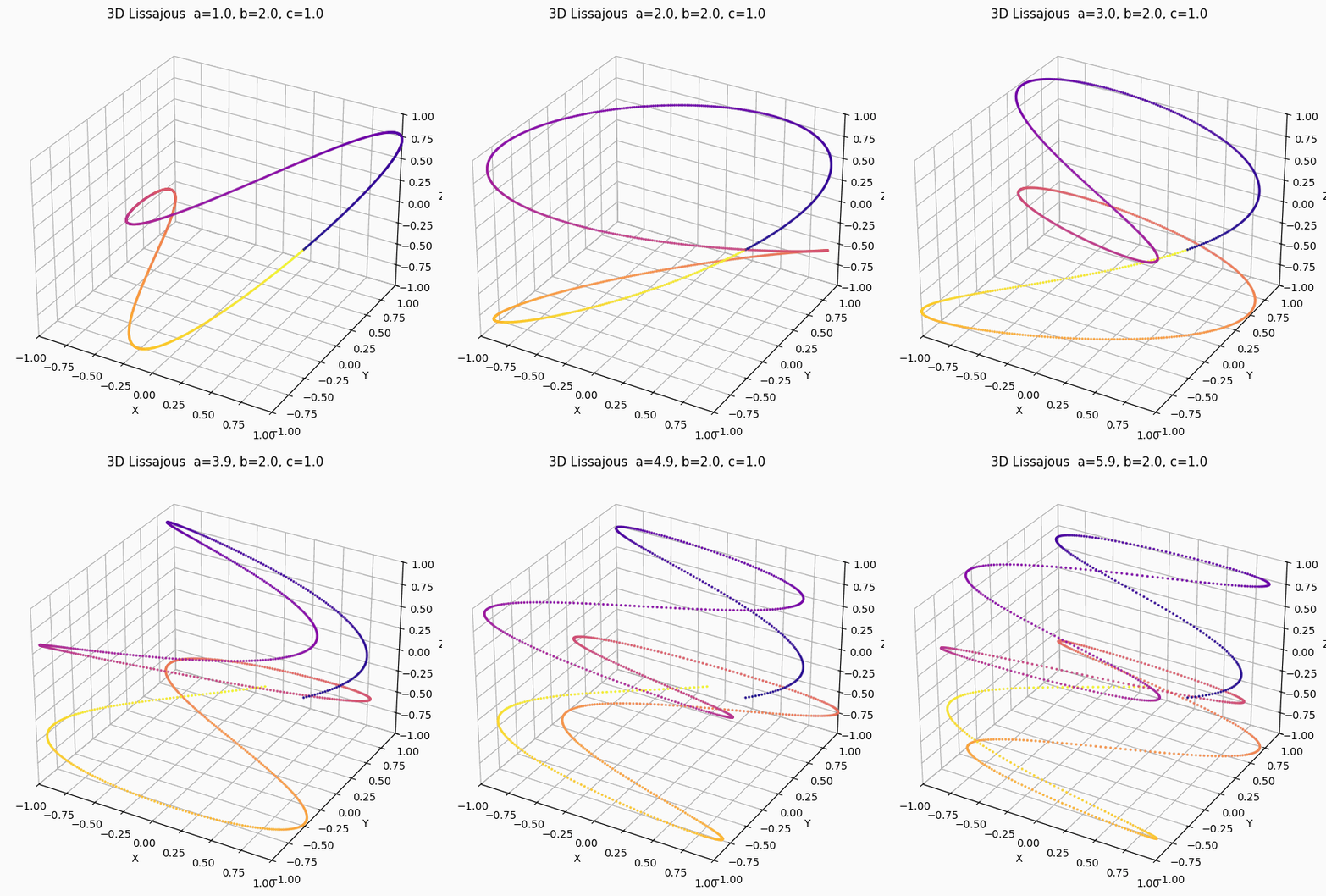
lissajous_3d_static.py draws a 3D Lissajous figure for fixed frequency ratio a:
# lissajous_3d_static.py  (key lines)
a  = 3.0          # <- variable to animate
b  = 2.0
c  = 1.0

t = np.linspace(0, 2 * np.pi, 1000)
x = np.sin(a * t + delta)
y = np.sin(b * t)
z = np.sin(c * t)

fig = plt.figure(figsize=(8, 6))
ax  = fig.add_subplot(111, projection='3d')
ax.scatter(x, y, z, c=colors, s=2, alpha=0.8)
ax.set_title(f"3D Lissajous  a={a:.1f}, b={b:.1f}, c={c:.1f}")
plt.show()
Animate a from 1 to 6, sweeping through different curve topologies:
python mpl_animator.py examples/lissajous_3d_static.py --var a --range "1,6" --frames 80 --fps 20
python lissajous_3d_static_animated.py
For 3D plots the animator calls fig.clear() and recreates the axes each frame (required to preserve the projection='3d' state), then re-runs all drawing commands with the new value of a.
Example 3 - Cinematic 3D orbit (multi-variable)
orbit_static.py draws a torus knot for fixed camera position and object rotation:
# orbit_static.py  (key lines)
azim = 45.0          # camera azimuth in degrees      <- animated
spin = 0.0           # object self-rotation (radians) <- animated
elev = 20.0          # camera elevation in degrees    <- animated

# Object geometry: rotate the knot around its own Z axis
cx_rot = cx * np.cos(spin) - cy * np.sin(spin)
cy_rot = cx * np.sin(spin) + cy * np.cos(spin)

fig = plt.figure(figsize=(7, 7))
ax  = fig.add_subplot(111, projection='3d')
ax.plot_surface(xs, ys, zs, cmap='plasma', alpha=0.92)
ax.view_init(elev=elev, azim=azim)   # <- camera controlled by both azim and elev
plt.show()
All three variables sweep simultaneously from the same frame clock — the camera orbits a full 360°, the object spins one full turn, and the camera gently cranes upward. --ping-pong plays the sequence forward then reversed for a seamless loop:
python mpl_animator.py examples/orbit_static.py \
    --var azim spin elev \
    --range "0,360" "0,6.28318" "20,40" \
    --frames 90 --fps 25 --dpi 120 --ping-pong
python orbit_static_animated.py --sequential
The animator identifies that cx_rot, cy_rot, and the tube surface xs/ys/zs all depend on spin, and that ax.view_init depends on azim and elev — all three dependency chains are tracked and placed in update() automatically.
How it works
- Parses your script's AST to find which variables depend on the animated one
- Splits code into static (run once) and dynamic (recalculated per frame)
- Generates a new script with
FuncAnimation(sequential 2D GIF), PNG+stitch (sequential MP4 or 3D), andmultiprocessing(parallel) renderers
Library usage
from mpl_animator import animate

src = open("my_plot.py").read()

# Single variable
animated_code = animate(src, var="t", range_str="0,6.28", frames=60, fps=25)
open("my_plot_animated.py", "w").write(animated_code)

# Multiple variables — pass lists of equal length
animated_code = animate(
    src,
    var=["azim", "spin", "elev"],
    range_str=["0,360", "0,6.28", "20,40"],
    frames=90, fps=25, ping_pong=True,
)

# Export as MP4
animated_code = animate(src, var="t", range_str="0,6.28", fmt="mp4")

# Explicit values: animate over a specific set of values (frame count is inferred)
animated_code = animate(src, var="n", values="5,10,50,200,1000")
animated_code = animate(src, var="n", values=[5, 10, 50, 200, 1000])

# Multi-variable explicit values
animated_code = animate(src, var=["a", "b"], values=["1,2,5,10", "0.1,0.5,1.0,2.0"])

# Ping-pong loop (seamless forward+reverse)
animated_code = animate(src, var="t", range_str="0,1", ping_pong=True, loop=0)
Supported plot types
2D (plot, scatter, bar, hist, contour, imshow, ...), 3D (plot_surface, scatter3D, ...), polar, and anything else matplotlib draws.
Tests
The animator has been extensively tested against all 510 official matplotlib gallery examples. Of those, 271 are directly animatable (the rest are interactive widgets, event-driven demos, or scripts with no scalar variable to sweep) — and the animator produces valid, runnable Python for every single one.
pytest tests/test_animator.py -v          # unit + integration tests (381 tests)
pytest tests/test_gallery.py -v           # all matplotlib gallery examples (271 tests)
pytest tests/ -v                          # everything (652 tests)
pytest tests/ -v -m slow                  # slow tests that generate actual GIFs/MP4s
Test coverage:
- 381 unit and integration tests covering AST parsing, dependency tracking, code generation, validation, multi-variable animation, 47 hand-crafted edge-case fixtures, and 10 real-world scripts sourced from public repos
- 271 parametrized tests — one per animatable official matplotlib gallery example, spanning every plot category: line, bar, scatter, histogram, contour, heatmap, 3D surface, 3D wireframe, polar, pie, errorbar, fill_between, quiver, stem, and more
Author: Basem Rajjoub
Built with the assistance of Claude Code
Release history Release notifications | RSS feed


Download files
Download the file for your platform. If you're not sure which to choose, learn more about installing packages.
Source Distribution
Built Distribution
Filter files by name, interpreter, ABI, and platform.
If you're not sure about the file name format, learn more about wheel file names.
Copy a direct link to the current filters
File details
Details for the file mpl_animator-0.1.6.tar.gz.
File metadata
- Download URL: mpl_animator-0.1.6.tar.gz
- Upload date:
- Size: 28.7 kB
- Tags: Source
- Uploaded using Trusted Publishing? No
- Uploaded via: twine/6.2.0 CPython/3.11.9
File hashes
| Algorithm | Hash digest | |
|---|---|---|
| SHA256 |
40c572b230cd84d9c97d9319d3986f5770baf85402a9a48ba1f9317c79dd768e
|
|
| MD5 |
2b5cb0aa29dcfc404e4d4f8b0da84c72
|
|
| BLAKE2b-256 |
de612baacac1036c441800419fc9161f8fa81d5bedf579fc305ea2453f876e50
|
File details
Details for the file mpl_animator-0.1.6-py3-none-any.whl.
File metadata
- Download URL: mpl_animator-0.1.6-py3-none-any.whl
- Upload date:
- Size: 17.0 kB
- Tags: Python 3
- Uploaded using Trusted Publishing? No
- Uploaded via: twine/6.2.0 CPython/3.11.9
File hashes
| Algorithm | Hash digest | |
|---|---|---|
| SHA256 |
ed48eee4e9e10611fec859cbc1b97166b82b4230e96196aafeb150ae4cf22c7f
|
|
| MD5 |
6b2a5e2db956b7519398078653275138
|
|
| BLAKE2b-256 |
f43b0523aa3bd7a765d06edff05be239781885d2545843581e286fe443f8b1ff
|






