






A Modern Simulation Wrapper for Google DeepMind’s MuJoCo
⚠️ WARNING
This package is currently in its zero-release stage. Class methods and APIs may change without prior notice. Please review the documentation and changelog after each update to stay informed about any modifications.
Installation
Add -U flag to upgrade pre-existing library
PyPI Package

pip install mujoco-toolbox
GitHub Package

pip install git+https://github.com/MGross21/mujoco-toolbox.git@main
Adding to Project Dependencies
Click to Expand
Place the following in your requirements.txt or pyproject.toml file.
PyPI
Expect less frequent, stable releases.
mujoco-toolbox
Github
Expect frequent rolling releases.
git+https://github.com/MGross21/mujoco-toolbox.git@main#egg=mujoco-toolbox
Extra Packages
FFMPEG
Required for mediapy dependency
Windows
winget install ffmpeg
ffmpeg -version
Linux
Debian/Ubuntu
sudo apt update && sudo apt install ffmpeg
ffmpeg -version
Arch Linux
sudo pacman -Syu ffmpeg
ffmpeg -version
MacOS
Using Homebrew
brew install ffmpeg
ffmpeg -version
Using MacPorts
sudo port install ffmpeg
ffmpeg -version
Example Script
Bare minimum to run MuJoCo simulation and display result
import mujoco_toolbox as mjtb

mjtb.Simulation("path/to/your/xml").run(render=True).save()
Data Capture
run() records MjData fields at data_rate captures per second. Each field is an array of shape (captures, *field_shape).
import mujoco_toolbox as mjtb

sim = mjtb.Simulation("path/to/xml", duration=5, data_rate=100, capture={"time", "qpos", "xpos"}).run()
sim.captured_data["qpos"]  # (500, nq)
sim.body_data("arm", "xpos")  # (500, 3)
Omit capture to use mjtb.CAPTURE_PARAMETERS, or pass capture="all" to record every numeric field.
Controllers
Pre-Made Controllers
The following controllers are available out-of-the-box:
sincossteprandomreal_time(recommended controller for digital twins)
You can import them as follows:
import mujoco_toolbox.controllers as ctrl
Custom
def foo(model: MjModel, data: MjData,**kwargs):
    # Perform logic based on model/data objects
    # ie. PID Controller
Extra keyword arguments to Simulation are passed to the controller on every step:
mjtb.Simulation("path/to/xml", controller=mjtb.sin, amplitude=0.5, frequency=2).run()
Instantiating a Digital Twin
import mujoco_toolbox as mjtb
from mujoco_toolbox.controllers import real_time

with mjtb.Simulation("path/to/xml", controller=real_time) as digitaltwin:
    viewer = digitaltwin.launch(show_menu=False)  # Open the simulation window
    while not viewer.done():  # until the window is closed (or ESC/Q)
        with digitaltwin.data_lock:
            digitaltwin.controller(digitaltwin.model, digitaltwin.data, {"mjdata_kwargs": value})
See MjData objects here
File Support
XML / MJCF (Native)
import mujoco_toolbox as mjtb

mjtb.Simulation("path/to/xml").show()

URDF
import mujoco_toolbox as mjtb

mjtb.Simulation("path/to/urdf", meshdir="path/to/mesh/files").show()  # supports *.stl or *.obj
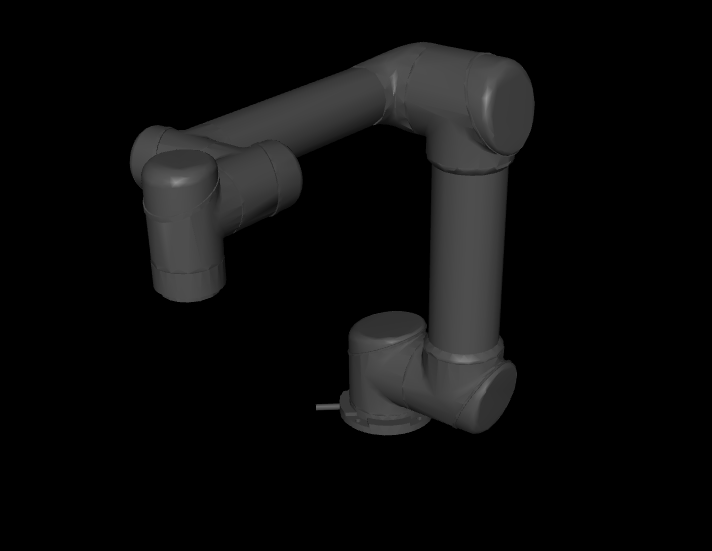
Merging Capabilities
Supports full <mujoco>...</mujoco> and <robot>...</robot> structure as well as complete sub-tree structures.
import mujoco_toolbox as mjtb

# Merges: XML & URDF Files, XML & URDF Strings, Sub Tree Structures
mjtb.Simulation("path/to/xml_1", string_xml_var, ..., "path/to/xml_n").show()
⚠️ WARNING
Duplicate sub-tree items with the same name will cause MuJoCo to throw aFatalError.

1 maintainer

Metadata
1 maintainer
Release files for mujoco-toolbox 0.8.0
For a detailed explanation of source distributions (sdists) and built distributions (wheels), please see the package formats documentation.
Source distribution (sdist)
| File | Size | Uploaded | Provenance | Actions |
|---|---|---|---|---|
| mujoco_toolbox-0.8.0.tar.gz | 2.3 MB | Without provenance | Details for mujoco_toolbox-0.8.0.tar.gz |
Built distribution (wheel)
| File | Interpreter | ABI | Platform | Actions Reset |
|---|---|---|---|---|
| mujoco_toolbox-0.8.0-py3-none-any.whl | Python 3 | none | any | Details for mujoco_toolbox-0.8.0-py3-none-any.whl |
Total release size: 2.3 MB
Release files / mujoco_toolbox-0.8.0.tar.gz
| Download URL | mujoco_toolbox-0.8.0.tar.gz |
|---|---|
| Size | 2.3 MB |
| Tags | Source |
|
SHA-256 checksum How to use checksums |
e9bb389dc6c6d35f44297afdf141b87a33e45d3e9a6d7ff144608ffb7d4a43e1
|
|
BLAKE2b-256 checksum How to use checksums |
7918d3f08996fe3d70d4372af1e90c23ce34510c05f6fcb26aaa63acfbe80f82
|
| Upload date | |
|
Uploaded using Trusted Publishing? What is trusted publishing? |
Yes |
| Uploaded via |
uv/0.13.4 {"installer":{"name":"uv","version":"0.13.4","subcommand":["publish"]},"python":null,"implementation":{"name":null,"version":null},"distro":{"name":"Ubuntu","version":"24.04","id":"noble","libc":null},"system":{"name":null,"release":null},"cpu":null,"openssl_version":null,"setuptools_version":null,"rustc_version":null,"ci":true}
|
Release files / mujoco_toolbox-0.8.0-py3-none-any.whl
| Download URL | mujoco_toolbox-0.8.0-py3-none-any.whl |
|---|---|
| Size | 20.9 kB |
| Tags | Python 3 |
|
SHA-256 checksum How to use checksums |
3274e18392c7b22e79114e493222bdc4edd7c259d6a19745953e60f4b04a6287
|
|
BLAKE2b-256 checksum How to use checksums |
ba0460ca9312a137d051988d0ff275c74a40f9f8fefd3caf7be1d8022fa2ccdc
|
| Upload date | |
|
Uploaded using Trusted Publishing? What is trusted publishing? |
Yes |
| Uploaded via |
uv/0.13.4 {"installer":{"name":"uv","version":"0.13.4","subcommand":["publish"]},"python":null,"implementation":{"name":null,"version":null},"distro":{"name":"Ubuntu","version":"24.04","id":"noble","libc":null},"system":{"name":null,"release":null},"cpu":null,"openssl_version":null,"setuptools_version":null,"rustc_version":null,"ci":true}
|
Security for mujoco-toolbox 0.8.0
Provenance
Provenance describes where a file came from. On PyPI, provenance is shared via attestations, which provide a verifiable record of the build or publishing details. View details, limitations and caveats.
No provenance found
None of the files in this release were uploaded with provenance metadata.
A note on package security
PyPI is a repository for distributing packages, not a service for auditing them. While third-party security researchers and our staff do their best to detect and remove malicious packages, PyPI cannot guarantee the quality, security or suitability of any given package.
To learn more about protecting yourself from malicious actors, visit our package security documentation.














