
Shows multiple serial text streams in a single window with individual highlighting options.
Verified details
These details have been verified by PyPIProject links
GitHub Statistics
Maintainers

Project description
multiserialviewer
Shows multiple serial text streams in a single window with individual highlighting options
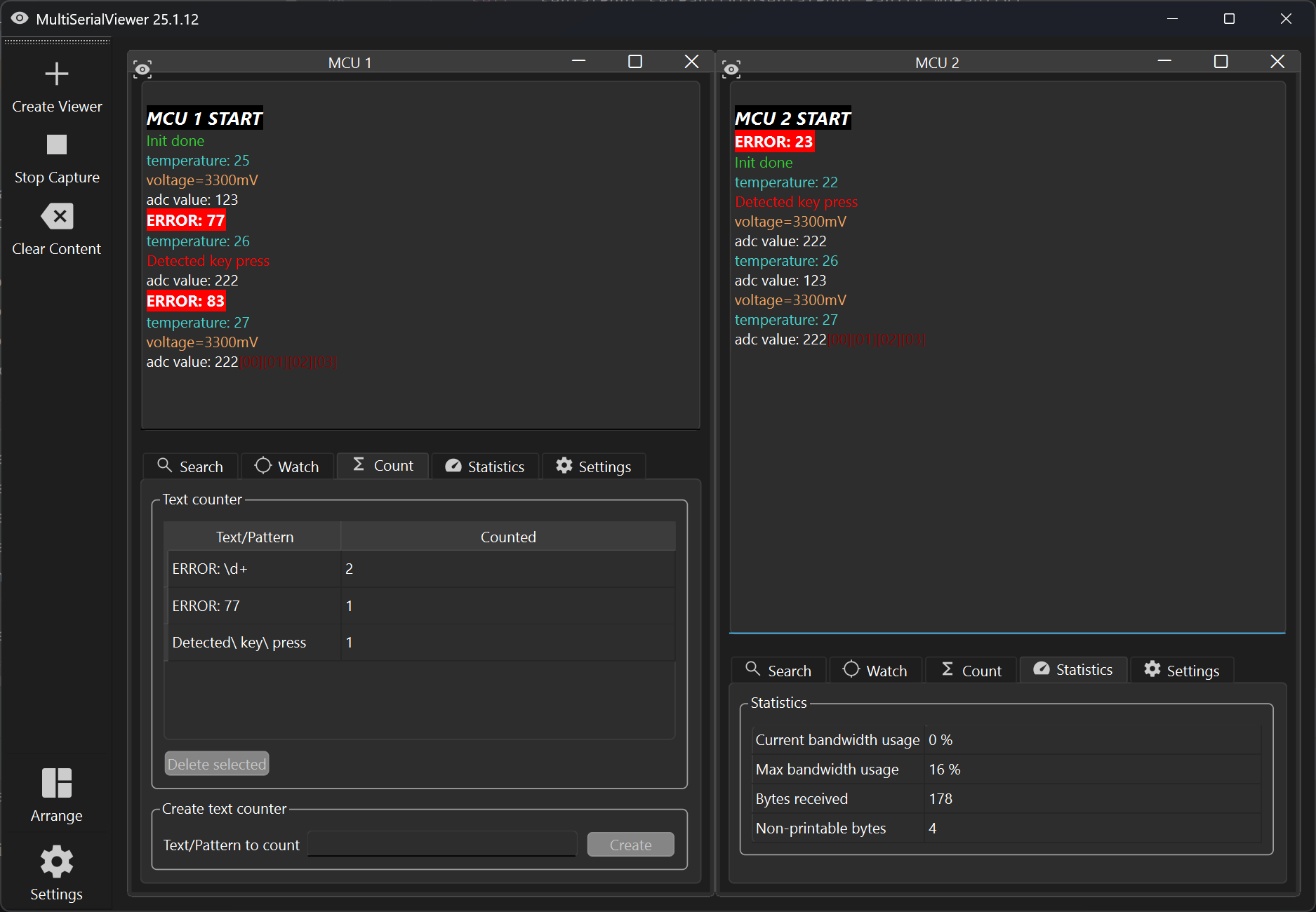
Motivation for using this tool
Imagine you have several embedded devices / MCUs all printing out debug information over a UART. You don't want to use a terminal program (e.g. HTerm) for every COM port manually. You want to easily open all COM ports at once and clear all received data with a single click. Would be nice, if important text messages could be highlighted with different colors, so you don't have to read everything your devices are telling you.
Installation
You can install this tool using the package installer for Python (pypi/multiserialviewer).
pip install multiserialviewer
If already installed, run the following command to install the latest version:
pip install multiserialviewer --upgrade
Usage
After installation using pip, you can start it by running
multiserialviewer
in a console (or by directly clicking '\Scripts\multiserialviewer.exe' in your python install directory).
Setting up your serial/COM port connections
Click in the top left corner on "Create Viewer" and enter your connection details. After you created all SerialViewers you need, start receiving your text data by clicking on "Start Capture".
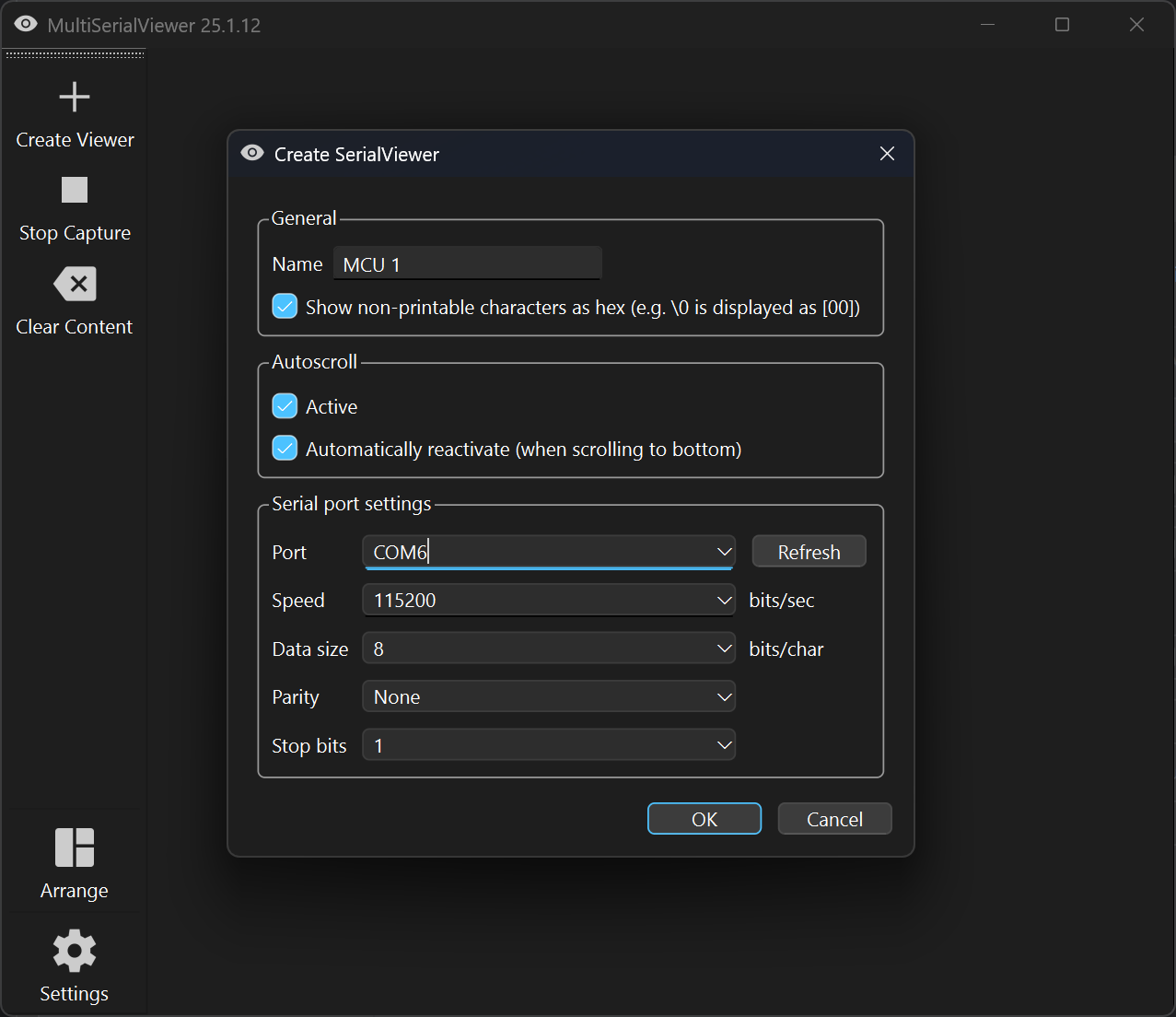
If one of your serial ports can not be opened, you will see an error message in the corresponding SerialView window. In this case all other connections/SerialViewer will be closed again.
Specifying text patterns for highlighting
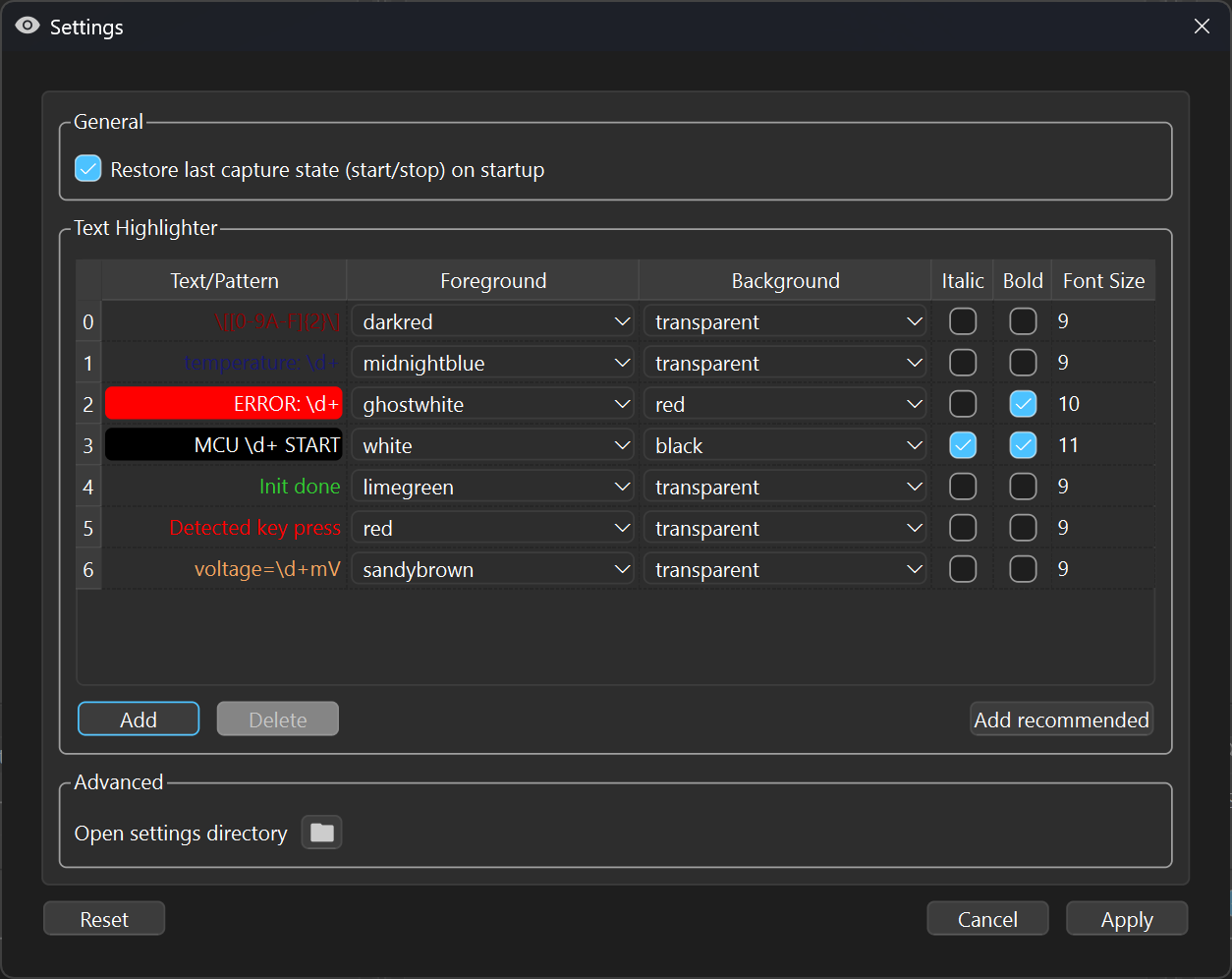
If you want to highlight specific text, you can define text patterns using regular expression syntax. If you just want to highlight certain words, enter them as normal text in the highlighter settings dialog (Highlighter).
Project details
Verified details
These details have been verified by PyPIProject links
GitHub Statistics
Maintainers
Release history Release notifications | RSS feed


Download files
Download the file for your platform. If you're not sure which to choose, learn more about installing packages.
Source Distribution
Built Distribution
Filter files by name, interpreter, ABI, and platform.
If you're not sure about the file name format, learn more about wheel file names.
Copy a direct link to the current filters
File details
Details for the file multiserialviewer-25.1.10.tar.gz.
File metadata
- Download URL: multiserialviewer-25.1.10.tar.gz
- Upload date:
- Size: 150.3 kB
- Tags: Source
- Uploaded using Trusted Publishing? Yes
- Uploaded via: twine/6.0.1 CPython/3.12.8
File hashes
| Algorithm | Hash digest | |
|---|---|---|
| SHA256 |
ad0e8e6ee39a55f41d245fd68d130cea5bf7f6e55299c46abc7c9326a5ab7298
|
|
| MD5 |
73a67dc8407fde6459da597bc8506bec
|
|
| BLAKE2b-256 |
347d42262983dd774cf3a066043297f1bd933ed0fea9d4337e593010b4ed7ae2
|
Provenance
The following attestation bundles were made for multiserialviewer-25.1.10.tar.gz:
Publisher:
python-publish.yml on shaag7967/multiserialviewer
-
Statement:
-
Statement type:
https://in-toto.io/Statement/v1 -
Predicate type:
https://docs.pypi.org/attestations/publish/v1 -
Subject name:
multiserialviewer-25.1.10.tar.gz -
Subject digest:
ad0e8e6ee39a55f41d245fd68d130cea5bf7f6e55299c46abc7c9326a5ab7298 - Sigstore transparency entry: 164468890
- Sigstore integration time:
-
Permalink:
shaag7967/multiserialviewer@0a88d7cde0278144074abbb9e1405ea09b22b5b1 -
Branch / Tag:
refs/tags/25.1.10 - Owner: https://github.com/shaag7967
-
Access:
public
-
Token Issuer:
https://token.actions.githubusercontent.com -
Runner Environment:
github-hosted -
Publication workflow:
python-publish.yml@0a88d7cde0278144074abbb9e1405ea09b22b5b1 -
Trigger Event:
release
-
Statement type:
File details
Details for the file multiserialviewer-25.1.10-py3-none-any.whl.
File metadata
- Download URL: multiserialviewer-25.1.10-py3-none-any.whl
- Upload date:
- Size: 175.0 kB
- Tags: Python 3
- Uploaded using Trusted Publishing? Yes
- Uploaded via: twine/6.0.1 CPython/3.12.8
File hashes
| Algorithm | Hash digest | |
|---|---|---|
| SHA256 |
2598eaf6178ab2027b25b87d3c98d37455a9a041dd06fad949ce406b608b7264
|
|
| MD5 |
82a3c115808f5e4b4b367653a0484a9b
|
|
| BLAKE2b-256 |
5010cb86a1d0b3edb6bb39a3d0092138281c1e20acabc633a80ecd0a118d65a5
|
Provenance
The following attestation bundles were made for multiserialviewer-25.1.10-py3-none-any.whl:
Publisher:
python-publish.yml on shaag7967/multiserialviewer
-
Statement:
-
Statement type:
https://in-toto.io/Statement/v1 -
Predicate type:
https://docs.pypi.org/attestations/publish/v1 -
Subject name:
multiserialviewer-25.1.10-py3-none-any.whl -
Subject digest:
2598eaf6178ab2027b25b87d3c98d37455a9a041dd06fad949ce406b608b7264 - Sigstore transparency entry: 164468892
- Sigstore integration time:
-
Permalink:
shaag7967/multiserialviewer@0a88d7cde0278144074abbb9e1405ea09b22b5b1 -
Branch / Tag:
refs/tags/25.1.10 - Owner: https://github.com/shaag7967
-
Access:
public
-
Token Issuer:
https://token.actions.githubusercontent.com -
Runner Environment:
github-hosted -
Publication workflow:
python-publish.yml@0a88d7cde0278144074abbb9e1405ea09b22b5b1 -
Trigger Event:
release
-
Statement type:






