
Shows multiple serial text streams in a single window with individual highlighting options.
Verified details
These details have been verified by PyPIProject links
GitHub Statistics
Maintainers

Project description
multiserialviewer
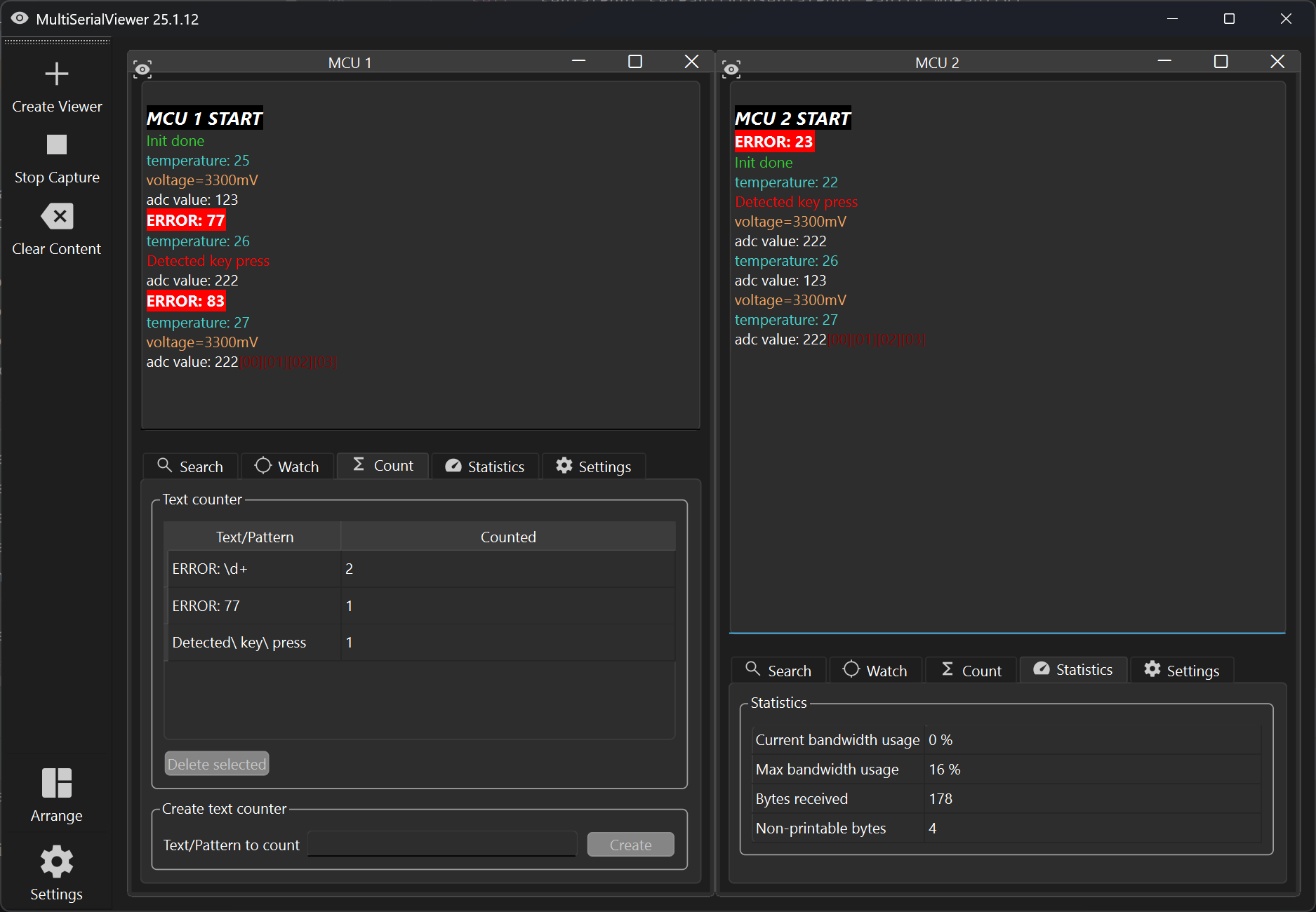
See multiple serial text streams in a single window
What you can do with it
- evaluate the output of one or more serial ports
- automatically highlight text, e.g. in color, according to user-defined patterns
- open and close all serial ports with a single click
- search the output of a serial port and navigate between the findings
- watch key-value pairs and display the last value
- count text while the data is being received
- get insights into your serial port bandwidth utilization
- keep all your settings and window sizes until next time
Screenshots
Installation
You can install this tool using the package installer for Python (pypi/multiserialviewer).
pip install multiserialviewer
If already installed, run the following command to install the latest version:
pip install multiserialviewer --upgrade
Start
After installation using pip, you can start it by running
multiserialviewer
in a console.
Start it using a Windows batch file
Create a batch file, e.g. multiserialviewer.bat, with the following content (enter your python path accordingly):
start /B pythonw "C:\myPythonInstallDir\Python311\Scripts\multiserialviewer.exe"
With this, you will not get a console window in the background.
Usage
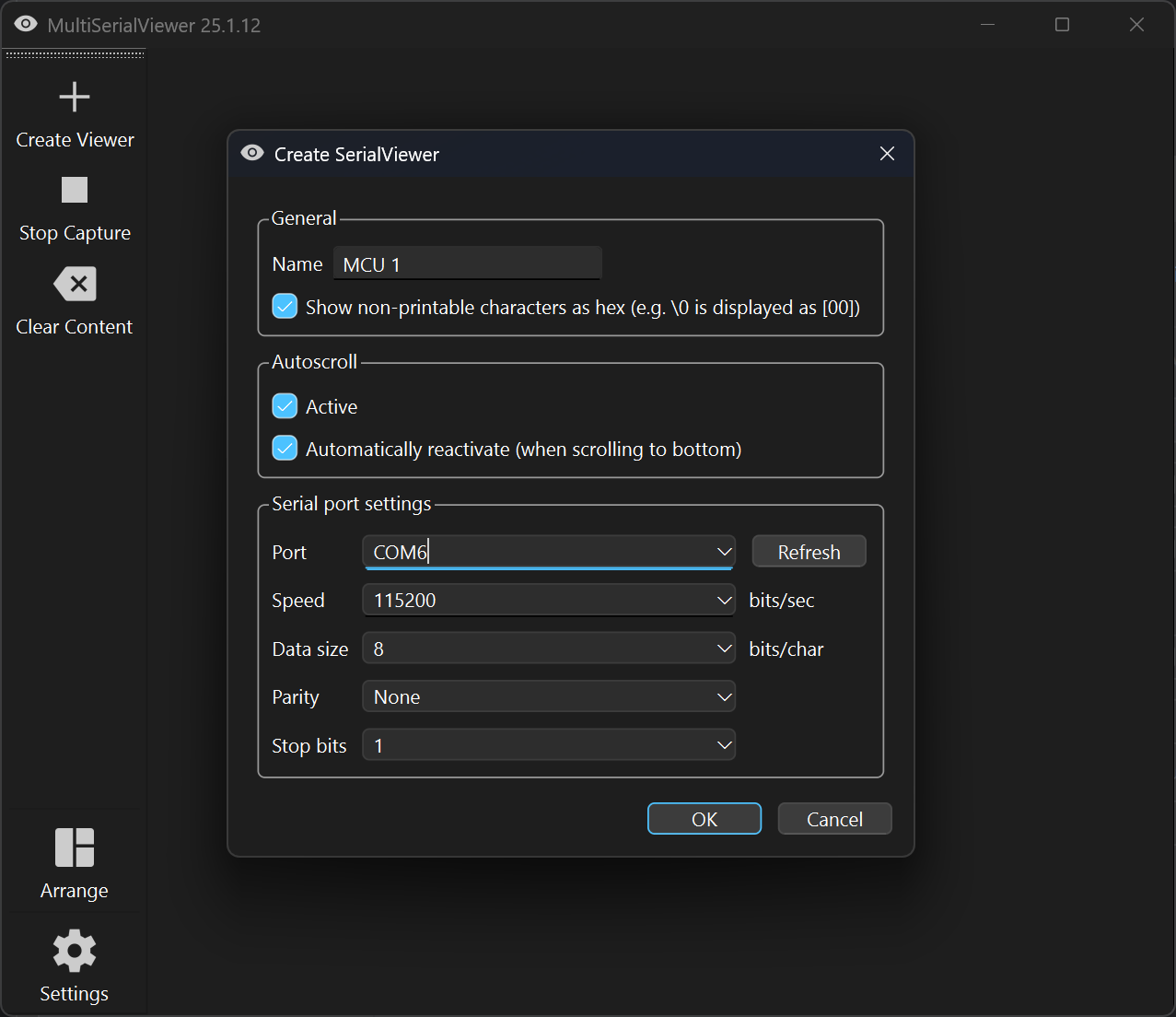
Set up your serial port connections
Click the button "Create Viewer" and enter your connection details. You can give the window a name and set your autoscroll preferences. The latter may be changed at any time later (but not the connection details).
It is not possible to create a viewer for the same port multiple times.
Open your serial ports and receive data
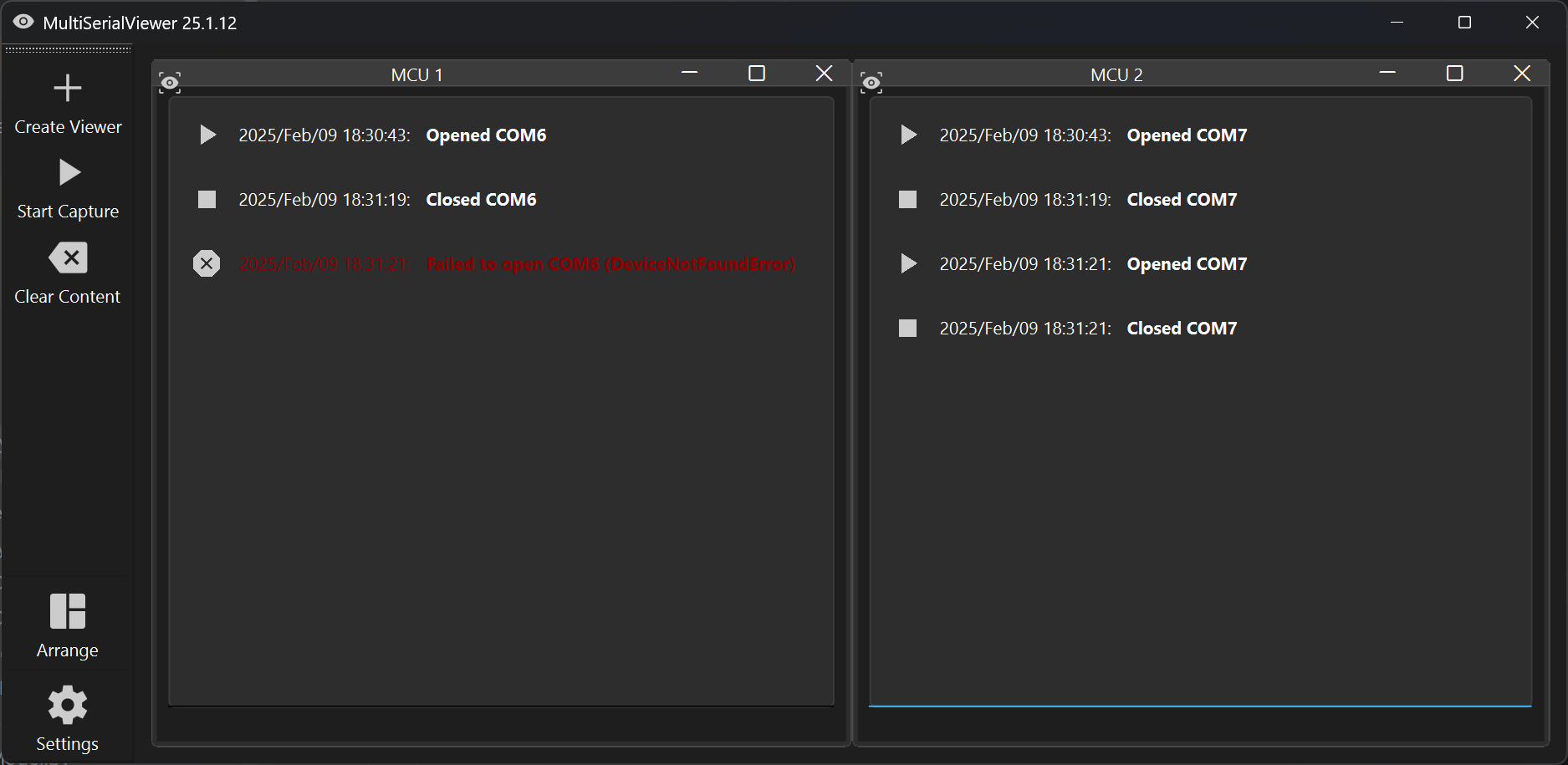
After you created all SerialViewers you need, start receiving your data by clicking "Start Capture".
You can close all serial ports by clicking "Stop Capture".
If one of your serial ports can not be opened, you will see an error message in the corresponding SerialView window. In this case all other connections will be closed again automatically.
What data is displayed?
You will only see printable characters in the output window, meaning every character with a value between (including) 32 and 126. LineFeed and CarriageReturn will cause a line break/new line.
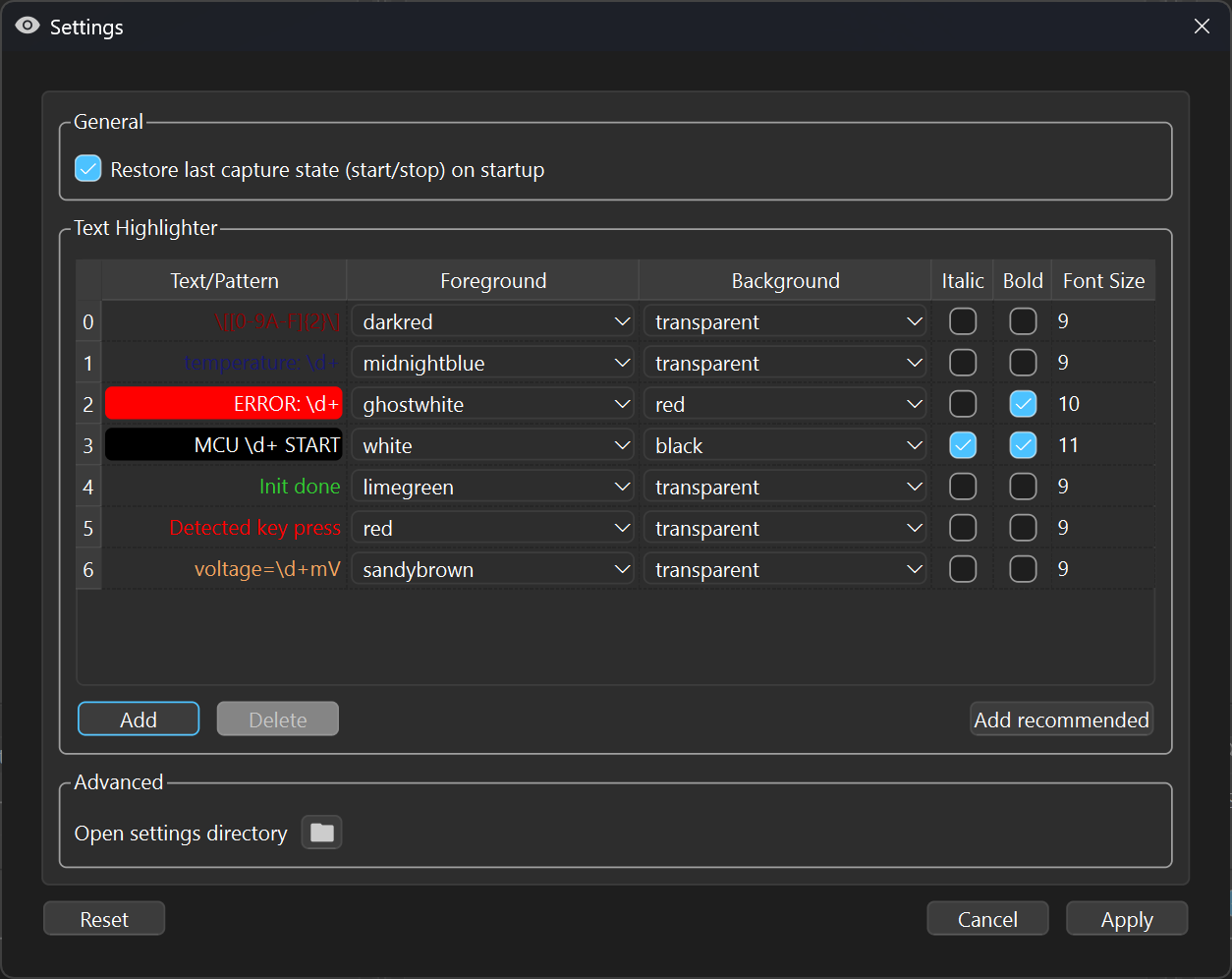
If you want to see non-printable characters (in hex), you can enable this in the settings dialog. E.g. '\0' will then be printed as [00].
Work with the data you received (while you receive it)
Specify text patterns to highlight information
If you want to highlight specific text, you can define text patterns using regular expression syntax. If you just want to highlight certain words, just enter them as normal text.
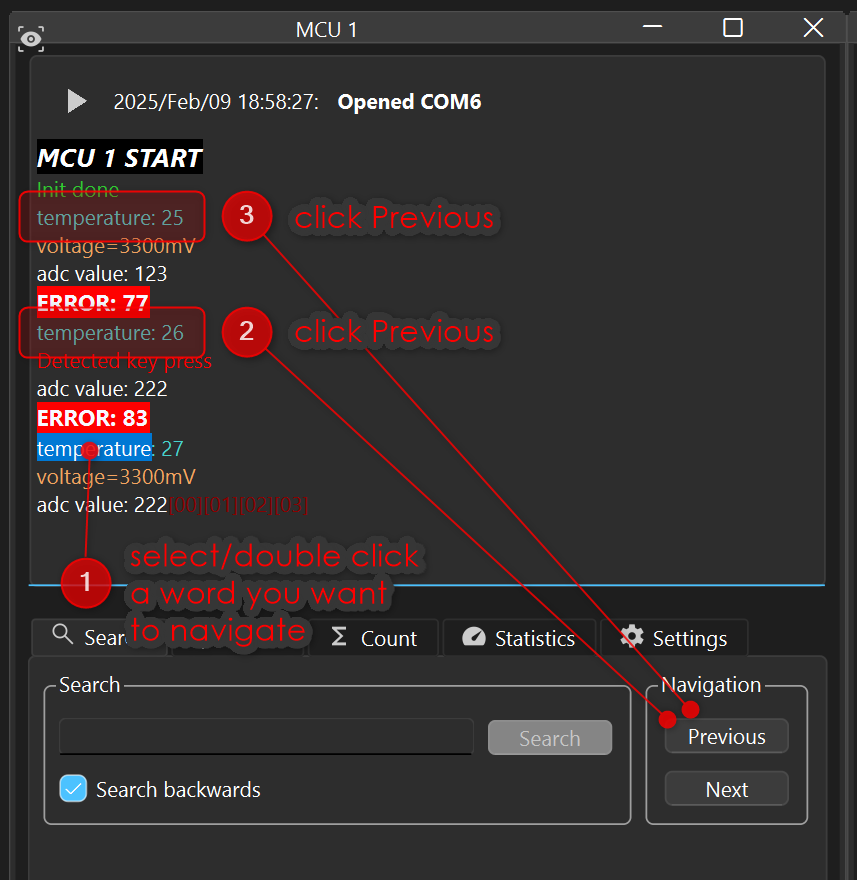
Search for a word and jump to the next/previous occurrence
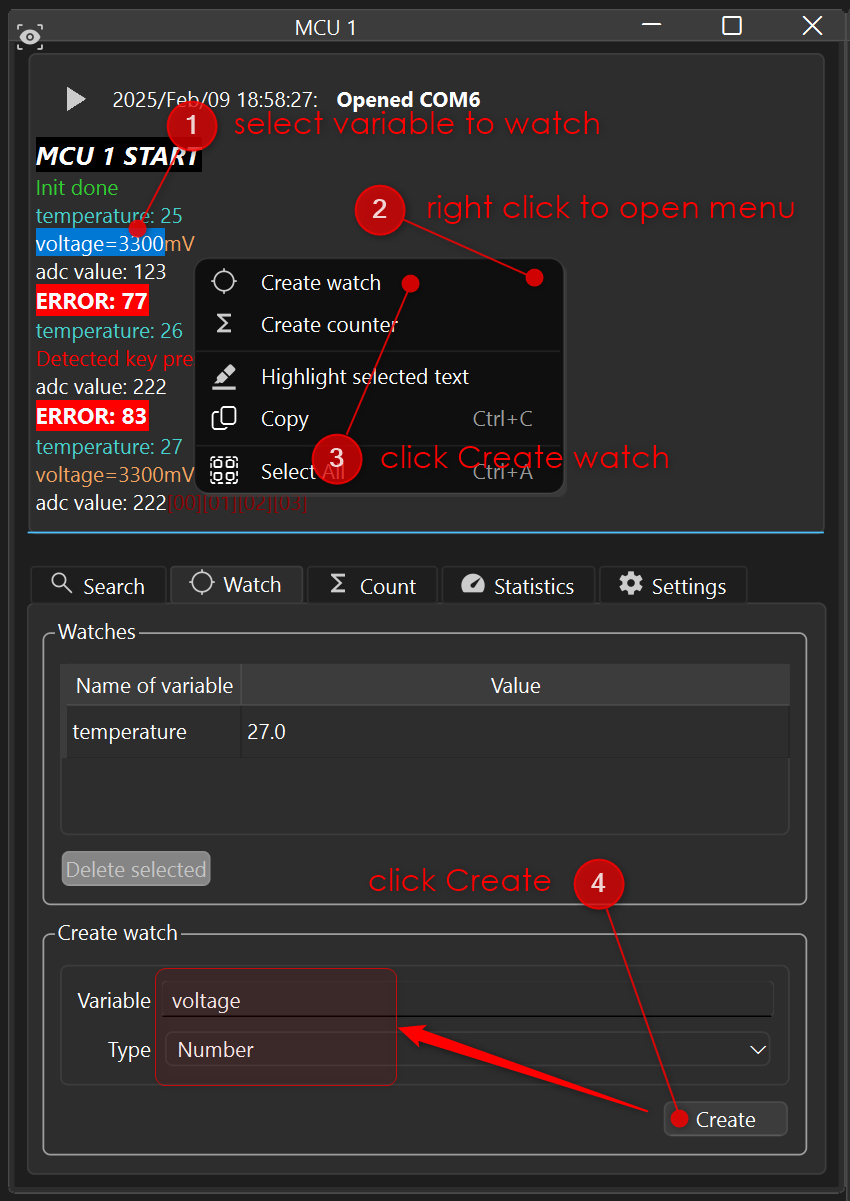
Watch values of key-value pairs
If you receive a lot of data and want to keep track of single values, e.g. temperature=88, you
can create a watch and display these values in a separate table. In this table, the last received
value will be displayed.
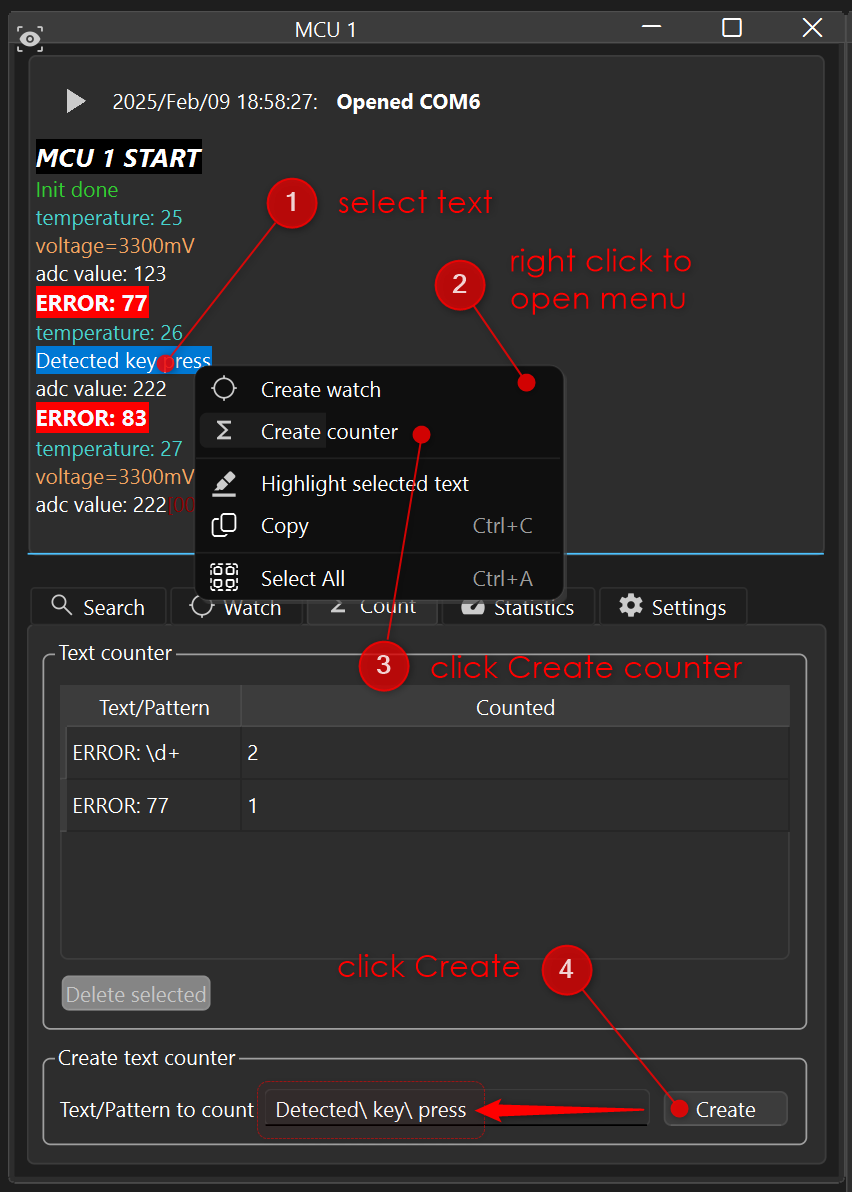
Count the occurrence of text patterns
If you are just interested in the number of occurrences of a word (or text pattern), you can create counter.
Get an idea of how much data you received and bandwidth is left
In the statistics tab you find basic information about the received data.
Project details
Verified details
These details have been verified by PyPIProject links
GitHub Statistics
Maintainers
Release history Release notifications | RSS feed


Download files
Download the file for your platform. If you're not sure which to choose, learn more about installing packages.
Source Distribution
Built Distribution
Filter files by name, interpreter, ABI, and platform.
If you're not sure about the file name format, learn more about wheel file names.
Copy a direct link to the current filters
File details
Details for the file multiserialviewer-25.9.0.tar.gz.
File metadata
- Download URL: multiserialviewer-25.9.0.tar.gz
- Upload date:
- Size: 166.5 kB
- Tags: Source
- Uploaded using Trusted Publishing? Yes
- Uploaded via: twine/6.1.0 CPython/3.13.7
File hashes
| Algorithm | Hash digest | |
|---|---|---|
| SHA256 |
916d428364a3fccc3e3aa42e78a705c95e114d1a200178d148a501eeec03461b
|
|
| MD5 |
ddf4020992ed660ae4bcba916ac55a55
|
|
| BLAKE2b-256 |
be9d27588d24bfffcbcd7ae466ed905ae95bfdd1031cdda74326aad66d24f6d7
|
Provenance
The following attestation bundles were made for multiserialviewer-25.9.0.tar.gz:
Publisher:
python-publish.yml on shaag7967/multiserialviewer
-
Statement:
-
Statement type:
https://in-toto.io/Statement/v1 -
Predicate type:
https://docs.pypi.org/attestations/publish/v1 -
Subject name:
multiserialviewer-25.9.0.tar.gz -
Subject digest:
916d428364a3fccc3e3aa42e78a705c95e114d1a200178d148a501eeec03461b - Sigstore transparency entry: 514395410
- Sigstore integration time:
-
Permalink:
shaag7967/multiserialviewer@b02826e352fbffae984ef71065303a7ac47371b2 -
Branch / Tag:
refs/tags/25.9.1 - Owner: https://github.com/shaag7967
-
Access:
public
-
Token Issuer:
https://token.actions.githubusercontent.com -
Runner Environment:
github-hosted -
Publication workflow:
python-publish.yml@b02826e352fbffae984ef71065303a7ac47371b2 -
Trigger Event:
release
-
Statement type:
File details
Details for the file multiserialviewer-25.9.0-py3-none-any.whl.
File metadata
- Download URL: multiserialviewer-25.9.0-py3-none-any.whl
- Upload date:
- Size: 194.5 kB
- Tags: Python 3
- Uploaded using Trusted Publishing? Yes
- Uploaded via: twine/6.1.0 CPython/3.13.7
File hashes
| Algorithm | Hash digest | |
|---|---|---|
| SHA256 |
e70e74b7bb7168033fe1dc4b8eec7f941013413032603163741a91e8b4a011d2
|
|
| MD5 |
b23a418da95ac49063e2545cd6b9e26c
|
|
| BLAKE2b-256 |
c326b7eec59ec53c4cf33eda2358d437264f40118810b59939c80fc3758dc4f1
|
Provenance
The following attestation bundles were made for multiserialviewer-25.9.0-py3-none-any.whl:
Publisher:
python-publish.yml on shaag7967/multiserialviewer
-
Statement:
-
Statement type:
https://in-toto.io/Statement/v1 -
Predicate type:
https://docs.pypi.org/attestations/publish/v1 -
Subject name:
multiserialviewer-25.9.0-py3-none-any.whl -
Subject digest:
e70e74b7bb7168033fe1dc4b8eec7f941013413032603163741a91e8b4a011d2 - Sigstore transparency entry: 514395436
- Sigstore integration time:
-
Permalink:
shaag7967/multiserialviewer@b02826e352fbffae984ef71065303a7ac47371b2 -
Branch / Tag:
refs/tags/25.9.1 - Owner: https://github.com/shaag7967
-
Access:
public
-
Token Issuer:
https://token.actions.githubusercontent.com -
Runner Environment:
github-hosted -
Publication workflow:
python-publish.yml@b02826e352fbffae984ef71065303a7ac47371b2 -
Trigger Event:
release
-
Statement type:






