
multiversum





multiversum is a package designed to make it easy to conduct multiverse analyses in Python. The package is intended to seemlessly integrate into a normal analysis or ML workflow and can also be added to an existing pipeline.
Features
- Simple 🧩: Built with the goal of being as simple as possible to integrate into existing workflows.
- Parallel 👯: Different universes are automatically evaluated in parallel.
- Notebooks 📓: Analyses can be written as Jupyter notebooks or Python scripts.
- Play/Pause ⏯️: Interrupt and then continue a multiverse analysis where you left it.
Installation
Install this library using pip:
pip install multiversum
Usage
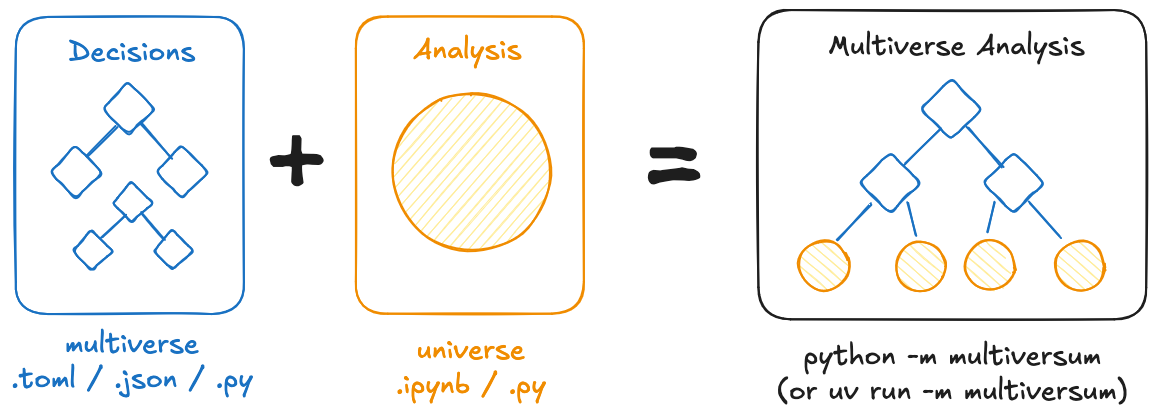
The package always works with two different files: The multiverse.toml (or json / py) ✨️, specifying the different dimensions (and their options) and the universe.ipynb (or py) ⭐️ containing the actual analysis code. The universe file is then evaluated (in parallel) using different dimension-combinations, by running python -m multiversum.
An example using a machine learning workflow in scikit-learn can be found here.
Getting Started
To quickly get started with running your own multiverse analysis, you can use the multiversum starter template.
Examples
This section contains real-world examples of multiverse analyses conducted using this library.
- Preventing Harmful Data Practices by using Participatory Input to Navigate the Machine Learning Multiverse [Code] [Paper]
- Bias Begins with Data: The FairGround Corpus for Robust and Reproducible Research on Algorithmic Fairness [Code] [Paper]
Development
To contribute to this library, first checkout the code. Then create a new virtual environment:
cd multiversum
python -m venv venv
source venv/bin/activate
Now install the dependencies and test dependencies:
python -m pip install -e '.[test]'
To run the tests:
python -m pytest
Formatting
Ruff is used for formatting and linting. Formatting can be automatically checked / applied wherever possible via ruff check . --fix && ruff format.
Docs
The documentation is generated using mkdocs and can be locally run using mkdocs serve after installing its dependencies using python -m pip install -e '.[docs]'.
1 maintainer

Metadata
1 maintainer
Release files for multiversum 0.7.2
For a detailed explanation of source distributions (sdists) and built distributions (wheels), please see the package formats documentation.
Source distribution (sdist)
| File | Size | Uploaded | Provenance | Actions |
|---|---|---|---|---|
| multiversum-0.7.2.tar.gz | 38.6 kB | With provenance | Details for multiversum-0.7.2.tar.gz |
Built distribution (wheel)
| File | Interpreter | ABI | Platform | Actions Reset |
|---|---|---|---|---|
| multiversum-0.7.2-py3-none-any.whl | Python 3 | none | any | Details for multiversum-0.7.2-py3-none-any.whl |
Total release size: 68.4 kB
Release files / multiversum-0.7.2.tar.gz
| Download URL | multiversum-0.7.2.tar.gz |
|---|---|
| Size | 38.6 kB |
| Tags | Source |
|
SHA-256 checksum How to use checksums |
f4f2de45a490d626648a7164508a17463141ce86ae30a251a0b96aaffed300e5
|
|
BLAKE2b-256 checksum How to use checksums |
3fac38ead29191332cfe56e2e372a025c474b06a28d7aaf36b1007e828153c22
|
| Upload date | |
|
Uploaded using Trusted Publishing? What is trusted publishing? |
Yes |
| Uploaded via |
twine/6.1.0 CPython/3.13.7
|
Provenance
Provenance describes where a file came from. On PyPI, provenance is shared via attestations, which provide a verifiable record of the build or publishing details. View details, limitations and caveats.


PyPI Publish Attestation
PyPI verified that this artifact, at this checksum, originated from the publisher listed below.
Signed by GitHub Actions, verified by PyPI on Dec 19, 2025.
Transparency logRelease files / multiversum-0.7.2-py3-none-any.whl
| Download URL | multiversum-0.7.2-py3-none-any.whl |
|---|---|
| Size | 29.8 kB |
| Tags | Python 3 |
|
SHA-256 checksum How to use checksums |
33a31e908e29f73e1ab7a2cf9b25f4e68fb5649a9763644c8871c407e374b91e
|
|
BLAKE2b-256 checksum How to use checksums |
8e29a044f55dd0aa9054824465955f0f5a323a3a999c717c0e6e12a549383a60
|
| Upload date | |
|
Uploaded using Trusted Publishing? What is trusted publishing? |
Yes |
| Uploaded via |
twine/6.1.0 CPython/3.13.7
|
Provenance
Provenance describes where a file came from. On PyPI, provenance is shared via attestations, which provide a verifiable record of the build or publishing details. View details, limitations and caveats.
PyPI Publish Attestation
PyPI verified that this artifact, at this checksum, originated from the publisher listed below.
Signed by GitHub Actions, verified by PyPI on Dec 19, 2025.
Transparency logSecurity for multiversum 0.7.2
Provenance
Provenance describes where a file came from. On PyPI, provenance is shared via attestations, which provide a verifiable record of the build or publishing details. View details, limitations and caveats.
Full provenance
All 2 files in this release have been uploaded with provenance metadata.
Attestation for multiversum-0.7.2.tar.gz
PyPI Publish Attestation
PyPI verified that this artifact, at this checksum, originated from the publisher listed below.
Signed by GitHub Actions, verified by PyPI on Dec 19, 2025.
Transparency logA note on package security
PyPI is a repository for distributing packages, not a service for auditing them. While third-party security researchers and our staff do their best to detect and remove malicious packages, PyPI cannot guarantee the quality, security or suitability of any given package.
To learn more about protecting yourself from malicious actors, visit our package security documentation.














