
A helper package to conduct multiverse analyses in Python
Verified details
These details have been verified by PyPIProject links
GitHub Statistics
Maintainers

Project description
multiversum





multiversum is a package designed to make it easy to conduct multiverse analyses in Python. The package is intended to seemlessly integrate into a normal analysis or ML workflow and can also be added to an existing pipeline.
Features
- Simple 🧩: Built with the goal of being as simple as possible to integrate into existing workflows.
- Parallel 👯: Different universes are automatically evaluated in parallel.
- Notebooks 📓: Analyses can be written as Jupyter notebooks or Python scripts.
- Play/Pause ⏯️: Interrupt and then continue a multiverse analysis where you left it.
Installation
Install this library using pip:
pip install multiversum
Usage
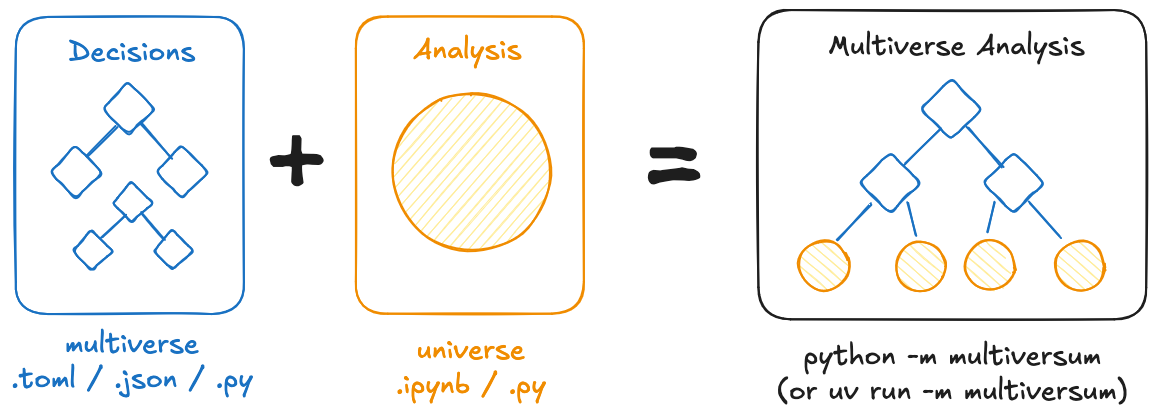
The package always works with two different files: The multiverse.toml (or json / py) ✨️, specifying the different dimensions (and their options) and the universe.ipynb (or py) ⭐️ containing the actual analysis code. The universe file is then evaluated (in parallel) using different dimension-combinations, by running python -m multiversum.
An example using a machine learning workflow in scikit-learn can be found here.
Getting Started
To quickly get started with running your own multiverse analysis, you can use the multiversum starter template.
Development
To contribute to this library, first checkout the code. Then create a new virtual environment:
cd multiversum
python -m venv venv
source venv/bin/activate
Now install the dependencies and test dependencies:
python -m pip install -e '.[test]'
To run the tests:
python -m pytest
Formatting
Ruff is used for formatting and linting. Formatting can be automatically checked / applied wherever possible via ruff check . --fix && ruff format.
Docs
The documentation is generated using mkdocs and can be locally run using mkdocs serve after installing its dependencies using python -m pip install -e '.[docs]'.
Project details
Verified details
These details have been verified by PyPIProject links
GitHub Statistics
Maintainers
Release history Release notifications | RSS feed


Download files
Download the file for your platform. If you're not sure which to choose, learn more about installing packages.
Source Distribution
Built Distribution
Filter files by name, interpreter, ABI, and platform.
If you're not sure about the file name format, learn more about wheel file names.
Copy a direct link to the current filters
File details
Details for the file multiversum-0.7.1.tar.gz.
File metadata
- Download URL: multiversum-0.7.1.tar.gz
- Upload date:
- Size: 38.1 kB
- Tags: Source
- Uploaded using Trusted Publishing? Yes
- Uploaded via: twine/6.1.0 CPython/3.13.7
File hashes
| Algorithm | Hash digest | |
|---|---|---|
| SHA256 |
a73127f4f8681f423a3048f208912df6155212e189cf1c2ddaa908a100fce41b
|
|
| MD5 |
377e9808bdbeedf9a94f930f5ae706bb
|
|
| BLAKE2b-256 |
d410a197fb332a108e529e5bd0a359087d9494c92644c9df8d933828e0d11c8c
|
Provenance
The following attestation bundles were made for multiversum-0.7.1.tar.gz:
Publisher:
publish.yml on jansim/multiversum
-
Statement:
-
Statement type:
https://in-toto.io/Statement/v1 -
Predicate type:
https://docs.pypi.org/attestations/publish/v1 -
Subject name:
multiversum-0.7.1.tar.gz -
Subject digest:
a73127f4f8681f423a3048f208912df6155212e189cf1c2ddaa908a100fce41b - Sigstore transparency entry: 757503174
- Sigstore integration time:
-
Permalink:
jansim/multiversum@911b9d1dbbaa2723a3ec145312cfbb09692cfc80 -
Branch / Tag:
refs/tags/v0.7.1 - Owner: https://github.com/jansim
-
Access:
public
-
Token Issuer:
https://token.actions.githubusercontent.com -
Runner Environment:
github-hosted -
Publication workflow:
publish.yml@911b9d1dbbaa2723a3ec145312cfbb09692cfc80 -
Trigger Event:
release
-
Statement type:
File details
Details for the file multiversum-0.7.1-py3-none-any.whl.
File metadata
- Download URL: multiversum-0.7.1-py3-none-any.whl
- Upload date:
- Size: 29.6 kB
- Tags: Python 3
- Uploaded using Trusted Publishing? Yes
- Uploaded via: twine/6.1.0 CPython/3.13.7
File hashes
| Algorithm | Hash digest | |
|---|---|---|
| SHA256 |
523e74c040295577ddc5b6dd3d49a5776dda76ad4d3dcb42efe25ec7481889ff
|
|
| MD5 |
10e207e40c4c6b9535adb0c09d2e2ee3
|
|
| BLAKE2b-256 |
9bc76044c401ff12a21b5220aae1c8dd69f9d1351bc2dc48135563b68bdfd840
|
Provenance
The following attestation bundles were made for multiversum-0.7.1-py3-none-any.whl:
Publisher:
publish.yml on jansim/multiversum
-
Statement:
-
Statement type:
https://in-toto.io/Statement/v1 -
Predicate type:
https://docs.pypi.org/attestations/publish/v1 -
Subject name:
multiversum-0.7.1-py3-none-any.whl -
Subject digest:
523e74c040295577ddc5b6dd3d49a5776dda76ad4d3dcb42efe25ec7481889ff - Sigstore transparency entry: 757503179
- Sigstore integration time:
-
Permalink:
jansim/multiversum@911b9d1dbbaa2723a3ec145312cfbb09692cfc80 -
Branch / Tag:
refs/tags/v0.7.1 - Owner: https://github.com/jansim
-
Access:
public
-
Token Issuer:
https://token.actions.githubusercontent.com -
Runner Environment:
github-hosted -
Publication workflow:
publish.yml@911b9d1dbbaa2723a3ec145312cfbb09692cfc80 -
Trigger Event:
release
-
Statement type:






