
Wordlist generator based on password cards

Project description
Wordlist generator based on password cards


What is a password card?
Password (aka. grid) card is a physical card that allows you to memorize your passwords easier.
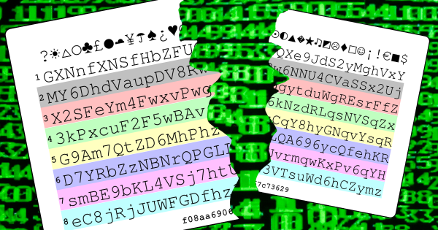
The card contains a block of random alphanumeric characters. You just need to choose and memorize a row, a column and a direction to pick a password from the card.
Security
Passwords cards heavily rely on physical security. The card should be kept in your wallet or pocket, far away from watchful eyes around you.
In case the card is lost or recorded with a camera (e.g. CCTV), your password shall be considered as compromised and changed immediately.
Features
Munchkin can generate wordlists from compromised password cards.
This utility generates potential passwords and dumps them onto the screen or into a text file.
Supported Strategies
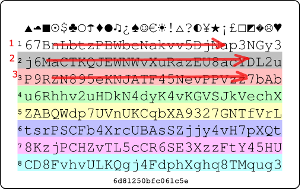
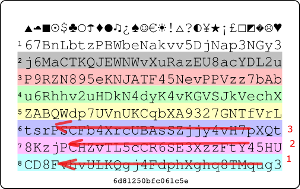
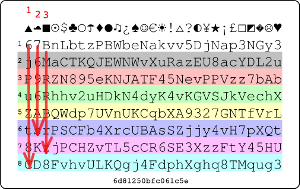
Munchkin can generate passwords based on the following card reading strategies.
Left to right
Right to left
Top down
Bottom up
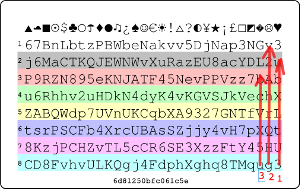
Supported Cards
Cards from http://passwordcard.org
Any user-supplied custom card
Installing Munchkin
The latest package is available on PyPI
$ pip install munchkin
Usage Instructions
Munchkin has two operation modes: one is for generating passwords based on cards from http://passwordcard.org, and the other is for user supplied custom cards.
Operation Modes
passwordcard.org Cards
Use the pcard selector to generate passwords from passwordcard.org cards
$ munchkin pcard -h
This selector recognises the following options:
- -s str, --seed str
card number (e.g. 7eb3fbfa560d1d1e)
- --symbols
include symbols (broken)
- --digits
incude digits
Custom Cards
The custom selector allows to supply password cards by pasting them as a block of text
$ munchkin custom -h
This selector does not require any special options.
Settings
The following switches are recognized for both card types
Password Length
Choose the minimum and maximum length of passwords to generate:
- --minlen num
minimum password length (default: 6)
- --maxlen num
maximum password length (default: 12)
Read Strategies
Select one or more strategies to generate passwords (refer to Supported Strategies section for further explanation)
- -l, --left-to-right
Left to right
- -r, --right-to-left
Right to left
- -t, --top-down
Top left corner to bottom right
- -b, --bottom-up
Bottom right corner to top left
File Output
Dump passwords to a file instead of the terminal:
- -f name, --file name
Dump passwords to file
Examples
Generate 6-8 digit passwords from a password card generated with seed the initial seed of 7eb3fbfa560d1d1e
$ munchkin pcard -s 7eb3fbfa560d1d1e -l
Supply your own password card and generate passwords with multiple read strategies
$ munchkin custom -l -r -t -b
Contributors
Gabor Szathmari - @gszathmari
Credits
Python port of passwordcard.org algorithm: olasd/passwordcard
Release history Release notifications | RSS feed


Download files
Download the file for your platform. If you're not sure which to choose, learn more about installing packages.
Source Distribution
Built Distribution
Filter files by name, interpreter, ABI, and platform.
If you're not sure about the file name format, learn more about wheel file names.
Copy a direct link to the current filters
File details
Details for the file munchkin-0.1.1.tar.gz.
File metadata
- Download URL: munchkin-0.1.1.tar.gz
- Upload date:
- Size: 15.7 kB
- Tags: Source
- Uploaded using Trusted Publishing? No
File hashes
| Algorithm | Hash digest | |
|---|---|---|
| SHA256 |
bd7adb4ec3a4ba2dd4fa6c89033ead5e21fbd0a7f5008cdf6952d83d2c267fc3
|
|
| MD5 |
84cde3d3827a53bcb7a455282700d0ed
|
|
| BLAKE2b-256 |
947886bf16d4baa7a2dcfc451c13744547c836d93096766ba7ec578b039567ff
|
File details
Details for the file munchkin-0.1.1-py2.py3-none-any.whl.
File metadata
- Download URL: munchkin-0.1.1-py2.py3-none-any.whl
- Upload date:
- Size: 23.5 kB
- Tags: Python 2, Python 3
- Uploaded using Trusted Publishing? No
File hashes
| Algorithm | Hash digest | |
|---|---|---|
| SHA256 |
6b5f67c8902671833f308a03752a84902651b68b8e686b402d4b805976c22ef6
|
|
| MD5 |
8803bd2cd3fc819d9f46043e65ef2e90
|
|
| BLAKE2b-256 |
397763020e9068f4b17702d3a41d3bfc17ac85b7961d58b58c5f547aa94f933b
|






