
A YOLO-based tool for ROI cropping and movement tracking of Mus musculus.

Project description
Mus Musculus Tracker 🐁


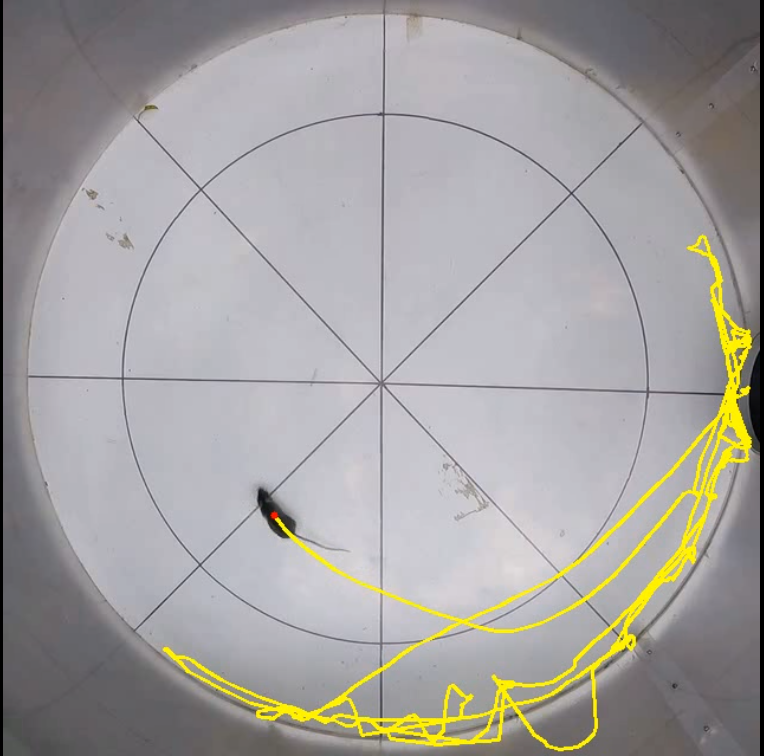
A custom YOLO-based tool for automated mouse (Mus musculus) detection, movement tracking, and manual keypoint labeling.
📋 Features
- Automated Detection: Robust mouse tracking powered by YOLO (v12).
- Video Cropping and Compression: Automatically crops video borders to focus on the arena/cage and compresses them to 640x640 MP4.
- Trajectory Tracking: Extracts movement coordinates and trajectory data.
- Keypoints Labeling: Interactive script to label points
p0..p9on the first frame. - CLI: Command-line interface.
🚀 Installation
Via Pip (Recommended)
pip install mus-musculus-tracker
Via Conda (Development)
gh repo clone juancolonna/mouse-tracker
cd mouse-tracker
conda env create -f environment.yml
conda activate mouse-tracker
pip install -e .
🛠 Usage
1) Basic Use of Mouse tracking (mouse-track)
Run mouse-track with a single video file:
mouse-track path/to/video.mp4
The output files are saved in the same directory as the input video:
video_tracked.mp4annotated video with the tracking results.video_log.csvCSV file containing the tracking data.
The video_log.csv file contains:
Frame: frame number in the video.Track_ID: object tracking ID assigned by YOLO.Class: detected object class.Time (s): timestamp of the frame in seconds.Confidence: YOLO detection confidence score.pos_x: x-coordinate of the detected mouse position.pos_y: y-coordinate of the detected mouse position.Radius: distance from the arena center (p0) to the detected position.Angle: angle of the detected position relative to the arena center (p0), in degrees.Jump: whether the detected point is outside the outer ellipse plus the margin.Region: position category:inner,outer, oroutside.Accumulated distance (px): total distance traveled by the animal in pixels of the processed 640x640 video.Velocity (px/s): instantaneous velocity measured in pixels per secondp0_x,p0_y,...,p16_x,p16_y: coordinates of the manually selected and inferred reference points.
For batch mode, provide a CSV file containing the list of videos (one video per row):
mouse-track path/to/list_of_videos.csv
Use the -y flag to automatically accept confirmation prompts:
mouse-track -y path/to/video.mp4
or, in batch mode:
mouse-track -y path/to/list_of_videos.csv
2) Keypoints labeling (keypoints-labeler)
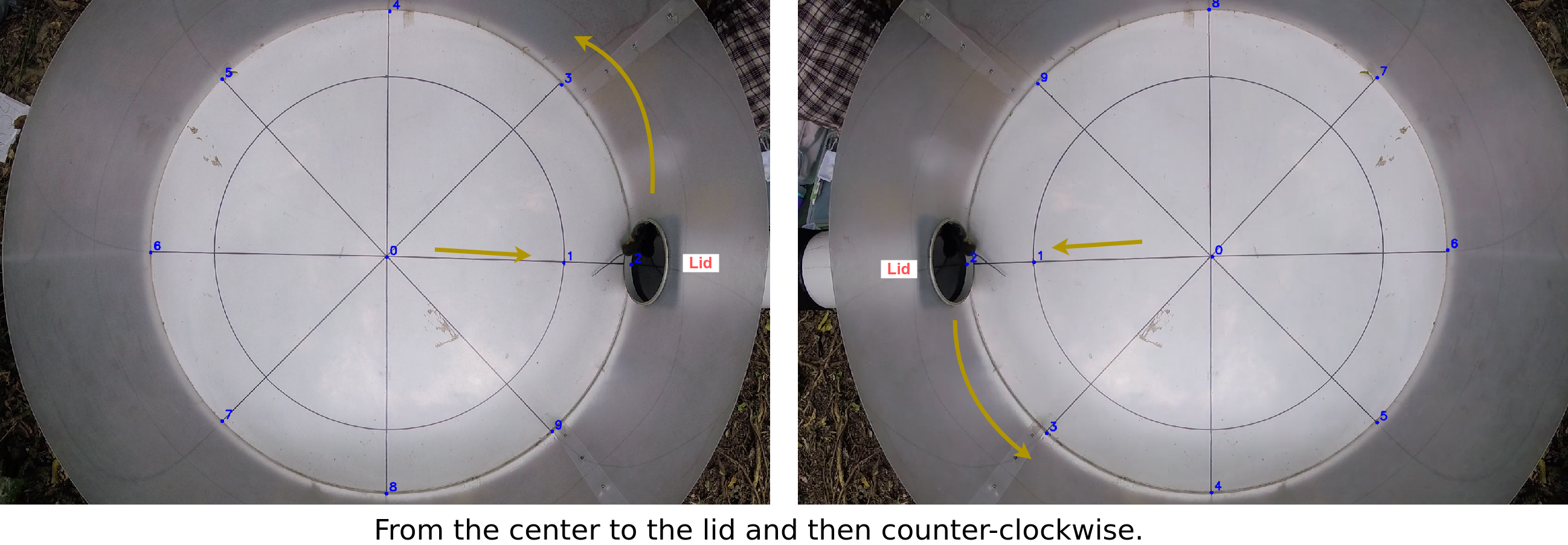
The keypoints_labeler.py script reads a CSV list of videos, opens the first frame of each video, and requests manual selection of the 10 keypoints (p0 to p9).
keypoints-labeler path/to/video_list.csv path/to/output_keypoints.csv
Expected video_list.csv format:
- No header.
- One video path per line.
- Only one column is used.
Example video_list.csv:
/data/exp01/video_001.mp4
/data/exp01/video_002.mp4
Output (output_keypoints.csv):
path_and_filecolumn with the original video path.p0_x,p0_y,...,p9_x,p9_ycolumns.
Labeling behavior:
- Left-click to select the current point.
- Any key (e.g.
ESC) other thanq/Qmoves to the next point. - If you advance without clicking (e.g. press
ESCtwice without a mouse click), the current video is skipped. qorQaborts the batch process.
Point order:
p0is the center.- Points
p0 -> p1 -> p2go from the center toward the lid. p3..p9follow a counter-clockwise order according to the figure.
3) Batch Tracking Mode (mouse-track)
For processing multiple videos with pre-labeled keypoints, use a CSV file containing video paths and their keypoints:
mouse-track -y path/to/keypoints_list.csv
Expected keypoints_list.csv format:
- Header row:
path_and_file,p0_x,p0_y,p1_x,p1_y,...,p9_x,p9_y - Each subsequent row: video path followed by 20 numeric values (x,y pairs for p0-p9)
Example keypoints_list.csv:
path_and_file,p0_x,p0_y,p1_x,p1_y,p2_x,p2_y,p3_x,p3_y,p4_x,p4_y,p5_x,p5_y,p6_x,p6_y,p7_x,p7_y,p8_x,p8_y,p9_x,p9_y
/data/exp01/video_001.mp4,320,240,315,235,310,230,325,245,330,250,335,255,340,260,345,265,350,270,355,275
/data/exp01/video_002.mp4,320,240,315,235,310,230,325,245,330,250,335,255,340,260,345,265,350,270,355,275
This mode automatically crops and tracks all videos in the list without manual interaction. The script will prompt for confirmation before starting the batch process.
📑 Requirements
- Python >= 3.13
ultralyticsopencv-pythonmoviepytqdmnumpy
✍️ Researchers and Authors
Software author and research: Juan G. Colonna juancolonna@icomp.ufam.edu.br
Instituto de Computação (Icomp) - Universidade Federal do Amazonas (UFAM) - Brazil
Data collection and research: Tamara Encinabecker tamara.encinabecker@vuw.ac.nz
Victoria University of Wellington (VUW) - New Zealand
Project research: Stephen Marsland stephen.marsland@vuw.ac.nz
Victoria University of Wellington (VUW) - New Zealand
Project research: Stephen Hartley stephen.hartley@vuw.ac.nz
Victoria University of Wellington (VUW) - New Zealand
📄 License
This project is licensed under the MIT License. See LICENSE for details.
Release history Release notifications | RSS feed


Download files
Download the file for your platform. If you're not sure which to choose, learn more about installing packages.
Source Distribution
Built Distribution
Filter files by name, interpreter, ABI, and platform.
If you're not sure about the file name format, learn more about wheel file names.
Copy a direct link to the current filters
File details
Details for the file mus_musculus_tracker-0.1.8.tar.gz.
File metadata
- Download URL: mus_musculus_tracker-0.1.8.tar.gz
- Upload date:
- Size: 4.9 MB
- Tags: Source
- Uploaded using Trusted Publishing? No
- Uploaded via: twine/6.2.0 CPython/3.13.13
File hashes
| Algorithm | Hash digest | |
|---|---|---|
| SHA256 |
d8b5abc3864e36a3699950446560a78bb17d44dc73d7d19fa6992d45e5b5f384
|
|
| MD5 |
696952f455dd54fd3df1974a0ed5b462
|
|
| BLAKE2b-256 |
bb72db4e5e5a63b9686ff42af9cf7ee4eacbe1fb8fdadd772045381482b76fa4
|
File details
Details for the file mus_musculus_tracker-0.1.8-py3-none-any.whl.
File metadata
- Download URL: mus_musculus_tracker-0.1.8-py3-none-any.whl
- Upload date:
- Size: 4.9 MB
- Tags: Python 3
- Uploaded using Trusted Publishing? No
- Uploaded via: twine/6.2.0 CPython/3.13.13
File hashes
| Algorithm | Hash digest | |
|---|---|---|
| SHA256 |
4e634cae332071055f75c59bad17443bb182adf803562ecd90459cf134ac2bfa
|
|
| MD5 |
c8fb30a9c33a9e1a17e1eea32a1996c8
|
|
| BLAKE2b-256 |
aa200efc28878009f2f2ddb6053d647d4728e1fe9b4bfa308e1cc244a0c2d406
|






