

mycellm_
Pool GPUs worldwide. Earn credits. No cloud required.
A peer-to-peer inference network with credits, privacy, and federation.





Website · Docs · iOS App · Join the network
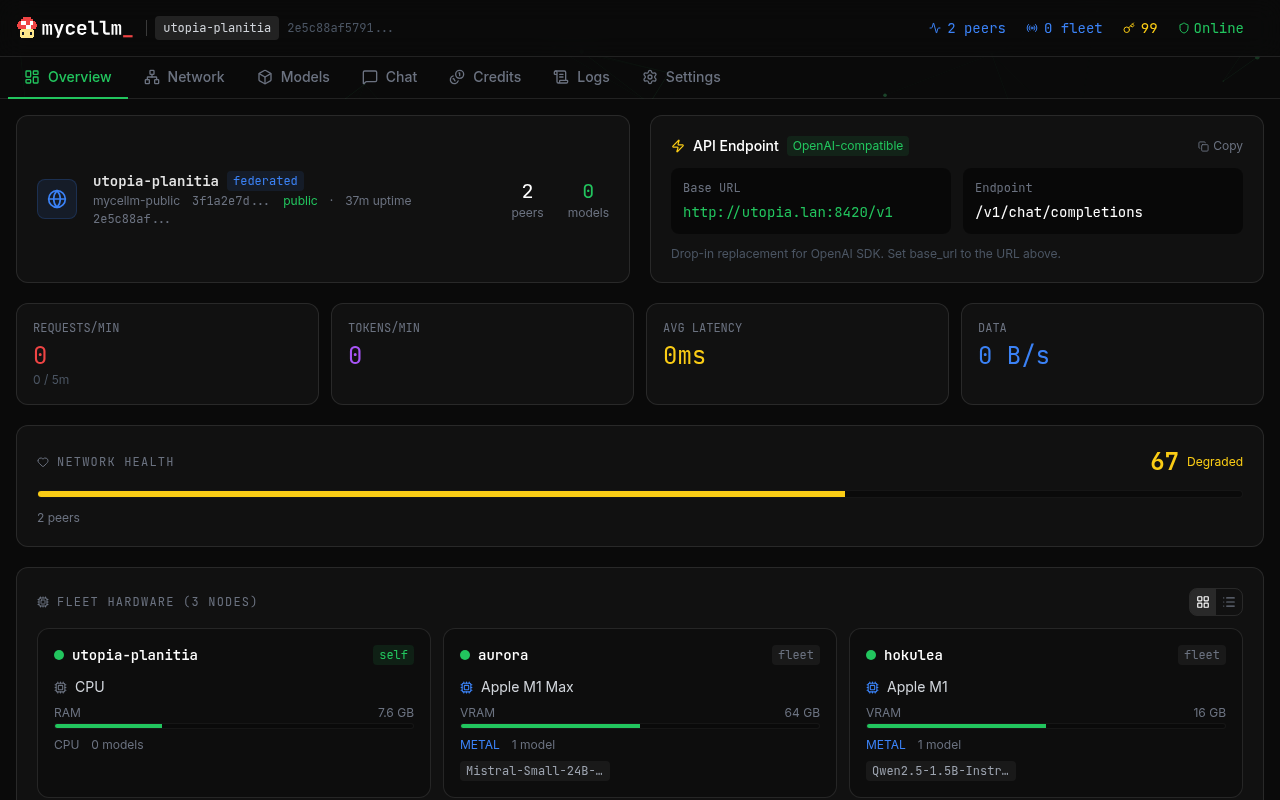
What is mycellm?
mycellm pools GPUs across the internet into a single inference network. Contribute compute and earn credits. Chat with open models for free. No blockchain, no tokens, no cloud vendor — just peers serving peers.
- Credit economy — earn credits by seeding, spend them consuming. Ed25519-signed receipts for every request. No cryptocurrency.
- Sensitive Data Guard — outgoing prompts are scanned on-device for API keys, passwords, and PII. Sensitive queries route to your local model automatically.
- Private networks — create invite-only inference networks for your team, lab, or org. A node can belong to multiple networks at once and, since 0.6.1, host private networks itself — one process serves the public network and coordinates your private ones on the same port. Fleet management for enterprise.
- OpenAI-compatible API — drop-in replacement at
/v1/chat/completions. Works with Claude Code, aider, Continue.dev, or any tool that accepts an OpenAI base URL. - iOS app — native app for iPad and iPhone. Your iPad serves inference at 30+ tokens/sec on Metal and earns credits as a full network peer.
- No cloud, no lock-in — QUIC transport with NAT traversal. Works across the internet, not just your LAN. Your hardware, your models.
Quick Start
# Install
pip install mycellm

# Create identity and join the public network
mycellm init

# Start serving (auto-detects GPU)
mycellm serve
Your node is now live. Load a model and start earning credits:
# Interactive chat
mycellm chat

# Or use the OpenAI-compatible API
curl http://localhost:8420/v1/chat/completions \
  -H "Content-Type: application/json" \
  -d '{"model": "auto", "messages": [{"role": "user", "content": "Hello!"}]}'
One-liner Install
curl -fsSL https://mycellm.ai/install.sh | sh
Or with Docker:
docker run -p 8420:8420 -p 8421:8421/udp ghcr.io/mycellm/mycellm serve
How It Works
You (consumer) ──QUIC──▶ Bootstrap (relay) ──QUIC──▶ Seeder (GPU)
                                                       │
                                                  llama.cpp / vLLM
                                                       │
                                              Tokens stream back ◀──
- Consumers send prompts via the API or chat interface
- Bootstrap relays requests to available seeders via QUIC
- Seeders run inference on their local GPU and stream tokens back
- Credits flow to seeders — signed Ed25519 receipts for every request
- NAT traversal enables direct P2P connections when possible
Why mycellm?
| mycellm | Cloud APIs | Local-only tools | Blockchain projects | |
|---|---|---|---|---|
| Works over internet | QUIC + NAT traversal | N/A | LAN only | Varies |
| No vendor lock-in | Your hardware | Their hardware | Your hardware | Token buy-in |
| Credit accounting | Signed receipts | Pay per token | None | Token economics |
| Private networks | Invite-only federation | N/A | N/A | Public by default |
| Privacy | PII scanning + local redirect | Trust the provider | Full control | Trust the miner |
| Mobile nodes | Native iOS app | N/A | N/A | N/A |
| Cost | Free (contribute compute) | $$$ | Free | Buy tokens |
Architecture
| Layer | Purpose | Tech |
|---|---|---|
| Canopy | Client access | iOS app, CLI chat, web UI, OpenAI API |
| Mycelium | Routing & discovery | QUIC transport, Kademlia DHT, STUN/ICE |
| Roots | Inference compute | llama.cpp (Metal/CUDA/ROCm/CPU), vLLM |
| Ledger | Accounting | Consumer co-signed Ed25519 receipts, per-network tracker-authoritative balances |
Features
Inference
- llama.cpp backend with Metal, CUDA, ROCm, and CPU support
- MLX backend for Apple Silicon (M-series) — typically faster than Metal-via-llama.cpp for the same quantization, uses unified memory more efficiently
- Multimodal (vision) — vision-language models (Qwen2.5-VL, Gemma 3) via the MLX-VLM backend;
/v1/chat/completionsaccepts OpenAI image content parts (image_url), and the public gateway routes image requests only to vision-capable nodes - OpenAI tool/function calling —
toolsandtool_choicepass through local backends, the OpenAI-compat relay, and QUIC peer routing - Streaming token generation via SSE — exact usage reporting (
stream_options.include_usage) and effectivecontext_lengthon/v1/modelsfor coding agents; stop sequences never leak partial markers into output - Embeddings — OpenAI-compatible
/v1/embeddingsbacked by native MLX embedding models (MiniLM/BERT/XLM-R via themlx-embeddingsbackend, with length-grouped batching), llama.cpp GGUF embedding models (load with"embedding": true), or an OpenAI-compatible upstream - Grammar-constrained output via GBNF (
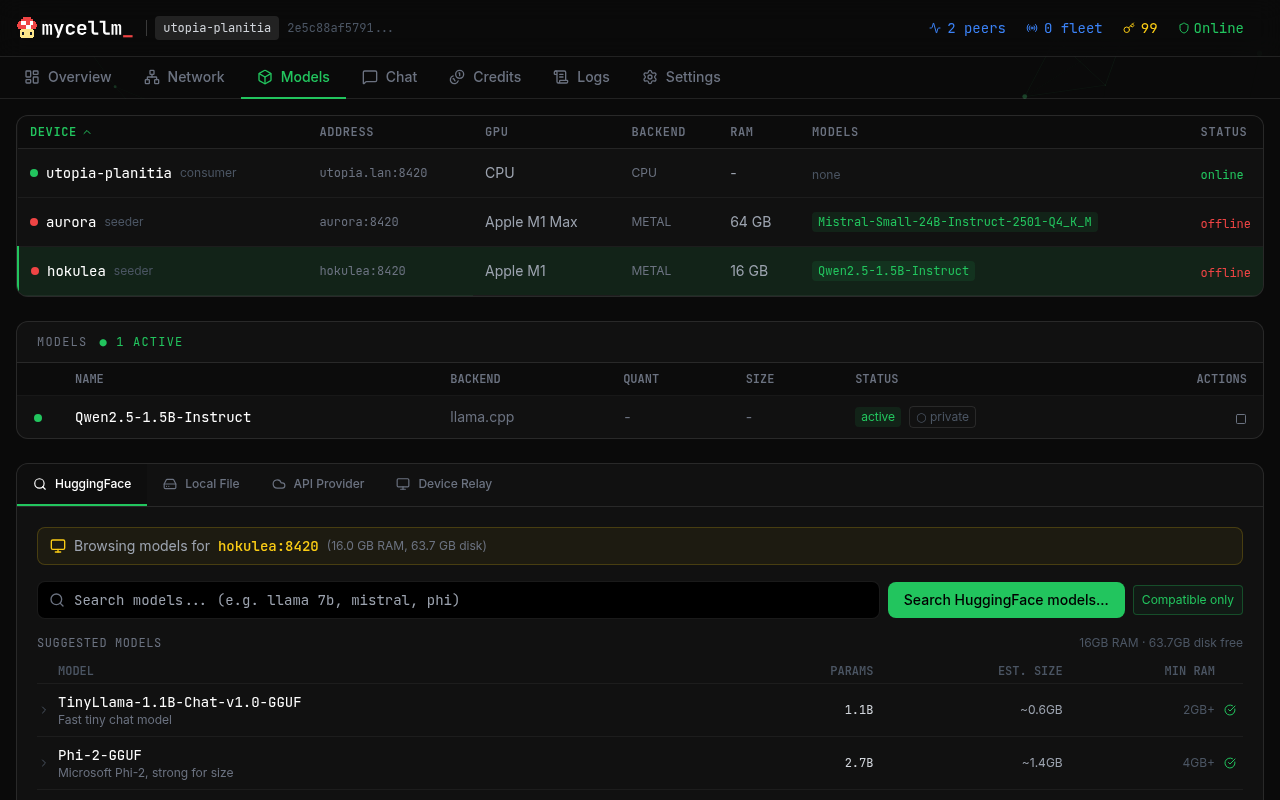
grammarfield on chat completions) - Model management — download from HuggingFace with content-hash verification (SHA-256 against the repo's published hashes), load/unload, scope control, platform-aware recommender
- Memory resilience — KV-aware load preflight (validated empirically), bounded KV cache (
max_kv_size), and a runtime memory-pressure watcher that clears caches and evicts idle models before the OS OOM killer fires - Thermal throttling — auto-adjusts on mobile devices
- macOS menu bar monitor —
pip install "mycellm[menubar]"thenmycellm menubar: the mushroom sits in your menu bar (green = healthy, cycling colors = inference in flight, gold = no models, gray = offline) with node stats, credits, and a link to the dashboard; hideable, optional launch-at-login
Networking
- QUIC transport with bidirectional streams (NWConnectionGroup on iOS, aioquic on Python)
- NAT traversal — STUN discovery + UDP hole punching for direct P2P
- HTTP fallback — works when QUIC is blocked
- Bootstrap relay — always works, even behind symmetric NAT
Security & Privacy
- Sensitive Data Guard — scans every outgoing prompt for API keys, passwords, credit cards, and PII. High-severity matches are automatically redirected to your local model — sensitive data never leaves your device.
- Gateway: returns 422 with explanation for flagged requests
- Override:
X-Privacy-Override: acknowledgedheader
- Ed25519 identity — account key → device cert → peer ID. Every node has a cryptographic identity.
- Signed receipts — cryptographic proof of inference served. Verifiable accounting without a blockchain.
- Fleet management — remote node control with admin key auth
Multi-Network
- Public network — open to all, auto-approved
- Private networks — invite-only with Ed25519-signed tokens
- Federation — gateway nodes bridge multiple networks
- Fleet — enterprise management with remote commands
- Trust levels — strict (verify all), relaxed (verify, don't enforce), honor (trusted LAN)
Use Cases
AI Coding Assistants
mycellm works as a drop-in backend for OpenAI-compatible coding tools:
- OpenClaw — autonomous AI agent framework. Point it at
http://localhost:8420/v1and your fleet serves the inference. - OpenCode — open-source coding assistant. Set
OPENAI_BASE_URLto your mycellm node. - Claude Code / aider / Continue.dev — any tool that accepts an OpenAI base URL.
No API keys to manage, no usage limits, no vendor lock-in. Your hardware, your models.
Or build your own: examples/hyphae/ is a coding agent that plans a task DAG and executes it across your nodes, using no cloud API. Running a coding agent on a heterogeneous local fleet writes up what measuring it taught us — including why small local models fail at tool calling, and why a "total time" number is meaningless unless it says whether the model was already loaded.
Homelab GPU Fleet
Pool every GPU in your house into one inference endpoint. An M1 Max Mac Studio, an old gaming PC with an RTX 3090, an iPad Pro — they all join the same network and share the load. The dashboard lets you manage models across all devices from a single browser tab.
Research Labs & Universities
Create a private mycellm network for your lab. Students and researchers get free inference from shared departmental GPUs. Ed25519 identity ensures accountability. Credit-based access prevents one user from monopolizing the cluster.
At Scale
When dozens of nodes contribute compute, mycellm's quality-aware routing shines:
- Tier routing — route to the best model that fits the request (1B for quick tasks, 70B for complex reasoning)
- Automatic failover — if a node goes offline, requests route to the next best
- Credit economics — contributors earn credits, consumers spend them, freeloaders get throttled
iOS App
Native app for iPad and iPhone. Your iPad is a full peer on the network — serve inference at 30+ tokens/sec on Metal, earn credits, and chat with privacy protection.
- On-device inference — llama.cpp and MLX on Metal, optimized for M-series iPads (incl. vision models)
- Network + local routing — toggle between network and on-device per message, with automatic fallback
- Chat persistence — threaded conversations with full metadata (model, node, tokens/sec, route). Export and share threads. Private ephemeral sessions.
- Sensitive Data Guard — prompts are scanned on-device; sensitive queries route to your local model
- Serves an OpenAI API — your iPad exposes
/v1/chat/completionson your LAN for other tools to use
Requires iOS 17.0+. Also works on iPhone. Source on GitHub.
Configuration
# Environment variables
MYCELLM_API_HOST=0.0.0.0         # API listen address
MYCELLM_API_PORT=8420            # API port
MYCELLM_QUIC_PORT=8421           # QUIC transport port
MYCELLM_LOG_LEVEL=INFO           # Logging level
MYCELLM_FLEET_ADMIN_KEY=...      # Fleet management key (optional)
MYCELLM_NO_DHT=true              # Disable Kademlia DHT
MYCELLM_DEFAULT_CTX_LEN=32768    # Default context window for loaded models
MYCELLM_RELAY_BACKENDS=...       # Comma-separated OpenAI-compatible relay URLs
See docs/config for full reference.
API
OpenAI-compatible. Works with any client that supports the OpenAI API format.
from openai import OpenAI

client = OpenAI(base_url="http://localhost:8420/v1", api_key="unused")
response = client.chat.completions.create(
    model="auto",
    messages=[{"role": "user", "content": "Hello!"}],
)
print(response.choices[0].message.content)
Endpoints
| Method | Path | Description |
|---|---|---|
| GET | /health |
Health check |
| GET | /v1/models |
List available models |
| POST | /v1/chat/completions |
Chat (streaming + non-streaming) |
| POST | /v1/embeddings |
Embeddings (string or list of strings) |
| GET | /v1/node/status |
Node status |
| GET | /v1/node/peers |
Connected peers |
| POST | /v1/node/models/load |
Load a model |
| POST | /v1/node/models/download |
Install a model (Hugging Face, or any URL) |
| POST | /v1/node/federation/invite |
Create network invite |
| POST | /v1/node/federation/join |
Join a network |
See API docs for the full reference.
Installing a model from somewhere other than Hugging Face
A fleet often needs a model the Hub doesn't have — a private fine-tune, or
anything an air-gapped network has to stage itself. /v1/node/models/download
takes a URL instead of a repo/filename pair:
# Single file (GGUF) — `filename` is optional; it defaults to the URL's last path component
curl -X POST localhost:8420/v1/node/models/download \
  -H "Authorization: Bearer $MYCELLM_API_KEY" -H 'Content-Type: application/json' \
  -d '{"url": "https://models.example.org/my-finetune-Q4_K_M.gguf",
       "sha256": "9f86d081884c7d659a2feaa0c55ad015a3bf4f1b2b0b822cd15d6c15b0f00a08",
       "filename": "my-finetune-Q4_K_M.gguf"}'

# MLX directory — many files, so pass `files`; `name` is the directory it publishes as
curl -X POST localhost:8420/v1/node/models/download \
  -H "Authorization: Bearer $MYCELLM_API_KEY" -H 'Content-Type: application/json' \
  -d '{"name": "my-finetune-mlx", "files": [
        {"path": "config.json",       "url": "https://…/config.json",       "sha256": "…"},
        {"path": "model.safetensors", "url": "https://…/model.safetensors", "sha256": "…", "size": 4128},
        {"path": "tokenizer.json",    "url": "https://…/tokenizer.json",    "sha256": "…"}]}'
A manifest must include config.json and at least one .safetensors file — a
directory missing either is refused up front rather than published as something
the model picker offers and the engine cannot load.
https and a sha256 per file are required, and the digest is verified as
each file lands — a mismatch fails the install and deletes the staged bytes.
Files stage under .staging/ and the model is published by rename, so an
interrupted install never leaves a half-written model that looks loadable. The
same request shape works against an iOS node.
Private Networks
Create a private network for your team, lab, or organization:
# On the bootstrap node
mycellm init --bootstrap --name "my-org"

# Generate an invite
mycellm network invite --max-uses 10

# On member nodes
mycellm network join mcl_invite_eyJ...
Contributing
mycellm is open source under the Apache 2.0 license.
git clone https://github.com/mycellm/mycellm
cd mycellm
pip install -e ".[dev]"
pytest
Built with AI
This project was developed in collaboration with Claude Code by Anthropic. Claude served as a pair-programming partner throughout architecture design, implementation, and testing. All technical decisions, project direction, and code review are my own.
Credits
Built by Michael Gifford-Santos.
- AI pair programming: Claude Code by Anthropic
- Protocol: QUIC + CBOR + Ed25519
- Inference: llama.cpp by Georgi Gerganov; MLX + mlx-lm by Apple; mlx-embeddings by Prince Canuma
- Design references: oMLX (batching engine, calibration, memory-pressure recovery, streaming correctness) and turbo-fieldfare (verified downloads) — see NOTICE
- DHT: kademlia by Brian Muller
- iOS inference: llama.swift by Mattt
License
Apache 2.0 — see LICENSE.
"mycellm" and the mycellm logo are trademarks of Michael Gifford-Santos. See TRADEMARK.md for usage guidelines.
mycellm_ — /my·SELL·em/ — mycelium + LLM
1 maintainer

Metadata
1 maintainer
Release files for mycellm 0.8.0
For a detailed explanation of source distributions (sdists) and built distributions (wheels), please see the package formats documentation.
Source distribution (sdist)
| File | Size | Uploaded | |
|---|---|---|---|
| mycellm-0.8.0.tar.gz | 1.5 MB | Details |
Built distribution (wheel)
| File | Interpreter | ABI | Platform | Reset |
|---|---|---|---|---|
| mycellm-0.8.0-py3-none-any.whl | Python 3 | none | any | Details |
Total release size: 2.7 MB
Release files / mycellm-0.8.0.tar.gz
| Download URL | mycellm-0.8.0.tar.gz |
|---|---|
| Size | 1.5 MB |
| Tags | Source |
|
SHA-256 checksum How to use checksums |
1386eb0f88d83a47bde2749cd2703b9f1d352d24afa595b350f6839d7725a70b
|
|
BLAKE2b-256 checksum How to use checksums |
f946cfa3e7ccb33d7247beaa116f8ca58bbbfddb241d3272a450109d8e20fd96
|
| Upload date | |
|
Uploaded using Trusted Publishing? What is trusted publishing? |
No |
| Uploaded via |
twine/7.0.0 CPython/3.14.5
|
Release files / mycellm-0.8.0-py3-none-any.whl
| Download URL | mycellm-0.8.0-py3-none-any.whl |
|---|---|
| Size | 1.3 MB |
| Tags | Python 3 |
|
SHA-256 checksum How to use checksums |
b6a01487cb02524a9ceba57b115ccebabcbbed63a88d3202a6080736e1a24546
|
|
BLAKE2b-256 checksum How to use checksums |
67597ed6a77c52fc7b22cb402ca165c40471ae91bb99943233efc5ecefeb541d
|
| Upload date | |
|
Uploaded using Trusted Publishing? What is trusted publishing? |
No |
| Uploaded via |
twine/7.0.0 CPython/3.14.5
|














