
Distributed LLM inference across heterogeneous hardware

Project description

mycellm_
Pool GPUs worldwide. Earn credits. No cloud required.
A peer-to-peer inference network with credits, privacy, and federation.




Website · Docs · iOS App · Join the network
What is mycellm?
mycellm pools GPUs across the internet into a single inference network. Contribute compute and earn credits. Chat with open models for free. No blockchain, no tokens, no cloud vendor — just peers serving peers.
- Credit economy — earn credits by seeding, spend them consuming. Ed25519-signed receipts for every request. No cryptocurrency.
- Sensitive Data Guard — outgoing prompts are scanned on-device for API keys, passwords, and PII. Sensitive queries route to your local model automatically.
- Private networks — create invite-only inference networks for your team, lab, or org. Federation bridges multiple networks. Fleet management for enterprise.
- OpenAI-compatible API — drop-in replacement at
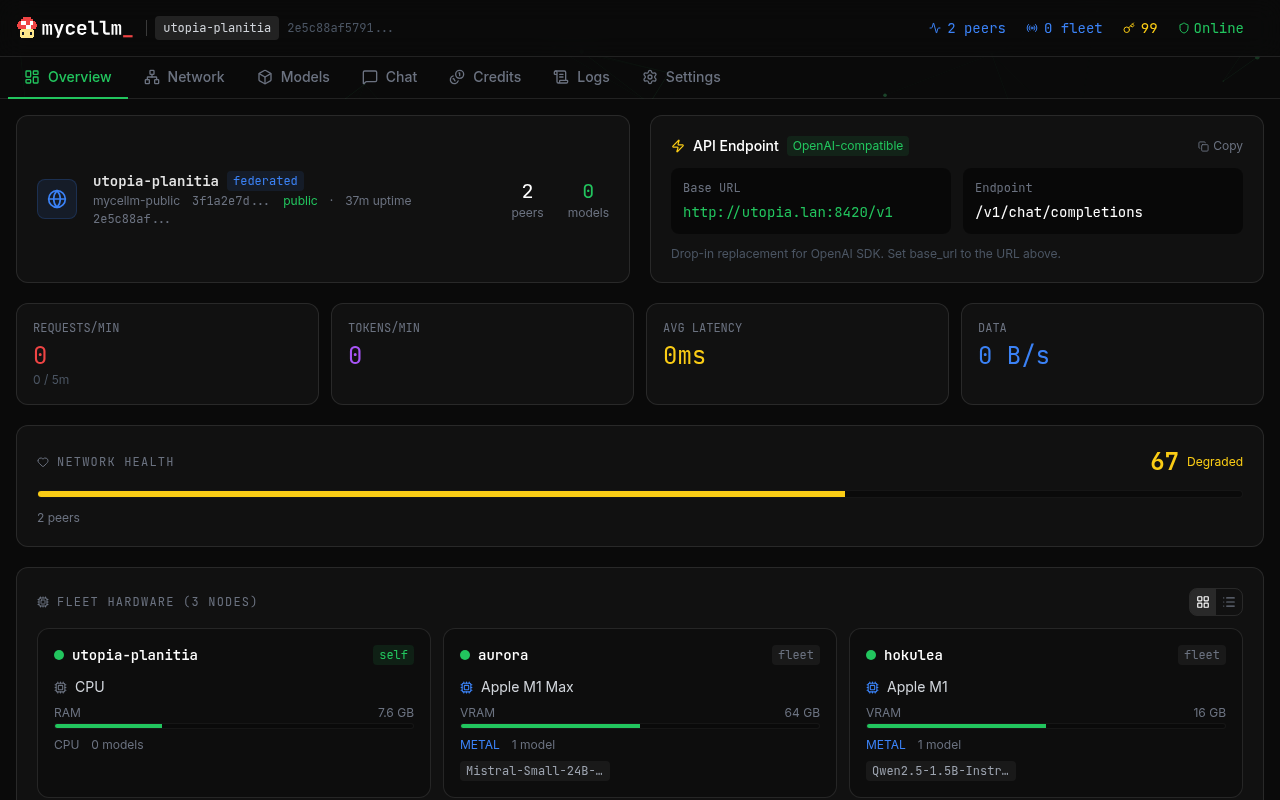
/v1/chat/completions. Works with Claude Code, aider, Continue.dev, or any tool that accepts an OpenAI base URL. - iOS app — native app for iPad and iPhone. Your iPad serves inference at 30+ tokens/sec on Metal and earns credits as a full network peer.
- No cloud, no lock-in — QUIC transport with NAT traversal. Works across the internet, not just your LAN. Your hardware, your models.
Quick Start
# Install
pip install mycellm

# Create identity and join the public network
mycellm init

# Start serving (auto-detects GPU)
mycellm serve
Your node is now live. Load a model and start earning credits:
# Interactive chat
mycellm chat

# Or use the OpenAI-compatible API
curl http://localhost:8420/v1/chat/completions \
  -H "Content-Type: application/json" \
  -d '{"model": "auto", "messages": [{"role": "user", "content": "Hello!"}]}'
One-liner Install
curl -fsSL https://mycellm.ai/install.sh | sh
Or with Docker:
docker run -p 8420:8420 -p 8421:8421/udp ghcr.io/mycellm/mycellm serve
How It Works
You (consumer) ──QUIC──▶ Bootstrap (relay) ──QUIC──▶ Seeder (GPU)
                                                       │
                                                  llama.cpp / vLLM
                                                       │
                                              Tokens stream back ◀──
- Consumers send prompts via the API or chat interface
- Bootstrap relays requests to available seeders via QUIC
- Seeders run inference on their local GPU and stream tokens back
- Credits flow to seeders — signed Ed25519 receipts for every request
- NAT traversal enables direct P2P connections when possible
Why mycellm?
| mycellm | Cloud APIs | Local-only tools | Blockchain projects | |
|---|---|---|---|---|
| Works over internet | QUIC + NAT traversal | N/A | LAN only | Varies |
| No vendor lock-in | Your hardware | Their hardware | Your hardware | Token buy-in |
| Credit accounting | Signed receipts | Pay per token | None | Token economics |
| Private networks | Invite-only federation | N/A | N/A | Public by default |
| Privacy | PII scanning + local redirect | Trust the provider | Full control | Trust the miner |
| Mobile nodes | Native iOS app | N/A | N/A | N/A |
| Cost | Free (contribute compute) | $$$ | Free | Buy tokens |
Architecture
| Layer | Purpose | Tech |
|---|---|---|
| Canopy | Client access | iOS app, CLI chat, web UI, OpenAI API |
| Mycelium | Routing & discovery | QUIC transport, Kademlia DHT, STUN/ICE |
| Roots | Inference compute | llama.cpp (Metal/CUDA/ROCm/CPU), vLLM |
| Ledger | Accounting | Ed25519 signed receipts, per-network credit tracking |
Features
Inference
- llama.cpp backend with Metal, CUDA, ROCm, and CPU support
- Streaming token generation via SSE
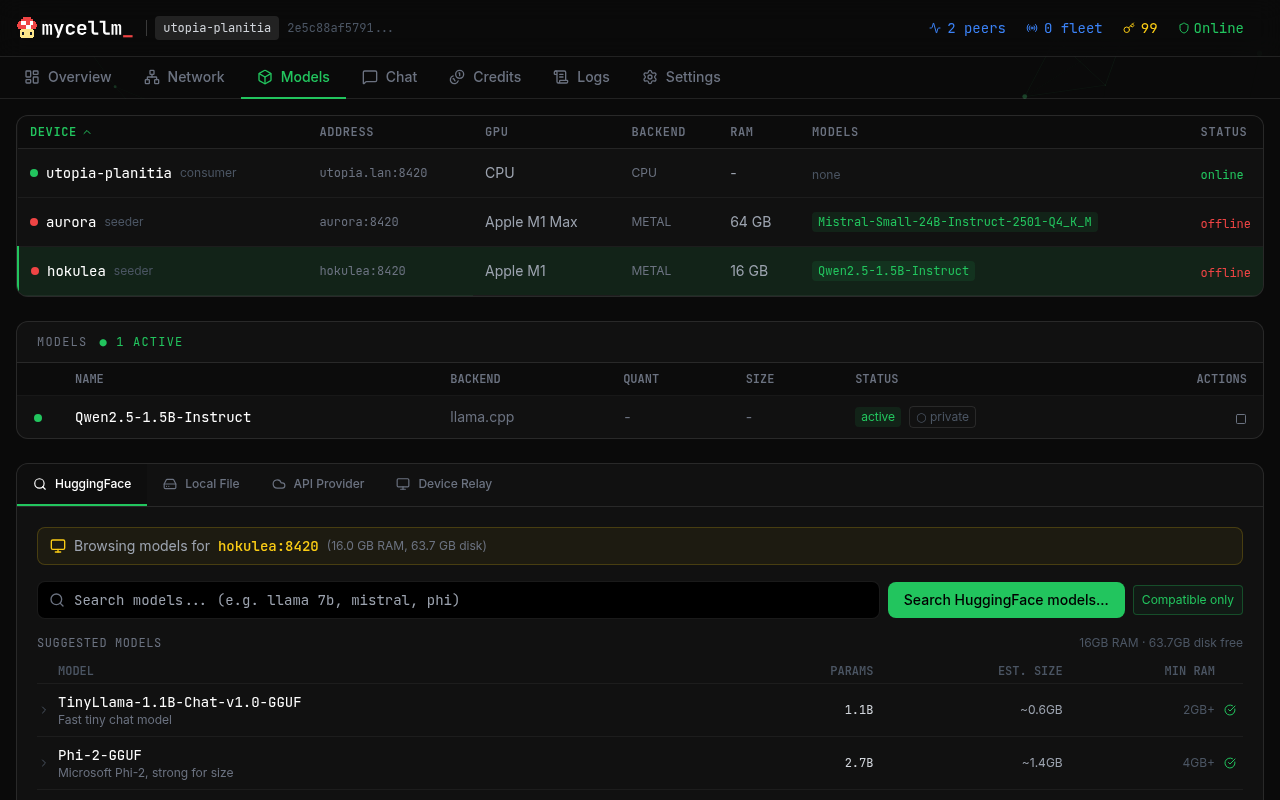
- Model management — download from HuggingFace, load/unload, scope control
- Thermal throttling — auto-adjusts on mobile devices
Networking
- QUIC transport with bidirectional streams (NWConnectionGroup on iOS, aioquic on Python)
- NAT traversal — STUN discovery + UDP hole punching for direct P2P
- HTTP fallback — works when QUIC is blocked
- Bootstrap relay — always works, even behind symmetric NAT
Security & Privacy
- Sensitive Data Guard — scans every outgoing prompt for API keys, passwords, credit cards, and PII. High-severity matches are automatically redirected to your local model — sensitive data never leaves your device.
- Gateway: returns 422 with explanation for flagged requests
- Override:
X-Privacy-Override: acknowledgedheader
- Ed25519 identity — account key → device cert → peer ID. Every node has a cryptographic identity.
- Signed receipts — cryptographic proof of inference served. Verifiable accounting without a blockchain.
- Fleet management — remote node control with admin key auth
Multi-Network
- Public network — open to all, auto-approved
- Private networks — invite-only with Ed25519-signed tokens
- Federation — gateway nodes bridge multiple networks
- Fleet — enterprise management with remote commands
- Trust levels — strict (verify all), relaxed (verify, don't enforce), honor (trusted LAN)
Use Cases
AI Coding Assistants
mycellm works as a drop-in backend for OpenAI-compatible coding tools:
- OpenClaw — autonomous AI agent framework. Point it at
http://localhost:8420/v1and your fleet serves the inference. - OpenCode — open-source coding assistant. Set
OPENAI_BASE_URLto your mycellm node. - Claude Code / aider / Continue.dev — any tool that accepts an OpenAI base URL.
No API keys to manage, no usage limits, no vendor lock-in. Your hardware, your models.
Homelab GPU Fleet
Pool every GPU in your house into one inference endpoint. An M1 Max Mac Studio, an old gaming PC with an RTX 3090, an iPad Pro — they all join the same network and share the load. The dashboard lets you manage models across all devices from a single browser tab.
Research Labs & Universities
Create a private mycellm network for your lab. Students and researchers get free inference from shared departmental GPUs. Ed25519 identity ensures accountability. Credit-based access prevents one user from monopolizing the cluster.
At Scale
When dozens of nodes contribute compute, mycellm's quality-aware routing shines:
- Tier routing — route to the best model that fits the request (1B for quick tasks, 70B for complex reasoning)
- Automatic failover — if a node goes offline, requests route to the next best
- Credit economics — contributors earn credits, consumers spend them, freeloaders get throttled
iOS App
Native app for iPad and iPhone. Your iPad is a full peer on the network — serve inference at 30+ tokens/sec on Metal, earn credits, and chat with privacy protection.
- On-device inference — llama.cpp on Metal, optimized for M-series iPads
- Network + local routing — toggle between network and on-device per message, with automatic fallback
- Chat persistence — threaded conversations with full metadata (model, node, tokens/sec, route). Export and share threads. Private ephemeral sessions.
- Sensitive Data Guard — prompts are scanned on-device; sensitive queries route to your local model
- Serves an OpenAI API — your iPad exposes
/v1/chat/completionson your LAN for other tools to use
Requires iOS 17.0+. Also works on iPhone. Source on GitHub.
Configuration
# Environment variables
MYCELLM_API_HOST=0.0.0.0        # API listen address
MYCELLM_API_PORT=8420            # API port
MYCELLM_QUIC_PORT=8421           # QUIC transport port
MYCELLM_LOG_LEVEL=INFO           # Logging level
MYCELLM_FLEET_ADMIN_KEY=...      # Fleet management key (optional)
MYCELLM_NO_DHT=true              # Disable Kademlia DHT
See docs/config for full reference.
API
OpenAI-compatible. Works with any client that supports the OpenAI API format.
from openai import OpenAI

client = OpenAI(base_url="http://localhost:8420/v1", api_key="unused")
response = client.chat.completions.create(
    model="auto",
    messages=[{"role": "user", "content": "Hello!"}],
)
print(response.choices[0].message.content)
Endpoints
| Method | Path | Description |
|---|---|---|
| GET | /health |
Health check |
| GET | /v1/models |
List available models |
| POST | /v1/chat/completions |
Chat (streaming + non-streaming) |
| GET | /v1/node/status |
Node status |
| GET | /v1/node/peers |
Connected peers |
| POST | /v1/node/models/load |
Load a model |
| POST | /v1/node/federation/invite |
Create network invite |
| POST | /v1/node/federation/join |
Join a network |
See API docs for the full reference.
Private Networks
Create a private network for your team, lab, or organization:
# On the bootstrap node
mycellm init --bootstrap --name "my-org"

# Generate an invite
mycellm network invite --max-uses 10

# On member nodes
mycellm network join mcl_invite_eyJ...
Contributing
mycellm is open source under the Apache 2.0 license.
git clone https://github.com/mycellm/mycellm
cd mycellm
pip install -e ".[dev]"
pytest
Built with AI
This project was developed in collaboration with Claude Code by Anthropic. Claude served as a pair-programming partner throughout architecture design, implementation, and testing. All technical decisions, project direction, and code review are my own.
Credits
Built by Michael Gifford-Santos.
- AI pair programming: Claude Code by Anthropic
- Protocol: QUIC + CBOR + Ed25519
- Inference: llama.cpp by Georgi Gerganov
- DHT: kademlia by Brian Muller
- iOS inference: llama.swift by Mattt
License
Apache 2.0 — see LICENSE.
"mycellm" and the mycellm logo are trademarks of Michael Gifford-Santos. See TRADEMARK.md for usage guidelines.
mycellm_ — /my·SELL·em/ — mycelium + LLM
Release history Release notifications | RSS feed


Download files
Download the file for your platform. If you're not sure which to choose, learn more about installing packages.
Source Distribution
Built Distribution
Filter files by name, interpreter, ABI, and platform.
If you're not sure about the file name format, learn more about wheel file names.
Copy a direct link to the current filters
File details
Details for the file mycellm-0.2.1.tar.gz.
File metadata
- Download URL: mycellm-0.2.1.tar.gz
- Upload date:
- Size: 720.7 kB
- Tags: Source
- Uploaded using Trusted Publishing? No
- Uploaded via: twine/6.2.0 CPython/3.13.5
File hashes
| Algorithm | Hash digest | |
|---|---|---|
| SHA256 |
33bfa824b60164d78d8afca6a16ce21d03fce7c1fef17caa6ea2ee8848477cc2
|
|
| MD5 |
bd48a3db4ce97b11202d92aaaa343573
|
|
| BLAKE2b-256 |
b45877ec176d1223b442e6c39c1648c61e2f4a3ce1b04feb57e76944d3de0c25
|
File details
Details for the file mycellm-0.2.1-py3-none-any.whl.
File metadata
- Download URL: mycellm-0.2.1-py3-none-any.whl
- Upload date:
- Size: 647.0 kB
- Tags: Python 3
- Uploaded using Trusted Publishing? No
- Uploaded via: twine/6.2.0 CPython/3.13.5
File hashes
| Algorithm | Hash digest | |
|---|---|---|
| SHA256 |
205de2478dfff4cc6cddfebef6cf66a2d87fdcce2a29ac8599e02a867b6bab50
|
|
| MD5 |
dec8a4231a4980c0d89ddc86af90b1c9
|
|
| BLAKE2b-256 |
d3da022cec3d06815705bdb675b86642d9e84bbde211921c4decc971ee93832f
|






